

















QuoteCraft AI
What is QuoteCraft AI?
That moment after a great discovery call when you’re excited but then dread writing the proposal — we’ve all been there. You know exactly what the client needs, but turning the conversation into a professional, persuasive document takes time you don’t always have. This tool changes that. You describe the project in plain words (or even record a quick voice note), and it builds a complete, well-structured proposal with scope, timeline, pricing, and terms. It even generates a tailored Upwork cover letter in one click. The first time I used it, I sent a proposal that felt like me — not a template — and closed the deal faster than usual. It’s one of those tools that quietly removes friction from the freelance workflow.
Introduction
Freelancers live and die by their proposals. A strong one can win the job; a weak one gets ignored. QuoteCraft AI was built specifically for this pain point. It learns your writing style from past proposals, understands project details you feed it, and produces a professional document that sounds like you wrote it after hours of refinement. No more starting from blank pages or copying old templates. It handles everything from scope of work to pricing tables and even client-facing e-signing links. For anyone who spends too much time writing instead of doing the actual work, it feels like having a very smart assistant who never sleeps.
Key Features
User Interface
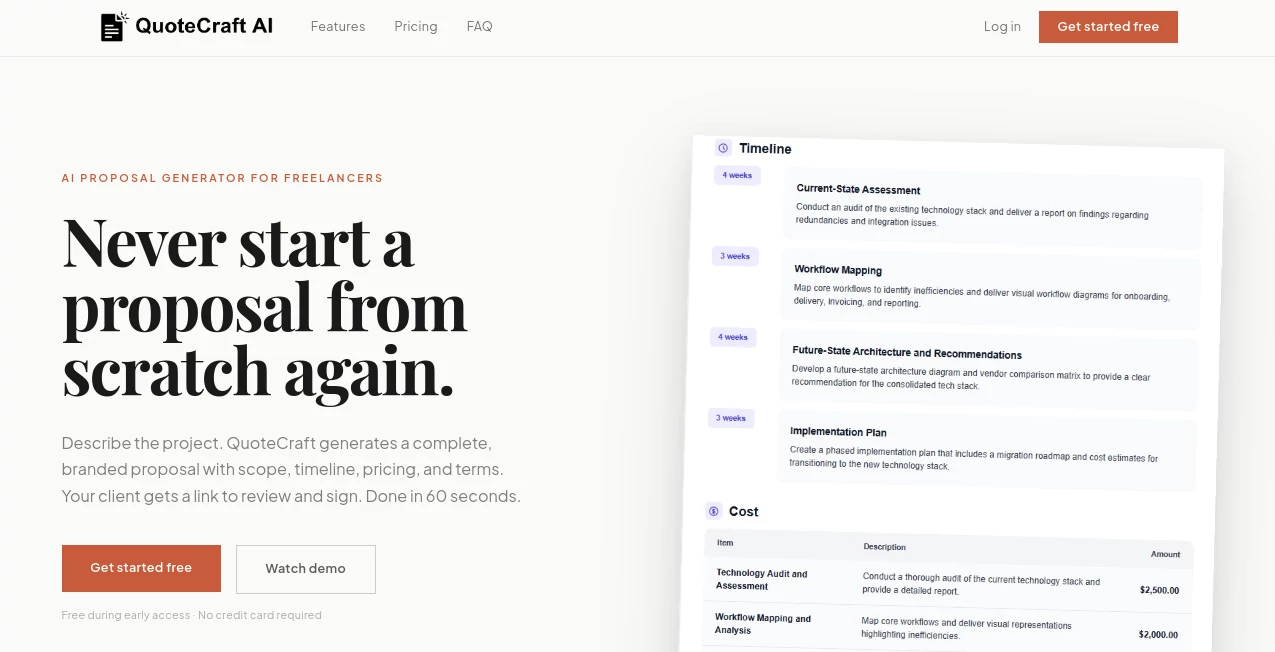
The interface is refreshingly straightforward. You type or speak the project details, and within seconds a full proposal appears with editable sections. You can adjust pricing, add or remove deliverables, tweak the tone, and regenerate specific parts. The clean layout makes it easy to review everything before sending. I especially like the one-click Upwork cover letter feature — it pulls from the same proposal and adapts it perfectly for the platform.
Accuracy & Performance
It captures the essence of your input remarkably well, turning casual notes into structured, professional language. The AI remembers your style after you upload one past proposal, so future outputs sound consistent. Generation is fast — most proposals are ready in under a minute. In practice, the results feel thoughtful rather than robotic, which is rare for AI writing tools.
Capabilities
You get full proposals with scope, deliverables, timeline, pricing tables, and terms. It supports voice input, learns from your previous work, generates branded client links with e-signing, and creates tailored Upwork cover letters. Clients can review, request changes, and sign all in one place, with real-time open tracking so you know exactly when to follow up. It’s built for how freelancers actually work.
Security & Privacy
Your proposals and client data are handled securely with encryption and proper access controls. The platform uses modern standards to keep everything protected, which gives peace of mind when dealing with client-sensitive information.
Use Cases
A web designer finishes a discovery call, records a two-minute voice summary, and sends a polished proposal before the end of the day. A copywriter uses it to quickly generate Upwork bids that stand out from the sea of generic applications. A consultant builds consistent proposals across multiple clients while keeping their unique voice intact. It shines whenever you need to move fast after a promising conversation without sacrificing quality or professionalism.
Pros and Cons
Pros:
- Turns meeting notes into complete, professional proposals in minutes.
- Learns and replicates your personal writing style effectively.
- One-click Upwork cover letters save even more time.
- Branded client links with e-signing and tracking feel premium.
- Free while they’re building — great for early users.
Cons:
- Still in active development, so some advanced customization options are growing.
- Best results come from clear project descriptions (though voice input helps).
Pricing Plans
Right now it’s free while they’re building the product, giving full access to early users. This is a smart move that lets freelancers test it thoroughly before any paid plans launch. When paid tiers arrive, they will likely focus on higher usage limits and advanced features for power users.
How to Use QuoteCraft AI
Sign up quickly, then head to the proposal builder. Type or record a voice note describing the project — scope, timeline, budget, special requests. Review the generated proposal, edit any section directly, and adjust pricing or deliverables as needed. Generate a matching Upwork cover letter if required. Send the branded link to your client, track when they open it, and follow up at the perfect moment. The whole process from idea to sent proposal can genuinely take under five minutes once you get the hang of it.
Comparison with Similar Tools
Many proposal templates feel generic and require heavy manual editing. Generic AI writers often produce robotic text that needs significant cleanup. This tool stands out by focusing specifically on freelancer proposals, learning your voice, and delivering ready-to-send documents with proper structure and client experience features like e-signing. It’s less about generic content generation and more about solving the real workflow pain freelancers face every week.
Conclusion
Proposal writing doesn’t have to be a time sink that steals hours from actual client work. This tool turns one of the biggest bottlenecks for freelancers into a quick, high-quality step that feels natural. By learning your style, handling the structure, and even managing client follow-up, it lets you focus on what you do best — delivering great work. If you’ve ever lost a deal because you were too slow with the proposal, this could be the edge you’ve been missing.
Frequently Asked Questions (FAQ)
How long does it take to create a proposal?
Most users complete their first proposal in under two minutes after describing the project.
Does it really learn my writing style?
Yes — upload one past proposal and it adapts tone, structure, and phrasing for future ones.
Can I edit the generated proposal?
Absolutely. Every section is fully editable so you always stay in control.
Is it good for Upwork proposals?
Very — it even generates tailored cover letters that stand out from generic bids.
Are my proposals private?
Yes — data is encrypted and handled securely with modern standards.
AI Writing Assistants , AI Content Generator , AI Digital Marketing Generator .
These classifications represent its core capabilities and areas of application. For related tools, explore the linked categories above.

QuoteCraft AI Alternatives Product

AI page tran…
TranslateAI

MaxAEO
Hintder AI
GPT Image 2-…

Top AI Writi…

RichlyAI

Orchestra

ReezoAI
