
Raphael AI
What is Raphael AI?
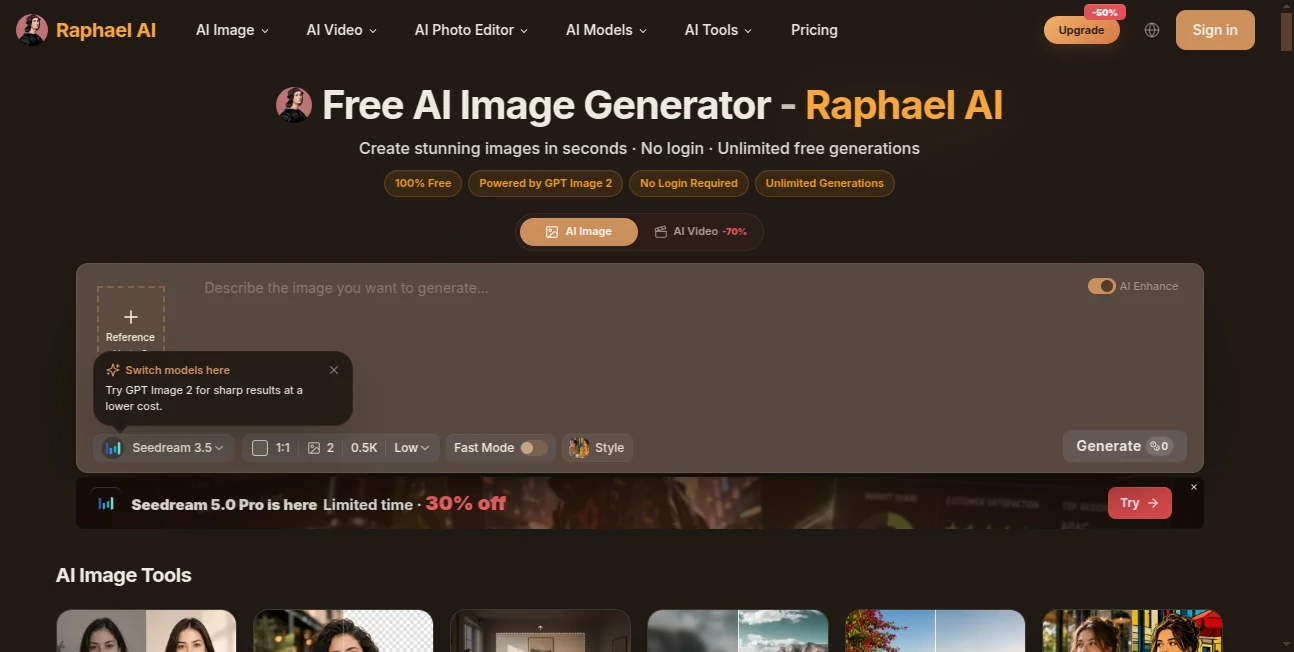
Creating a good image from a simple idea no longer requires hours of editing or advanced design skills. Raphael AI offers a straightforward way to turn written prompts into images directly from a browser, with no account required to get started. The platform is built around a multi-model approach, allowing users to work with several modern image-generation models from one interface.
One of the most appealing aspects is its accessible free experience. Users can begin creating without entering payment details, while signed-in users can access unlimited basic generations without Fast Mode. The platform also supports higher-resolution models and additional creative tools for users who need more control over their work.
Whether the goal is to create a product visual, social media graphic, character concept, illustration, portrait, or an entirely fictional scene, the workflow remains remarkably simple: describe what you want, choose the appropriate settings, and generate.
Key Features
- Free basic image generation with no account required to get started.
- Unlimited basic generations for signed-in users when Fast Mode is not used.
- Access to multiple image-generation models from a single platform.
- Support for text-to-image and image-to-image workflows.
- Reference image support with up to three reference images.
- Multiple aspect ratios including square, portrait, landscape, and other formats.
- Generation of up to four images from a single prompt.
- Additional tools for image editing, background removal, image expansion, upscaling, and style transformation.
- Support for high-resolution generation with selected paid models.
User Interface
The interface is designed to keep the creative process focused. A prompt field sits at the center of the workflow, while model selection, aspect ratio, output quantity, resolution, quality, and generation modes can be adjusted without navigating through complicated menus.
Reference images can also be added when a result needs to follow a particular subject, composition, or visual direction. This is especially useful for designers and creators who want more consistency than a text-only prompt can provide.
Accuracy & Performance
Performance is one of the platform's strongest practical advantages. The free Basic model can produce an image in roughly eight seconds under normal conditions, while paid plans receive priority in the generation queue.
The underlying multi-model routing system is particularly useful because different visual tasks can benefit from different models. Instead of forcing every prompt through one generation engine, the platform provides access to models such as GPT Image 2, Nano Banana, Nano Banana Pro, Seedream and other supported models.
Prompt interpretation is also an important part of the experience. Detailed descriptions can be used to specify objects, environments, composition, lighting, artistic direction, and other visual characteristics, making the tool useful for both quick experiments and more deliberate creative work.
Capabilities
The platform goes beyond basic text-to-image generation. Users can work with photorealistic scenes, digital artwork, anime-inspired visuals, portraits, product imagery, illustrations, and a wide range of other styles.
Its surrounding collection of creative tools makes the platform more useful as an everyday visual workspace. Users can remove backgrounds, expand images, upscale existing visuals, transform styles, edit images, and work with image-to-image generation without having to move between several unrelated services.
Video generation is also available through supported models, including options from Seedance, Veo, and Kling. This gives creators a convenient path from static image creation toward short-form visual content.
Security & Privacy
Privacy is presented as an important part of the service. The platform states that it follows a minimal data collection approach. Requests from users who are not signed in are generally processed temporarily, while signed-in accounts retain information needed for account functionality, history, subscriptions, and security.
The service also states that it does not sell users' prompts or images. Paid plans provide additional privacy benefits, with the higher tiers offering full privacy and keeping generated work out of the public gallery and suggested images.
Use Cases
There are plenty of practical situations where this kind of workflow can save time. A freelance designer might use it to explore several visual directions before committing to a final concept. An online store owner can create product presentation scenes without arranging a complete photo shoot. Social media creators can quickly produce artwork for posts, thumbnails, campaigns, or visual stories.
It can also be useful for game development and creative planning. Characters, environments, mood boards, concept art, and visual references can be produced much faster than with a traditional manual workflow.
For casual users, the appeal is even simpler. Someone with an idea for a fantasy landscape, cinematic portrait, anime character, poster, or surreal scene can describe it and see the concept come to life within seconds.
Pros and Cons
Pros:
- No registration is required to begin generating images.
- Basic generation is available without payment or a credit card.
- Signed-in users can access unlimited basic generations without Fast Mode.
- Multiple modern image and video models are available.
- Supports reference images and image-to-image creation.
- Generation can produce up to four images at once.
- Includes useful image editing and enhancement tools.
- Paid plans provide faster queues and commercial-use benefits.
Cons:
- Free images may include a watermark.
- Free users do not receive the same commercial-use rights as paid subscribers.
- Higher-resolution and advanced models can require credits or a paid plan.
- Generation speed can vary depending on queue conditions and the selected model.
- There is currently no public API available.
Pricing Plans
The platform has a free entry-level experience, making it possible to test image generation without signing up or providing a credit card. Free images may include a watermark, and commercial usage is reserved for eligible paid plans under the service's terms.
The Pro plan is listed at $10 per month when billed annually and includes 2,000 monthly credits, priority queue access, no watermarks, batch image upscaling, and access to advanced models.
The Ultimate plan costs $20 per month with annual billing and provides 5,000 monthly credits, the highest queue priority, no watermarks, batch upscaling, and full privacy.
The Max plan is priced at $40 per month when billed annually and increases the allowance to 10,000 monthly credits while retaining the premium benefits and highest queue priority.
How to Use It
Getting started is straightforward. Open the image generation workspace and enter a description of the image you want to create. A useful prompt should mention the main subject, environment, visual style, lighting, composition, and any important details.
For example, instead of asking for a generic city image, a creator could describe a rainy futuristic street at night, illuminated by neon signs, with cinematic lighting and reflections on wet pavement. More specific instructions generally provide the model with a clearer creative direction.
Users can then select an available model, choose an aspect ratio and output quantity, add reference images when necessary, and start the generation process. Once the image is ready, additional editing or enhancement tools can be used to refine the result.
Comparison with Similar Tools
Many AI image generators focus primarily on one model or one specific style of generation. This platform takes a broader approach by bringing multiple models and supporting tools together in one place.
Its biggest advantage is accessibility. A user can experiment without creating an account, while more demanding users can move to advanced models, higher resolutions, faster queues, and additional editing capabilities when needed.
For someone who frequently switches between different creative tasks, having image generation, editing, expansion, background removal, upscaling, and video generation within the same ecosystem can be more convenient than maintaining several separate subscriptions.
Conclusion
This is a strong option for anyone looking for an accessible way to experiment with AI-generated visuals without immediately committing to a paid subscription. The combination of a generous basic experience, multiple generation models, reference-image support, and additional creative tools gives it considerably more flexibility than a simple prompt-to-picture service.
Its free accessibility makes it particularly attractive for experimentation, while the paid tiers are better suited to designers, marketers, creators, and businesses that need cleaner outputs, faster processing, advanced models, and commercial usage.
For quick visual ideas or more serious creative production, it offers a practical workspace where an ordinary text description can become a finished visual in a matter of seconds.
Frequently Asked Questions (FAQ)
Is it free to use?
Yes. The platform provides a free basic generation experience without requiring registration or a credit card. Signed-in users can access unlimited basic generations without Fast Mode, although free outputs may include a watermark.
Do I need an account to generate an image?
No. You can start generating images without creating an account. Signing in provides additional benefits such as free daily credits and access to more models and features.
What types of images can I create?
You can create photorealistic scenes, portraits, digital artwork, anime-style images, illustrations, product visuals, conceptual artwork, and many other types of images by describing your desired result in a prompt.
Can I upload reference images?
Yes. The generation interface supports reference images, with up to three references available for supported workflows.
Can I generate multiple images at once?
Yes. The interface supports generating up to four outputs from a single prompt, which is useful when comparing different interpretations of the same idea.
Can I use the generated images commercially?
Commercial use is available to eligible paid subscribers, subject to the platform's terms of use and applicable law. Free users are generally limited to personal and other non-commercial use unless otherwise stated by the service.
Does it offer image editing tools?
Yes. The platform includes tools for image editing, background removal, image expansion, upscaling, and style transformation, allowing users to refine existing visuals as well as create new ones.
Does it support video generation?
Yes. The platform provides access to several supported video-generation models, including models from Seedance, Veo, and Kling.
Does it have an API?
There is currently no public API. The service states that an API is planned for the future.
Is it available on mobile?
The web platform works through mobile browsers. Dedicated mobile applications are also being developed according to the service.
AI Photo & Image Generator , AI Video Generator , AI Image to Image , AI Text to Image .
These classifications represent its core capabilities and areas of application. For related tools, explore the linked categories above.

Raphael AI Alternatives Product

Reztune

Flow Veo 3
Zilivo AI
MuseCraft.AI

GPT Image 1.5

Seedance 2.0

Seedance 2.0…

seedance2

ai seedance …