
ReadDocs
What is ReadDocs?
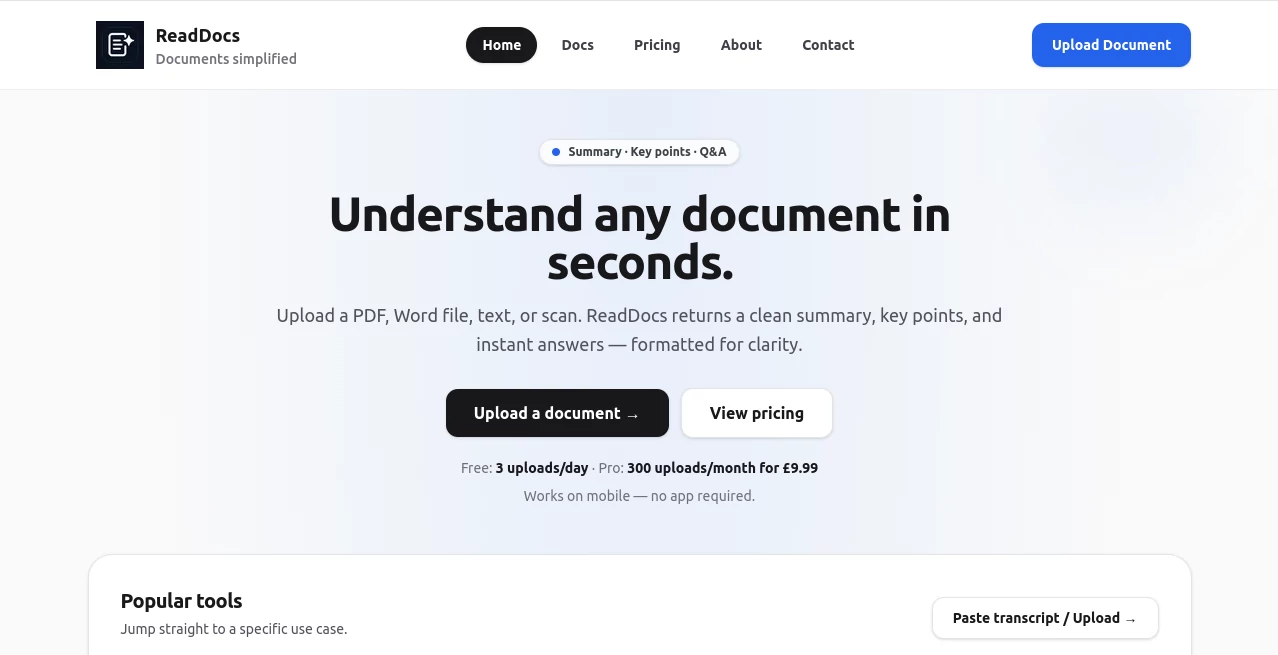
Long documents can slow down decision-making, especially when important information is hidden inside dozens of pages. This platform was created to solve that problem by turning complex files into clear summaries, key takeaways, and direct answers within seconds. Whether you are reviewing contracts, analyzing reports, studying research papers, or organizing meeting notes, it helps users focus on what truly matters.
The experience feels refreshingly straightforward. Upload a file, wait a few moments, and receive a structured overview that is easy to understand and share. Instead of scrolling through lengthy documents searching for a specific detail, users can instantly access the information they need in a concise format.
Students, researchers, consultants, managers, and business professionals can all benefit from a faster way to process information. The combination of document summarization, OCR technology, and question-answering capabilities makes it a practical solution for everyday document workflows.
Key Features
User Interface
The platform offers a clean and distraction-free interface that prioritizes simplicity. Uploading documents requires only a few clicks, and the generated results are presented in a well-organized format. Summaries, key points, and question responses are separated clearly, making the output easy to read and share with colleagues or classmates.
Accuracy & Performance
Document processing is fast and efficient, even when working with lengthy reports or detailed research papers. The system extracts the most relevant information and presents it in a concise manner. OCR support also allows scanned documents and images to be analyzed, helping users retrieve valuable information from files that would otherwise require manual review.
Capabilities
- Summarizes PDF, DOCX, TXT, and image files.
- Generates concise summaries for faster understanding.
- Extracts key points and actionable insights.
- Answers questions based on document content.
- Supports OCR for scanned files and photos.
- Works on desktop and mobile devices.
- Suitable for contracts, reports, study notes, and research papers.
Security & Privacy
Privacy is an important consideration when handling sensitive documents. The platform emphasizes secure processing and states that uploaded documents are not used to train public AI models. This makes it a suitable option for professionals who need a balance between convenience and responsible document handling.
Use Cases
- Business Reports: Quickly review performance updates, executive summaries, and operational reports.
- Contracts: Identify important clauses, deadlines, and obligations without reading every page.
- Academic Research: Extract key findings from lengthy papers and journals.
- Meeting Notes: Turn detailed notes into actionable insights and summaries.
- Student Learning: Simplify lecture notes and study materials for faster revision.
- Document Analysis: Find answers to specific questions within large files.
Pros and Cons
Pros
- Fast document summarization process.
- Supports multiple file formats.
- OCR functionality for scanned documents.
- Question-and-answer feature improves document exploration.
- Simple interface suitable for beginners.
- Works across desktop and mobile devices.
Cons
- AI-generated outputs should still be verified for critical decisions.
- Free plan includes daily usage limits.
- Some advanced capabilities are reserved for paid plans.
Pricing Plans
The platform offers flexible pricing options designed for different user needs.
- Free Plan: Includes limited daily uploads with access to summaries, key points, and document Q&A.
- Pro Plan: Designed for professionals who require significantly more monthly uploads and priority processing.
- Business Plan: Suitable for teams and organizations that need higher usage limits and additional support.
The availability of a free plan makes it easy for new users to test the service before upgrading.
How to Use ReadDocs
Getting started is simple and requires no complicated setup.
- Upload a PDF, DOCX, TXT file, or image.
- Allow the system to analyze the content.
- Receive a structured summary and key points.
- Ask questions related to the document if needed.
- Review, copy, and share the generated insights.
The process is designed to reduce reading time while preserving the most valuable information from the original document.
Comparison with Similar Tools
Many document summarization platforms focus solely on creating short summaries. What makes this solution stand out is its combination of document understanding, OCR support, key point extraction, and interactive question answering within a single workflow.
While some alternatives require multiple tools to summarize, extract text from scans, and search for answers, this platform brings those functions together in one streamlined experience. Its emphasis on clarity and professional presentation also makes the results particularly useful for business and academic environments.
Conclusion
For anyone who regularly works with lengthy documents, this platform provides a practical way to save time and improve productivity. The ability to summarize files, highlight essential points, answer questions, and process scanned documents creates a versatile document intelligence solution.
Its clean interface, useful output structure, and support for multiple file types make it a valuable companion for students, professionals, researchers, and business teams. Instead of spending hours reading through documents, users can quickly reach the information that matters most and make better-informed decisions.
Frequently Asked Questions (FAQ)
What file formats are supported?
The platform supports PDF, DOCX, TXT files, and images with OCR capabilities.
Can scanned documents be analyzed?
Yes. OCR technology extracts text from scanned files and photos before generating summaries.
Does it provide answers to document-related questions?
Yes. Users can ask questions and receive responses based on the uploaded content.
Is there a free version available?
Yes. A free plan is available with daily upload limits.
Who can benefit from using this tool?
Students, researchers, consultants, analysts, legal professionals, and business teams can all use it to process documents more efficiently.
AI Document Extraction , AI PDF , AI Documents Assistant , AI Research Tool .
These classifications represent its core capabilities and areas of application. For related tools, explore the linked categories above.

ReadDocs Alternatives Product

Remove Handw…

IntoTheBlock

SalaryHow

Treeova

Grok
ResumeFreePro

PortBackLinks

Rate My Prof…

Arobis AI Vi…