

















Record2Code
What is Record2Code?
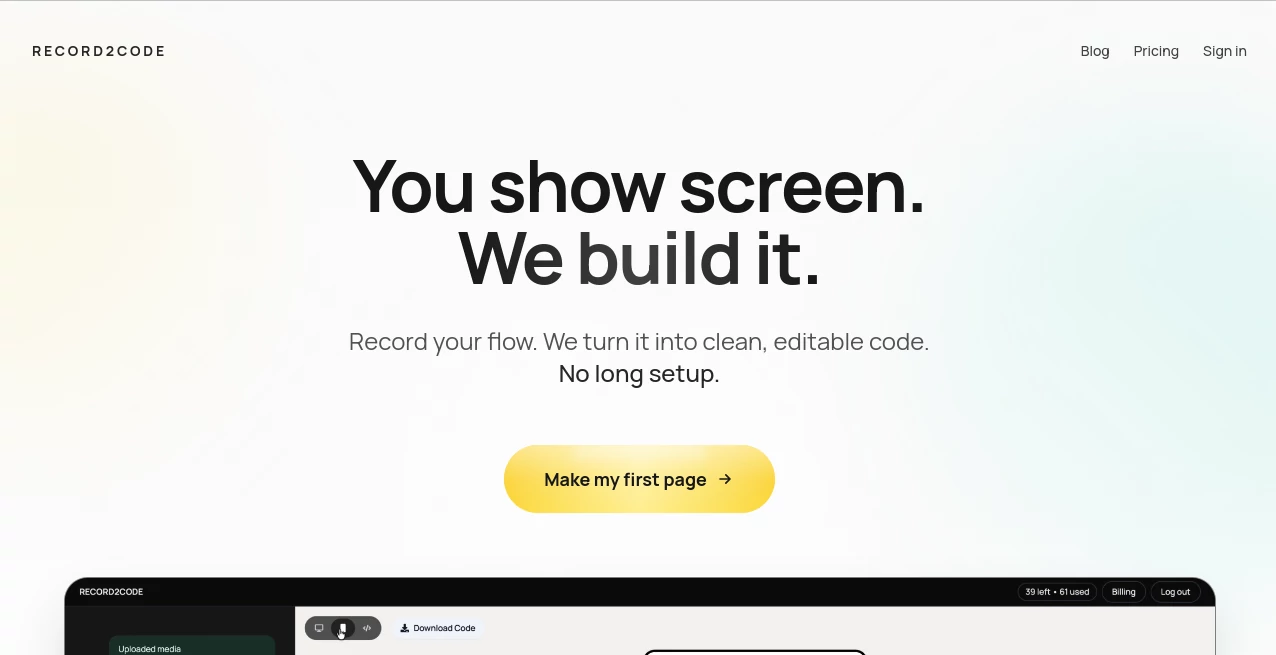
Building software often starts with an idea that is easier to show than explain. Many developers, founders, and product teams can visualize a workflow, interface, or user journey, yet translating that vision into production-ready code usually takes time and multiple iterations. This platform approaches the problem differently by allowing users to record a screen demonstration and transform that visual workflow into editable code.
Instead of spending hours creating specifications, wireframes, or lengthy documentation, users can simply capture what they want to build. The system analyzes layouts, typography, spacing, visual elements, and interactions, then converts those observations into structured code that developers can continue working with immediately.
For startups moving quickly, agencies recreating designs, or solo builders validating concepts, this creates a remarkably direct path from idea to implementation. The result is a workflow that feels modern, practical, and refreshingly efficient.
Key Features
User Interface
The platform offers a streamlined experience focused on simplicity. Users begin by recording their screen and demonstrating the interface or flow they want to recreate. The process avoids complicated setup procedures, making it approachable even for non-technical users.
Navigation remains straightforward, allowing visitors to focus on creating rather than configuring. The minimal workflow reduces friction and helps users move from concept to output in just a few steps.
Accuracy & Performance
One of the most impressive aspects is the emphasis on visual accuracy. The system analyzes video frames to understand layouts, colors, typography, and spacing with a high level of detail. This makes it particularly valuable when preserving the look and feel of an existing design is important.
In practical scenarios, maintaining design consistency can save significant development time. Teams no longer need to manually recreate every visual detail from screenshots or design notes.
Capabilities
- Convert screen recordings into editable code.
- Capture complete user flows and interface structures.
- Generate clean output suitable for further development.
- Replicate visual designs with strong attention to detail.
- Support rapid prototyping and product validation.
- Reduce the need for lengthy design specifications.
- Help transform mobile experiences into web-based versions.
A product designer, for example, can record a prototype walkthrough and quickly receive a working foundation that developers can refine rather than build from scratch.
Security & Privacy
For professional teams, handling project materials responsibly is essential. The platform is designed around a controlled workflow where users intentionally provide recordings for processing. This approach helps organizations maintain clarity regarding the assets being converted while benefiting from automated code generation.
Use Cases
- Rapid website and landing page prototyping.
- Recreating existing interfaces from video demonstrations.
- Transforming onboarding experiences into web-based flows.
- Accelerating communication between designers and developers.
- Creating proof-of-concept projects for startups.
- Building MVPs with reduced development effort.
- Testing product ideas before committing to full implementation.
Imagine a founder discovering an interface they admire. Rather than writing extensive requirements, they can record a walkthrough and generate a working foundation within minutes. This dramatically shortens the gap between inspiration and execution.
Pros and Cons
Pros
- Fast conversion from visual ideas to code.
- Simple workflow with minimal setup.
- Strong focus on design fidelity.
- Useful for developers, startups, and agencies.
- Reduces manual specification work.
- Produces editable output suitable for customization.
Cons
- Complex applications may still require developer refinement.
- Output quality depends on the clarity of the recording.
- Advanced business logic may need additional implementation.
Pricing Plans
The service offers multiple subscription levels designed for different workloads.
- Starter Plan: Suitable for experimentation, occasional projects, and first-time users.
- Professional Plan: Designed for builders who generate code regularly and manage multiple projects.
- Team Plan: Intended for organizations requiring larger credit allocations and continuous production workflows.
The tiered structure makes it easy to begin with a small commitment and scale usage as project demands grow.
How to Use Record2Code
Getting started requires only a few simple steps.
- Record the interface or workflow you want to recreate.
- Upload the recording for analysis.
- Allow the system to process visual elements and interactions.
- Receive clean, editable code.
- Customize, expand, and deploy the generated output.
This process removes many traditional barriers between concept creation and software development.
Comparison with Similar Tools
Many design-to-code solutions rely on screenshots, wireframes, or manually prepared design files. While these methods can be effective, they often introduce extra steps into the workflow.
This platform takes a more direct approach by using video as the primary input. Instead of requiring detailed preparation, users simply demonstrate what they want. This creates a more natural experience and can significantly reduce the time spent communicating requirements.
For teams focused on speed, visual consistency, and rapid execution, the video-first approach provides a practical advantage over more traditional alternatives.
Conclusion
Modern product development rewards speed, clarity, and efficient collaboration. By transforming screen recordings into clean code, this platform offers a compelling solution for developers, entrepreneurs, designers, and product teams who want to move faster without sacrificing quality.
The ability to capture a vision through video and receive editable code creates a workflow that feels intuitive and highly productive. Whether the goal is prototyping a startup idea, recreating an interface, or accelerating development cycles, it delivers a refreshing alternative to conventional design-to-code processes.
Frequently Asked Questions (FAQ)
What is the primary purpose of this platform?
It converts screen recordings into editable code, helping users transform visual concepts into working software foundations.
Do I need coding experience to use it?
No. Non-technical users can record a workflow, while developers can use the generated code as a starting point for further customization.
Can it recreate existing website designs?
Yes. The system is designed to analyze layouts and visual details from recordings and generate code that closely matches the demonstrated design.
Is it suitable for startups?
Absolutely. It is particularly useful for founders and small teams that need to validate ideas and build prototypes quickly.
Can the generated code be modified?
Yes. The output is editable, allowing developers to extend functionality, optimize performance, and adapt the project to specific requirements.
AI Website Builder , AI Code Generator , AI Developer Tools , AI App Builder .
These classifications represent its core capabilities and areas of application. For related tools, explore the linked categories above.

Record2Code Alternatives Product

OGimage

GetVivix

Vurge

BetterAntisp…

Interview Co…
JustCopy.ai

Lovable APP

Sourcetable

Lovable
