Refero
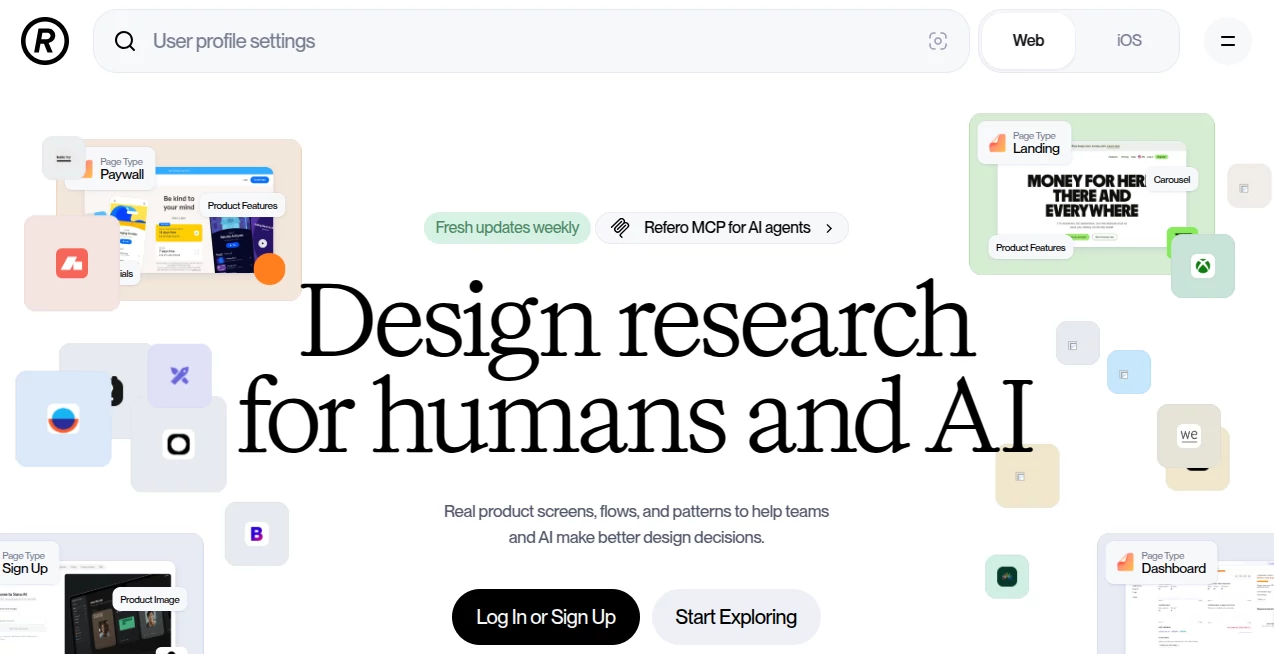
What is Refero?
I used to waste hours jumping between Dribbble, Behance, and random product pages just to find good references for a new dashboard or checkout flow. Then I discovered this platform and my whole process changed. It’s a thoughtfully organized collection of actual interfaces from real products — not polished mockups, but screens that real users interact with every day. The first time I used it, I found three perfect dashboard examples in under ten minutes that perfectly matched the mood I was going for. That kind of speed and relevance is rare, and it genuinely makes designing more enjoyable.
Introduction
Great design is rarely created from nothing. The best work is informed by what already exists and works well. This platform understands that and makes finding high-quality, real-world inspiration incredibly easy. It collects screens from successful apps and websites across different industries, organizes them by page type, pattern, and industry, and updates regularly so you’re always seeing current trends. Whether you’re a solo designer, part of a product team, or building something completely new, it removes the painful part of research and leaves you with clear, usable references that spark better ideas.
Key Features
User Interface
The site feels calm and purposeful. A strong search bar sits at the top, while smart filters on the side let you narrow by interface type (dashboard, pricing page, onboarding, etc.), industry, or specific design pattern. Every image loads quickly and can be viewed full size with context. You can save anything you like into personal collections without any hassle. It never feels cluttered — just helpful and focused on what designers actually need.
Accuracy & Performance
Every example is carefully selected and properly categorized, so search results are relevant instead of random. The collection stays fresh with new additions every week, meaning you’re not looking at outdated patterns. In practice, it consistently surfaces useful references quickly, saving hours compared to scattered browsing across the internet. The quality of examples is consistently high, which builds trust every time you use it.
Capabilities
You can explore complete user flows, recurring UI patterns, individual components, and even popular font choices used in top products. There’s also Refero MCP — a feature that lets AI design tools study real interfaces before generating new ones, helping them produce more grounded and tasteful results. Whether you’re doing research manually or feeding references to an AI, it serves both approaches beautifully.
Security & Privacy
Your saved collections and search history stay private to your account. The platform focuses on delivering value without collecting unnecessary personal data. For teams, there are controlled sharing options that keep inspiration organized without exposing sensitive projects.
Use Cases
A product designer working on a new SaaS tool searches for similar dashboards and quickly builds a moodboard that gets instant approval from stakeholders. A freelance designer shows clients real examples of successful pricing pages to align expectations early. An AI product team uses the MCP feature to give their model better visual understanding before generating interfaces. Students studying UI/UX pull real examples to understand how established products solve common problems. It fits naturally into almost any design workflow, from solo side projects to large team efforts.
Pros and Cons
Pros:
- Focuses on real shipped products instead of generic mockups.
- Excellent organization and filtering that actually saves time.
- Regular updates keep the inspiration relevant and fresh.
- Works beautifully for both human designers and AI-assisted workflows.
- Clean, fast experience that respects your creative flow.
Cons:
- Some very niche patterns may have fewer examples as the library continues growing.
- Advanced team features and unlimited collections require a paid plan.
Pricing Plans
The free tier is generous enough for personal use and light projects, letting you explore and save favorites. Paid plans unlock unlimited searches, advanced filters, team sharing, larger collections, and full MCP access for AI tools. The pricing feels reasonable for the time and quality it returns — many designers say it quickly becomes one of their most visited tools during any project.
How to Use Refero
Start by typing what you need in the search bar — “SaaS dashboard”, “mobile checkout flow”, “pricing table”, or whatever you’re working on. Use the filters to narrow by industry or pattern. Browse the results and click any screen to see it larger with surrounding context. Save the ones you like to collections for later reference. When working with AI, connect via MCP to provide real examples for better generation quality. The whole process stays fast and intuitive, turning research from a chore into an enjoyable part of designing.
Comparison with Similar Tools
While other inspiration sites often show beautiful but isolated mockups, this one focuses on real interfaces from actual products, complete with user flows and context. Many libraries feel outdated or random, but the regular updates and smart organization here keep it consistently useful. It strikes a great balance between human taste and AI compatibility, making it more practical for modern design workflows than most alternatives.
Conclusion
Design is part research, part creativity. This platform makes the research part faster, smarter, and more inspiring, so you can spend more energy on the creative side. Whether you’re solving a specific problem or just feeding your visual curiosity, it consistently delivers references that move your work forward. For anyone who designs interfaces, it’s quickly becoming one of those quiet essential tools you wonder how you ever lived without.
Frequently Asked Questions (FAQ)
How often is new content added?
New high-quality examples are added almost every week.
Can I use these references for commercial projects?
Yes — they’re meant to inspire your own original designs.
Is there support for AI tools?
Yes, through Refero MCP, AI agents can study real interfaces before generating new designs.
Do I need an account?
You can browse without one, but saving collections and using advanced features requires a free or paid account.
What kind of designs are included?
Real product screens, complete user flows, recurring UX patterns, UI components, and popular fonts from successful apps and websites.
AI Design Assistant , AI Website Designer , AI Design Generator , AI Graphic Design .
These classifications represent its core capabilities and areas of application. For related tools, explore the linked categories above.

Refero Alternatives Product

Avatarka AI

chibi genera…

Wplace Live

grok imagine…

RoomDecorFin…

Toon Composer

Use Nano Ban…

Ai logo maker

TimelessHome…