

















ReWords AI
What is ReWords AI?
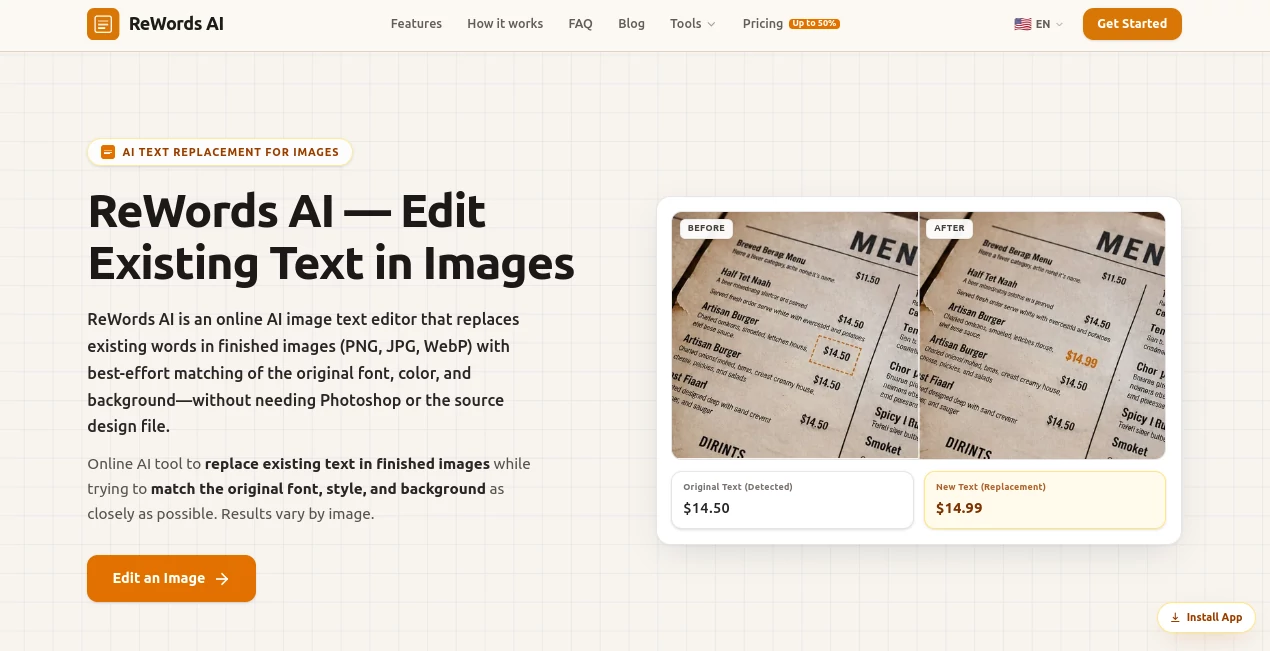
Editing text inside a finished image can be surprisingly difficult. If the original design file is missing, finding the exact font, rebuilding the background, and making the replacement look natural can take far longer than the actual wording change. ReWords AI takes a much simpler approach: upload the finished image, select the text, enter the replacement, and let AI rebuild the selected area.
The tool is designed specifically for replacing existing text rather than simply placing a new text layer over an image. It supports PNG, JPG, and WebP files and works directly in a web browser on both desktop and mobile devices. New users can also try an image edit after signing in before deciding whether they need additional credits or a subscription.
This makes it particularly useful for practical edits such as correcting a typo in a screenshot, changing a price on a promotional graphic, updating a date on a poster, localizing product imagery, or fixing misspelled words in an AI-generated image.
Key Features
- AI-assisted replacement of existing text inside finished images
- Automatic analysis of the original font and visual style
- Attempts to match font size, color, and surrounding background
- Support for PNG, JPG, and WebP images
- Text detection with the option to manually select missed areas
- Useful for screenshots, posters, product images, social graphics, and documents
- Can handle multiple text replacements within an image
- Works without requiring the original Photoshop, Figma, or design file
- Browser-based workflow with no desktop software installation
- Free image edit available for new users after signing in
- Higher-resolution 2K and 4K output available with subscriptions
- Beta API availability for developers who want image-text editing capabilities in their own applications
User Interface
The interface keeps the workflow focused on the actual edit. Users begin by uploading an image, then select detected text or draw a box around text that was not automatically recognized. After entering the replacement wording, the revised image can be generated and downloaded.
That simplicity is one of its strongest qualities. Someone who only needs to change a number on a graphic does not have to learn layers, masking, cloning, or typography tools. For quick jobs, the difference is noticeable.
Accuracy & Performance
The main strength is its attempt to preserve the visual character of the original text. Instead of treating the replacement as an unrelated overlay, the system analyzes the existing text and surrounding image before rebuilding the selected area.
Results can vary depending on image quality, font complexity, background texture, text length, and how clearly the original text appears. Clear images with enough surrounding context generally provide the best results. Handwritten, curved, and more complicated text can also be attempted, although these edits deserve a visual check before publication.
For everyday corrections and marketing graphics, the workflow can save considerable manual editing time. A designer who only needs to change a date or price on an exported asset can avoid reopening the entire original project.
Capabilities
The tool goes beyond simple text correction. It can be used for localization, marketing updates, e-commerce graphics, social media images, screenshots, memes, packaging visuals, presentation graphics, and AI-generated artwork.
For example, a retailer could change promotional wording on a finished storefront image, while an online seller could update packaging text for a different market. Content creators can also repair distorted or misspelled words generated inside AI images without recreating the entire visual.
Developers may also be interested in the image-text editing API, which is currently available in beta. Access details and current limitations are provided by the team on request.
Security & Privacy
Uploaded images are processed to generate the requested edits. The service states that image processing may involve third-party AI and storage providers, so users working with confidential or sensitive material should review the current privacy policy and data-handling terms before uploading it.
For ordinary marketing graphics, screenshots, social media visuals, and other content that users are authorized to edit, the browser-based workflow is convenient. As with any online image-processing service, it is sensible to avoid uploading material containing information that should not be processed by external services.
Use Cases
- Marketing graphics: Change prices, offers, dates, headlines, or promotional wording without rebuilding the design.
- E-commerce: Update product labels, packaging text, and promotional imagery for different markets.
- Screenshots: Correct a typo or update a number without taking a new screenshot.
- Posters and flyers: Make last-minute changes when the original design file is unavailable.
- Social media: Update captions and text in graphics prepared for platforms such as Instagram, TikTok, and YouTube.
- AI-generated images: Repair strange spelling or distorted text produced by image-generation models.
- Creative documents: Update wording inside presentation graphics and other visual materials that the user has permission to modify.
- Localization: Replace text in finished visuals when adapting creative assets for another language or market.
Pros and Cons
Pros
- Focused specifically on editing text already embedded in images
- No original design file is required
- Automatic font and style analysis reduces manual work
- Simple upload, select, replace, and download workflow
- Supports common image formats including PNG, JPG, and WebP
- Useful across marketing, e-commerce, social media, and creative workflows
- New users can try an edit before purchasing additional usage
- API is being developed for integration into other products
Cons
- Results can vary with image quality and text complexity
- Very unusual fonts or heavily textured backgrounds may require additional checking
- Handwritten and curved text may not always reproduce perfectly
- Additional usage requires credits or a subscription
- Users should review privacy and third-party processing terms when working with sensitive images
Pricing Plans
The service offers a free way for new users to try an image edit after signing in. Continued usage is available through credits or subscription plans. The pricing system is designed around image editing rather than simply charging for individual text boxes, and multiple text replacements can be handled as part of an image edit.
Subscription options also provide access to higher-resolution 2K and 4K outputs. The exact cost can change, so users should check the current pricing page before purchasing. This approach makes the service suitable both for someone who occasionally needs to fix a single graphic and for users who regularly process visual content.
How to Use It
- Open the image editing workspace in your browser.
- Upload a PNG, JPG, or WebP image.
- Wait for the existing text to be detected.
- Click the text you want to replace or draw a selection box around missed text.
- Enter the new wording.
- Review the detected original text and correct it if necessary.
- Generate the edited image.
- Check the result carefully, especially when working with unusual fonts or complex backgrounds.
- Download the finished image and use it in your authorized project.
Comparison with Similar Tools
The biggest distinction is the type of editing being performed. Traditional graphic editors are designed for broad creative control and are excellent when the original layered project is available. However, changing embedded text in a finished image can require several manual steps, including removing the old wording, repairing the background, locating a suitable font, and positioning the replacement.
Tools focused on adding text generally place a new layer above an image. That is useful for creating graphics, but it does not necessarily reproduce the appearance of text that is already part of the image.
This solution sits in a narrower but useful space. It concentrates on replacing existing text inside a finished visual and uses AI-assisted rebuilding to make the replacement fit the surrounding design. For a quick price change, screenshot correction, poster update, or localization task, that focused workflow can be much more convenient than opening a full creative suite.
Conclusion
For anyone who regularly works with finished images, the ability to change embedded wording without returning to the original design file can remove a surprisingly frustrating part of the workflow. The tool keeps the process straightforward: upload an image, select the wording, provide the replacement, and generate the revised visual.
Its strongest use cases are practical rather than flashy. Marketing teams can update promotional graphics, e-commerce sellers can modify product visuals, designers can fix exported work, and content creators can clean up text inside AI-generated imagery. The automatic attempt to preserve the original typography and background is what makes the approach especially useful.
It is not a replacement for a complete professional image editor, and complicated images should always be reviewed before publication. But when the job is specifically to replace text already embedded in an image, this focused approach can save time and eliminate much of the repetitive manual work.
Frequently Asked Questions (FAQ)
Can I replace text inside an existing image?
Yes. Upload a finished image, select the existing text, enter the replacement wording, and generate a revised version. The system attempts to preserve the original visual style.
Which image formats are supported?
The workspace supports PNG, JPG, and WebP images.
Can the original font style be preserved?
The AI analyzes the original text and attempts to match its font, size, color, and surrounding style. The quality of the result depends on the source image, typography, background, and replacement text.
Can I edit text in a screenshot?
Yes. Screenshot editing is one of the practical use cases. It can be useful for correcting typos, updating numbers, or revising text in web interface mockups and screenshots that you are authorized to modify.
Can it edit handwritten text?
Handwritten and curved text can be attempted, but results may vary. Clear text with sufficient surrounding image information generally provides more reliable results.
Is there a free option?
New users can sign in and try a free image edit without a credit card. Additional editing requires credits or a subscription.
Does it offer an API?
Yes. An image-text editing API is currently in beta. Developers interested in integration can contact the team for access information and current limitations.
Photo & Image Editor , AI Image Scanning , AI Image to Image .
These classifications represent its core capabilities and areas of application. For related tools, explore the linked categories above.

ReWords AI Alternatives Product
PostPlus AI
AI Consisten…

OutfitSwap S…

Blur & Unblu…

Seedream 5.0

Mage

img2img.net

Uni-1

CozAIPhoto
