

















saasgrow.ai
What is saasgrow.ai?
SaaSGrow is a curated SaaS discovery platform built for people who want to find useful software without having to sift through endless directories, sponsored rankings, and low-quality listings. The platform focuses on growth-oriented tools and puts an editorial screening process between a product and its appearance in the directory.
Instead of simply presenting a large collection of software, the platform aims to make discovery more practical. Visitors can browse tools by category, search for specific products or use cases, and compare different options with useful context before deciding what is worth trying.
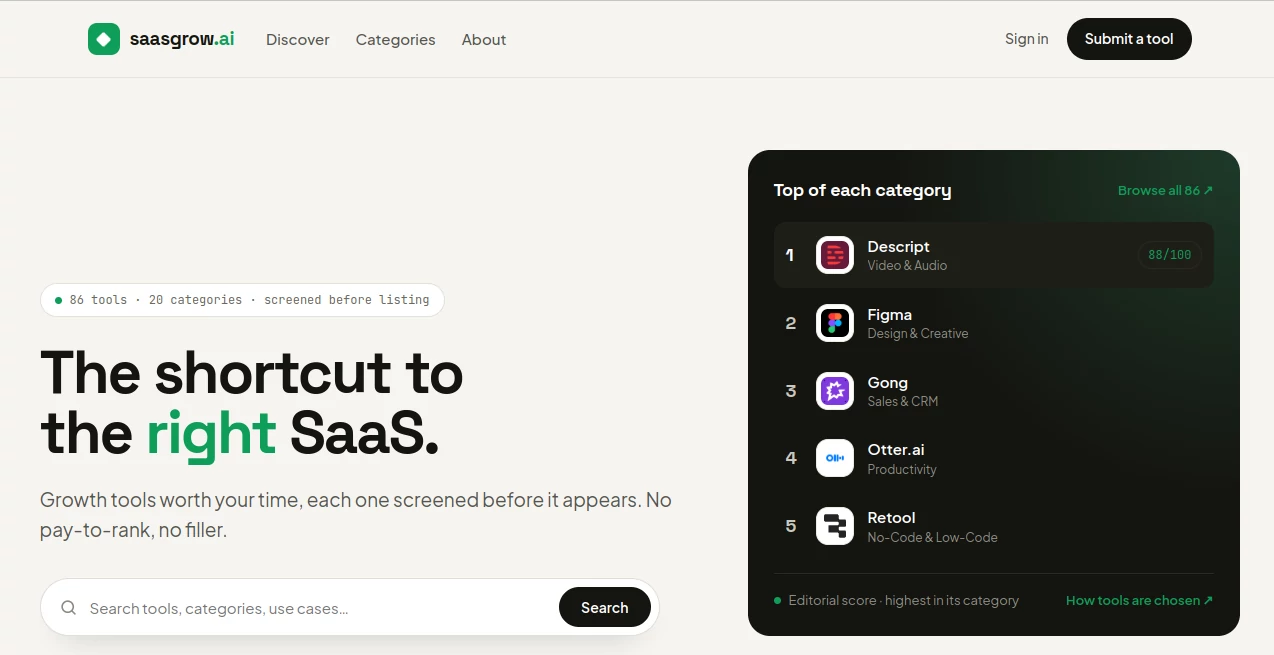
The directory currently features 86 tools across 20 categories, with every listing screened before publication. That editorial approach gives the platform a more selective feel than a typical open submission directory.
Key Features
- Curated SaaS and software discovery
- Editorial screening before tools are listed
- Category-based browsing
- Search for tools, categories, and use cases
- Editorial scores for selected tools
- Visible caveats for highly rated products
- Free browsing without requiring an account
- Continuous directory updates
- Tool submission options for makers
User Interface
The interface is intentionally straightforward. A prominent search field lets visitors look for tools, categories, or particular use cases, while the category navigation provides a faster route for people who are still exploring their options.
The homepage also highlights the strongest tools within individual categories, making it possible to discover useful products without opening dozens of separate pages. The layout feels closer to an editorial catalog than a conventional software marketplace.
Accuracy & Performance
One of the more useful aspects of the directory is its emphasis on screening. Tools are not simply added to the index without review. Editorial selections are researched and reviewed, while maker submissions go through a screening process based on the information supplied by the maker.
The platform also avoids presenting every recommended product as flawless. Its editorial picks include a caveat, which gives visitors a more balanced picture of what they might encounter after choosing a tool. For example, limitations involving pricing, interface complexity, or particular types of use can be surfaced alongside positive recommendations.
Capabilities
The platform covers a broad collection of software categories, including Video & Audio, Productivity, Writing & Content, Automation, Design & Creative, Marketing, Sales & CRM, No-Code & Low-Code, SEO & Growth, Customer Support, Social Media, and Analytics.
This range makes it useful for different stages of a modern software stack. A founder looking for an automation platform, a marketer searching for growth software, or a content professional exploring writing solutions can start from the relevant category rather than beginning with a completely open-ended search.
The platform also provides an editorial score for selected category leaders. This adds another layer of guidance for visitors who want a quick starting point instead of an enormous list of indistinguishable products.
Security & Privacy
Visitors can browse the directory without creating an account, which keeps the basic discovery experience simple. The website also provides dedicated privacy and terms pages for users who want to understand its policies before interacting further with the service.
For makers, the platform provides account-based functionality for submitting and managing listings. The submission process also includes badge verification before a maker listing becomes live.
Use Cases
The directory can be useful in several everyday situations. A startup team choosing software for its growth stack can use category browsing to narrow down potential options. A marketer can explore marketing or SEO-focused products, while a small business owner can search for software that helps with sales, productivity, automation, or customer support.
It is also useful when someone knows the problem they want to solve but does not yet know which product to use. Searching by a use case can be more practical than searching for a specific brand.
For example, imagine a small team trying to replace several disconnected tools with a more efficient workflow. Rather than researching every SaaS product independently, the team can start with relevant categories, inspect the available choices, and pay attention to the strengths and caveats highlighted by the directory.
Pros and Cons
Pros
- Tools are screened before appearing in the directory.
- The catalog is curated rather than relying entirely on volume.
- Useful category-based discovery makes exploration easier.
- Editorial picks include caveats instead of presenting products as universally perfect.
- Browsing is free and does not require an account.
- The directory is updated continuously.
Cons
- The catalog is smaller than very large software directories.
- Not every category has the same number of listings.
- Some users may prefer a much larger database when researching niche software.
- Editorial scores are most useful as a starting point rather than a replacement for personal testing.
Pricing Plans
Browsing the directory is free, and visitors do not need an account to read the available listings. For makers, submitting a tool is also offered as a free listing option. Submissions are screened, and a listing can go live after the maker completes the required badge verification.
This model makes the platform accessible both to people looking for software and to SaaS makers who want to introduce their products to a relevant audience without paying simply to appear in the directory.
How to Use SaaSGrow
Start by searching for a specific tool, category, or use case. If you are not sure what type of software you need, browse the available categories and look through the leading options in each section.
When you find an interesting product, review its category and the additional editorial information provided with the listing. Pay particular attention to any stated caveat, since it can reveal a limitation that may not be obvious from a product's marketing page.
Makers can take a different route by submitting their own product. After the submission is screened, the maker can verify the site's badge so the listing can be published.
Comparison with Similar Tools
Traditional software directories often try to win through the sheer number of listings. This platform takes a more selective approach. Instead of making visitors navigate an enormous database, it emphasizes screened entries, editorial selections, category leaders, and practical caveats.
That difference matters when the goal is not simply to find every possible SaaS product, but to quickly identify a smaller group of options that deserve further investigation. A large directory may be better for exhaustive research, while a curated directory can be more convenient when time and decision quality matter.
The editorial approach is particularly helpful for users who dislike directories filled with repetitive or low-value listings. The combination of category rankings and visible limitations provides more context than a basic name-and-link database.
Conclusion
SaaSGrow offers a focused approach to software discovery by combining a curated directory with editorial screening and practical product context. Its current collection of 86 tools across 20 categories is intentionally selective, making the experience easier to navigate than a directory built purely around quantity.
The strongest feature is arguably the balance between recommendation and caution. Highlighting useful products while also acknowledging their limitations gives visitors a more realistic starting point for software research.
For founders, marketers, teams, and independent professionals who would rather discover a handful of relevant SaaS products than scroll through endless listings, this is a directory worth keeping in the research toolkit.
Frequently Asked Questions (FAQ)
Is the directory free to use?
Yes. Visitors can browse the directory and read tool listings without paying or creating an account.
How are tools selected?
Every tool is screened before it appears in the directory. Editorial selections are researched and reviewed, while maker submissions are screened using the information provided by the maker.
How many tools are currently listed?
The website currently states that it has 86 tools across 20 categories.
How often is the directory updated?
The directory is updated continuously. Makers can submit products at any time, and listings can be published after the required verification process is completed.
Can SaaS makers submit their own products?
Yes. Makers can submit their tools for consideration. The submission is screened, and the maker is required to verify the site's badge before the listing becomes live.
Does the directory rank tools only by popularity?
No. The platform highlights editorial picks and provides category-based editorial scoring rather than relying solely on popularity.
Are recommended tools presented without criticism?
No. The directory specifically highlights a caveat for its editorial picks, helping visitors understand that even highly rated products can have limitations.
Can I browse tools without signing up?
Yes. The website states that browsing is free and no account is required to read its listings.
What types of software can I discover?
The directory covers categories such as productivity, video and audio, writing and content, automation, design, marketing, sales and CRM, no-code and low-code, SEO and growth, customer support, social media, and analytics.