
Saymo
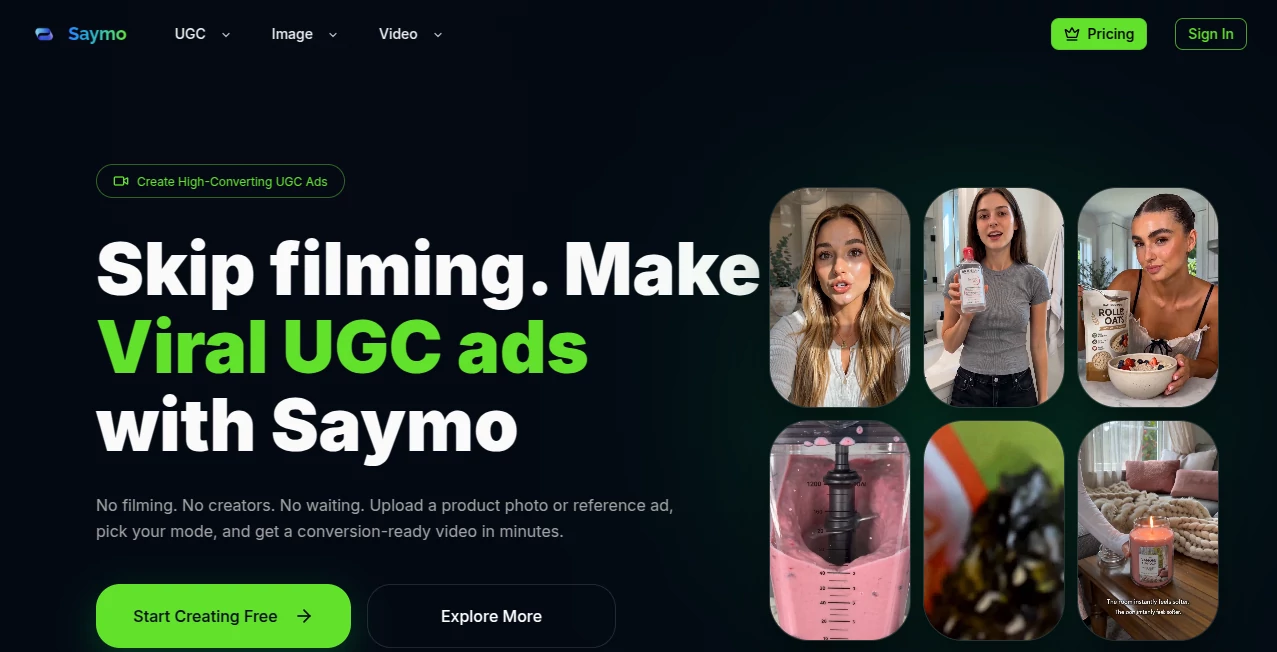
What is Saymo?
Saymo is an AI creative platform built for brands, marketers, agencies, and online sellers that want to produce polished UGC-style advertising content without organizing traditional shoots. Instead of coordinating creators, cameras, locations, editors, and repeated takes, users can start with a product image, reference advertisement, script, audio file, or existing video and turn it into new marketing content.
The platform is particularly focused on performance-driven advertising. Its workflows are designed around product promotion, creative testing, UGC videos, AI presenters, product-in-hand content, and the rapid production of different ad variations. This makes it an interesting option for teams that need more creative output but do not want production work to become a bottleneck.
One of the more practical ideas is the ability to work from an existing successful advertisement. Rather than inventing every campaign from scratch, marketers can study the structure of a reference ad and adapt its hook, pacing, scenes, product presentation, and call to action to a different offer.
Key Features
- AI-generated UGC advertising videos
- AI actors and talking presenters
- Product-in-hand images and videos
- Ad cloning and reference-ad analysis
- AI lip sync and voice-matched delivery
- Text-to-speech and AI voiceovers
- Image and video generation workflows
- Scene, product, and character swapping
- Creative variations for faster advertising tests
- Commercial-use exports without watermarks on paid plans
User Interface
The workflow is designed around a straightforward creation process rather than a traditional video-editing timeline. Users can provide their source material, select the relevant generation workflow, and review the resulting creative. This approach should feel familiar to marketers who care more about producing and testing advertising concepts than manually editing every frame.
The product-in-hand workflow is a good example. A product image and an avatar image can be used as the starting point for creating scenes where a person appears to hold, present, or use the product. For ecommerce teams, that can be much faster than arranging a product photoshoot for every new campaign.
Accuracy & Performance
Performance depends on the source material, selected generation model, prompt, and type of creative being produced. For advertising workflows, consistency is especially important, and the platform provides tools for keeping products, characters, scenes, and messaging connected throughout the generation process.
The lip-sync workflow is designed to align visible mouth movement with speech, while the talking-actor workflow combines a character or portrait with a script or audio input. These features are useful when the goal is to make an AI presenter feel connected to the spoken message rather than simply placing a voice over a static image.
The platform also emphasizes speed. Its own comparison describes generated advertising content as taking minutes rather than the several days normally associated with traditional UGC production. That difference can matter when a marketing team needs to test several creative directions during the same campaign.
Capabilities
The strongest part of the platform is its advertising-oriented workflow. The Ad Clone feature can analyze a reference advertisement and identify elements such as the hook, pacing, scene flow, product reveal, visual narrative, script, and CTA. Marketers can then use those structural ideas as the foundation for a new product advertisement.
Another useful capability is product-in-hand generation. A product photo can be combined with an avatar to create creator-style visual content without requiring a physical shoot. Multiple creator appearances, environments, and presentation styles can then be explored for testing.
The AI talking actor workflow adds another layer. A character or portrait can be paired with a written script or recorded audio to create a presenter-led video with synchronized speech, facial expression, and character motion.
There are also workflows for face swapping, lip synchronization, voiceovers, and video localization. Together, these tools make the platform more than a simple text-to-video generator; it is aimed at creating and adapting complete advertising creatives.
Security & Privacy
When working with product images, customer-facing campaigns, portraits, or reference advertisements, users should consider the rights they have to the material they upload. This is particularly important when using recognizable people, third-party advertisements, or branded assets.
The platform is intended for commercial creative production, and paid plans include commercial use and watermark-free exports. Even so, businesses should review their own licensing requirements and make sure that uploaded media and generated campaigns comply with the policies of the advertising platforms where they will be published.
Use Cases
Ecommerce advertising: Online stores can turn product photography into creator-style advertising content without arranging a new shoot for every product.
DTC brands: Direct-to-consumer companies can generate multiple hooks, product presentations, and creative variations for paid social campaigns.
Marketing agencies: Agencies can produce advertising concepts for several clients while reducing the amount of traditional production coordination required.
Creative testing: Growth teams can create different openings, messages, audiences, and visual approaches and test them against each other instead of relying on a single advertisement.
Product demonstrations: Product photos, demos, and existing footage can be transformed into more engaging promotional material with presenters, narration, or additional visual elements.
International campaigns: Voice and lip-sync workflows can help teams adapt existing video concepts for audiences speaking different languages.
Pros and Cons
Pros:
- Strong focus on UGC advertising rather than generic video generation
- Product-in-hand generation is useful for ecommerce campaigns
- Ad Clone provides a practical way to study and recreate winning creative structures
- AI actors and talking presenters reduce the need for repeated filming
- Includes voiceovers, lip sync, and other supporting creative tools
- Multiple creative variations can be produced for testing
- Paid plans include commercial use and watermark-free exports
Cons:
- Credit consumption can become important for teams producing large volumes of content
- Results can vary depending on the source image, reference material, and generation settings
- Users creating large advertising campaigns may need a higher-tier plan
- Traditional video editors may still prefer a dedicated professional editing application for detailed manual control
Pricing Plans
The platform offers three main monthly plans. The Starter plan includes 500 credits per month and is aimed at users getting started. The Pro plan provides 1,000 credits, while the Ultra plan increases the allowance to 2,000 credits for heavier users.
When billed annually, the listed prices are $29.99 per month for Starter, $49.99 per month for Pro, and $79.99 per month for Ultra. The monthly list prices are $39.99, $59.99, and $99.99 respectively.
There is also a one-time quick test option priced at $2.99, providing 160 trial credits for two short UGC ad video tests. Paid plans include commercial use and exports without a watermark.
How to Use
Start by choosing the type of creative you want to produce. Depending on the campaign, you can work from a product image, an existing advertisement, a character image, a script, audio, or video footage.
For a UGC advertisement, upload a suitable product image and provide the information needed to communicate the product's benefits, audience, use cases, and offer. You can then choose the desired creative direction and generate a first version.
If you already have a successful reference advertisement, use the ad analysis workflow to identify its hook, pacing, visual structure, and CTA. You can then adapt that structure to your own product rather than starting with a blank page.
After generating the first result, review the product presentation, facial performance, lip synchronization, messaging, and overall visual consistency. Create additional variations when you want to compare different hooks, scenes, presenters, or selling angles.
Comparison with Similar Tools
Many AI video platforms concentrate on cinematic text-to-video generation, while this platform takes a more commercial approach. Its workflows are built around the needs of advertising teams, particularly UGC creatives, ecommerce products, AI presenters, and rapid creative testing.
That distinction matters. A company looking for an experimental visual generator may prioritize cinematic control and artistic generation. A performance marketer, on the other hand, may care more about producing ten usable advertising variations from one product photo. The latter is where this platform has a clearer advantage.
The combination of product-in-hand generation, talking actors, ad structure analysis, lip sync, voiceovers, and creative swapping also gives marketers several ways to reuse the same core assets. Instead of treating every advertisement as a completely separate production project, teams can build variations around a repeatable workflow.
Conclusion
For brands and marketing teams that depend on a steady supply of advertising creatives, this platform offers a practical alternative to traditional UGC production. Its focus is not simply on making attractive AI videos; it is on turning products, reference ads, scripts, and existing creative assets into content that can be tested in real marketing campaigns.
The combination of AI actors, product-in-hand content, ad cloning, voiceovers, lip sync, and creative variations makes it particularly relevant for ecommerce businesses, agencies, DTC brands, and growth marketers. If the main challenge is producing more advertising concepts without continuously arranging shoots and managing creators, this approach can significantly simplify the workflow.
Frequently Asked Questions (FAQ)
What type of content can be created?
The platform can create UGC-style advertising videos, product-in-hand content, talking-presenter videos, AI voiceovers, lip-synced videos, and other image and video creatives designed for marketing campaigns.
Can I create an advertisement from a product photo?
Yes. A product photo can be used as the starting point for product-in-hand images and creator-style videos, allowing ecommerce teams to build promotional content without arranging a traditional product shoot.
Can an existing advertisement be used as a reference?
Yes. The Ad Clone workflow can analyze a reference advertisement and identify elements such as the hook, pacing, scenes, product presentation, script, and CTA before adapting the creative structure to another product.
Does it support AI presenters?
Yes. The talking-actor workflow can turn a character or portrait into a speaking presenter using a script or audio while synchronizing speech with facial movement.
Does it support lip sync?
Yes. Lip-sync capabilities are available for creating talking performances from images and videos, including localized versions using different languages and audio tracks.
Is commercial use available?
Commercial use is included with the paid plans, and paid exports are available without a watermark.
Is there a way to test the platform before subscribing?
There is a one-time quick test option that provides 160 credits for two short UGC ad video tests. It does not require a recurring subscription.
Which plan is suitable for frequent advertising production?
Starter can be a reasonable entry point for lighter workloads, while Pro and Ultra provide substantially more monthly credits for teams producing a larger number of creatives and variations.
AI Ad Creative Assistant , AI Video Generator , AI Advertising Assistant , AI UGC Video Generator .
These classifications represent its core capabilities and areas of application. For related tools, explore the linked categories above.

Saymo Alternatives Product

Mimo AI

Blinkly AI

Runway Gen-4…

Sora-2.co

UPDF AI

Seedance 2.0

Sora AI Vide…

happyhorse ai

Trump AI Vid…