

















Seedance 2.5 AI
What is Seedance 2.5 AI?
Creating professional-looking videos no longer requires advanced editing skills or expensive production equipment. Seedance 2.5 AI brings modern video generation into a simple and accessible workflow, allowing creators to transform ideas into visually engaging content in just a few steps. Built for marketers, filmmakers, content creators, educators, and businesses, this platform combines text prompts, reference images, and intelligent video generation into one streamlined experience.
The platform focuses on delivering smooth motion, cinematic composition, synchronized audio, and impressive visual consistency. Whether someone wants to create short advertisements, storytelling videos, social media content, or creative animations, it provides an efficient solution without sacrificing quality. Its multi-reference workflow also helps maintain character consistency, scene continuity, and artistic style across generated clips, making it suitable for projects that demand more than simple text-to-video generation.
One aspect that immediately stands out is how approachable the workflow feels. Even first-time users can generate polished videos without spending hours learning complicated editing software. Experienced creators, on the other hand, will appreciate the flexibility offered through prompt customization, reference-guided generation, and professional-quality outputs.
Key Features
User Interface
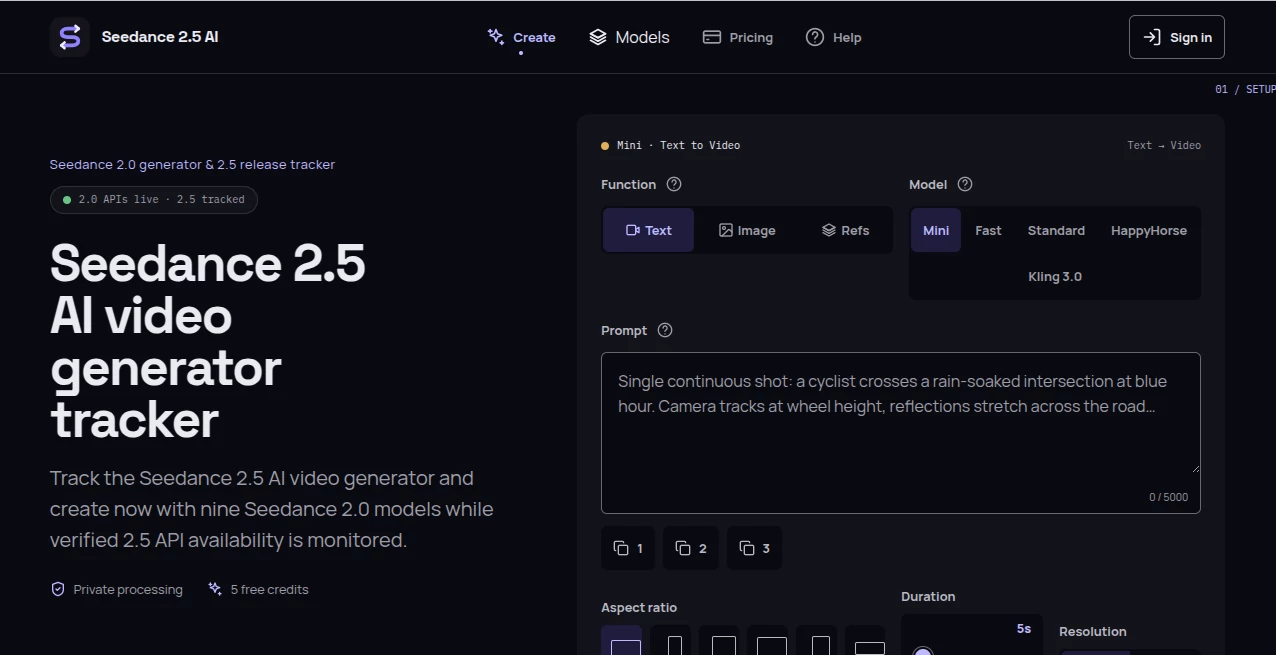
The interface is designed around simplicity. Users can enter a detailed prompt, upload reference images when needed, choose video settings, and generate results from a single workspace. Navigation remains intuitive, allowing both beginners and professionals to focus on creativity instead of technical complexity. Previous generations can also be managed conveniently, making revisions and experimentation straightforward.
Accuracy & Performance
The platform delivers highly detailed scenes with realistic motion and strong prompt understanding. It produces natural camera movements, coherent transitions, synchronized audio generation, and visually consistent subjects throughout multiple scenes. Generation speed is optimized for practical use, allowing creators to receive high-quality outputs within minutes depending on project complexity.
Capabilities
Beyond traditional text-to-video generation, the platform supports image-guided creation, reference-based storytelling, multi-shot cinematic sequences, synchronized audio generation, realistic lip synchronization, and high-resolution video rendering. It is particularly useful for promotional videos, educational presentations, product showcases, creative storytelling, and social media campaigns where visual consistency matters.
Security & Privacy
User-generated projects remain private under supported plans, allowing creators to work on commercial or confidential content with greater confidence. Paid subscriptions also include commercial usage rights, making the generated videos suitable for professional publishing, advertising, and business marketing.
Use Cases
Content creators can quickly produce engaging YouTube introductions, Instagram Reels, TikTok videos, and promotional clips. Marketing teams can generate product advertisements, brand campaigns, and social media assets without traditional production costs. Educators may create visual learning materials that explain complex topics through animation and storytelling.
Independent filmmakers and creative professionals can prototype scenes, visualize concepts, and experiment with cinematic storytelling before investing in full production. Businesses can also produce internal presentations, promotional materials, and customer engagement videos while significantly reducing production time.
Pros and Cons
Pros
Produces cinematic-quality videos with realistic motion.
Supports both text-to-video and image-to-video generation.
Multi-reference workflow improves visual consistency.
Native synchronized audio and realistic lip synchronization.
Suitable for commercial projects.
Simple interface with minimal learning curve.
Cons
High-resolution generations consume more credits.
Complex projects may require prompt refinement for the best results.
Premium capabilities are available only through paid plans.
Pricing Plans
The platform offers free daily credits, allowing new users to test its capabilities before subscribing. Paid plans include Basic, Pro, and Studio subscriptions with increasing monthly credits, faster generation speeds, private video generation, commercial licenses, priority support, and watermark-free exports. This flexible pricing structure makes it suitable for casual creators as well as professional production teams.
How to Use Seedance 2.5 AI
Begin by writing a detailed text prompt describing the desired scene or upload one or more reference images to guide the generation process. Choose the preferred video settings, including aspect ratio, duration, and quality. Start the generation process and wait while the AI creates the final video. Once completed, preview the result, make adjustments if necessary, and download the finished project for publishing or further editing.
Comparison with Similar Tools
Compared with many AI video generators, this platform places greater emphasis on cinematic storytelling rather than producing isolated short clips. Multi-shot scene generation, reference-guided consistency, synchronized audio, realistic motion, and professional-quality rendering help distinguish it from many competing solutions. While several alternatives specialize in either text-to-video or image animation, this platform combines multiple creative workflows into one unified environment, making it attractive for creators seeking both flexibility and production quality.
Conclusion
For creators looking to produce visually impressive videos without investing in expensive equipment or lengthy editing sessions, this platform offers an outstanding balance between simplicity and professional results. Its ability to combine intelligent prompt understanding, reference-guided generation, cinematic motion, and synchronized audio creates an enjoyable production experience for beginners and professionals alike. Whether building marketing campaigns, educational content, social media videos, or creative storytelling projects, it delivers a modern workflow capable of transforming ideas into polished visual content.
Frequently Asked Questions (FAQ)
Is it suitable for beginners?
Yes. The interface is designed for users with little or no video editing experience.
Can I create videos from images?
Yes. Reference images can be uploaded to guide video generation while maintaining visual consistency.
Are the generated videos suitable for commercial use?
Commercial usage rights are included with eligible paid subscription plans.
Does it support AI-generated audio?
Yes. The platform can generate synchronized audio alongside video creation for a more natural viewing experience.
Who benefits the most from this platform?
Content creators, marketers, educators, agencies, filmmakers, and businesses looking for high-quality AI video production can all benefit from its capabilities.