
SeeGen.AI
What is SeeGen.AI?
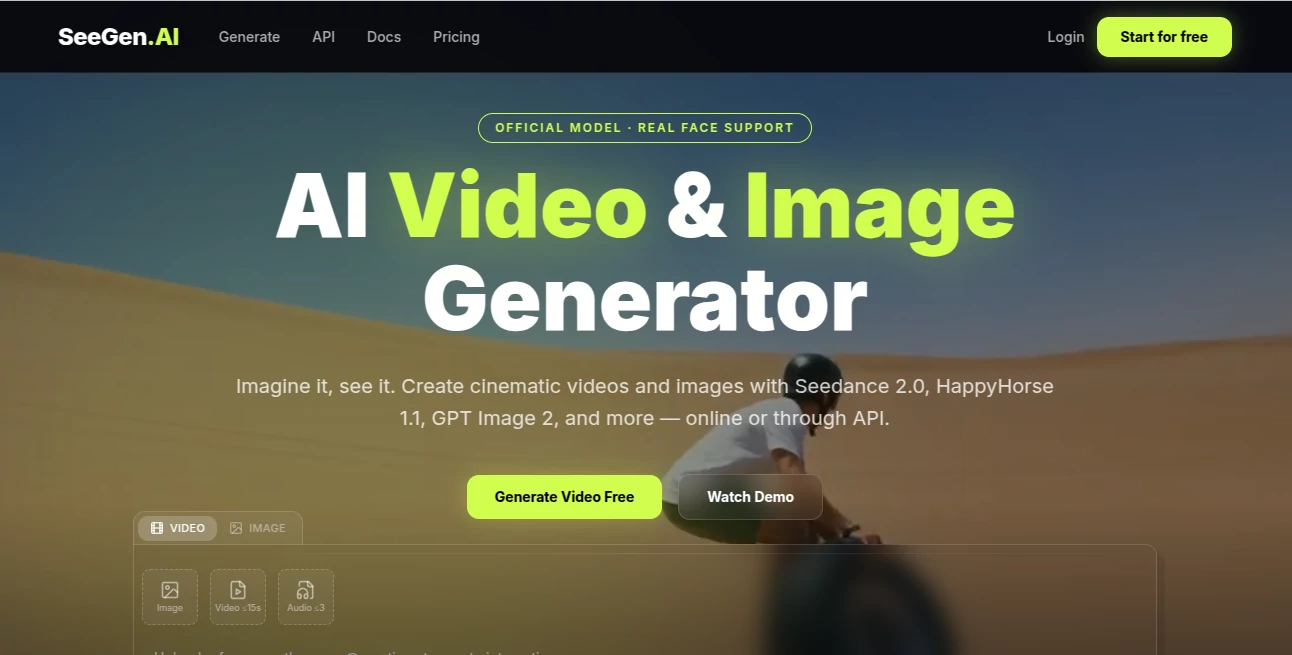
SeeGen AI is a modern creative platform that brings advanced image and video generation into a single workspace. Designed for creators, marketers, designers, developers, and businesses, it makes it easy to transform ideas into professional visual content without requiring technical expertise. Whether you are producing marketing campaigns, social media videos, product showcases, cinematic scenes, or AI-generated artwork, the platform provides a streamlined workflow powered by multiple industry-leading AI models.
One of its biggest advantages is flexibility. Instead of relying on a single generation engine, users can choose from several high-quality AI models for different creative needs. From text-to-video and image-to-video generation to advanced multi-reference workflows and video upscaling, every feature is built to reduce production time while maintaining impressive visual quality. The result is a creative environment where experimentation feels natural and professional results are achievable even for beginners.
For teams and developers, the platform also provides API access, allowing businesses to integrate AI-powered image and video generation directly into their own applications. This combination of creator-friendly tools and developer capabilities makes it suitable for individuals as well as commercial projects.
Key Features
User Interface
The workspace is clean, intuitive, and organized around the creative process. Users can generate images, create videos, upload reference materials, and manage projects without navigating through complicated menus. Beginners can start with simple text prompts, while experienced creators can take advantage of advanced reference-based workflows for greater control over consistency and visual storytelling.
Accuracy & Performance
The platform supports several leading AI generation models, allowing users to select the one that best matches their creative goals. Video generation produces smooth animations, while image generation focuses on realistic details, artistic quality, and prompt accuracy. Integrated video upscaling also allows creators to generate content efficiently before enhancing it to higher resolutions for final delivery.
Capabilities
The platform offers far more than standard text-to-image generation. Users can create videos from text prompts, animate existing images, generate scenes using multiple reference images, edit AI-generated videos, upscale completed projects, and build consistent visual assets for advertising, storytelling, social media, product demonstrations, and entertainment. API access enables developers to automate these capabilities inside their own software products.
Security & Privacy
User privacy is treated seriously. Uploaded creative assets are stored securely, payment information is handled through third-party payment providers rather than stored directly, and creators maintain control over their generated content. Commercial usage is supported on eligible plans, making the platform suitable for professional business workflows while following clear usage policies for responsible AI content generation.
Use Cases
Content creators can rapidly produce engaging short videos for social media without traditional editing software. Marketing teams can build advertising creatives, promotional videos, and product demonstrations in minutes. Designers can generate concept artwork and visual assets for presentations or campaigns. Agencies can maintain visual consistency across multiple projects using reference-based generation. Developers can integrate AI-powered image and video generation into SaaS products through the available API. Educators and startups can also use the platform to create presentations, tutorials, and visual storytelling content with minimal production costs.
Pros and Cons
Pros
- Supports both AI image and AI video generation.
- Multiple advanced AI models available in one platform.
- Reference-based workflows improve visual consistency.
- Built-in video editing and upscaling.
- Commercial usage supported.
- Developer-friendly API access.
- Free credits for new users.
Cons
- Advanced features consume credits quickly.
- Highest quality outputs may require paid plans.
- Rendering complex videos can take time depending on workload.
Pricing Plans
The platform offers a free plan with complimentary credits for new users, making it easy to explore its capabilities before purchasing. Paid credit packs are available for creators who need additional generation capacity, while API plans are designed for developers and businesses. Instead of requiring monthly subscriptions, purchased credits remain available for future use, providing a flexible pay-as-you-go pricing model.
How to Use SeeGen AI
Create an account and claim the free credits. Choose whether to generate an image or a video, then select the preferred AI model. Enter a descriptive prompt or upload one or more reference files to guide the generation process. Adjust available settings if needed and start the generation. Once the output is complete, refine it using the editing or upscaling tools before exporting the final result for commercial or personal projects.
Comparison with Similar Tools
Compared with many AI generation platforms that specialize in either images or videos, this solution combines both creative workflows into a unified environment. Its support for multiple AI models, reference-driven generation, integrated video editing, and developer APIs provides greater flexibility than many single-purpose competitors. The credit-based pricing system is also attractive for users who create content occasionally rather than maintaining a recurring subscription.
Conclusion
For anyone looking to simplify AI-powered visual creation, this platform delivers an impressive combination of speed, quality, and creative flexibility. The ability to generate images, produce cinematic videos, edit existing content, upscale results, and integrate AI generation into custom applications makes it valuable for individual creators, marketing professionals, agencies, and software developers alike. Its modern workflow, generous free entry point, and broad range of supported AI models make it an excellent choice for both creative experimentation and professional production.
Frequently Asked Questions (FAQ)
1. Can I use the platform for free?
Yes. New users receive free credits to explore image and video generation features.
2. Does it support commercial projects?
Yes. Commercial usage is available according to the selected pricing plan and service terms.
3. Can developers integrate its AI models?
Yes. API access is available for businesses and developers who want to integrate AI generation into their own products.
4. What types of content can be created?
Users can generate AI images, text-to-video content, image-to-video animations, reference-based videos, edited videos, and high-resolution visual assets.
5. Is a monthly subscription required?
No. The platform primarily uses a flexible credit-based payment system, allowing users to purchase credits when needed.
AI Photo & Image Generator , AI Image to Video , AI Video Generator , AI Text to Video .
These classifications represent its core capabilities and areas of application. For related tools, explore the linked categories above.

SeeGen.AI Alternatives Product

whisk ai

JPG to Small

Undertale Te…

Image3

Sora by Open…
soro2

Pinci.ai

Seedance 2 V…

RunwayAI