
SeeVido AI
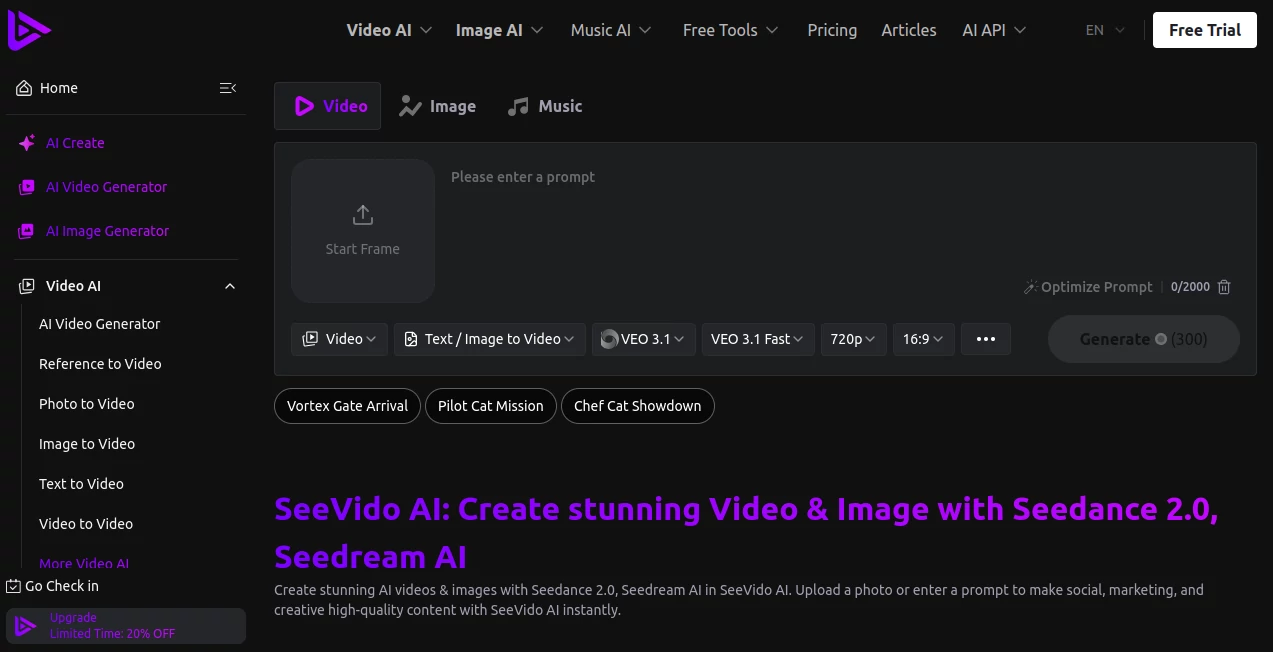
What is SeeVido AI?
SeeVido AI is an advanced AI-powered creative platform designed to help users transform ideas, images, and text prompts into high-quality videos and images. The platform brings multiple modern AI generation technologies together, allowing creators, marketers, designers, and businesses to produce engaging visual content without requiring professional editing skills.
Whether you want to animate a photo, create a marketing video, generate creative scenes, or experiment with different visual styles, this platform provides a simple workflow that makes AI content creation more accessible. It combines powerful generation models with an easy-to-use interface, making it a practical choice for both beginners and experienced creators.
Key Features
- AI text-to-video generation for creating videos from written ideas.
- AI image-to-video technology for adding movement and life to static images.
- AI image generation with multiple creative styles and models.
- Access to advanced video generation models for different creative needs.
- AI-powered visual effects for creating unique video transformations.
- Fast processing for generating images within seconds and videos efficiently.
- High-quality output designed for social media, marketing, and creative projects.
- Private generations with user-focused privacy options.
- Commercial usage rights available on supported plans.
- Credit-based system that allows flexible content creation.
User Interface
The platform offers a clean and straightforward interface where users can quickly enter prompts, select generation options, and create content without complicated settings. The workflow is designed around simplicity, allowing users to focus more on creativity rather than technical processes.
For example, a social media manager can describe a promotional scene, choose a preferred visual model, and generate content ready for further editing or publishing. The organized dashboard makes it easier to manage creations, explore different tools, and repeat successful workflows.
Accuracy & Performance
The platform focuses on producing visually consistent results with realistic movements, detailed images, and smooth AI-generated effects. It supports several advanced generation models, helping users choose suitable options depending on whether they need realistic videos, artistic animations, or promotional visuals.
The fast generation process is especially useful for creators who need to test multiple ideas quickly. Instead of spending hours creating initial concepts manually, users can explore different versions and select the best result.
Capabilities
This AI creative suite supports a wide range of visual creation tasks. Users can generate videos from text descriptions, animate existing images, create AI-generated artwork, enhance old photos, and experiment with different video effects.
Its flexibility makes it suitable for various creative industries, from digital marketing and content creation to personal projects and online branding. The combination of image and video tools provides a complete environment for visual storytelling.
Security & Privacy
Privacy is an important part of the platform experience. Uploaded photos are handled with privacy considerations, and the service provides private generation options for users who want more control over their creative content.
Users creating commercial projects can also benefit from available commercial rights on supported plans, making it suitable for professional workflows.
Use Cases
- Social Media Marketing: Create eye-catching videos and images for campaigns, advertisements, and online communities.
- Content Creators: Produce creative clips, animations, and visual experiments faster.
- E-commerce: Generate promotional visuals and product-focused content.
- Design Projects: Explore new concepts, styles, and creative directions.
- Personal Creativity: Transform personal photos into engaging visual experiences.
- Businesses: Create professional-looking marketing materials without large production costs.
Pros and Cons
Pros
- Supports both AI image and AI video creation.
- Simple interface suitable for beginners.
- Multiple AI models available for different creative styles.
- Fast generation speed.
- Useful for marketing, social media, and professional projects.
- No watermark option available on supported plans.
Cons
- Advanced generations require credits.
- Results may vary depending on the complexity of prompts.
- Professional users may need higher plans for frequent content production.
Pricing Plans
The platform offers a free plan with limited credits and access to selected features. Paid plans provide more monthly credits, faster generation queues, additional AI features, longer history storage, private generations, and commercial rights.
Available options include monthly subscriptions and one-time credit packages. Users can select plans based on their content creation frequency, from casual experiments to professional production workflows.
How to Use SeeVido AI
- Create an account and access the creative dashboard.
- Select an image or video generation feature based on your project.
- Enter a detailed text prompt describing your desired result.
- Choose available AI models and generation settings.
- Generate the content and review the result.
- Download or use the final creation for personal or commercial projects.
Comparison with Similar Tools
Many AI video platforms focus on only one type of generation, but this platform combines multiple creative features in one place. Instead of switching between separate services for image creation, animation, and video generation, users can manage different visual workflows from a single environment.
Its access to various AI models gives creators more flexibility when searching for the right balance between speed, quality, and creative style.
Conclusion
SeeVido AI provides a powerful and accessible solution for anyone looking to create AI-generated images and videos. With a combination of modern generation technology, simple controls, and flexible pricing options, it helps creators turn ideas into visual content more efficiently.
From marketers preparing campaigns to individuals exploring creative projects, this platform offers a practical way to experiment with AI-powered storytelling and produce impressive results without advanced technical knowledge.
Frequently Asked Questions (FAQ)
What can users create with this AI platform?
Users can create AI-generated videos, images, animations, photo transformations, and creative visual content using text prompts and uploaded images.
Does it offer a free plan?
Yes, a free option is available with limited credits and access to selected tools.
Can generated content be used commercially?
Commercial rights are available on supported paid plans, allowing users to create content for professional projects.
Is it suitable for beginners?
Yes, the simple interface makes it accessible for beginners while still providing advanced options for experienced creators.
What type of AI models are supported?
The platform supports multiple modern AI models for video and image generation, allowing users to choose different options depending on their creative goals.
AI Photo & Image Generator , AI Image to Video , AI Video Editor , AI Text to Video , AI Video Generator .
These classifications represent its core capabilities and areas of application. For related tools, explore the linked categories above.

SeeVido AI Alternatives Product
JoyFlix AI

Sora 2 Video…

Omnesuite AL…

Nano Banana …

kling 4.0

Transform An…

Nano Banana 2

Reztune

Seedance 2.0