
Seedance 2.0
What is Seedance 2.0?
Creating a convincing AI video is no longer just about writing a prompt and hoping for a good result. For creators who care about movement, character appearance, camera direction, timing, and sound, having more control over the source material can make a major difference. Seedance 2.0 takes this approach by allowing creators to work with images, videos, audio, and text in the same creative workflow.
The platform is particularly interesting for people who already have visual references in mind. Instead of trying to describe every detail in a long prompt, you can upload reference material and explain what should be borrowed from it. A camera movement from one clip, the appearance of a character from an image, or the rhythm of an audio track can become part of a new generation.
That makes the tool useful for more than simple text-to-video experiments. Marketers can develop product clips, filmmakers can test visual ideas before production, and social media creators can build short-form videos around existing concepts. The workflow feels closer to directing a scene than simply generating an image that happens to move.
Key Features
- Multi-modal generation using text, images, videos, and audio.
- Reference up to 9 images, 3 videos with a combined duration of up to 15 seconds, and 3 audio files.
- Reference camera movements, choreography, visual effects, characters, scenes, and sounds.
- Generate videos with consistent characters, clothing, text, scenes, and visual styles.
- Extend existing videos and continue scenes without rebuilding the entire sequence.
- Edit selected portions of generated videos while keeping other content intact.
- Replace characters, introduce new elements, or change specific actions.
- Generate context-aware sound effects and background music.
- Synchronize visuals with uploaded audio and music beats.
- Generate multiple videos in a batch using the same settings.
- Support several aspect ratios, including 16:9, 9:16, 4:3, 3:4, 21:9, and 1:1.
- Offer API access for developers and teams.
User Interface
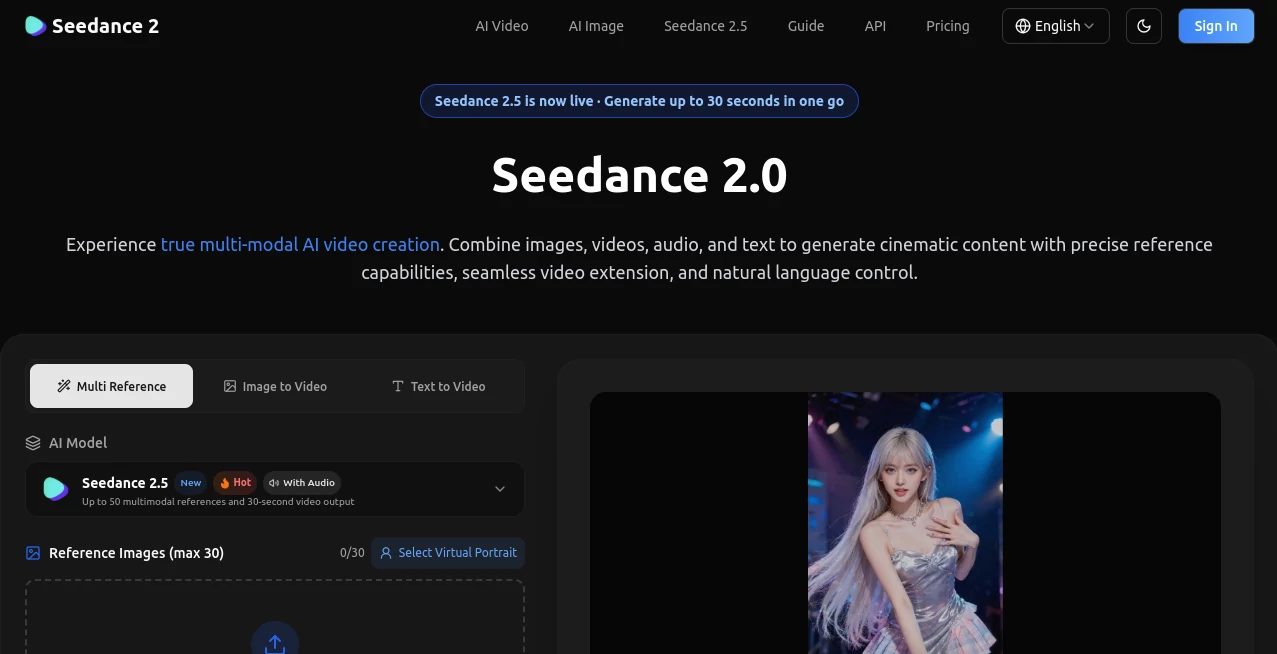
The interface is built around the actual creative process rather than a complicated editing timeline. Users can upload reference assets, write a natural-language description, select generation settings, and start creating from the same workspace.
One useful detail is the ability to identify uploaded assets when writing a prompt. For example, a creator can describe one image as the character reference while asking the system to use the camera movement from a separate video. This makes the interface easier to understand for users who prefer directing with examples instead of writing highly technical prompts.
Batch generation is also available, allowing multiple videos to be created with the same settings. That can be handy when testing different creative directions for an advertisement, social post, or short scene.
Accuracy & Performance
The strongest part of the experience is the level of reference control. Rather than treating an uploaded video as a generic inspiration source, the system is designed to extract specific elements such as movement, camera direction, effects, character appearance, and scene composition.
Character consistency is another important advantage. Maintaining the same face, clothing, visual style, and scene details across frames is one of the persistent challenges in generated video. The platform specifically focuses on reducing this kind of visual drift.
Output length depends on the selected model and workflow. The standard generation workflow supports short clips, while the newer model options on the platform extend the available generation capabilities. Resolution options also vary by model, with higher-resolution generations consuming more credits.
Capabilities
The range of creative controls makes the platform suitable for several different production styles. A filmmaker could upload a reference sequence to explore a camera movement before shooting it. A social media creator could provide a reference clip and apply its motion to a different character or concept.
It can also work as a video editing companion. Existing clips can be extended, merged, or selectively modified instead of forcing the creator to regenerate an entire sequence. This is especially useful when most of a clip already works and only one part needs changing.
Audio is another notable part of the workflow. The system can generate contextual sound effects and background music, while uploaded audio can be used for beat-synchronized video creation. For music videos, dance content, and short promotional pieces, that connection between sound and movement can save considerable editing time.
Security & Privacy
The platform states that uploaded assets and generated videos are stored using industry-standard encryption. It also states that user data is private and is not shared with third parties. According to the service's published information, users retain ownership of the content they create.
Content safety restrictions are also applied. The service does not support the generation of NSFW or explicit adult material, and prompts or uploads intended to produce such content can be blocked by its safety filters.
Use Cases
Advertising and Marketing: Marketing teams can create product videos, branded content, and short advertisements while using existing creative references as a starting point. Referencing successful visual formats can make it easier to experiment with different campaign concepts.
Social Media: Short-form creators can develop content for platforms such as TikTok, Instagram Reels, and YouTube Shorts. Reference-based generation is especially useful when the goal is to reproduce a particular type of movement or visual effect with an original concept.
Film and Pre-Visualization: Directors and cinematographers can test camera movements, transitions, effects, and scene concepts before committing resources to a real production. It can serve as a practical way to explore whether an idea works visually.
Music Videos: Artists can upload audio and create visuals designed around specific rhythms or beats. The combination of generated sound, uploaded music, and visual generation opens up interesting possibilities for independent musicians.
Education and Training: Teachers and course creators can turn concepts into visual demonstrations, animated explanations, tutorials, and other short educational materials.
Real Estate and Architecture: Property photographs and architectural references can be transformed into dynamic presentations, walkthrough-style visuals, and virtual staging concepts.
Dance and Motion Content: Choreography or movement from a reference video can be applied to another creative concept. This is particularly useful for dance covers, action sequences, and experimental motion content.
Pros and Cons
Pros:
- Supports text, image, video, and audio references.
- Strong emphasis on motion and camera replication.
- Useful character and visual consistency controls.
- Video extension and targeted editing reduce the need for complete regeneration.
- Built-in audio generation and beat synchronization add another creative layer.
- Multiple aspect ratios make the output suitable for different platforms.
- API access is available for developers and teams.
- Generated videos are advertised as watermark-free.
Cons:
- Credit consumption can increase quickly at higher resolutions.
- The strongest results may require carefully selected reference material.
- Generation is focused primarily on relatively short video clips rather than complete long-form productions.
- Users creating many high-resolution variations may need to monitor their credit usage closely.
Pricing Plans
The platform uses a credit-based pricing system, with the number of credits consumed depending on the selected model, resolution, and whether video references are included.
For the standard model, generation without video input currently ranges from 6 credits per second at 480p to 70 credits per second at 4K. A five-second generation therefore uses 30 credits at 480p, 60 credits at 720p, 150 credits at 1080p, or 350 credits at 4K.
Lower-cost model variants are available for users who want to reduce credit consumption. The faster model starts at 5 credits per second at 480p, while the Mini version starts at 3 credits per second. The site also lists newer model options with their own credit rates.
Video references can change the calculation because credits are based on the combined duration of the input and output video. API usage is also supported through available credits, with the service stating that users can subscribe to a plan or purchase a one-time credit package.
How to Use the Platform
Start by uploading the material you want to use as a reference. Depending on the project, this can include images, videos, audio, or a combination of them. The standard workflow supports multiple files across different modalities.
Next, describe the desired result in natural language. Instead of explaining every visual detail from scratch, point to the relevant uploaded assets. You might ask for the character from one image, the camera movement from a video, and the rhythm of an audio file.
Choose the appropriate resolution, duration, aspect ratio, and other available settings, then generate the video. If the first result is close but not quite right, use the generated clip as part of another iteration and make a more targeted adjustment.
A practical approach is to start with a short, simple concept. Once the movement and composition look right, gradually introduce additional references and more complex instructions. This usually makes it easier to understand which part of the prompt or reference material is influencing the result.
Comparison with Similar Tools
Many AI video generators are designed primarily around text prompts or a single reference image. This platform takes a broader route by treating several types of media as controllable references. That distinction matters when the desired result depends on a specific movement, camera path, character, or sound rather than just a visual description.
It also sits somewhere between a generator and a lightweight creative editing environment. Features such as video extension, segment modification, character replacement, and scene merging can reduce the number of times a creator has to move between separate generation and editing applications.
For someone who mainly wants quick text-to-video experiments, a simpler generator may be sufficient. For creators who want to direct the output using multiple references and make targeted changes afterward, the additional controls are considerably more appealing.
Conclusion
AI video creation becomes much more practical when creators can show the system what they mean instead of trying to describe every detail in words. The combination of visual references, motion guidance, audio input, natural-language instructions, and targeted video editing gives this platform a distinctive place in the growing AI video market.
Its strongest appeal is control. A creator can start with an existing idea, borrow a useful movement or camera technique, maintain a character's appearance, add sound, and continue refining the result without starting from zero each time. That makes it worth considering for marketers, filmmakers, social media creators, musicians, educators, and anyone experimenting with short-form AI video production.
Frequently Asked Questions (FAQ)
What types of input can be used?
The platform supports text prompts together with images, videos, and audio. The standard workflow can accept up to 9 images, 3 videos with a combined duration of up to 15 seconds, and 3 audio files, with a total of up to 12 files across modalities.
Can existing videos be extended?
Yes. Existing videos can be extended by specifying the desired additional duration. The system is designed to preserve continuity in motion, style, and content between the original and generated sections.
Can camera movements be copied from a reference video?
Yes. A reference video can be used to reproduce camera movements, choreography, and other motion characteristics. This can be useful when creating cinematic sequences or testing a particular visual technique.
Does it generate audio?
Yes. Built-in audio generation can create contextual sound effects and background music. Users can also upload their own audio and synchronize generated visuals with beats or rhythms.
Are generated videos watermarked?
The service states that generated videos are provided without watermarks, allowing creators to use clean output in their projects.
Is API access available?
Yes. API access is available for both individual and team users. An account needs available credits through a subscription or a one-time credit purchase before API requests can be made.
What resolutions are available?
Available resolutions depend on the selected model. The platform lists options ranging from 480p and 720p through higher-resolution generation, including 1080p and 4K for the standard model.
Does the platform allow NSFW generation?
No. The service states that NSFW and explicit adult content are not supported, and its safety filters can block prompts or uploads intended to generate such material.
Who is this tool best suited for?
It is a strong fit for video creators, marketers, filmmakers, social media managers, musicians, educators, designers, and developers who want more control over AI-generated video through multiple types of reference material.
AI Image to Video , AI Video Generator , AI Video Editor , AI Text to Video .
These classifications represent its core capabilities and areas of application. For related tools, explore the linked categories above.

Seedance 2.0 Alternatives Product

See dance 2.…

Quso AI

ds video

Seedance 2.0…

Sora 2

Seedance 2.0

Happy Horse

AI Motion Co…

Wan AI Video…