Shyne
What is Shyne?
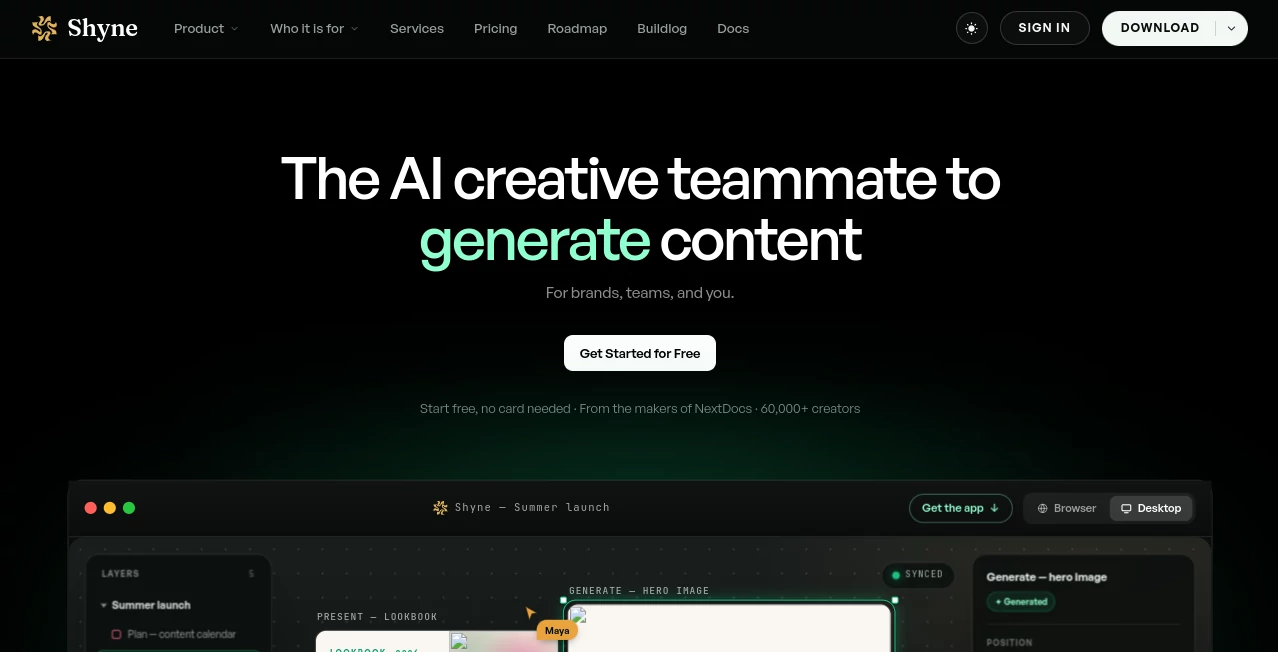
Shyne is an AI-powered creative workspace built for people who need to turn ideas into polished visual and business content without constantly switching between different tools. Instead of separating presentations, documents, social media content, websites, images, and video into different apps, it brings them together on one shared canvas.
The idea is simple but useful: your team can plan, create, edit, and prepare content from the same place while an AI teammate works alongside you. A marketer can build a campaign, a founder can prepare a pitch deck, and a designer can develop visual assets without losing the connection between each piece of work.
The platform is designed for brands, teams, agencies, freelancers, creators, and other professionals who regularly produce content. It also supports real-time collaboration, so people and AI agents can work on the same canvas instead of passing files back and forth.
Key Features
- AI-assisted creative work on a shared infinite canvas
- Presentation and pitch deck creation
- Document and one-pager creation
- Social media post creation and scheduling
- AI image and video generation
- Interactive prototypes and mockups
- Brand kits for consistent colors, fonts, and logos
- Real-time collaboration for teams and AI agents
- Content calendar for planning and scheduling campaigns
- Timeline-based video editing and MP4 export
- Multiple export formats including PNG, JPG, PDF, HTML, PowerPoint, and MP4
- Integration with external AI models and MCP-based workflows
User Interface
The interface revolves around a large, flexible canvas rather than a collection of disconnected editors. Different types of work can live together, which makes the workspace particularly practical for campaigns where a presentation, social post, image, document, and video need to share the same visual direction.
Files can be placed directly onto the canvas as editable layers. Users can move, resize, remix, and organize their assets without constantly opening another application. The desktop version takes the same concept further by allowing projects to open in individual tabs on Mac and Windows.
Accuracy & Performance
For a creative platform, performance is less about producing a single correct answer and more about keeping the workflow responsive while ideas are being developed. The platform combines AI generation with direct editing, giving users room to adjust the result instead of accepting a finished file as-is.
Video work can be handled on a real timeline, while generated images and video clips can be placed directly into the canvas. Desktop rendering can also take place on the user's machine, which is useful when working with larger projects and exports.
Capabilities
The range of creative formats is one of the strongest parts of the platform. Users can work on presentations, documents, social posts, websites, wireframes, mockups, moodboards, storyboards, infographics, images, and video from the same environment.
Brand kits are particularly useful for teams that produce content at scale. Colors, fonts, and logos can be defined once and then applied throughout the work. This reduces the small inconsistencies that often appear when several people create assets separately.
The platform also supports interactive prototypes, generative image and video workflows, content calendars, and universal exports. For more technical workflows, it can be driven through MCP from tools such as Claude, ChatGPT, Gemini, Cursor, or custom code.
Security & Privacy
According to the company's pricing and FAQ information, user work is encrypted, is not sold, and is not used to train its models. The company also states that model providers are engaged under terms that prohibit them from training on customer content.
These policies are important for teams handling campaign materials, internal documents, presentations, and unreleased creative work. As with any cloud-based creative platform, businesses should still review the current privacy and security documentation before using it for particularly sensitive projects.
Use Cases
Marketing teams can use the workspace to move from an initial campaign concept to social posts, visuals, presentations, and scheduled content without rebuilding the same idea in several applications.
Founders can prepare investor presentations, product mockups, one-pagers, websites, and launch materials in one project. This is especially convenient when a startup needs professional-looking material quickly but does not have a large design department.
Designers can use the editable canvas for moodboards, prototypes, visual concepts, generated imagery, and video experiments. Since the AI works alongside the user, generated material can become a starting point rather than the final result.
Agencies and freelancers can also benefit from brand kits and shared workspaces. Client assets can stay organized while multiple deliverables are developed around the same visual identity.
Sales teams can prepare presentations, supporting documents, product visuals, and other materials from a connected workspace. Students, teachers, consultants, and nonprofit teams can use the same approach for presentations, documents, and visual communication.
Pros and Cons
- Pros: Combines many creative workflows in one canvas.
- Pros: Strong support for brand consistency through brand kits.
- Pros: Real-time collaboration between people and AI agents.
- Pros: Supports presentations, documents, images, video, social content, and websites.
- Pros: Offers several useful export formats.
- Pros: Has a free plan without requiring a credit card.
- Cons: AI usage is controlled through monthly credits.
- Cons: Advanced image and video models are available on paid plans.
- Cons: Users who only need a simple presentation or image generator may find the broader workspace more than they need.
Pricing Plans
The platform offers a free plan with 1,000 AI credits per seat each month, 250 hosted MCP calls per organization per week, and 2 GB of pooled organization storage. The free tier also includes several export formats and does not require a credit card.
The Pro plan is listed at $16 per seat per month when billed annually. It includes 2,000 AI credits per seat each month, access to current text models, paid AI image and video models, 25,000 hosted MCP calls per organization per week, and 100 GB of pooled storage.
The Ultra plan costs $80 per seat per month when billed annually and increases the allowance to 12,000 AI credits per seat each month, 200,000 hosted MCP calls per organization per week, and 500 GB of pooled organization storage.
An Enterprise option is also available for organizations that need custom seats, security requirements, support, or other tailored arrangements. Pricing for this tier is provided through the sales team.
How to Use Shyne
Start by creating a project and deciding what you want to produce. You can work on a presentation, document, social campaign, website concept, visual asset, video, or another supported format.
Once the canvas is ready, add your files and assets directly to the workspace. You can prompt the AI to help create or modify content while continuing to edit the result yourself. This makes it possible to combine automated generation with hands-on creative decisions.
For brand projects, configure a brand kit with your preferred colors, fonts, and logos. The same visual rules can then be used across different formats.
When the project is finished, export it in the format you need. Available formats include PNG, JPG, PDF, HTML, PowerPoint, and MP4. Teams can also collaborate on the same live canvas and use supported AI integrations for more advanced workflows.
Comparison with Similar Tools
Many creative AI products concentrate on one specific task, such as generating images, writing presentations, editing video, or creating social posts. This platform takes a broader approach by connecting these activities inside one canvas.
That distinction matters for users working on complete campaigns rather than isolated assets. Instead of generating an image in one application, building a presentation somewhere else, and then preparing social content in another service, the same project can contain each part of the campaign.
It is therefore better suited to users who value connected creative workflows and collaboration. Someone looking for a narrowly focused image generator may prefer a specialized service, while a brand or creative team producing many types of content can gain more from having everything connected.
Conclusion
Shyne takes an ambitious approach to AI-assisted creative work by combining generation, editing, collaboration, brand management, scheduling, and publishing in one environment. The shared canvas is the central idea, and it gives teams a practical way to keep related work together instead of spreading a project across numerous applications.
The combination of AI assistance and direct editing is another strong point. Users remain in control of the creative process while the AI helps with production and iteration. Add brand kits, real-time collaboration, generative media, MCP support, and broad export options, and the platform becomes a compelling choice for teams that create a lot of content.
For professionals who want one workspace for everything from a pitch deck and campaign assets to video, social content, and simple websites, this is a particularly interesting option to explore. The free tier also makes it easy to test the workflow before committing to a paid plan.
Frequently Asked Questions (FAQ)
Can I use Shyne for free?
Yes. The free plan includes the full canvas, standard text models, GPT Image generation, monthly AI credits, storage, and several export formats. No credit card is required to start.
What can I create with Shyne?
You can create presentations, documents, social posts, images, videos, websites, wireframes, mockups, moodboards, storyboards, and other visual content from the shared canvas.
Does Shyne support team collaboration?
Yes. Multiple people and AI agents can work on the same canvas with live cursors, presence, and shared editing.
Can I create and export videos?
Yes. The platform provides a real timeline for animation and video editing and supports MP4 exports. Some hosted video rendering uses AI credits.
What export formats are available?
Supported export formats include PNG, JPG, PDF, HTML, PowerPoint, and MP4, with the available options depending on the type of content being exported.
Is my work used to train AI models?
The company states that user work is encrypted, not sold, and not used to train its models. It also states that its model providers are bound by terms that prohibit training on customer content.
Does it support external AI models?
Yes. Users can bring existing AI services such as Claude, ChatGPT, or Gemini into their workflow, while MCP support allows the platform to be driven through compatible tools and custom code.
AI Video Editor , AI Presentation Generator , AI Graphic Design , AI Productivity Tools .
These classifications represent its core capabilities and areas of application. For related tools, explore the linked categories above.

Shyne Alternatives Product

Eleven AI

AllInOneTools

wigoo

Classroom Sc…
KronoPrompt

AI Motion Co…

Zivy

Sora 2 Video…

Black Screen