
SparkVid
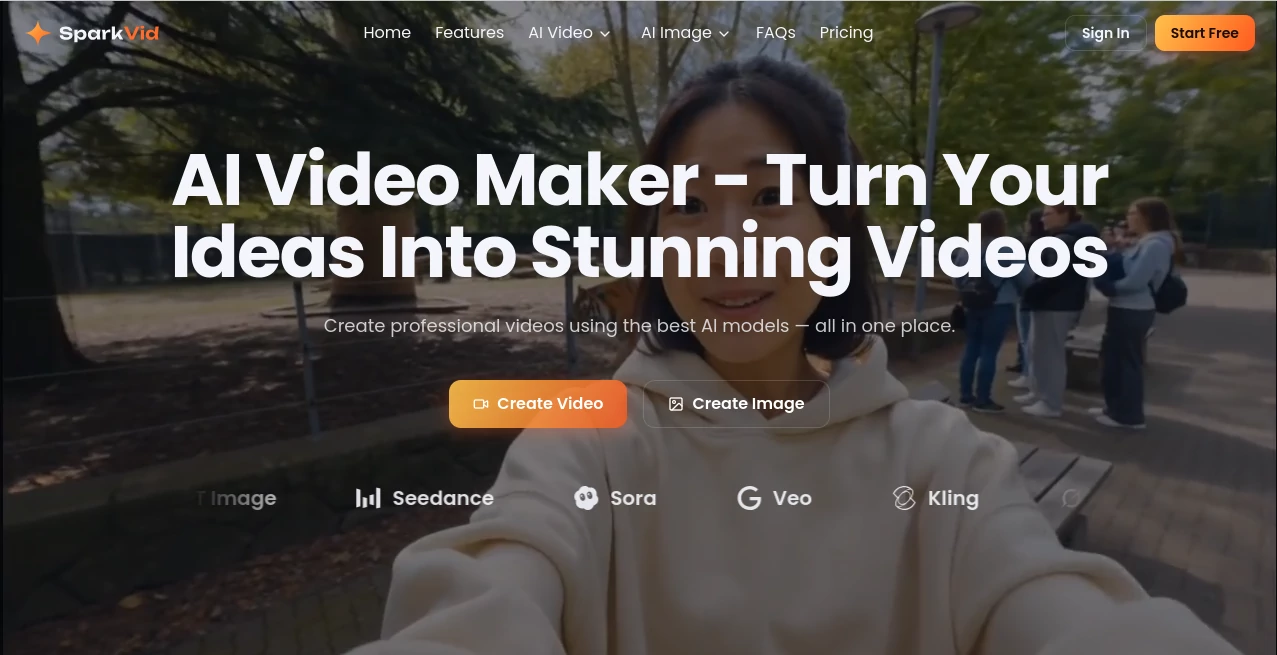
What is SparkVid?
Creating a polished video from scratch can involve scripting, visual generation, editing, motion control, and several different software tools. SparkVid brings much of that process into one browser-based workspace, allowing creators and marketers to turn text prompts or images into videos while choosing from multiple leading AI models.
The platform is designed for people who want more control than a simple text-to-video generator provides. Users can create videos from prompts, animate existing images, transfer motion from reference footage, direct camera movement, and make changes to generated footage using natural-language instructions. The service also includes image generation, making it possible to create a visual and then move directly into video production.
With more than 240,000 videos reportedly created, over 18,000 creators onboarded, availability across more than 50 countries and regions, and access to more than 20 AI models, the platform has positioned itself as a flexible workspace for modern video production.
Key Features
- Text-to-video generation: Turn written descriptions into short AI-generated video clips.
- Image-to-video: Upload a product photo, character image, artwork, or other visual and use it as the starting point for animation.
- Multiple AI models: Choose between engines such as Seedance, Kling, Veo, Sora, and other available models depending on the desired result.
- Motion control: Transfer movement from a reference video onto another subject and guide camera actions such as pans, zooms, orbits, and dolly shots.
- AI video editing: Describe changes in natural language to remove objects, replace backgrounds, or modify visual styles without relying entirely on traditional masks and keyframes.
- Reference images: Use visual references to maintain elements, styles, products, or scenes more consistently.
- AI image generation: Create concept art, characters, product visuals, thumbnails, and other starting frames before turning them into videos.
- Browser-based workflow: Generation, editing, previewing, and exporting can be handled online without installing desktop video-production software.
User Interface
The interface is built around a straightforward generation workflow. Users can select a model, provide a prompt or upload an image, adjust available settings, and start rendering from the same workspace. Options such as reference frames, start and end frames, duration, and resolution are presented directly in the creation interface.
This approach should feel familiar to anyone who has experimented with generative media tools, while the additional motion and editing controls make the workspace more useful for projects that require direction rather than random experimentation.
Accuracy & Performance
Video generation quality depends heavily on the selected model, prompt, source image, and complexity of the requested movement. The platform addresses this by giving users access to several generation engines instead of forcing every project through a single model.
The ability to compare different model outputs can be particularly useful when a first generation is close but not quite right. Motion transfer and camera controls also provide a practical way to influence movement instead of repeatedly generating clips and hoping the model produces the intended action.
Processing speed can vary according to the model and generation settings. Paid plans include priority processing, while generated clips can be previewed, refined, and exported after rendering.
Capabilities
The strongest part of the platform is the range of workflows available from one place. A creator can begin with a written concept, generate an image, animate that image, control the camera, and refine the resulting footage without constantly moving between unrelated applications.
For product creators, an ordinary product photograph can become the foundation for a lifestyle-style video. For filmmakers, reference footage and camera controls can help with previsualization. Social media creators can produce short-form content without recording every scene themselves.
The image-generation side also supports photorealistic, anime, 3D, and illustration-oriented styles, giving users more options when developing the visual direction of a project.
Security & Privacy
Because users may upload original artwork, product photography, characters, and other creative material, privacy and content-handling policies are important considerations before using any AI media platform for sensitive projects.
The service provides dedicated privacy, terms, acceptable-use, and refund policies for users to review. Businesses and professional creators should examine those policies carefully before uploading confidential material or using generated content in commercially sensitive workflows.
Use Cases
- Social media: Create short videos for TikTok, Reels, YouTube Shorts, and other social platforms without filming every scene.
- Marketing and advertising: Produce and test multiple creative concepts and advertising variations more quickly.
- E-commerce: Turn static product photographs into animated lifestyle clips for product pages and promotional campaigns.
- Education: Create visual explanations, lesson material, and engaging educational clips from simple descriptions.
- Film previsualization: Prototype scenes, camera movements, characters, and shots before production begins.
- Gaming and fan content: Animate characters and environments from concept artwork and create promotional material.
- Creative experimentation: Test different visual ideas and compare outputs from multiple generation models without maintaining separate accounts across several platforms.
Pros and Cons
Pros
- Combines video generation, motion control, editing, and image creation in one workspace.
- Offers access to multiple AI video and image models.
- Supports both text-to-video and image-to-video workflows.
- Motion transfer and camera controls provide more creative direction.
- Natural-language video editing can simplify certain editing tasks.
- Commercial use is included with the listed paid plans.
- Works directly in the browser, reducing the need for additional software.
Cons
- AI video generation can still produce inconsistent results depending on the prompt and subject.
- Credits are consumed during generation, so frequent experimentation can require a larger plan.
- Different AI models can behave quite differently, meaning users may need some trial and error to find the best option for a particular project.
- Complex professional editing workflows may still benefit from a dedicated traditional video editor.
Pricing Plans
The service uses a credit-based pricing system with monthly subscription options and annual billing. A free starting option is also promoted for users who want to try the workflow before committing to a paid plan.
- Lite: $19.90 per month on the monthly price, or $9.90 per month when billed annually. The annual plan includes 200 credits per month, access to all models, priority processing, commercial use, and priority customer support.
- Pro: $49.90 per month on the monthly price, or $24.90 per month when billed annually. It includes 800 credits per month and is intended for users producing considerably more content.
- Max: $119.90 per month on the monthly price, or $59.90 per month when billed annually. It provides 2,500 credits per month for heavier production needs.
The listed annual plans provide a lower effective monthly cost, while the credit allowance determines how much content can be generated. The exact number of videos or images a user can produce depends on the generation model and credit consumption.
How to Use It
- Choose a model: Select the video or image generation engine that best fits the visual style and movement you want.
- Describe your idea: Write a clear prompt describing the subject, environment, action, camera movement, lighting, and overall style.
- Upload a reference if needed: Add an image or other supported visual when you want to guide the appearance of the generated result.
- Adjust the generation settings: Select available options such as duration and resolution, and configure reference, start, or end frames when appropriate.
- Generate the video: Start the rendering process and wait for the selected model to produce the clip.
- Review and refine: Compare the result with your original idea and use additional generations, motion controls, or AI editing to improve it.
- Export the final result: Once the clip meets your requirements, preview it and export it for your intended project.
Comparison with Similar Tools
Many AI video platforms concentrate primarily on one workflow, such as text-to-video or image animation. This platform takes a broader approach by combining several stages of production in the same browser workspace.
Its biggest advantage is flexibility. Someone who wants to compare several generation models, transfer movement from reference footage, direct camera motion, edit generated scenes, and create source images does not necessarily need to jump between multiple services.
That does not mean it will replace every professional video application. Traditional editors remain valuable for detailed timelines, advanced audio work, complex compositing, and precise post-production. The real strength here is accelerating the creative and generative stages that usually happen before or alongside conventional editing.
Conclusion
For creators who want to move from an idea to a finished AI-generated video without piecing together a collection of separate services, this platform offers an appealing workflow. Text-to-video and image-to-video generation cover the fundamentals, while motion transfer, camera direction, natural-language editing, and multiple AI models add a level of control that is useful for more demanding projects.
The combination is especially interesting for social media creators, marketers, e-commerce businesses, educators, and filmmakers who need to produce visual content frequently. It is not a replacement for every stage of professional video production, but it can remove a substantial amount of repetitive work between the initial concept and a usable video.
Frequently Asked Questions (FAQ)
What can I create with the platform?
You can create AI-generated videos from text prompts or images, animate characters and products, experiment with camera movements, edit generated footage, and create images that can be used as starting frames for video projects.
Can I create a video from an image?
Yes. You can upload an image such as a product photograph, character, artwork, or other visual and use it as the foundation for an image-to-video generation.
Can I choose different AI video models?
Yes. The platform provides access to multiple models, including Seedance, Kling, and Veo, with additional image and video models available depending on the current service offering.
Can I control camera movement?
Yes. Motion Control includes options for directing camera movements such as pans, zooms, orbits, and dolly-style shots.
Can I transfer motion from another video?
Yes. A reference video can be used to transfer movement onto a character or subject, giving creators more control over the resulting performance.
Can I edit an AI-generated video with text instructions?
Yes. The AI editing workflow allows users to describe certain changes in natural language, including object removal, background changes, and style modifications.
Is commercial use available?
Commercial use is included with the listed Lite, Pro, and Max paid plans. Users should still review the current terms and acceptable-use policy for project-specific requirements.
Do I need to install software?
No. The main workflow is browser-based, allowing users to generate and edit their AI media online.
AI Video to Video , AI Image to Video , AI Video Generator , AI Video Editor .
These classifications represent its core capabilities and areas of application. For related tools, explore the linked categories above.

SparkVid Alternatives Product
Kling-4 Vide…

VO4 AI

Toon Composer

Seedance 2.0

Veo 4 AI

Nano Banana …

Seedance 2.0…

Vidmix
Seedance 2 A…