


















Square Face Generator
What is Square Face Generator?
Some tools just do one thing really well. This is one of them. If you've ever needed a quick, clean square avatar for a Discord server, a gaming profile, or a fresh TikTok PFP — and didn't want to spend 45 minutes wrestling with a full-featured design app — this browser-based avatar maker was basically made for that exact moment.
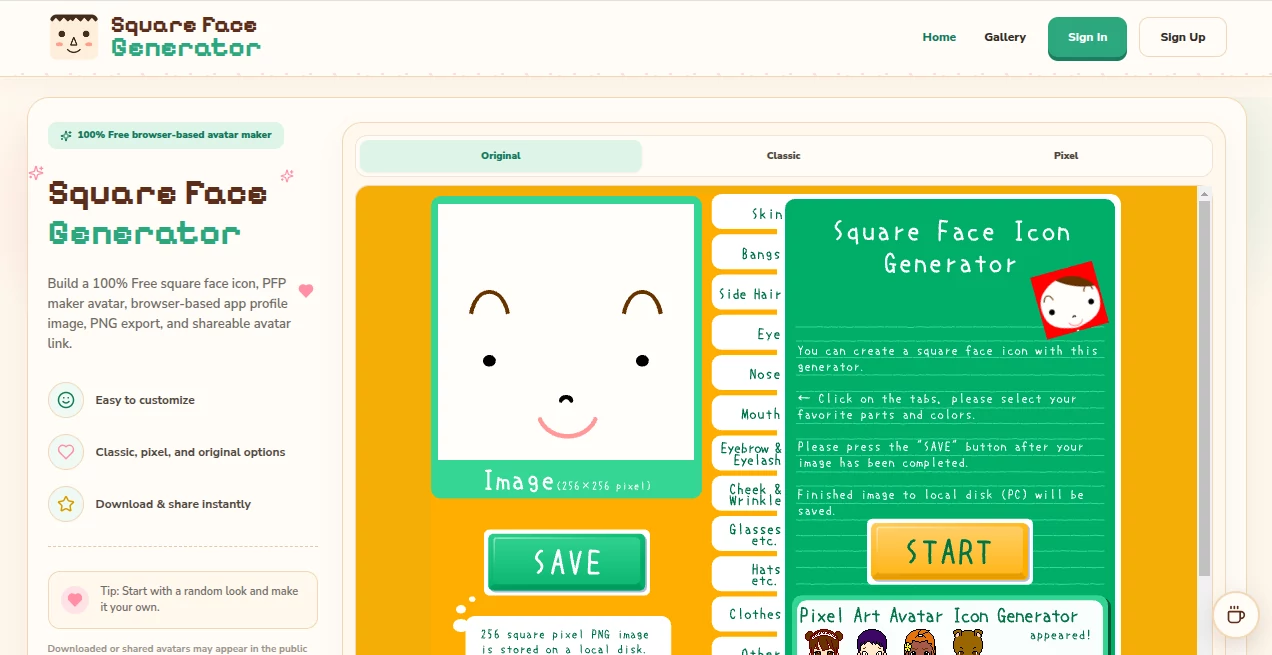
The concept is simple: open the tool, pick your style, mix and match face parts, and walk away with a crisp PNG file ready to drop anywhere that accepts a profile picture. No downloads, no plugins, no account required to get started. It runs entirely in your browser using modern HTML5 Canvas technology, which means it works equally well on a phone in your pocket as it does on a desktop at your desk.
There's also a bit of nostalgia baked in. Classic square face icon tools from the Flash era had a genuine following — and when Adobe pulled the plug on Flash Player at the end of 2020, those tools went dark overnight. This is the modern answer to that. Built from scratch with original artwork, it captures the same fast, playful energy without any of the compatibility headaches.
Key Features
User Interface
The layout is refreshingly uncluttered. You get three style tabs — Original, Classic, and Pixel — and a customization panel that lets you work through face shapes, hair, eyes, mouth, clothing, accessories, and backgrounds one layer at a time. It feels more like clicking through a wardrobe than navigating a design tool, which is exactly the right vibe for this kind of app.
There's a Random button for when you just want the generator to surprise you. That's genuinely one of the more fun features — hit it a few times, land on something unexpected, then tweak the parts you don't like. Most people end up with something they're happy with faster using that method than they would by building from a blank slate.
The mobile experience holds up well too. Touch targets are sensibly sized, the layout adapts cleanly to narrower screens, and export still works without friction. Plenty of avatar tools fall apart on phones; this one doesn't.
Accuracy & Performance
Because everything runs in-browser with HTML5 Canvas, load times are fast and the rendering is instant. There's no server round-trip every time you change a hair style or swap an accessory — the Canvas redraw happens immediately, so what you see is genuinely what you'll get in the exported file.
PNG export at three sizes — 256, 512, and 1024 pixels — gives you clean, crisp output at each resolution. The 1024px version holds up well at larger display sizes; the 512px is the practical choice for most social profiles; the 256px handles compact icon use cases. None of the exports show compression artifacts or blurring that would undermine the point of a profile image.
Capabilities
The tool covers three distinct visual styles, each with its own character:
- Classic: The style most closely inspired by the original Flash-era square face icons. Clean lines, bold shapes, immediately recognizable as that genre of avatar art.
- Pixel: A blocky, retro aesthetic that suits gaming profiles, Twitch accounts, and anyone who wants something that reads as intentionally lo-fi. The Gallery includes some particularly satisfying cube-style builds in this mode.
- Original: A fresh style with its own visual language — less tied to the nostalgia angle and more focused on creating something distinct.
Beyond the styles, the customization layer covers:
- Face shapes with color options
- Multiple hair styles and colors
- Eye styles including various expressions
- Mouth and expression options
- Glasses and accessory overlays
- Background colors and patterns
- Clothing and outfit elements
Shareable links let you post a specific avatar configuration without needing to export the image first — useful if you want a friend's opinion before committing to a download. The public Gallery shows community creations, which doubles as an inspiration browser when you're not sure what direction to take your avatar.
Security & Privacy
The tool doesn't require an account or any personal information to use the generator or download exports. Sign-in is available for users who want to manage gallery submissions or use removal tokens, but it's entirely optional for the core experience.
One important thing to be aware of: avatars that are downloaded or shared may automatically appear in the public gallery. The platform is transparent about this upfront. If you want to remove an avatar you've shared, the browser that published it receives a removal token that lets you hide it from the gallery. Visitors can also report public avatars. It's a straightforward system that respects user control without making it complicated.
Use Cases
The obvious use case is profile pictures — and the tool covers that comprehensively. Square avatars work natively on Discord, TikTok, YouTube, Instagram, X (Twitter), Twitch, and most gaming platforms. But the range of export sizes makes it versatile beyond just social profiles.
- Discord servers: The 512px export is the standard choice for Discord PFPs. The pixel style particularly suits gaming communities where that aesthetic fits the culture.
- Content creators: A consistent avatar across YouTube, TikTok, and Instagram helps build visual recognition without needing branded design work.
- Gaming profiles: Steam, Xbox, PlayStation, and gaming forums all support square avatars. The pixel and classic styles read well at small display sizes.
- Forum identities: Older forum platforms where square avatars are the norm benefit from the compact 256px export option.
- Twitch streamers: Channel icons and emote-style graphics sit naturally alongside the aesthetic this tool produces.
- Anyone refreshing their online identity: Sometimes you just want something that represents you without requiring a graphic design degree to create it.
There's also a secondary use case that doesn't get mentioned often: the Gallery itself functions as a reference point for community avatar trends. Scrolling through what other people have made gives you a real sense of what's possible and what resonates visually — the kind of thing that's genuinely useful when you're building a persona for a new platform.
Pros and Cons
What works well:
- Entirely free — no paywalled features or export limits hiding behind a subscription prompt
- No installation, no Flash, no plugins — opens immediately in any modern browser
- Three genuinely distinct styles rather than minor variations of the same aesthetic
- Three export sizes covering most practical use cases without requiring a paid upgrade
- Random generation makes the creative process fast and actually fun
- Shareable links work without requiring the other person to have an account
- Mobile experience is properly functional, not an afterthought
- Public gallery provides ongoing inspiration from community builds
Worth knowing before you start:
- Downloads and shares may appear in the public gallery — something to factor in if you want a completely private creation process
- The tool is focused on square face icons specifically; it's not a general-purpose avatar builder for other shapes or styles
- Customization depth, while solid, is narrower than full-featured avatar platforms — that's a deliberate trade-off for speed, but worth noting if you want very granular control
- No animation export or GIF output for platforms that support animated avatars
Pricing Plans
The tool is completely free to use. There are no pricing tiers, no watermarks on exports, and no feature gates behind a paid plan. You can create, download, and share as many avatars as you like without spending anything.
Account creation is optional and free. Signing up gives you the ability to manage gallery submissions and access removal tokens for previously shared avatars, but none of the core generation or export features require it. For a tool that delivers genuine value at zero cost, that's a notable position in a landscape where most creative tools have moved aggressively toward subscription models.
How to Use Square Face Generator
Getting from opening the tool to a finished export takes less than five minutes once you know the workflow. Here's how it goes in practice:
- Step 1 — Pick your style: Classic, Pixel, or Original. Each has its own set of parts and aesthetic. If you're not sure, Classic is the most familiar starting point; Pixel is the right choice for gaming and retro vibes.
- Step 2 — Try Random first: Hit the Random button a few times and see what comes up. It's genuinely the fastest way to get into the creative process. Most people find something worth refining within three or four randomizations.
- Step 3 — Customize from there: Work through the available parts — hair, eyes, mouth, accessories, clothing, background. Change colors where available. The Canvas updates instantly so you see every change in real time.
- Step 4 — Choose your export size: 1024px for high-resolution profiles and future-proofing, 512px for Discord and most social platforms, 256px for compact icon use.
- Step 5 — Download or share: PNG download goes directly to your device. The share link generates a URL you can copy and send. Either way, you're done.
The whole process is genuinely that quick. There's no save/export queue, no email confirmation, no waiting. The simplicity is the point.
Comparison with Similar Tools
Picrew is the most common comparison point — it's a well-known avatar maker with a large library of community-built makers. The difference is scope and speed. Picrew makers vary wildly in quality and style because they're community-created, and finding one that matches what you want can take longer than actually making the avatar. This tool is narrower in scope but faster and more consistent — you know what you're getting, and you can get it in under five minutes.
Full design platforms like Canva or Adobe Express can produce square avatars, but they're general-purpose tools that require significantly more setup and design knowledge to produce something equivalent. The learning curve is real, and for a profile picture, it's often overkill.
The old Flash-era square face icon generators — the tools this was partly inspired by — had a dedicated following precisely because they were fast and fun. But they've been dead since 2020. This is the working, modern alternative that doesn't require digging up a legacy Flash emulator to use.
For anyone who specifically wants square face icons in a classic or pixel aesthetic, with browser-based access, zero cost, and instant PNG export — the comparison landscape is thin. This fills a real gap that other tools haven't properly addressed.
Conclusion
Not every tool needs to do everything. Sometimes the best creative tools are the ones that do one thing cleanly, quickly, and at no cost. This is a square face avatar maker that knows exactly what it is — and that clarity of purpose is actually what makes it worth using.
The Flash-era tools it draws inspiration from had something genuinely appealing about them: accessible, fast, fun, and community-driven. Rebuilding that experience with HTML5 Canvas and original artwork rather than just emulating the old files was the right call. The result feels current rather than like a historical artifact kept on life support.
If you need a profile picture for a new platform, a gaming avatar that matches your handle's personality, or just want to spend ten minutes making something that represents you online — open this in a browser tab and see what you come up with. The Random button alone makes it worth at least five minutes of your time.
Frequently Asked Questions (FAQ)
Is this the original Flash Museum square face icon generator?
No. This is an independently built modern remake using HTML5 Canvas with original artwork. It was inspired by the classic square face icon tools associated with Flash Museum, h071019, and Icongenerators.net, but it is not affiliated with any of them and uses entirely original assets.
Why did the old square face generators stop working?
Adobe stopped updating and distributing Flash Player after December 31, 2020. Any tool that relied on Flash stopped functioning in modern browsers after that date. This tool uses HTML5 Canvas instead, which works natively in all current browsers without any plugin.
Can I use the exported avatar as a Discord or TikTok profile picture?
Yes. The 512px PNG export is the recommended size for Discord and most social platform profile pictures. Use 1024px for larger previews or higher-resolution displays, and 256px for compact icon applications.
Will my avatar appear in the public gallery?
Avatars that are downloaded or shared may appear automatically in the public gallery. The browser that published the avatar receives a removal token to hide it if needed. Visitors can also report gallery avatars. This is disclosed upfront before you create or share.
Do I need to create an account?
No. Account creation is entirely optional. You can generate, customize, and export avatars without signing in. An account gives you gallery management features and access to removal tokens for shared avatars.
What's the difference between Classic, Pixel, and Original styles?
Classic draws from the aesthetic of the original Flash-era square face icons — bold shapes and clean lines. Pixel uses a blocky, retro style suited to gaming profiles and lo-fi aesthetics. Original is a fresh visual direction with its own distinct character, not directly tied to the nostalgia angle of the other two styles.
Does it work on mobile?
Yes. The generator is designed to work on phones and tablets as well as desktop browsers. No app download is required — it runs directly in a mobile browser.
Is it really free?
Completely. There are no pricing tiers, no watermarked exports, and no features locked behind a subscription. Everything — including PNG export at all three sizes — is available at no cost.
AI Icon Generator , AI Profile Picture Generator , AI Avatar Generator , AI Emoji Generator .
These classifications represent its core capabilities and areas of application. For related tools, explore the linked categories above.
Square Face Generator details
Website unavailable — View Alternatives
Pricing
- Free
Apps
- Web App
Categories

Square Face Generator Alternatives Product

NanoEditor

Klyra AI

SparkIconAI

aiiStudio

Picsart
Try OC Maker

Beardless Fi…

Professional…

Lensgo
