
Supernormal
What is Supernormal?
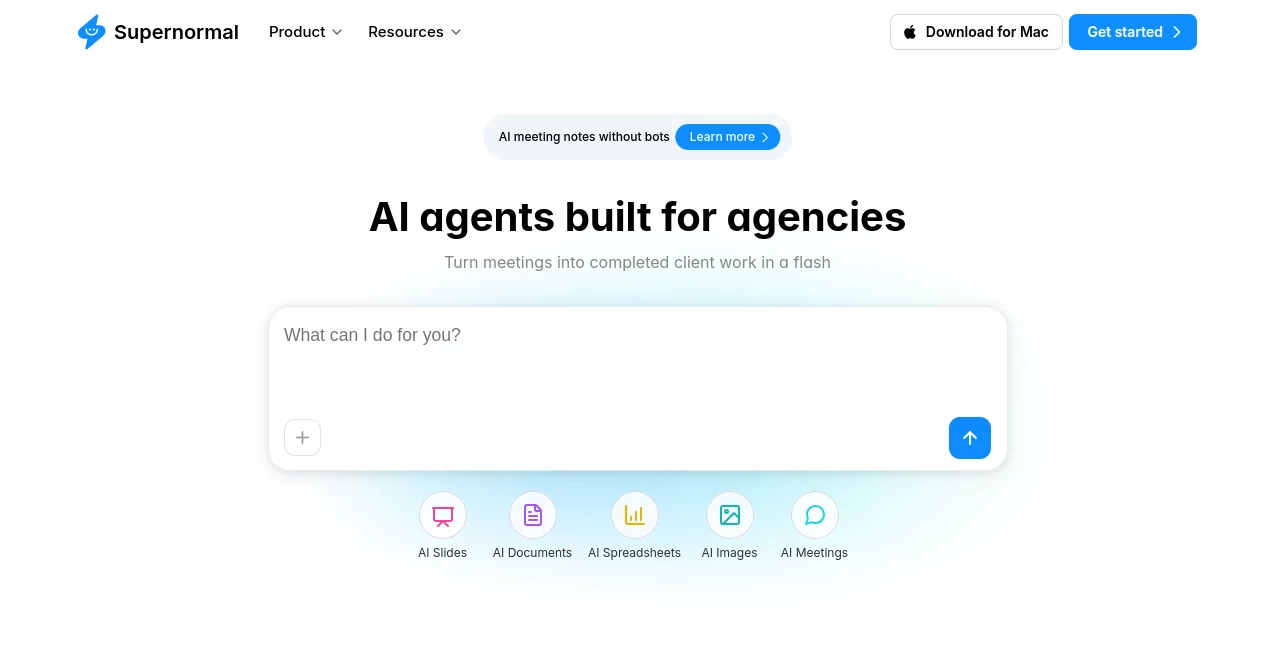
Modern teams spend countless hours reviewing meetings, writing summaries, preparing follow-up emails, and organizing project documentation. This intelligent meeting assistant eliminates that repetitive work by automatically capturing conversations, generating structured notes, and transforming discussions into actionable business assets. Unlike traditional meeting bots that join video calls, it records meeting context directly from the user's computer, creating a seamless experience without interrupting conversations.
Designed for agencies, remote teams, consultants, sales professionals, recruiters, and project managers, the platform goes far beyond transcription. Every meeting becomes valuable business knowledge that can instantly power presentations, documents, emails, reports, project updates, and client deliverables. The result is a smoother workflow where professionals can focus entirely on conversations instead of taking notes.
Key Features
User Interface
The interface is remarkably clean and easy to navigate. Meetings are automatically organized, transcripts are searchable, and AI-generated outputs are presented in a structured workspace. Even first-time users can begin capturing meetings within minutes, while the desktop application quietly runs in the background without disrupting ongoing conversations.
Accuracy & Performance
The platform delivers highly accurate meeting transcripts, organized summaries, speaker recognition, and clear action items. Instead of producing generic summaries, it understands meeting context and transforms discussions into practical deliverables such as follow-up emails, project briefs, presentations, strategic documents, and meeting reports. Its bot-free recording approach also creates a more natural meeting environment.
Capabilities
- Automatic meeting transcription
- AI-generated meeting summaries
- Action item extraction
- Follow-up email generation
- Presentation creation
- Document drafting
- Project brief generation
- Calendar invite generation
- Meeting search and organization
- Context-aware AI agents
- File and document integration
- Email and calendar connectivity
- Team collaboration features
- Support for client project workflows
Security & Privacy
Privacy is one of the platform's strongest advantages. Instead of inviting an external recording bot into meetings, conversations are captured directly from the user's own device. This approach helps organizations reduce meeting interruptions while maintaining greater control over sensitive discussions. Business teams can confidently manage confidential client meetings, internal planning sessions, and strategic conversations.
Use Cases
- Recording client meetings without manual note-taking.
- Creating project documentation immediately after discussions.
- Generating sales follow-up emails in seconds.
- Producing executive meeting summaries.
- Managing remote team collaboration.
- Capturing brainstorming sessions.
- Preparing onboarding documentation.
- Creating project updates for stakeholders.
- Supporting recruiters during candidate interviews.
- Keeping consultants focused on client conversations instead of writing notes.
Pros and Cons
Pros
- Bot-free meeting recording experience.
- Fast and accurate transcription.
- Excellent AI-generated summaries.
- Automatically identifies action items.
- Creates presentations, emails, and documents from meeting context.
- Simple installation and intuitive interface.
- Strong collaboration capabilities.
- Useful integrations for business workflows.
Cons
- Advanced capabilities require a paid subscription.
- Desktop application is required for the bot-free experience.
- Some AI-generated outputs may benefit from light human editing before sharing.
Pricing Plans
The service offers a free plan suitable for individuals who want to experience automated meeting notes and AI-powered summaries. Paid subscriptions unlock additional AI agents, advanced collaboration features, expanded integrations, higher usage limits, and more sophisticated document generation tools. Enterprise options are also available for larger organizations that require advanced administration and security features.
How to Use Supernormal
Getting started is straightforward. Install the desktop application, sign in using your work or Google account, and allow the software to monitor scheduled meetings. During each meeting, conversations are captured automatically without adding a recording bot. After the session ends, AI instantly generates transcripts, summaries, action items, emails, documents, slides, and other deliverables based on everything discussed. Users can further refine outputs, collaborate with teammates, and export completed work to their preferred productivity tools.
Comparison with Similar Tools
Many AI meeting assistants rely on visible bots joining Zoom, Google Meet, or Microsoft Teams meetings. This solution takes a different approach by recording directly from the user's computer, making meetings feel more natural and less intrusive. Compared with traditional transcription services, it also delivers significantly more value by converting conversations into business-ready documents, presentations, client reports, and project materials instead of simply providing raw transcripts.
Professionals who regularly handle client meetings, project management, consulting, or sales conversations will appreciate its ability to transform meeting context into meaningful work products with minimal manual effort.
Conclusion
For professionals who spend a large portion of their day in meetings, this platform offers a refreshing productivity boost. It reduces administrative work, improves collaboration, and turns conversations into structured knowledge that teams can immediately use. The combination of bot-free meeting capture, intelligent AI agents, and context-aware document generation creates a workflow that feels both efficient and remarkably natural. It is an excellent choice for businesses looking to save time while improving the quality of meeting documentation and follow-up tasks.
Frequently Asked Questions (FAQ)
Does it require a meeting bot to join video calls?
No. Meetings are captured directly from the user's computer without adding a visible recording bot.
Can it generate more than meeting summaries?
Yes. It can create follow-up emails, project briefs, presentations, documents, reports, and other business content from meeting context.
Is there a free version?
Yes. A free plan is available, while premium subscriptions provide advanced AI features and larger usage limits.
Who benefits the most from this platform?
Consultants, agencies, remote teams, recruiters, sales professionals, customer success teams, and project managers can all significantly reduce manual meeting work.
Can teams collaborate using generated meeting content?
Yes. Meeting outputs can be organized, shared, edited, and used across collaborative workflows for ongoing projects.
AI Productivity Tools , AI Team Collaboration , AI Meeting Assistant , AI Notes Assistant .
These classifications represent its core capabilities and areas of application. For related tools, explore the linked categories above.
Supernormal details
Website unavailable — View Alternatives
Pricing
- Free
Apps
- Web App
- Mac App
Categories

Supernormal Alternatives Product
YouTube Thum…

Slackactivity

Jamy.ai | Au…

4ga Boards
photo to URL

TryApplyNow
CoolVerdict

Clay Read

KwaKwa Cours…