
















What is OLVA?
Meetings rarely go exactly as planned. A customer asks an unexpected question, someone mentions an important detail, or the conversation suddenly moves in a direction you did not anticipate. Taking notes while trying to listen and respond at the same time can make even a simple meeting feel like a juggling act.
OLVA takes a different approach to meeting assistance. Instead of appearing as another participant in Zoom, Google Meet, Microsoft Teams, Slack huddles, or Webex, it works directly from your device and provides private assistance while the conversation is happening. The focus is not simply on creating a transcript after the call. It is on helping you think, respond, and stay informed during the live conversation.
The platform combines real-time transcription, automatic question detection, live answers, AI coaching, meeting insights, multilingual support, translation, and searchable meeting memory. For professionals who regularly handle sales calls, interviews, client discussions, negotiations, or internal meetings, this can turn a fast-moving conversation into something much easier to manage.
Key Features
- Real-time transcription that follows conversations as they happen.
- Automatic detection of questions during meetings.
- Live Q&A based on the active meeting context.
- Real-time insights covering suggestions, opportunities, risks, and fact-checking.
- Private AI coaching for responses and follow-up questions.
- Document-aware answers using connected files and business materials.
- Searchable meeting memory with summaries, decisions, action items, and follow-ups.
- Support for 87 language and regional options.
- Automatic and manual live translation.
- Editable PowerPoint presentation generation from meeting conversations.
- iOS and Android companion apps.
- Support for both online and in-person conversations.
User Interface
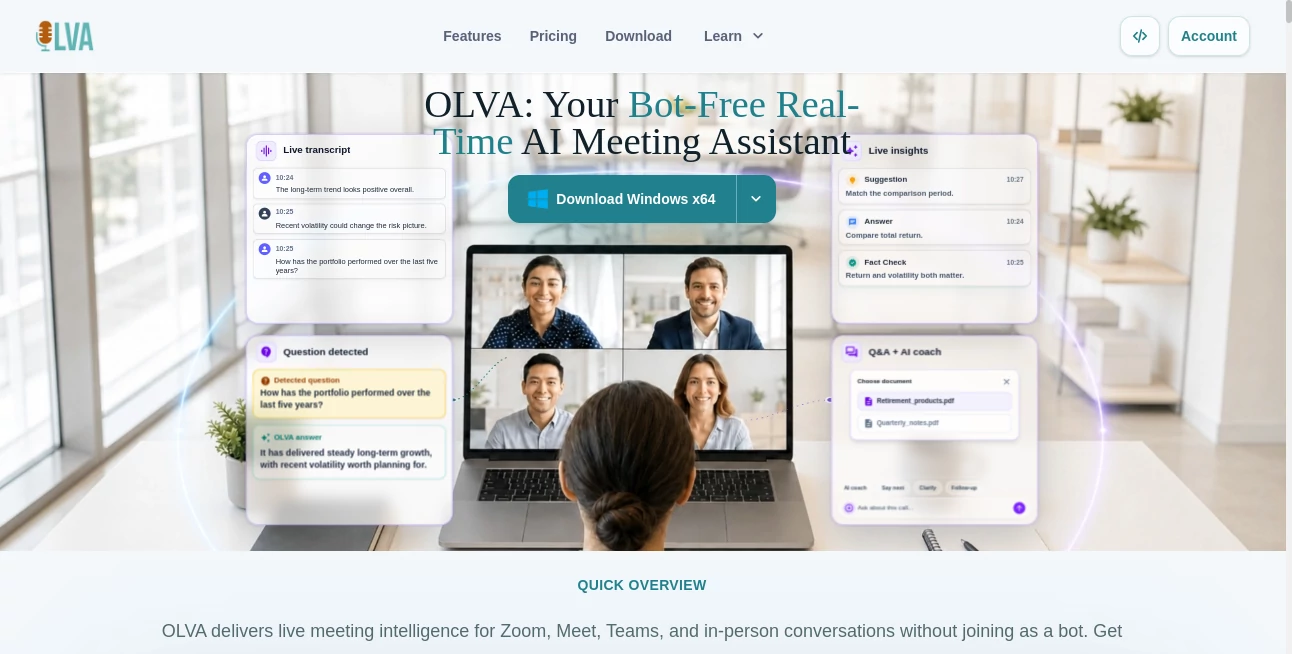
The interface is designed around the meeting itself rather than forcing users to manage a complicated dashboard while they are talking. Live transcription, detected questions, answers, insights, and coaching prompts can appear as the discussion develops.
This is particularly useful when attention is already divided. Instead of constantly switching between a browser, notes application, search engine, and meeting window, users can keep their attention on the conversation and use the assistant when something needs clarification.
The mobile experience extends the same idea beyond the desktop. Users can capture conversations, review meeting history, read recaps, and ask follow-up questions from iOS or Android devices.
Accuracy & Performance
Real-time transcription is the foundation of the experience. The system processes conversation as it happens, allowing its question detection, answers, insights, and coaching features to work with the current discussion rather than relying solely on information collected after the meeting.
Its multilingual support is another practical advantage. There are 87 language and regional options, with automatic multilingual and manual language selection available. Transcripts, answers, and summaries can follow the language being used in the meeting, while live translation can help when participants need additional language support.
For situations where accuracy matters more than a generic answer, documents can also provide additional context. Uploading contracts, pricing information, product specifications, internal policies, or research material gives the assistant more relevant information to work from.
Capabilities
The strongest part of the platform is its emphasis on live assistance. It can automatically recognize questions and bring them forward, provide answers based on the current conversation, and offer suggestions when the user needs help deciding what to say next.
Live insights can highlight potential opportunities, risks, suggestions, and fact-checking signals. For a sales representative, for example, a customer question about pricing or implementation can be surfaced immediately rather than discovered later while reviewing a transcript.
After the meeting, the workflow continues with summaries, detailed minutes, action items, decisions, risks, and searchable meeting memory. Previous meeting context can also remain useful in later conversations, making it easier to follow ongoing projects instead of treating every call as an isolated event.
Another useful capability is presentation generation. Completed meetings can be turned into structured, editable PowerPoint presentations using information from the transcript, insights, and meeting Q&A.
Security & Privacy
Privacy is one of the more distinctive aspects of the platform. It does not join meetings as a visible recording bot or appear as another participant. Instead, it captures the relevant computer or mobile audio directly from the user's device.
The service states that it does not store meeting audio, video recordings, voice recordings, or biometric voiceprints. Audio is processed for real-time transcription and then discarded, while meeting transcripts are stored for the user's reference.
The company also states that meeting content is not used to train, fine-tune, or improve general-purpose foundation or shared AI models. Users can manage and delete supported content through available controls or by contacting support, subject to applicable retention and backup terms.
For professional meetings, users should still follow the consent and notification requirements that apply to their particular location and meeting. A bot-free workflow does not remove those responsibilities.
Use Cases
Sales calls: Sales professionals can use live question detection, document-aware answers, and coaching to handle unexpected pricing, product, contract, or implementation questions without losing the flow of the conversation.
Client meetings: Account managers and consultants can keep track of decisions, risks, requests, and follow-up items while still participating naturally in the discussion.
Interviews: Recruiters and interviewers can use real-time transcription and meeting memory to capture important details without spending the entire interview typing notes.
Business negotiations: Contract documents, pricing sheets, and internal policies can provide additional context when important questions come up during negotiations.
Multilingual meetings: Teams working across languages can benefit from multilingual transcription and live translation without having to rely entirely on separate translation tools.
In-person meetings: The workflow is not limited to video conferences. Desktop and mobile capture can also support conversations that take place away from traditional meeting platforms.
Post-meeting work: Teams can turn conversations into summaries, action lists, decisions, and presentation material instead of starting from an empty document after every call.
Pros and Cons
- Pros: Works without adding a visible meeting bot.
- Pros: Provides assistance during the meeting rather than focusing only on post-meeting notes.
- Pros: Automatic question detection can bring important questions to attention quickly.
- Pros: Supports 87 language and regional options.
- Pros: Includes live translation and document-aware assistance.
- Pros: Offers both desktop and mobile experiences.
- Pros: Keeps searchable meeting memory for later reference.
- Cons: Some advanced integrations are restricted to higher-tier plans.
- Cons: Meeting capacity varies considerably between plans.
- Cons: PowerPoint generation uses feature credits, which may require additional purchases depending on usage.
- Cons: Users remain responsible for obtaining any required consent before transcription.
Pricing Plans
The pricing structure is based largely on meeting volume and the level of workflow support required. A free Basic plan is available for users who want to try the essential meeting features.
Basic: Free, with 2 hours of meeting time per month. It includes live transcription, real-time insights, in-meeting chat, automatic question detection, AI coaching, meeting summaries, post-meeting Q&A, multilingual support, translation, and other core features. Meeting history is limited.
Plus: $12.50 per month when billed annually, or $150 per year. The plan provides 15 hours of meeting time per month and adds features such as unlimited meeting history, document-aware Q&A, and calendar-aware meeting workflows.
Pro: $19.99 per month when billed annually, or $239.88 per year. This tier provides unlimited meeting time and adds integrations such as Slack, Google Drive, and Notion, along with outbound webhooks for developers.
Teams and Enterprise+ plans are also available for organizations that need administrative controls, privacy and security reviews, onboarding, audit logs, data exports, custom integrations, API access, or dedicated account management.
How to Use OLVA
Getting started is straightforward. First, install the desktop or mobile application and sign in to your account. For desktop meetings, the assistant can work alongside supported platforms without joining the meeting as a visible participant.
Once a conversation begins, live transcription follows the discussion. When a question is detected, it can be brought forward automatically, allowing you to review an answer or ask for additional help without leaving the meeting.
For more specialized meetings, attach relevant documents such as contracts, product information, pricing sheets, or internal documentation. This gives the assistant additional material to use when answering context-sensitive questions.
After the meeting, review the generated summary, action items, decisions, and other meeting notes. You can then search your meeting history or ask follow-up questions when you need to revisit something that was discussed earlier.
Comparison with Similar Tools
Meeting assistants such as Granola, Fireflies.ai, Fathom, and Otter.ai can all help with meeting capture and follow-up, but their primary workflows differ.
Granola is particularly associated with personal, bot-free meeting notes and a lightweight writing experience. Fireflies.ai places greater emphasis on team transcripts, searchable conversations, and conversation intelligence. Fathom is commonly used for call recording, summaries, clips, and CRM-oriented follow-up, while Otter.ai is well known for transcription, collaborative notes, and searchable meeting records.
The main distinction here is the emphasis on the live moment. Instead of treating the meeting primarily as something to record and analyze afterward, the workflow combines live transcription with automatic question detection, real-time answers, coaching, insights, document-aware assistance, and live translation.
That makes this approach particularly interesting for people who need help while a conversation is still unfolding. Someone who mainly wants a searchable archive of recordings may prefer a traditional meeting notetaker, while a salesperson, consultant, interviewer, or executive who needs private assistance during the call may find the live workflow more valuable.
Conclusion
A good meeting assistant should do more than produce a transcript that nobody reads two weeks later. The real value appears when useful information arrives at the moment it is needed.
This platform takes that idea seriously by combining bot-free meeting capture with live transcription, question detection, answers, coaching, insights, multilingual support, translation, and document-aware assistance. The post-meeting features then turn the conversation into something searchable and actionable.
For professionals who spend a significant part of their working week in meetings, it offers a compelling way to stay focused on the person in front of them while still having an intelligent layer of support in the background. The free tier also makes it relatively easy to test whether this live approach fits your particular workflow before committing to a paid plan.
Frequently Asked Questions (FAQ)
Does it join meetings as a bot?
No. The assistant is designed to work from the user's device rather than appearing as a visible participant in the meeting.
Which meeting platforms are supported?
It can work alongside Zoom, Google Meet, Microsoft Teams, Slack huddles, and Webex. It can also support in-person conversations through desktop and mobile capture.
How many languages are supported?
The platform provides 87 language and regional options, including automatic multilingual mode and manual language selection.
Can it translate meetings?
Yes. Live transcript translation is available, with automatic or manual language selection depending on the user's needs.
Can it answer questions during a meeting?
Yes. It can automatically detect questions and provide context-aware answers using the active transcript and connected context. Documents can also be used to provide additional information for supported plans.
Does it store meeting audio?
The company states that meeting audio and voice recordings are not stored. Audio is processed for real-time transcription and then discarded, while transcripts can be stored for future reference.
Does it use meeting data to train AI models?
The company states that meeting content is not used to train, fine-tune, or improve general-purpose foundation or shared AI models.
Is there a free plan?
Yes. The Basic plan is free and provides 2 hours of meeting time per month along with a selection of the core live meeting features.
Can it create PowerPoint presentations?
Yes. Completed meetings can be converted into structured, editable PowerPoint presentations using relevant conversation context. Slide generation uses feature credits.
Is there a mobile app?
Yes. Companion applications are available for both iOS and Android, allowing users to capture meetings, review history, access recaps, and ask follow-up questions away from the desktop.