
supernotes
What is supernotes?
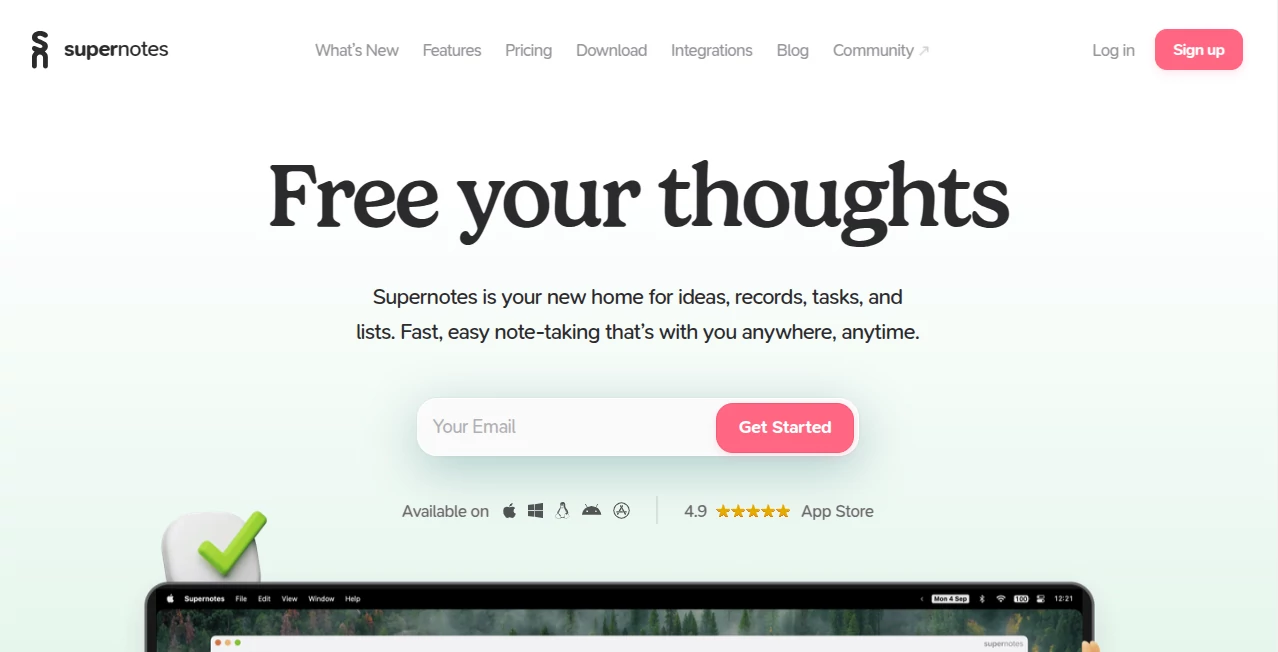
Supernotes is a modern note-taking and knowledge management workspace built around a simple idea: capturing information should feel effortless. Instead of forcing every thought into traditional files and folders, it uses compact digital notecards that can contain text, images, tables, checklists, mathematical equations, and other useful content.
The approach is particularly appealing for people who collect a lot of information but do not want their notes to become another source of clutter. Ideas can be linked, nested, searched, filtered, shared, and arranged into a personal knowledge structure. The result feels less like storing documents and more like gradually building a connected library of useful thoughts.
AI is also available as an optional layer rather than being placed in the way of the writing process. Its AI features can help identify common typos, improve notes, suggest relevant tags, and assist with organisation while keeping the user in control of the thinking itself.
Key Features
- Card-based note-taking for ideas, records, tasks, lists, and knowledge.
- Rich notecards supporting text, images, tables, checklists, equations, and emojis.
- Hierarchical organisation with nested and multi-parent notes.
- Bi-directional links for connecting related ideas.
- Universal search, filters, tags, and sorting for quickly finding information.
- 2D and 3D graph views for exploring relationships between notes.
- Real-time collaboration, comments, sharing, and publishing.
- Offline note creation and editing with automatic synchronisation when connectivity returns.
- Markdown support with LaTeX mathematics.
- Flashcard and spaced-repetition features for learning.
- Task collections that automatically bring together open tasks from notes.
- Import and Markdown export options.
- Desktop and mobile applications across major platforms.
- API and integrations for extending productivity workflows.
- Optional AI assistance for proofreading and note organisation.
User Interface
The interface is one of the strongest parts of the experience. Rather than presenting users with a complicated document editor and layers of menus, the product puts the notecard at the centre of the workflow. This makes it easy to create a thought quickly and then connect it to other information later.
The editor is designed for speed, with keyboard controls and a responsive writing experience. Different layouts, including tables, columns, flashcards, and graph views, allow the same collection of information to be approached in different ways. Someone working on a research project may prefer linked cards and graphs, while a student might get more value from flashcards and daily views.
Accuracy & Performance
Performance matters in a note-taking application because even small delays can interrupt the flow of capturing an idea. The platform is designed around fast interaction, quick searching, and synchronisation across devices. Notes can also be created and edited offline, which is useful when travelling or working somewhere with unreliable internet access.
The AI functionality takes a deliberately supportive approach. Rather than attempting to write everything automatically, it focuses on tasks such as identifying typos, improving notes, recommending relevant tags, and helping organise information. This makes the assistance useful without completely taking over the user's writing process.
Capabilities
The platform works particularly well as a personal knowledge system. A researcher can create cards for individual findings and connect them to related topics. A student can turn lecture notes into concise cards and use flashcards for revision. A professional can keep project information, meeting notes, tasks, and reference material connected in one workspace.
Collaboration is another practical strength. A card can be shared through a secure link, while people using the platform can edit and comment in real time. The API and integrations also make it possible to connect note-taking with broader productivity workflows.
Security & Privacy
Privacy is treated as an important part of the product rather than an afterthought. The company states that it does not sell user data or snoop through personal notes. AI assistance is opt-in, and the AI system is designed to minimise the information sent for processing. According to the documentation, the AI features generally work with the card being edited and the available tag library rather than unnecessarily exposing an entire knowledge base.
Users also have control over their information through export functionality, including the ability to export notes as Markdown. This is an important detail for anyone who wants to build a long-term knowledge base without feeling locked into a particular platform.
Use Cases
- Students: Capture lecture material, organise subjects, create flashcards, and review information using structured notes.
- Researchers: Connect findings, references, observations, and ideas through linked notecards.
- Professionals: Keep project information, tasks, meeting notes, and useful resources together.
- Writers: Store research, characters, outlines, ideas, and drafts in an interconnected workspace.
- Developers: Keep technical notes, snippets, documentation, project ideas, and troubleshooting information searchable.
- Teams: Share information and collaborate on notes without forcing every participant through a complicated document structure.
- Knowledge enthusiasts: Build a personal second brain where individual ideas can gradually become a connected knowledge network.
Pros and Cons
- Pros: Fast and clean interface, flexible notecard system, strong linking and organisation, offline support, real-time collaboration, useful AI assistance, Markdown support, graph views, and a generous free plan.
- Pros: Notes remain portable through export options, while the combination of hierarchy, backlinks, tags, and search provides several ways to reach the same information.
- Cons: The card-based approach can take some adjustment for people who are accustomed to conventional folders and long-form documents.
- Cons: The more advanced AI features are reserved for the paid Unlimited plan.
- Cons: Users who primarily need a traditional word processor may find the knowledge-management approach more extensive than necessary.
Pricing Plans
The Starter plan is free and includes the essential experience, with a limit of 100 cards. It includes access across web, desktop, and mobile applications, fast synchronisation, offline editing, the heatmap calendar, and collaboration and publishing features.
The Unlimited plan is listed at £6 per month and removes the card limit. It also adds AI Superpowers along with the full API and integrations and higher API limits. The pricing structure makes it possible to use the service for free first and upgrade only when the additional capacity or advanced features become useful.
How to Use the Tool
- Create an account and start with the free plan.
- Create your first notecard and capture a single idea, task, reference, or piece of information.
- Add useful details such as images, tables, checklists, equations, or links.
- Use tags, collections, nesting, and backlinks to connect related information.
- Use search and filters when you need to retrieve older notes.
- Turn relevant information into flashcards when studying or learning.
- Use the Tasks collection to review outstanding tasks across your notes.
- Share individual cards with colleagues, friends, or collaborators when needed.
- Enable the optional AI features when you want help with proofreading or organisation.
- Export your notes as Markdown when you need a portable copy of your knowledge.
Comparison with Similar Tools
Traditional note applications tend to organise information around notebooks, pages, folders, or documents. This product takes a different route by making individual cards the basic building blocks of knowledge. That distinction becomes valuable when notes need to belong to several contexts at once.
Compared with general-purpose workspace applications, the experience feels more focused on fast capture and connected knowledge. Compared with pure knowledge-management tools, it puts considerable emphasis on simplicity and everyday usability. The addition of collaboration, tasks, offline access, publishing, and optional AI assistance also makes it suitable for users who want more than a static personal notebook.
The biggest difference is therefore not simply the number of features. It is the way information is structured. Instead of asking, “Which folder should this document go into?”, users can create a small card and connect it to multiple relevant ideas. Over time, that approach can make a large collection of notes easier to navigate.
Conclusion
For anyone who takes notes frequently and has grown tired of watching useful information disappear inside folders and documents, Supernotes offers a refreshing alternative. Its notecard system encourages concise thinking while still providing enough flexibility for research, projects, studying, writing, and everyday planning.
The combination of linked knowledge, fast editing, collaboration, offline support, task management, and optional AI assistance gives it a broad range of practical uses. The free plan also makes it easy to experiment with the workflow before committing to a larger setup.
What stands out most is the philosophy behind the product: technology should help people organise and develop their thinking rather than simply generate more content for them. For users who value that distinction, this is a particularly compelling approach to modern note-taking.
Frequently Asked Questions (FAQ)
Is there a free plan?
Yes. The Starter plan is free and provides the core note-taking experience with up to 100 cards.
Does it work offline?
Yes. Notes can be created and edited without an internet connection, with changes synchronised when the device reconnects.
Does it have AI features?
Yes. Optional AI features can help with proofreading, organisation, tag recommendations, and improving notes. The advanced AI features are available on the Unlimited plan.
Can notes be shared with other people?
Yes. Individual notecards can be shared through secure links, and users can collaborate through real-time editing and comments.
Can information be exported?
Yes. Notes can be exported as Markdown, helping users retain a portable copy of their information.
What platforms are supported?
The service is available through web, desktop, and mobile applications, including Windows, Mac, Linux, Android, and iOS.
Is it suitable for students?
Yes. Students can use linked notes, daily views, flashcards, spaced repetition, search, and task collections for studying and organising course material.
Can it be used for team collaboration?
Yes. Notes can be shared and collaborative editing and commenting are supported, making it useful for projects and shared knowledge.
Who is it best suited for?
It is particularly well suited to students, researchers, writers, developers, professionals, and anyone who wants a fast way to build and navigate a connected personal knowledge base.
AI Productivity Tools , AI Notes Assistant .
These classifications represent its core capabilities and areas of application. For related tools, explore the linked categories above.

supernotes Alternatives Product

Rierino

SlideStorm AI

Classroom Sc…

VercelAPP

Liftburst

Toolquix

Video To Text
FLINT AI

YT Video Sum…