
Template.net
What is Template.net?
I still remember the first time I needed a polished proposal in under an hour and didn’t want to start from a blank page. That moment of mild panic is something millions of professionals face every week. This platform solves it beautifully by offering a massive, well-organized library of ready-to-use templates that actually look good. Whether you need a resume that stands out, a pitch deck that impresses investors, or a simple invoice that feels premium, you’ll find something that fits the bill. It’s become my quiet go-to whenever time is tight but quality still matters.
Introduction
Creating professional-looking documents, presentations, and designs from scratch takes time most of us simply don’t have. Template.net brings together hundreds of thousands of thoughtfully designed files across dozens of categories, so you can focus on content instead of formatting. What makes it special is the sheer variety combined with consistent quality—templates feel modern without being trendy, clean without being boring. Small business owners, students, freelancers, and marketing teams all use it regularly because it turns “I need this done” into “it’s already done, and it looks great.”
Key Features
User Interface
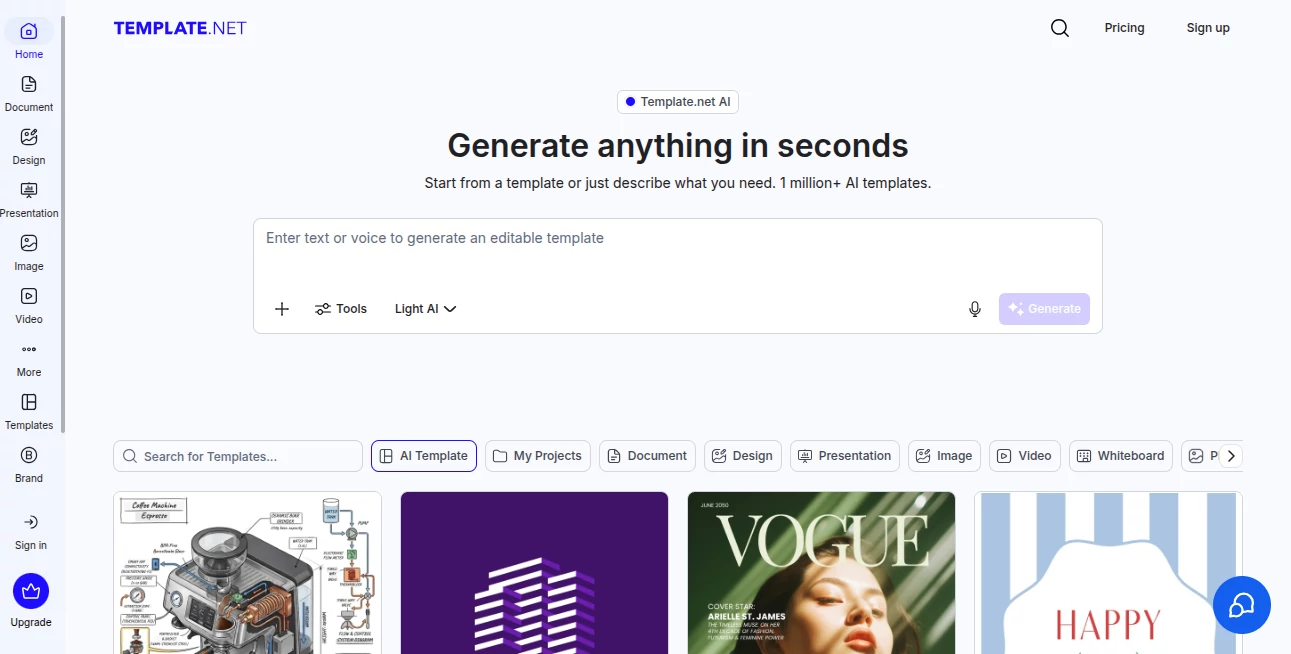
The site is refreshingly straightforward. A powerful search bar at the top, clear category navigation on the side, and beautiful preview thumbnails that actually show you what you’re getting. Once you open a template, the editor feels familiar—especially if you’ve used Word or PowerPoint before. You can customize colors, fonts, images, and text without fighting the layout. It never feels overwhelming, even for non-designers.
Accuracy & Performance
The templates are built with real-world use in mind. Layouts are balanced, typography is readable, and colors work well together. Everything is properly layered and editable, so you’re not fighting locked elements or broken formatting. Downloads are fast and reliable across formats (Word, PowerPoint, Excel, Google Docs, PSD, and more). In practice, this means you spend less time fixing things and more time actually working on your project.
Capabilities
The library covers almost everything: resumes, business plans, invoices, social media posts, brochures, certificates, menus, flyers, websites, and much more. You’ll find both completely free options and premium designs. Many templates come in multiple formats so you can edit wherever you’re comfortable. The collection is constantly updated, so you’re rarely stuck with outdated styles. It’s like having a full design team available at your fingertips.
Security & Privacy
You can browse and download many templates without even creating an account. When you do sign up, your data is handled cleanly. There’s no aggressive tracking or forced sharing. For professionals handling client work or sensitive documents, that simplicity and respect for privacy is appreciated.
Use Cases
A freelancer updates their resume in minutes before a big pitch and lands the client. A small café owner creates beautiful new menus that make their offerings look more premium. A student puts together a final-year project report that looks like it came from a design agency. A marketing manager quickly builds a presentation deck for Monday’s meeting that actually gets compliments. The common thread is saving hours while still looking professional.
Pros and Cons
Pros:
- Enormous variety across almost every document and design category.
- High-quality, modern templates that don’t look generic.
- Multiple editable formats for maximum flexibility.
- Fast search and intuitive browsing experience.
- Generous free collection alongside premium options.
Cons:
- Some of the very best designs are behind the premium subscription.
- Advanced customization still requires basic design knowledge.
- Occasional overlap between similar templates.
Pricing Plans
You can start completely free and access thousands of solid templates right away. The premium subscription unlocks the full library, exclusive designs, priority support, and higher download limits. Pricing is reasonable for the time and professional appearance it saves—many users say it pays for itself after just one or two big projects.
How to Use Template.net
Go to the homepage and type what you need (“business proposal”, “modern resume”, “product catalog”). Browse the results, click on a template you like, and hit the edit or download button. Make your changes in the built-in editor or download the file and open it in your favorite program. Save your customized version and you’re ready to go. The whole process usually takes less than ten minutes from start to finished document.
Comparison with Similar Tools
While some platforms offer templates, few match the combination of quantity, quality, and ease of use you get here. Many free sites have outdated or low-quality designs, and premium-only tools can feel expensive for occasional use. This one strikes an excellent balance: generous free access for everyday needs and strong premium options when you want the absolute best.
Conclusion
Good design shouldn’t be a luxury or a time sink. This platform makes professional-looking work accessible to everyone, whether you’re a solo freelancer, small business owner, or part of a larger team. It takes the stress out of formatting and lets you focus on what actually matters—your ideas and your message. In a world that judges by appearances, having the right template at the right moment can make all the difference.
Frequently Asked Questions (FAQ)
Are the templates really free?
Yes—thousands of high-quality templates are available at no cost. Premium unlocks even more exclusive designs.
Can I edit templates offline?
Absolutely. Most files download in editable formats like Word, PowerPoint, or Photoshop.
Is it suitable for professional business use?
Very much so. Many companies and freelancers rely on it daily for client-facing materials.
How often are new templates added?
New designs are added regularly across all major categories.
Do I need design skills to use it?
Not at all. The templates are ready to go, and basic customization is straightforward.
AI Presentation Generator , AI Website Designer , AI Design Generator , AI Graphic Design .
These classifications represent its core capabilities and areas of application. For related tools, explore the linked categories above.

Template.net Alternatives Product

FaceTo3D

Seedream 5.0

Nano Banana …

Pixelied

bratgenerator

EaseMaker

insMind

Z Image Turbo

textile gen