

















textile gen
What is textile gen?
TextileGen is an AI-powered textile design workspace built for turning ideas, sketches, and fabric references into practical patterns for real-world design work. Instead of stopping at a single generated image, it brings pattern creation, extraction, seamless repeats, color development, and product visualization into one workflow.
This makes it particularly useful for surface pattern designers, fashion professionals, independent creators, and anyone who needs textile artwork that can move beyond the screen. A designer can start with a written idea, a sketch, or an existing fabric image and develop it into a repeat-ready design without rebuilding the process in several different applications.
Key Features
- AI textile pattern generation from text prompts, sketches, and reference images.
- Pattern extraction from garments, fabric photographs, and other visual references.
- Seamless repeat creation with block, half-drop, and brick layouts.
- Colorway development while maintaining the underlying pattern structure.
- Fabric mockups for garments, interiors, and other patterned products.
- High-resolution artwork and downloadable outputs.
- Text-to-image and image-to-image generation.
- Access to multiple image models through the professional plans.
User Interface
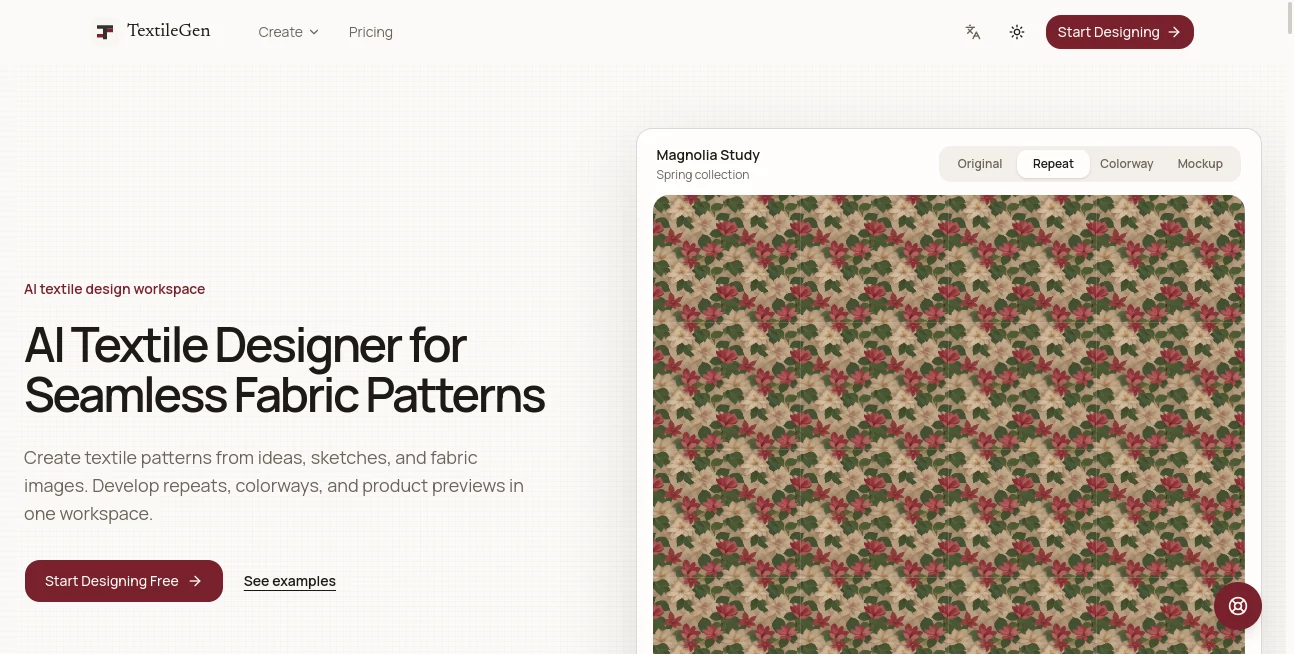
The workspace is organized around the actual stages of textile development, which keeps the process easy to follow. Rather than treating every output as an isolated image, the workflow lets designers move from creation or extraction into repeat testing, recoloring, and product visualization.
The focused structure is especially helpful when experimenting with several variations of the same design. Motif scale, repeat direction, and color direction can be explored without losing sight of the original visual concept.
Accuracy & Performance
Its main strength is not simply generating attractive artwork, but giving that artwork a textile-specific workflow. Designers can inspect how motifs behave across a repeating field and choose between block, half-drop, and brick repeat structures.
The pattern extraction workflow is also useful when working from physical references. A photograph of a garment or fabric can be turned into cleaner flat artwork and then developed further as a reusable repeat. This reduces the amount of manual reconstruction normally required before experimentation can begin.
Capabilities
The platform covers five important stages of textile development: generating original artwork, extracting patterns from references, creating seamless repeats, developing coordinated colorways, and visualizing designs on products.
It supports a wide range of visual directions, including floral, botanical, geometric, paisley, batik, and ikat-inspired patterns. Designers can also adjust motif scale and explore different palettes before deciding how a pattern should look in a practical product context.
Security & Privacy
Privacy is presented as a core part of the workspace, with designs described as remaining yours and the service highlighting a private-by-default approach. The platform also states that commercial use depends on the user's inputs, selected plan, and applicable model terms, so creators should review the current terms before using generated work in production or commercial projects.
Use Cases
For surface pattern designers, the platform can help turn an initial concept into repeat-ready artwork and coordinated colorways for a collection. Fashion designers can explore fabric prints and see how a design may appear on garments before committing to physical samples.
Independent creators can use the workflow to develop original artwork for print-on-demand products, client projects, and other creative applications. It can also be useful for home textile concepts, wallpaper ideas, and early-stage product visualization where seeing the pattern in context can influence the final design direction.
Pros and Cons
Pros:
- Designed specifically around textile pattern workflows.
- Combines generation, extraction, repeats, colorways, and mockups.
- Supports several repeat structures rather than only producing standalone images.
- Can work from text, sketches, and reference images.
- Useful product previews can help evaluate a design before production.
- Professional plans include commercial licensing and free downloads.
Cons:
- The service is more specialized than a general-purpose image generator, so it may not be the best fit for unrelated image-generation tasks.
- Commercial rights can depend on the inputs, plan, and applicable model terms.
- Users with very occasional design needs may not require the larger credit-based plans.
Pricing Plans
The service uses a credit-based pricing model with monthly, yearly, and one-time purchasing options. The Pro plan is listed at $24.90 per month and includes 57,600 credits valid for one year, text-to-image and image-to-image generation, all image models, free downloads, and a commercial license.
The Ultra plan is listed at $26.73 per month and provides 120,000 credits valid for one year, along with text-to-image and image-to-image generation, access to all image models, free downloads, and a commercial license. Annual billing is also available with savings compared with the standard monthly pricing.
How to Use TextileGen
- Start with a textile concept, sketch, or reference image.
- Generate original artwork or extract artwork from a fabric or garment reference.
- Build a seamless repeat and select a suitable structure such as block, half-drop, or brick.
- Adjust the motif scale and inspect how the design behaves across the repeating field.
- Experiment with coordinated colorways while preserving the pattern structure.
- Preview the design on garments, interiors, or other products using the mockup workflow.
- Refine the final direction and export the artwork for the next stage of the design process.
Comparison with Similar Tools
General AI image generators are excellent for producing individual visual concepts, but textile design often requires more than an appealing square image. A fabric pattern needs to repeat cleanly, maintain a sensible motif scale, work across different color directions, and make sense when applied to an actual product.
This platform stands apart by connecting those stages. Instead of generating an image and then moving it into separate software for repeat construction, recoloring, and visualization, designers can continue developing the same concept through a textile-focused workflow. That makes it a more specialized option for users whose end goal is fabric, surface, or pattern design rather than general image creation.
Conclusion
For designers who work with patterns, the difference between generating an image and developing a usable textile design is significant. This workspace addresses that gap by combining AI artwork generation with pattern extraction, seamless repeats, colorways, and product mockups.
The result is a practical environment for exploring ideas quickly while keeping the final design connected to how it may actually be used. Whether the goal is a fashion print, home textile collection, wallpaper concept, or print-on-demand design, it offers a focused workflow that can make experimentation considerably more efficient.
Frequently Asked Questions (FAQ)
What is an AI textile designer?
An AI textile designer is a specialized creative tool that helps develop textile artwork through tasks such as pattern generation, extraction, repeat creation, colorway development, and product visualization.
Can it create seamless repeat patterns?
Yes. Designs can be developed into repeating textile fields using block, half-drop, and brick repeat structures, with the repeating result available for inspection before moving to later stages.
Can I extract a pattern from a fabric photograph?
Yes. A fabric, garment, or other reference image can be used to extract clean flat artwork, which can then be developed into a repeat and explored through different colorways.
Can I create different colorways?
Yes. The colorway workflow allows designers to explore coordinated palettes while retaining the structure of the underlying pattern.
Can the designs be used commercially?
Commercial use depends on the user's inputs, selected plan, and applicable model terms. Anyone planning commercial production should review the current terms before using generated artwork.
What types of repeat patterns are supported?
The available repeat structures include block, half-drop, and brick layouts. Motif scale can also be adjusted to help evaluate how the design behaves across the repeating field.
Who can benefit most from this tool?
Surface pattern designers, fashion designers, independent creators, and professionals developing fabric, wallpaper, home textile, or print-on-demand concepts are among the users most likely to benefit from its specialized workflow.
Does it work with both text and images?
Yes. The platform supports text-to-image and image-to-image workflows, allowing designers to begin with written concepts, sketches, or visual references.