The Logo Creator
What is The Logo Creator?
The Logo Creator is an AI-powered design tool built for people who want to move from a rough brand idea to a usable logo without spending hours inside professional design software. It can turn a written concept, visual reference, or existing image into a range of logo directions, making it useful for founders, creators, small businesses, ecommerce stores, and marketing teams.
The experience is particularly appealing when the challenge is not knowing how to use design software, but knowing what the brand should look like. Instead of starting with a blank canvas, users can describe the business, choose a visual style, select colors, add a reference image, and generate several possibilities. This makes early-stage branding feel much more approachable.
For someone launching a small cafe, an online store, a SaaS product, or a personal brand, being able to test several visual directions before committing to a final identity can save both time and money. The platform also supports practical export formats, so the finished concept can move beyond the generator and into websites, social profiles, presentations, packaging, and other brand materials.
Key Features
- Text-to-logo generation from natural-language prompts.
- Image-to-logo workflows for sketches, photos, mascots, and other visual references.
- Style presets for exploring different visual directions.
- Primary, secondary, and background color controls.
- Reference image support for more controlled creative direction.
- AI Enhance for refining an initial logo idea or prompt.
- Multiple logo variations for comparing different concepts.
- JPEG Standard, PNG Transparent, and SVG Vector export options.
- Ability to review, edit, and download generated results.
- Recent generation history retained for seven days.
- Additional tools for vector conversion and logo animation.
User Interface
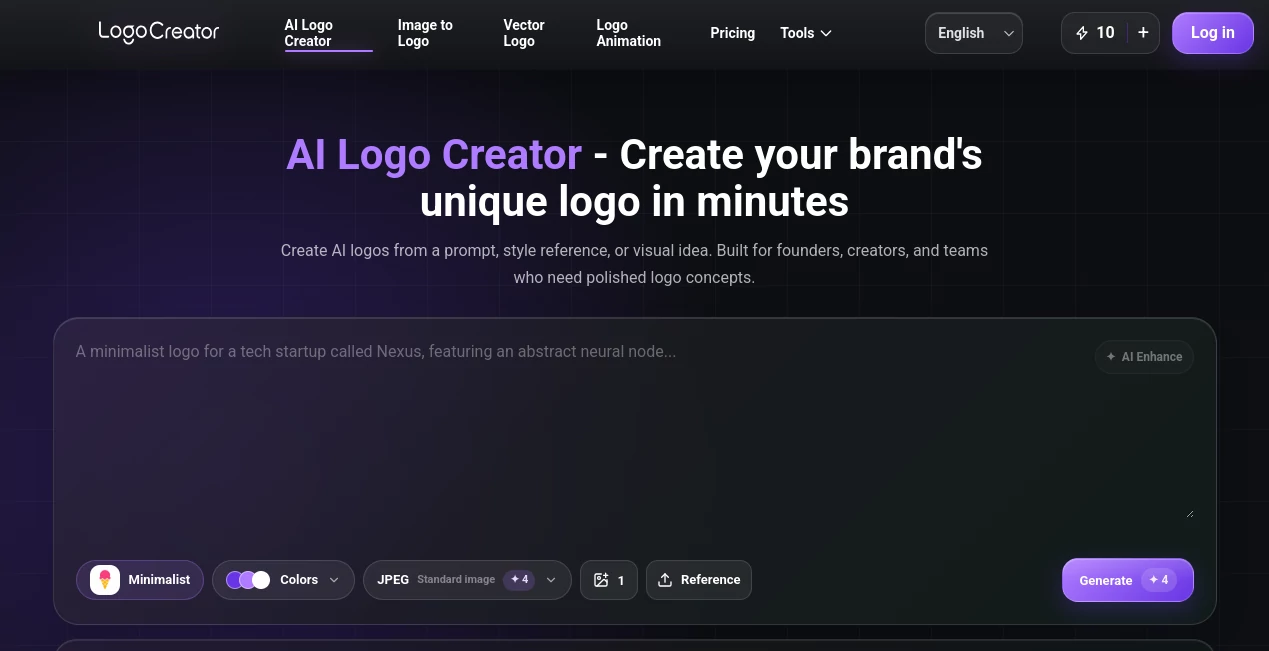
The interface keeps the main creative decisions close together. Users can describe an idea, select a style, choose colors, provide a reference, decide on the desired output, and then generate variations. That workflow is much less intimidating than opening a professional graphics application and being presented with dozens of unfamiliar controls.
The style browser is also useful for people who know the feeling they want but cannot quite describe it. A minimalist mark, luxury badge, playful mascot, retro identity, or technology-focused symbol can provide a starting point for experimentation. The gallery of generated examples adds another practical shortcut: sometimes seeing a direction is easier than explaining it.
Accuracy & Performance
Logo generation is ultimately a creative process, so there is no single definition of a correct result. The strength of this platform is its ability to translate several inputs together rather than relying only on a short text prompt. Style, colors, references, and output preferences can all contribute to the final direction.
Generation is designed to happen quickly, allowing users to compare several concepts instead of spending an entire afternoon developing one idea manually. Multiple variations are especially helpful when the first result is close but not quite right. Rather than treating the first generation as the final answer, users can use the results as a visual conversation with the tool.
Capabilities
The platform goes beyond simple prompt-to-image generation. Users can start with text or an existing visual reference, experiment with different styles, and export their preferred result in formats suited to different applications. SVG Vector output is particularly useful when scalability matters, while transparent PNG files can work well for websites, social graphics, and presentations.
The image-to-logo workflow is another valuable option. A rough sketch on paper, an existing product image, a mascot, or another visual reference can provide the starting point for a new logo direction. This is useful when the founder already has an idea but lacks the design skills to turn it into a polished concept.
There are also supporting brand tools available within the same ecosystem, including vector logo conversion and logo animation. That creates a more complete workflow for users who want to take a static identity and prepare it for additional digital applications.
Security & Privacy
Users should review the platform's privacy policy and terms before uploading sensitive or confidential brand materials. As with any online AI design service, it is sensible to avoid submitting proprietary information that does not need to be processed by an external service.
The published terms explain that the service uses a credit-based system and that paid credits remain valid while the account remains open. They also state that generation credits consumed by a failed task caused by a technical system error can be returned to the account.
Use Cases
- Startups: Create early logo concepts for a new product, app, landing page, or pitch deck.
- Small businesses: Explore branding for cafes, salons, studios, local services, and independent shops.
- Ecommerce brands: Develop visual identities for online stores, packaging, product labels, and social accounts.
- Creators: Produce recognizable marks for YouTube channels, newsletters, communities, and personal brands.
- Marketing teams: Generate visual directions for campaigns and early-stage brand exploration.
- Agencies: Produce initial concepts and moodboard directions before moving into a deeper branding process.
- Rebranding projects: Use an existing visual as a starting point for exploring a refreshed identity.
Pros and Cons
Pros
- Simple workflow suitable for users without professional design experience.
- Supports both text-based and image-based logo creation.
- Style, color, and reference controls provide useful creative direction.
- Multiple variations make it easier to compare ideas.
- SVG, PNG, and JPEG export options cover common branding needs.
- Pay-as-you-go credits avoid the need for a recurring subscription.
Cons
- AI-generated concepts may still require human refinement before becoming a final brand identity.
- Users should independently check trademark and originality concerns before commercial launch.
- Credit consumption can become a consideration for users generating many variations.
- Recent generation history is only retained for seven days.
Pricing Plans
The service uses a credit-based, pay-as-you-go pricing model rather than requiring a recurring subscription. A free option provides 10 credits per day, with approximately five AI image generations and standard JPG/PNG downloads.
The Standard plan is listed at $4.99 for 100 credits as a one-time purchase, while the Pro plan provides 300 credits for $9.99. The published pricing page describes these as non-recurring purchases, meaning users are not automatically charged for another billing period. Paid credits also remain available rather than expiring on a monthly cycle.
This approach can be attractive for occasional projects. Someone creating a logo for a new business may prefer purchasing credits when needed rather than maintaining another monthly software subscription.
How to Use the Tool
- Start by describing the logo idea, including the business type, mood, symbol, or visual direction.
- Use AI Enhance if the initial description needs more structure.
- Choose a suitable style preset and select primary, secondary, and background colors.
- Upload a reference image when you already have a visual direction in mind.
- Select the desired output format, such as JPEG, transparent PNG, or SVG.
- Choose how many variations you want to generate.
- Generate the concepts and compare the available directions.
- Open a promising result, make adjustments where available, and download the version that best fits the brand.
A useful approach is to avoid trying to describe everything in one complicated prompt. Start with the brand's purpose and visual personality, generate a few directions, and then use the strongest result as inspiration for the next iteration. This usually produces a more focused design process.
Comparison with Similar Tools
Traditional template-based logo makers usually begin with predetermined layouts that users customize by changing text, colors, icons, and fonts. That approach can be convenient, but it may feel restrictive when the goal is to explore an unusual brand concept.
General-purpose image generators offer much broader creative freedom, although they are not always designed around the practical requirements of a logo. A dedicated logo workflow has an advantage here because it puts emphasis on styles, brand references, color direction, variations, and useful export formats.
Professional design applications remain the better choice when a brand requires detailed manual control, precise vector construction, advanced typography, or a complete identity system. For the earlier stage, however, an AI-driven workflow can be an efficient way to turn vague ideas into visual concepts worth developing.
Conclusion
Creating a good logo is rarely just about drawing an attractive symbol. It is about finding a visual idea that feels right for the business and can work across different places. This tool makes that discovery stage considerably easier by combining prompts, references, styles, colors, variations, and practical export options in one workflow.
Its biggest advantage is accessibility. A founder with no design background can arrive with little more than a business name and an idea, then leave with several directions to consider. Experienced designers can also use the rapid generation process for brainstorming and early concept exploration.
It is not a replacement for every professional branding project, but for startups, creators, ecommerce businesses, and small teams that need a strong starting point without a complicated design workflow, it is a compelling option to try.
Frequently Asked Questions (FAQ)
Can I create a logo without design experience?
Yes. The workflow is designed to be accessible to beginners. You can start with a short description, select a visual style, choose colors, and optionally provide a reference image.
Can I use an existing image as a logo reference?
Yes. The image-to-logo workflow allows users to provide a visual starting point such as a sketch, product image, mascot, or other reference and use it to guide the resulting logo direction.
What file formats are available?
The available export choices include standard JPEG, transparent PNG, and SVG Vector. These formats cover many common website, social media, presentation, packaging, and branding requirements.
Does the service require a monthly subscription?
No. The published pricing uses a pay-as-you-go credit system. Users can purchase credit packs as one-time payments rather than signing up for an automatically renewing subscription.
How long are generated results kept in history?
Recent generation history is retained for seven days, giving users time to return to previous concepts, review variations, edit a result, or download a preferred design.
Should I check a generated logo before using it commercially?
Yes. Before launching a logo commercially, it is sensible to review the design for originality, trademark conflicts, brand suitability, and any other requirements relevant to your business or market.
AI Illustration Generator , AI Design Generator , AI Graphic Design , AI Logo Generator .
These classifications represent its core capabilities and areas of application. For related tools, explore the linked categories above.
The Logo Creator details
Website unavailable — View Alternatives
Pricing
- Free
Apps
- Web App
Categories

The Logo Creator Alternatives Product
PatchDesign.…

Reztune

LPM AI:

Pixelied

Banana AI

Modelfy 3D

Flux 2 Cloud

Leonardo.ai

NanoBanana P…