
Thinklist.
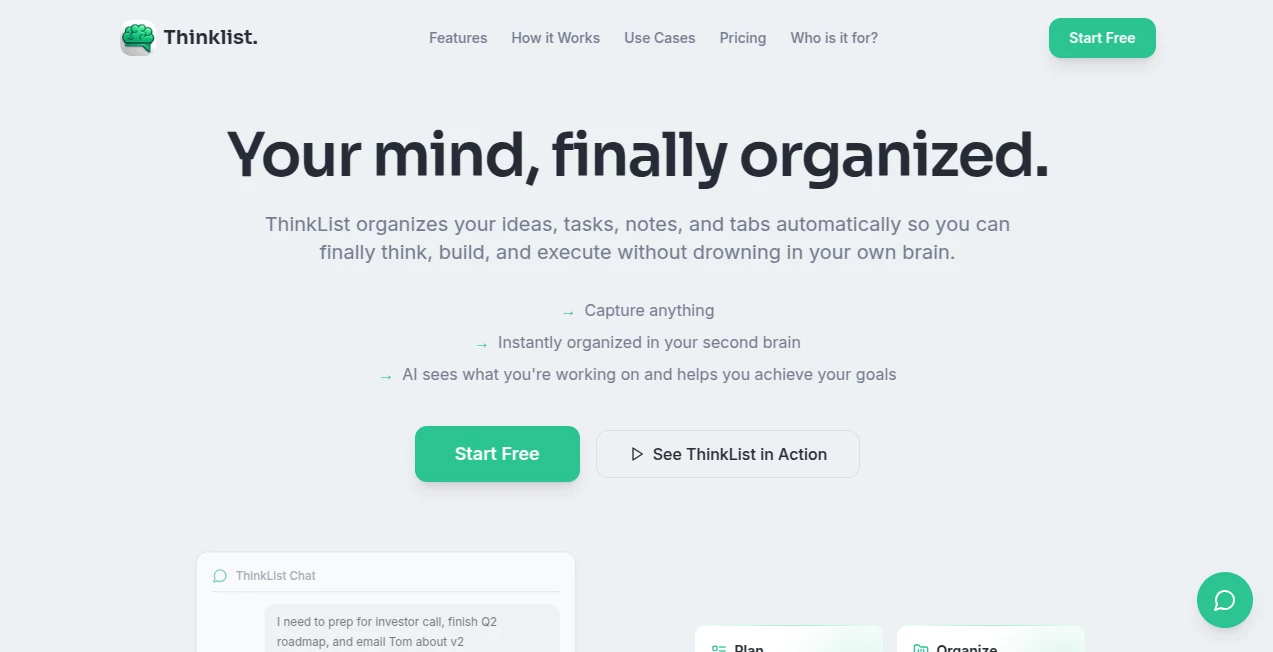
What is Thinklist.?
Keeping track of ideas, projects, research, tasks, and useful links often becomes more difficult as work grows. Instead of helping, many productivity tools require constant manual organization, forcing users to spend valuable time maintaining folders, tags, and documents rather than focusing on meaningful work.
This platform takes a refreshingly different approach. Rather than expecting users to organize everything themselves, it captures thoughts naturally through conversation and automatically transforms them into structured projects, actionable tasks, connected notes, and searchable knowledge. The result is a workspace that feels less like traditional project management software and more like a digital thinking partner.
Whether you're building a startup, managing multiple clients, researching complex topics, or simply trying to stay organized, the experience is designed to reduce cognitive overload while making information easier to discover and act upon.
Key Features
User Interface
The interface focuses on simplicity. Instead of navigating dozens of menus, users interact through natural conversations where ideas, notes, links, screenshots, and tasks can be added instantly. Everything is automatically categorized behind the scenes, allowing work to continue without interruptions.
A visual knowledge graph gives users an intuitive overview of how projects, notes, tasks, and references relate to each other, making large amounts of information surprisingly easy to understand.
Accuracy & Performance
The intelligent organization engine analyzes user input and identifies projects, deadlines, relationships, priorities, and action items automatically. Semantic understanding allows information to remain connected even when entered weeks or months apart, reducing duplicated work and making search significantly more useful than traditional keyword matching.
Fast organization, contextual retrieval, and intelligent recommendations help users move from scattered ideas to clear execution without spending hours restructuring their workspace.
Capabilities
- Automatically converts conversations into organized projects.
- Extracts tasks, priorities, and deadlines from natural language.
- Creates interconnected notes and searchable knowledge.
- Builds a visual knowledge graph showing relationships between ideas.
- Stores links with automatic categorization.
- Supports intelligent project management.
- Provides AI-powered web research assistance.
- Generates daily summaries and contextual reminders.
- Maintains long-term memory across projects.
- Helps founders, creators, researchers, and teams stay organized with minimal effort.
Security & Privacy
Sensitive information is protected using encrypted storage designed for confidential notes, passwords, API keys, and other private information. Users maintain control over their workspace while benefiting from AI-powered organization and contextual assistance.
Use Cases
- Managing startup planning, fundraising, and product roadmaps.
- Organizing research projects and reference materials.
- Tracking client work across multiple projects.
- Creating structured meeting notes with actionable follow-ups.
- Collecting competitor research and market intelligence.
- Managing personal productivity from one workspace.
- Planning content strategies and creative projects.
- Keeping long-term knowledge connected instead of scattered across multiple applications.
Pros and Cons
- Pros
- Natural conversational workflow.
- Automatic project and task organization.
- Powerful visual knowledge graph.
- Excellent contextual search capabilities.
- Reduces mental clutter and app switching.
- Encrypted storage for sensitive information.
- Suitable for founders, creators, researchers, and professionals.
- Cons
- Advanced capabilities require a paid subscription.
- New users may need time to adapt to an AI-first workflow.
- Some collaboration features are available only in higher plans.
Pricing Plans
A free trial is available without requiring a credit card. Paid subscriptions include multiple tiers designed for individual professionals, founders, and collaborative teams. Higher plans provide increased storage, premium AI models, unlimited AI usage, and priority processing for demanding workflows.
How to Use ThinkList
Begin by creating an account and opening a new workspace. Instead of manually creating folders or projects, simply write naturally. Paste notes, drop links, upload screenshots, or describe your goals in plain language. The AI automatically extracts projects, tasks, deadlines, and relationships while continuously expanding your personal knowledge base. As new information is added, everything remains connected, searchable, and easy to visualize through the built-in knowledge graph.
Comparison with Similar Tools
Many productivity platforms require users to build and maintain their own organizational systems. Traditional note-taking applications focus primarily on documentation, while project management software concentrates on tasks and deadlines. This solution combines both approaches by understanding context automatically and continuously organizing information without requiring manual maintenance.
The addition of conversational interaction, semantic search, automatic relationship mapping, and an evolving knowledge graph creates a more dynamic experience than conventional productivity software. Instead of simply storing information, the workspace actively helps users understand, connect, and execute their ideas.
Conclusion
For professionals who constantly juggle ideas, research, projects, meetings, and daily responsibilities, this platform delivers a refreshing approach to productivity. By transforming unstructured thoughts into organized knowledge automatically, it removes much of the friction associated with modern work.
The combination of intelligent organization, contextual memory, visual knowledge mapping, secure storage, and conversational interaction makes it particularly valuable for founders, creators, operators, researchers, and anyone looking to replace multiple disconnected productivity tools with a single AI-powered workspace.
Frequently Asked Questions (FAQ)
What makes this workspace different from traditional productivity software?
It automatically organizes ideas, tasks, notes, projects, and references using AI instead of relying on manual folders and tagging.
Who benefits the most from using it?
Founders, entrepreneurs, creators, researchers, consultants, students, and professionals managing multiple projects can benefit from its intelligent organization features.
Can it manage both notes and tasks?
Yes. Notes, tasks, projects, links, research, and contextual information are connected automatically inside a unified workspace.
Is sensitive information protected?
Yes. The platform includes encrypted storage for confidential information and private knowledge.
Does it offer a free trial?
Yes. Users can explore the platform through a free trial before choosing one of the paid subscription plans.
AI Knowledge Management , AI Productivity Tools , AI Workflow Management , AI Project Management .
These classifications represent its core capabilities and areas of application. For related tools, explore the linked categories above.

Thinklist. Alternatives Product

CapyQR
Anti Noise F…

Graph Maker

YouMind

Khuram Youraj

SlideStorm AI

Vibe Coding …

Skywork Supe…

Clay Read