


















ThumbnailMake
What is ThumbnailMake?
There’s nothing more frustrating than spending hours editing a great video only to watch it get ignored because the thumbnail doesn’t grab attention. This tool fixes that problem beautifully. You give it a few details about your video, and it generates eye-catching, professional thumbnails that actually make people stop scrolling. I’ve seen creators go from generic screenshots to bold, colorful designs that boosted their click-through rates noticeably. It feels less like a generator and more like having a smart designer who understands what works on YouTube.
Introduction
YouTube is a tough platform — great content alone isn’t enough if the thumbnail doesn’t spark curiosity. ThumbnailMake was built specifically for this moment. It combines smart AI with real design principles to help creators, especially those without design skills or big budgets, produce thumbnails that look custom-made. Whether you’re a gamer, educator, vlogger, or reviewer, it takes the guesswork out of “what will make someone click?” and replaces it with fast, effective options you can tweak and download instantly. Many users say it’s become one of their favorite parts of the upload process because it finally makes thumbnails fun instead of painful.
Key Features
User Interface
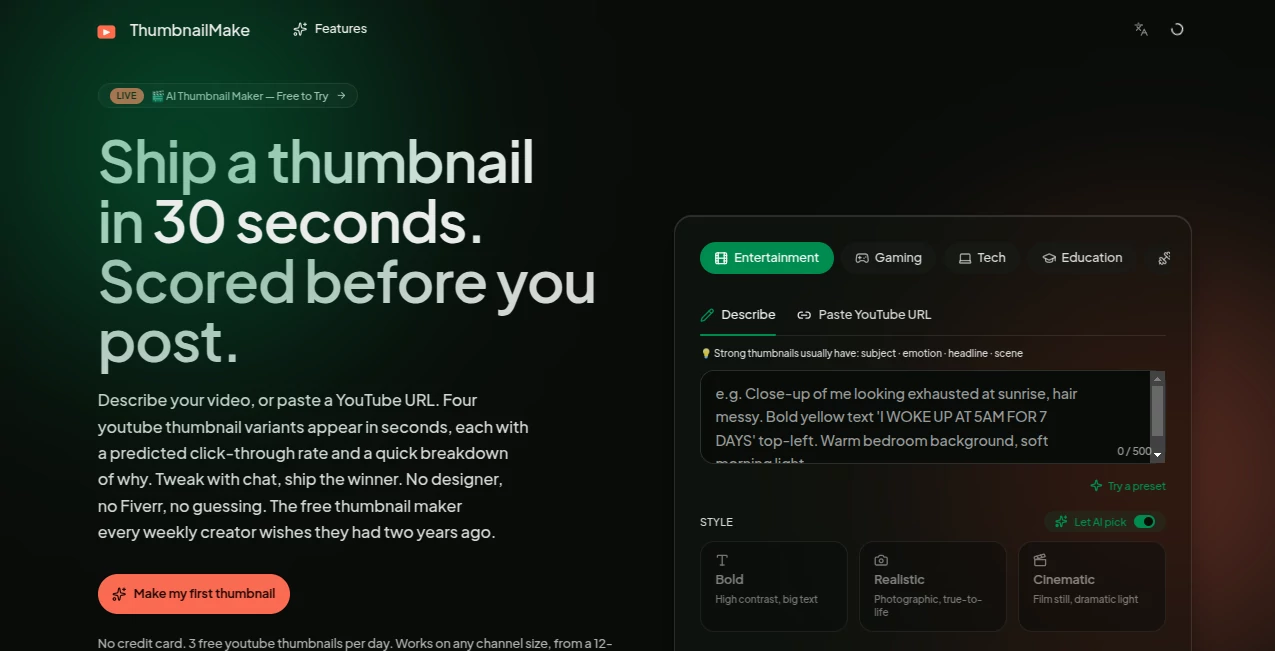
The interface is refreshingly straightforward. You type your video title or a short description, choose a style or mood, and the AI gets to work. Results appear in a clean grid so you can compare them side by side. You can then click any thumbnail to customize text, colors, fonts, or add emojis and stickers. Everything happens in one place without confusing menus or slow loading. It feels like a creative playground rather than a complicated design program.
Accuracy & Performance
It understands what performs well on YouTube — bold contrast, clear faces, strong emotions, readable text. The generated thumbnails consistently hit that sweet spot between professional and clickable. Generation is fast, usually just a few seconds per batch, and the quality holds up even when you upscale for high-resolution needs. The AI learns from trending patterns without copying them directly, so your thumbnails feel fresh rather than recycled.
Capabilities
You can start from text only, upload your own background image, or let the AI suggest scenes. It offers multiple styles (minimal, cinematic, bold, funny, etc.), smart text placement, emoji suggestions, and face enhancement for better emotional impact. You can generate dozens of variations quickly, then fine-tune with easy drag-and-drop. Exports are high-resolution and ready for direct upload to YouTube or other platforms.
Security & Privacy
Your uploaded images and video details stay private during the creation process. No unnecessary data collection or sharing with third parties. You control what gets saved, and nothing is used to train models without your consent. For creators who value their content ideas, that peace of mind is important.
Use Cases
A gaming creator generates ten different thumbnails for a new gameplay video and picks the one that best shows the big moment. An educator makes clean, professional thumbnails for lecture series that look consistent across an entire playlist. A beauty vlogger quickly creates eye-catching before-and-after designs that drive more views to product reviews. Even small business owners use it for promotional videos, turning simple clips into scroll-stopping marketing assets. It shines anywhere a strong visual hook can make the difference between being seen and being skipped.
Pros and Cons
Pros:
- Extremely fast generation with multiple high-quality options at once.
- Designs actually look like they were made by a human who understands YouTube.
- Easy customization without needing Photoshop skills.
- Great value for creators who upload frequently.
Cons:
- Free tier has daily limits that heavy creators will outgrow quickly.
- Very niche or unusual video topics sometimes need more manual tweaking.
Pricing Plans
The free plan gives you a generous number of generations per day, perfect for testing or occasional use. Paid plans remove limits, unlock premium styles, higher resolutions, and faster processing. Pricing is reasonable and clearly worth it for anyone serious about growing their channel — many creators say the time saved and extra views easily cover the cost.
How to Use ThumbnailMake
Go to the generator, type your video title or a short description of the content. Optionally upload a screenshot or main image from your video. Choose a style direction or let the AI surprise you. Click generate and browse the results. Pick your favorite, tweak the text, colors, or elements until it feels right, then download in high resolution. Upload it to YouTube and watch the difference. The whole process usually takes under two minutes.
Comparison with Similar Tools
Many thumbnail generators either produce generic results or require too much manual design work. This one sits in the sweet spot — smart enough to create strong concepts quickly, flexible enough to let you add your personal touch. It focuses specifically on what performs on YouTube rather than generic graphic design, which gives it an edge over broader tools.
Conclusion
Thumbnails are often the first (and sometimes only) impression your video makes. Getting them right shouldn’t be stressful or time-consuming. ThumbnailMake turns that stressful step into one of the most enjoyable and effective parts of uploading. When your thumbnails start doing some of the heavy lifting for views and clicks, you realize how much difference thoughtful design can make. For creators who want better results without the design headache, it’s one of the smartest tools available right now.
Frequently Asked Questions (FAQ)
How many thumbnails can I generate for free?
You get a solid daily limit — enough to create options for several videos.
Do the thumbnails look professional?
Yes — they consistently look like custom designs rather than obvious AI output.
Can I use my own images as background?
Absolutely. Uploading key frames or screenshots often produces the best results.
Is it only for YouTube?
Primarily optimized for YouTube, but the thumbnails work great for TikTok, Instagram, and other platforms too.
Do I need design experience?
Not at all. The tool is built so anyone can create strong thumbnails quickly.
AI Thumbnail Maker , Photo & Image Editor , AI Design Generator , AI Image to Image .
These classifications represent its core capabilities and areas of application. For related tools, explore the linked categories above.

ThumbnailMake Alternatives Product
Transpic

Image To Ima…

Nano Banana 2

EaseMaker

GPT Image 1.5
Caricature G…

PNG to 3D

Flux2 Klein

Nano Banana 2
