
















Transpic
What is Transpic?
Transpic is a private AI image translator designed for people who need to understand or localize text without losing the visual context of the original image. Instead of turning everything into a plain block of translated text, it detects text regions and places the translated wording back into the image. This makes it particularly useful for menus, screenshots, posters, product graphics, manga pages, and scanned documents.
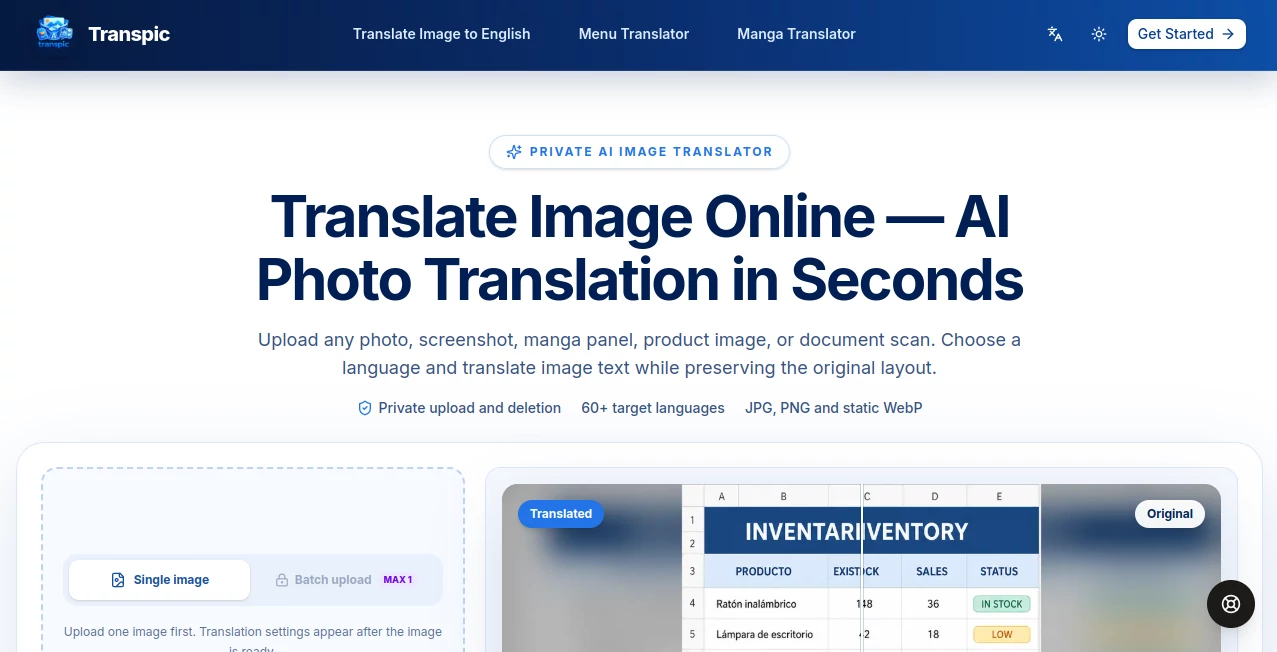
The workflow is refreshingly straightforward. Upload an image, select the target language and translation mode, review the result, make any necessary adjustments, and export the finished graphic. With support for more than 60 target languages and common image formats such as JPG, PNG, and static WebP, it offers a practical solution for both everyday translation and visual localization.
Key Features
- AI-powered translation of text directly inside images.
- Support for more than 60 target languages.
- Layout-aware text detection that keeps translated wording near its original position.
- Support for JPG, PNG, and static WebP files.
- General, document image, e-commerce, manga, and custom translation modes depending on the plan.
- Before-and-after comparison for checking translated images.
- Editable translated text blocks before export.
- Batch processing for paid plans.
- Watermark-free exports on paid plans.
- Commercial-use support on applicable paid plans.
User Interface
The interface focuses on the task rather than surrounding users with unnecessary controls. Images can be uploaded by dragging them into the workspace or selecting a file from the device. On supported phones, the camera option can also be used to capture an image directly, which is handy when translating a restaurant menu, sign, label, or printed material while traveling.
Once the image is uploaded, translation settings become available. After processing, users can compare the original and translated versions, inspect individual text blocks, adjust wording and placement, and export the result. The editor is an important part of the experience because image translation is not always perfect when text is tiny, curved, heavily textured, or mixed with artwork.
Accuracy & Performance
The biggest advantage of this approach is that translation is handled in relation to the visual structure of the image. Text regions are detected and their approximate positions are preserved, so a translated product benefit, menu price, or manga speech bubble remains connected to the element it describes.
Performance also depends on the source material. Clear screenshots and ordinary graphics are naturally easier to process than images containing extremely small lettering, unusual typography, heavy textures, or overlapping artwork. The built-in editing workflow provides a useful safety net, allowing users to correct wording or reposition text instead of having to recreate the entire graphic manually.
Capabilities
The tool covers several visual translation scenarios rather than treating every image as a simple photograph. General mode works well for menus, posters, screenshots, signs, and everyday photos. E-commerce mode is aimed at product creatives, helping translate headlines, feature callouts, prices, and promotional text while keeping the product and visual hierarchy recognizable.
Manga mode is designed around speech bubbles and panel-based content, while document image mode can handle screenshots and scanned pages containing tables, forms, reports, and labels. Users can also choose from a broad selection of target languages, including English, Japanese, Chinese, Korean, Spanish, French, German, Portuguese, Arabic, and Hindi.
Security & Privacy
Privacy is one of the more prominent parts of the service. Uploaded images are handled through private storage and short-lived access URLs rather than being presented as permanent public images. The service also validates uploaded files before processing, checking factors such as file type, size, dimensions, and whether an image is animated.
Users should still review the privacy policy and terms before uploading confidential business documents or sensitive material. The platform is designed around private processing, but responsible handling of sensitive information remains important with any online image-processing service.
Use Cases
- Travel: Translate menus, signs, notices, and printed information without manually typing the text.
- E-commerce: Localize product graphics and promotional images for new markets.
- Manga: Translate dialogue and speech bubbles while preserving the original panel structure.
- Education: Understand screenshots, diagrams, learning materials, and photographed text.
- Business documents: Work with scanned forms, reports, tables, and document screenshots.
- Social media: Adapt visual posts and promotional graphics for international audiences.
- Content localization: Prepare existing visual assets for audiences speaking different languages.
Pros and Cons
- Pros: Supports 60+ target languages, preserves visual context, offers editable results, supports several specialized modes, provides before-and-after comparison, and includes private image processing.
- Pros: The workflow can be useful for both individual translations and larger localization tasks, with batch capabilities available on paid plans.
- Cons: PDF and Word files cannot be uploaded directly and must first be converted into supported image formats.
- Cons: Very small, curved, textured, or overlapping text may require manual corrections after translation.
- Cons: The free plan includes a watermark and more limited translation options.
Pricing Plans
A free plan is available for users who want to try the image translation workflow. It includes 30 signup credits plus 10 daily credits, original-size exports with a watermark, one target language per job, General mode, fast processing, and seven days of translation history.
The Starter plan is listed at $8.25 per month when billed annually, with 60,000 credits provided upfront each year. It adds watermark-free exports, commercial use, batch ZIP processing, up to 20 images and two languages, editable results, and General, Document Image, and E-commerce modes.
The Pro plan is listed at $16.58 per month when billed annually. It provides 144,000 annual credits, up to 50 images and five languages, all available modes including Manga and Custom, custom prompts, additional translators, editable results, and 90 days of history.
The Studio plan is listed at $66.58 per month when billed annually. It is intended for higher-volume production workflows and includes 600,000 annual credits, up to 100 images and 10 languages, every Pro feature, commercial use, support for images up to 50 MB, higher processing limits, and 180 days of history.
How to Use Transpic
- Upload a JPG, PNG, or static WebP image from your device, or use the camera option on a supported phone.
- Select the target language and choose the translation mode that best matches the image.
- Start the translation and wait for the text regions to be detected and translated.
- Open the completed result and compare it with the original image.
- Edit wording, text size, color, or positioning if necessary.
- Export the translated image at the uploaded dimensions.
Comparison with Similar Tools
Traditional translation services are excellent when the main requirement is converting written language from one form to another, but image translation has an additional challenge: the translated words need to make sense within the original visual composition. A product image, menu, or comic page cannot always be replaced by a simple paragraph of translated text.
This platform takes a more visual approach by detecting text regions, translating them, and placing the results back into the image. The ability to review and edit those individual text blocks also gives users more control than a workflow that only provides extracted text. For people whose goal is to create a usable translated graphic rather than simply understand the words, that distinction can make the process considerably more convenient.
Conclusion
For anyone who regularly encounters text embedded inside images, this is a practical alternative to manually copying, translating, and rebuilding graphics. Its strongest point is the combination of translation and visual preservation: the image remains an image, while the text becomes accessible in another language.
The specialized workflows for e-commerce graphics, manga, and document screenshots make it more versatile than a basic image-to-text translator. Add editable results, comparison tools, broad language coverage, and private processing, and it becomes a useful option for travelers, creators, online sellers, localization teams, and anyone working with multilingual visual content.
Frequently Asked Questions (FAQ)
Is the image translator free?
Yes. A free plan is available with signup and daily credits. Free users can translate images with General mode and export results with a watermark.
What image formats are supported?
The service currently supports JPG, PNG, and static WebP images. PDF and Word documents are not accepted directly and need to be converted to an image first.
How many languages are supported?
More than 60 target languages are supported, including widely used languages such as English, Japanese, Chinese, Korean, Spanish, French, German, Portuguese, Arabic, and Hindi.
Can translated text be edited?
Yes. After processing, users can inspect the translated text blocks and make adjustments such as changing wording, resizing text, modifying color, or moving the text before exporting the image.
Can I translate manga pages and product images?
Yes. Dedicated workflows are available for manga and e-commerce graphics on applicable plans. These modes are designed to account for the way text is arranged within panels, product images, promotional graphics, and other visual content.
Does it support batch image translation?
Batch processing is available on paid plans, with the number of images and target languages depending on the selected plan.
Are uploaded images public?
The service states that uploads are handled through private storage and short-lived access URLs rather than being published as permanent public images. Users working with sensitive material should still review the current privacy policy before uploading it.