

















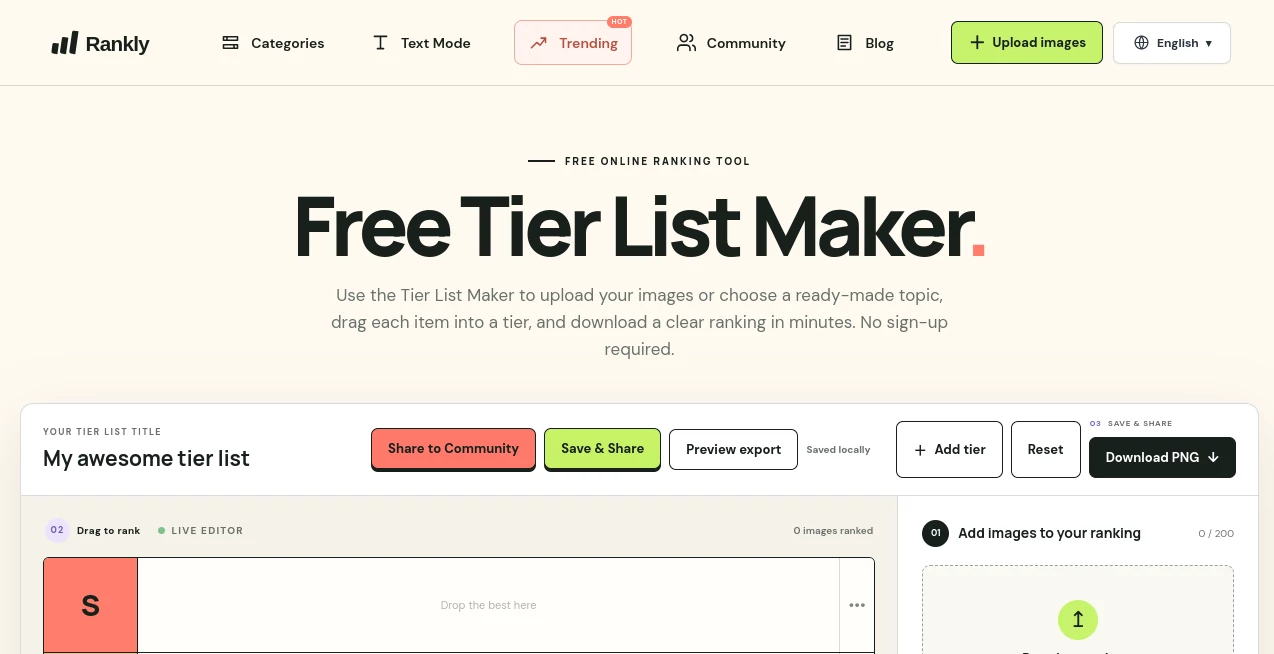
What is Rankly?
Tier List Maker is a simple online ranking tool designed for people who want to compare, organize, and rank images without dealing with complicated software. Whether you are sorting game characters, movies, food, sports teams, music, or personal favorites, the platform gives you a visual board where everything can be arranged into custom tiers.
The experience is refreshingly straightforward. There is no account required, and users can either upload their own images or start with one of the ready-made ranking templates. For anyone who has ever tried to make a tier list manually, the drag-and-drop approach makes the process considerably quicker and more enjoyable.
Key Features
- Free online tier list creation without requiring an account
- Upload PNG, JPG, and WebP images directly from your device
- Support for large rankings with up to 200 images
- Drag-and-drop ranking editor for quick organization
- Customizable tier labels that can be renamed to match your ranking system
- Ready-made templates for games, movies, fandoms, food, and other popular topics
- PNG export for saving and sharing completed rankings
- Browser-based image processing for the custom ranking editor
User Interface
The interface keeps the main task front and center: add images, move them into tiers, adjust the labels, and export the result. The live editor uses a familiar drag-and-drop layout, so there is very little to learn before creating a first ranking.
The tier labels can also be changed, which is useful when the traditional S, A, B, C, and D structure does not fit the topic. A movie ranking might use categories such as “Must Watch,” “Good,” and “Skip,” while a gaming list could use performance-based labels instead.
Accuracy & Performance
Ranking itself is intentionally left to the user, which is one of the platform's strengths. Rather than pretending that there is one objectively correct answer, the editor provides a visual workspace for making your own judgment.
The workflow is also fast. Images can be placed into tiers with drag-and-drop controls, and the completed board can be exported as a PNG. The site states that images used in the editor are processed locally in the browser rather than uploaded to its server.
Capabilities
The platform is flexible enough for far more than gaming. Ready-made examples cover popular games and fandoms, while the custom editor can be used for movies, television, anime, music, sports, food, books, products, and everyday choices.
For example, a gaming community could rank characters or weapons, a movie fan could compare films across different eras, and a food enthusiast could build a personal ranking of fast-food chains. The ability to upload your own images means users are not restricted to predefined subjects.
Security & Privacy
Privacy is particularly useful for people creating custom rankings. According to the website, images used in the editor stay in the browser and are processed locally rather than being uploaded to a server. The service also allows users to create and download rankings without signing up for an account.
Use Cases
Gaming is one of the most obvious applications. Players can rank characters, weapons, maps, bosses, abilities, or other game elements. Ready-made templates make it possible to start with large collections rather than building every image set from scratch.
Entertainment is another strong use case. Users can compare movies, anime characters, television shows, villains, performances, albums, songs, or memorable scenes. The visual format works particularly well for discussions because the final ranking is easy to understand at a glance.
It can also be useful for casual decisions. A group of friends could rank restaurants or snacks, a sports fan could compare athletes or teams, or a book lover could organize favorite novels. The format is simple enough for personal use while still being suitable for shareable community content.
Pros and Cons
Pros
- Free to use
- No account or sign-up required
- Simple drag-and-drop editor
- Supports custom image uploads
- Large image capacity for custom rankings
- Multiple ready-made templates
- Custom tier names
- PNG export makes finished rankings easy to share
- Images are processed locally in the browser according to the website
Cons
- The main experience is focused on visual image-based rankings rather than complex data analysis
- Users looking for advanced collaborative ranking features may need a more specialized platform
- The quality of a ranking ultimately depends on the user's own criteria and judgment
Pricing Plans
The tier list editor is free to use. Users can upload their own images, arrange them into tiers, customize labels, and download the finished ranking without creating an account. This makes it particularly appealing for casual users who simply want to create a ranking without committing to another subscription service.
There is also no need to pay before experimenting with the editor. Someone can create a quick ranking for a game, movie collection, food list, or personal favorites and export the result when finished.
How to Use the Tool
Start by opening the tier list editor and deciding whether you want to work from a ready-made template or create a ranking from your own images.
- Choose a template or start with a blank ranking.
- Upload PNG, JPG, or WebP images if you are creating a custom list.
- Drag each image into the tier that best represents your opinion.
- Rename the tier labels if you want a custom ranking system.
- Rearrange the images until the order feels right.
- Review the completed board and export it as a PNG.
The whole process is designed to be quick. For a simple ranking, there is no reason to spend time learning complicated editing tools when a few drag-and-drop actions can produce a finished result.
Comparison with Similar Tools
Compared with more complex tier-list platforms, this solution takes a particularly lightweight approach. Its strongest advantage is the combination of free access, no required account, custom image uploads, ready-made templates, and straightforward PNG export.
Some competing platforms focus heavily on community interaction, voting, profiles, or advanced sharing systems. This tool instead puts the creation process first. That makes it a good choice for someone who simply wants to build a ranking, customize it, and save the finished image without unnecessary steps.
The ready-made templates also give it an advantage for popular subjects. Instead of collecting hundreds of images manually, users can begin with established collections for games and other fandoms, then adjust the ranking according to their own preferences.
Conclusion
For anyone who enjoys ranking things, this is a practical tool that gets out of the way and lets the ranking itself take center stage. The combination of custom uploads, ready-made templates, flexible tier labels, drag-and-drop editing, and free PNG export covers what most people need from a modern tier list creator.
It is especially appealing for gamers, entertainment fans, creators, and anyone who enjoys turning opinions into visual lists. Whether the goal is settling a friendly argument about the best game characters or creating a personal ranking of favorite movies, the process remains quick and approachable.
Frequently Asked Questions (FAQ)
Is the tool free to use?
Yes. The website provides a free tier list editor where users can create rankings, upload images, arrange items, and download the finished result without creating an account.
Do I need to create an account?
No. The editor can be used without signing up, which makes it convenient for quick one-time rankings.
Can I upload my own images?
Yes. Users can upload PNG, JPG, and WebP images from their device and use them in a custom ranking.
How many images can I add?
The editor supports up to 200 images for a custom ranking.
Can I change the tier names?
Yes. Tier labels can be renamed, allowing users to create a ranking system that matches their topic instead of relying only on standard S-to-F labels.
Can I download my finished tier list?
Yes. Completed rankings can be exported as PNG images for saving or sharing.
Are uploaded images stored on a server?
According to the website, images used by the editor are processed locally in the browser and are not uploaded to the server.
What can I create a tier list about?
You can rank games, characters, movies, television shows, anime, music, sports, food, books, products, and many other subjects. You can also create a completely custom ranking using your own images.