Toon Tone
What is Toon Tone?
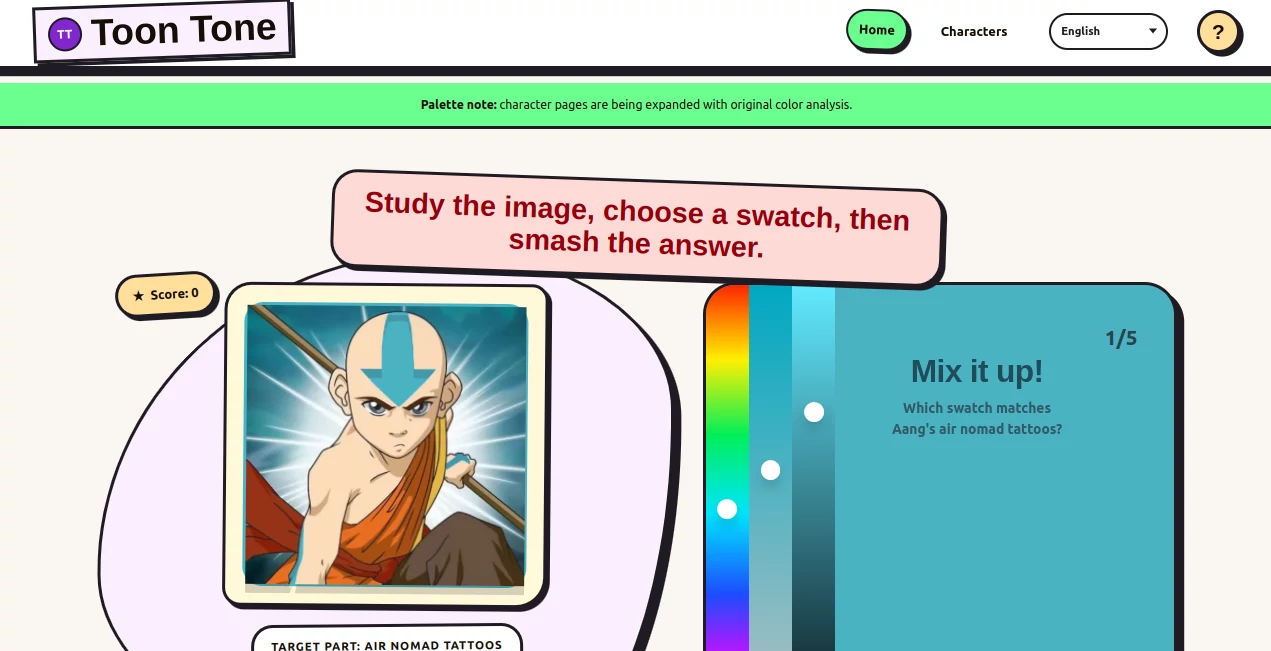
Ever tried to remember the exact shade of SpongeBob’s yellow or Patrick’s pink and realized your brain was fuzzier than you thought? This game turns that everyday memory slip into something genuinely addictive. You get a hint about a beloved cartoon or anime character, then use three simple sliders to rebuild the exact color. When you hit “smash,” it shows how close you got and explains why that particular hue, saturation, or brightness makes the character instantly recognizable. I’ve spent more time than I care to admit trying to nail Pikachu’s yellow or Luffy’s red vest—and every round leaves me smiling, even when I miss badly.
Introduction
In a world full of serious productivity tools, Toon Tone is a refreshing reminder that learning can be pure fun. It’s a browser-based color memory game that focuses on iconic cartoon and anime palettes. Instead of copying official images, it uses original abstract color cards and clever text prompts so you train your eye and memory without any copyright worries. Whether you’re a casual fan or someone who geeks out over animation details, it scratches that perfect itch: challenging enough to feel rewarding, light enough to play for just five minutes while waiting for coffee. The best part? Every wrong guess teaches you something useful about how colors work in character design.
Key Features
User Interface
The design is delightfully clean and focused. A big preview area shows the target prompt, three tall HSB sliders sit on the right, and a prominent “Smash Color!” button begs to be clicked. No clutter, no unnecessary menus—just you, the color, and the character hint. The instant feedback after each guess (with a side-by-side comparison) makes it addictive. It works beautifully on both desktop and mobile, so you can sneak in a round during a commute or break.
Accuracy & Performance
The color matching is precise and fair. The game uses real HSB values behind the scenes, so your guesses are measured meaningfully rather than by vague “close enough” logic. Feedback is immediate and educational—it tells you exactly which part (hue, saturation, or brightness) you nailed or missed. Loading is lightning fast, and the scoring system feels honest: you quickly learn that getting the hue right is usually the biggest hurdle, while saturation and brightness are easier to fine-tune.
Capabilities
You can play general rounds, focus on anime characters, or stick to classic cartoons. There’s a full character hub where you can browse and practice specific favorites like SpongeBob, Pikachu, Luffy, Homer Simpson, and many more. The game includes helpful explanations about why certain colors work so well for each character. Leaderboards add a bit of friendly competition, and the color guessing guide teaches fundamentals that actually improve your eye over time.
Security & Privacy
It’s completely browser-based with no signup required to play. No accounts, no data collection beyond basic anonymous scoring if you choose to appear on leaderboards. Your guesses and progress stay private unless you decide to share a high score. That simplicity and respect for your time and privacy make it feel trustworthy and welcoming.
Use Cases
Animation students use it to train their color memory for character design class. Parents play quick rounds with kids to teach color theory without it feeling like school. Fans challenge themselves to master their favorite shows’ palettes. Even professional illustrators drop in occasionally to sharpen their eye and warm up before drawing sessions. It’s the perfect mix of entertainment and subtle skill-building—fun first, learning as a happy side effect.
Pros and Cons
Pros:
- Truly addictive gameplay that improves your color sense without feeling like work.
- Excellent feedback system that turns every mistake into a mini lesson.
- Beautifully curated characters from both Western cartoons and anime.
- Completely free with no aggressive ads or paywalls blocking fun.
- Works great on phones for on-the-go play.
Cons:
- Some very obscure characters might stump newer players.
- Leaderboards can feel intimidating if you’re just starting out.
- Limited to color guessing—no actual drawing or creation tools.
Pricing Plans
The entire experience is completely free. No hidden premium tiers, no ads interrupting your flow, and no pay-to-win elements. It’s built as a genuine gift to the cartoon-loving internet—play as much as you want, whenever you want. That generosity makes it even more special in a world where most fun tools eventually ask for money.
How to Use Toon Tone
Go to the main page and pick a round (general, anime, or cartoon). Read the character prompt, then use the three sliders: Hue first to get the basic color family, then Saturation for vividness, and Brightness for lightness/darkness. Watch the big preview square update in real time. When it feels close, hit “Smash Color!” and see how you did. Study the explanation, then jump into the next round. The more you play, the better your eye gets—it’s that simple and rewarding.
Comparison with Similar Tools
Most color games are either too childish or too technical. This one hits a sweet spot: fun enough for casual play, deep enough to actually train your eye. Where other memory games feel random, Toon Tone ties every round to beloved characters and real design principles. The HSB approach is far more intuitive than RGB sliders most tools force on you. It’s less about rote memorization and more about developing genuine color intuition.
Conclusion
In a digital world that can feel overwhelmingly serious, Toon Tone is a joyful little pocket of play that also makes you sharper. It celebrates the vibrant world of animation while quietly teaching you how colors work and why they matter. Whether you play for two minutes or two hours, you’ll walk away smiling—and probably a little better at seeing the world in shades of character. If you love cartoons, color, or just need a fun mental break, this is one of those rare gems worth bookmarking.
Frequently Asked Questions (FAQ)
Is Toon Tone really free?
Yes—completely free, no signup, no ads, no catch.
Do I need to know every character?
Not at all. The prompts give strong hints, and every round teaches you something new.
Why use HSB sliders instead of RGB?
HSB matches how our brains actually remember colors—hue family first, then vividness, then lightness. Much more intuitive.
Can I play on my phone?
Yes, it works beautifully on mobile browsers.
How do scores work?
Hue is the most important. Close saturation and brightness still score well if the base color family is correct.
These classifications represent its core capabilities and areas of application. For related tools, explore the linked categories above.

Toon Tone Alternatives Product
GCS Cheats

Max Studio AI
tarotguide

Chainsaw Man…

Kirkified AI

funboxie

Kitchendary
Caricature A…

Kirkify