
TradeTab
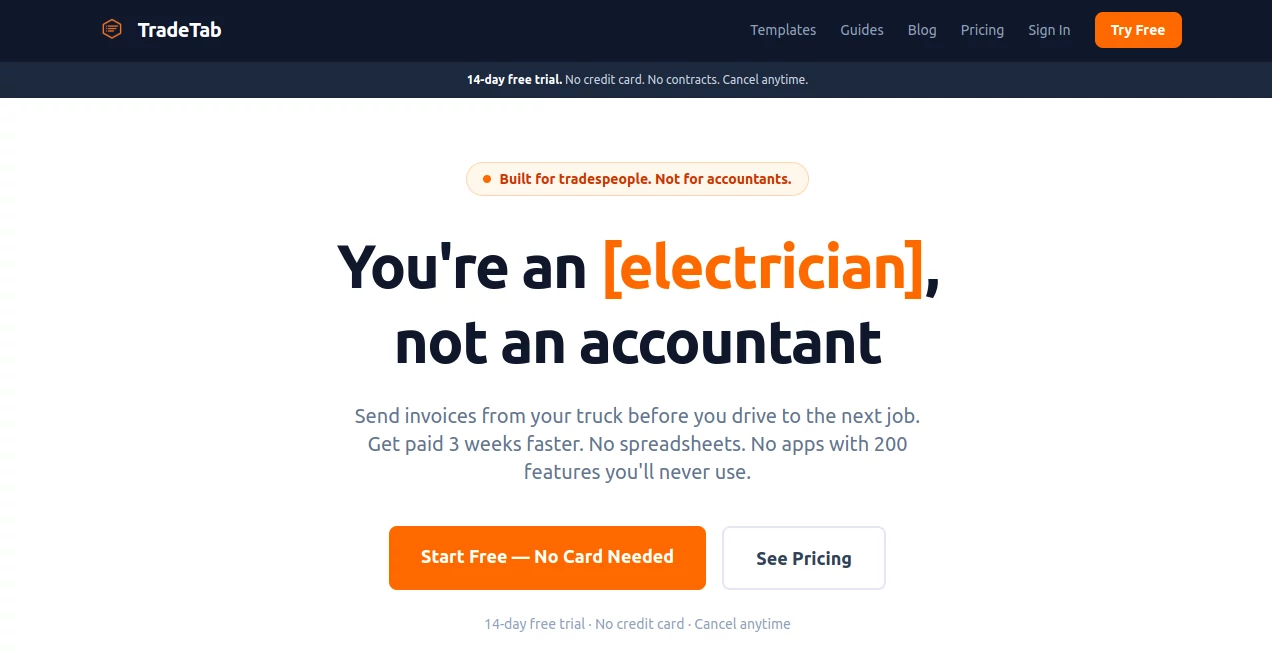
What is TradeTab?
After a long day on the job, the last thing you want to do is sit down and wrestle with invoicing software. TradeTab gets that. It’s built specifically for plumbers, electricians, HVAC techs, carpenters, and other tradespeople who need to send professional invoices fast without the headache. You pick the job type, the AI suggests accurate line items, you tap send, and you’re done—often before you even leave the job site. Many tradespeople I’ve talked to say it’s the first invoicing tool that actually feels like it was made for them, not for big office teams.
Introduction
Most invoicing apps are either too complicated with features you’ll never use or too basic and unprofessional. TradeTab hits the sweet spot. It focuses on what actually matters for solo operators and small crews: speed, simplicity, and looking pro to your clients. The AI line item suggestions alone save a ton of time, and the clean PDFs make you look established even if you’re a one-person operation. It’s the kind of tool that quietly solves daily frustrations—like forgetting to invoice or chasing payments—so you can focus on the work you actually enjoy.
Key Features
User Interface
The interface is refreshingly straightforward. Everything happens in your browser on your phone or laptop—no app downloads required. You select a job type (like “faucet repair” or “full bathroom remodel”), the AI fills in sensible line items with pricing, you make quick tweaks if needed, and you send a clean PDF or payment link. The flow is so smooth that many users report creating and sending invoices in under 30 seconds. It stays out of your way so you can get back to your truck and the next job.
Accuracy & Performance
The AI suggestions for line items are surprisingly on-point for different trades. It knows typical pricing and tasks for plumbing, electrical, HVAC, and more. Invoices generate quickly and look professional every time. Users consistently report getting paid faster because the invoices look trustworthy and include easy payment links. The system is reliable even during busy seasons when you’re sending multiple invoices a day.
Capabilities
It handles everything a tradesperson actually needs: quick invoice creation, professional PDFs with your branding, online payment links, client management, job photo attachments for before/after proof, and simple tracking of who owes what. You can work entirely from your phone at the job site. It’s deliberately focused—no bloated CRM or scheduling features you’ll never touch—just invoicing done right.
Security & Privacy
Your business data and client information stay secure. The platform is built with small business needs in mind, so it doesn’t require risky integrations or excessive permissions. You maintain full control over your invoices and client relationships.
Use Cases
A plumber finishes a repair job, pulls out his phone, selects the job type, and sends a professional invoice with photos before driving to the next call. An electrician uses it to batch invoices for multiple jobs at the end of the week. A general contractor keeps all client history organized and sends polished estimates that convert better. Solo operators love how it replaces the old “I’ll invoice when I get home” habit that often led to forgotten payments. It works especially well for anyone who’s tired of paying $50+ per month for tools that are overkill for their needs.
Pros and Cons
Pros:
- Incredibly fast—most invoices take under 30 seconds to create and send.
- AI line item suggestions save massive amounts of time.
- Professional-looking PDFs that make you look established.
- Simple online payment options that get you paid faster.
- Only $9 per month with no hidden fees or unused features.
Cons:
- Focused purely on invoicing—if you need full job scheduling or advanced CRM, you may need another tool.
- Best for solo operators and small crews rather than large enterprises.
Pricing Plans
TradeTab keeps it honest and simple: just $9 per month. No tiers, no hidden costs, no features you’ll never use. That single price gets you unlimited invoicing, client management, payment links, and all the core tools. Compared to other platforms charging $39–$59 for bloated software, it feels like a breath of fresh air for hardworking tradespeople.
How to Use TradeTab
Sign up in under a minute. When you finish a job, open the site on your phone, select the job type (or create a custom one), review the AI-suggested line items, add any photos, and send the invoice. Your client receives a clean PDF or can pay instantly with the link. Track everything from the simple dashboard. Many users build a habit of sending invoices right at the job site before packing up—getting paid faster and staying organized without evening paperwork.
Comparison with Similar Tools
Compared to big names like Jobber or Housecall Pro, TradeTab is dramatically simpler and cheaper while still delivering professional results. It doesn’t try to be everything to everyone—it focuses on fast, reliable invoicing for tradespeople who just want to get paid without the hassle. If you don’t need complex scheduling or massive team features, this is often the smarter, more affordable choice.
Conclusion
For tradespeople who work with their hands all day, admin work should never feel like punishment. TradeTab makes invoicing quick, professional, and even a little satisfying. It respects your time, helps you get paid faster, and lets you focus on what you do best. If you’re tired of chasing payments or wrestling with complicated software, this could be the simple solution you’ve been looking for.
Frequently Asked Questions (FAQ)
How fast can I really create an invoice?
Most users send professional invoices in 20–40 seconds once they’re familiar with the flow.
Do clients have to pay online?
No—you can send a clean PDF for cash, check, or Venmo, or include a payment link for card payments.
Is it good for my specific trade?
Yes—strong support for plumbers, electricians, HVAC, carpenters, roofers, painters, and more.
Can I add my own branding?
Yes—your business name and logo appear on every invoice.
Is there a long contract?
No—month-to-month with no long-term commitment.
AI Documents Assistant , AI Forms & Surveys .
These classifications represent its core capabilities and areas of application. For related tools, explore the linked categories above.

TradeTab Alternatives Product

Create Filla…

JFIF to JPG …

jpg to excel

Certificate …

The #1 Compa…

AIDeckly

Flowmata AI
Fill PDF fro…

Rename files…