


















Transcrisper
What is Transcrisper?
Nothing kills momentum faster than waiting for an audio file to upload, paying per minute, or wondering if your private meeting notes just left your computer. This tool cuts through all that noise. You drop in any audio or video file—interview, lecture, podcast, Zoom recording—and it transcribes everything right in your browser, instantly, for free, with no limits and no data leaving your device. I’ve used it on long interviews where other services would have charged a small fortune, and the accuracy on everyday speech is genuinely impressive. It feels like finally having a reliable assistant who doesn’t charge by the word and doesn’t store your conversations.
Introduction
Transcription has always been one of those necessary but painful tasks. Paid services can get expensive quickly, cloud tools raise privacy concerns, and many free options cap minutes or shove ads in your face. This platform takes a refreshingly different approach: it runs powerful AI transcription locally in your browser using your own hardware. No sign-up required, no data sent to servers, no usage limits. It’s built for people who actually need to transcribe things regularly—journalists, students, podcasters, researchers, meeting-heavy professionals—and want speed, privacy, and zero cost standing in the way. The experience is simple enough that my non-technical colleague started using it immediately after one demo.
Key Features
User Interface
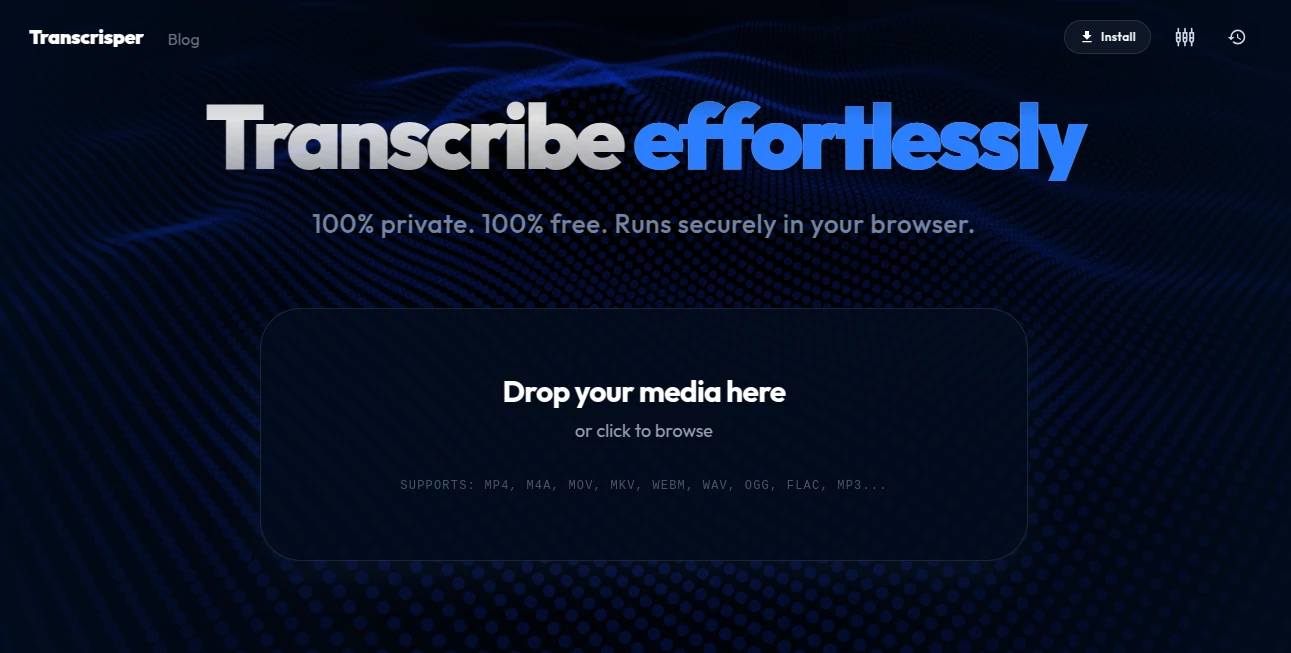
The page is wonderfully minimal. Big drop zone in the center, clear file size indicators, a few helpful options for language and model strength, and that’s basically it. No accounts, no dashboards, no upsells popping up mid-process. You drag a file, choose any tweaks you want, and watch clean, timestamped text appear as it processes. The interface disappears so you can focus on the content, which is exactly how transcription tools should feel.
Accuracy & Performance
It handles real-world audio surprisingly well—conversations with overlapping speech, background noise, different accents—all without the usual dramatic drop in quality. Timestamps are accurate, speaker detection works in many cases, and the text comes out readable rather than robotic. Because it runs locally, speed depends on your machine, but on decent hardware it’s impressively fast even for hour-long files. The privacy bonus means you never have to worry about sensitive interviews or client calls sitting on someone else’s servers.
Capabilities
Supports a wide range of audio and video formats, multiple languages, different model sizes so you can balance speed and accuracy, automatic timestamping, and easy export options (plain text, SRT subtitles, Word doc). It works completely offline after the initial model download, making it perfect for travel, planes, or anywhere without reliable internet. You can even transcribe while working on other things since it runs in the background.
Security & Privacy
This is where it really stands out. Everything happens on your device—no uploads, no cloud processing, no data retention. Your recordings never leave your computer. For journalists protecting sources, lawyers handling client privilege, or anyone dealing with confidential material, that level of privacy is a game-changer. It’s rare to find a tool this capable that respects your data so completely.
Use Cases
A journalist records an hour-long interview in the field, drops the file in while driving home, and has clean, timestamped notes ready by the time they reach the office. A student records lectures and turns them into searchable study notes without paying monthly fees. A podcaster transcribes episodes for show notes and SEO in one pass. Remote teams turn long meetings into actionable summaries without worrying about who owns the recording. It’s especially powerful for anyone who deals with lots of spoken content and wants full control over their data.
Pros and Cons
Pros:
- Truly unlimited and completely free with no hidden catches.
- 100% private—nothing leaves your computer.
- Surprisingly accurate on everyday recordings.
- Works offline after initial setup.
- Clean, fast, no-nonsense interface.
Cons:
- Speed depends on your device’s hardware (weaker laptops may take longer).
- Very noisy or heavily accented audio can still need some manual cleanup.
- No automatic speaker labeling in all cases (though timestamps help).
Pricing Plans
It’s completely free. No premium tiers, no usage caps, no “pro” version hiding the good stuff. The creators made it with the philosophy that essential tools like transcription shouldn’t cost money or compromise privacy. That alone makes it stand out in a sea of subscription-heavy alternatives.
How to Use Transcrisper
Go to the site, drag your audio or video file into the upload area (or click to browse). Select language if needed and choose model size based on your device. Click transcribe and wait while it processes locally. Review the text with timestamps, make any quick corrections if needed, then export as TXT, SRT, or copy to clipboard. That’s the entire workflow—simple, private, and effective.
Comparison with Similar Tools
Most popular transcription services require uploading your files to the cloud, charge by the minute, and keep your data. This one runs everything locally, costs nothing, and keeps everything private. While cloud services might edge it out slightly on very difficult audio with heavy accents, the combination of zero cost, zero privacy risk, and solid everyday performance makes it the clear winner for most personal and professional use cases.
Conclusion
Transcription shouldn’t be complicated, expensive, or a privacy headache. This tool proves it doesn’t have to be. It gives you fast, accurate, private results without subscriptions or compromises. For students, journalists, creators, researchers, or anyone who works with spoken words, it’s one of those rare tools that quietly makes life noticeably better. If you’ve ever been frustrated by transcription costs or worried about where your recordings end up, give it a try. You’ll likely wonder how you managed without it.
Frequently Asked Questions (FAQ)
Is it really completely free?
Yes—unlimited use, no hidden fees, no premium version required for core features.
Does my audio leave my computer?
No—everything runs locally in your browser using your hardware.
What file formats are supported?
Most common audio and video formats—MP3, WAV, MP4, M4A, and more.
How accurate is it?
Very good on clear speech; noisy environments or strong accents may need light editing.
Can I use it on my phone?
Best performance on desktop/laptop; mobile works but depends on your device’s power.
AI Documents Assistant , AI Productivity Tools , AI Transcription , AI Speech to Text .
These classifications represent its core capabilities and areas of application. For related tools, explore the linked categories above.

Transcrisper Alternatives Product

Skywork Supe…

VisualGPT

Sales Prospe…
FluentDictat…

Magpie

GPT Image 2 …

Workik
ReportRemarks

ApplyBtn
