

















TranslateImage
What is TranslateImage?
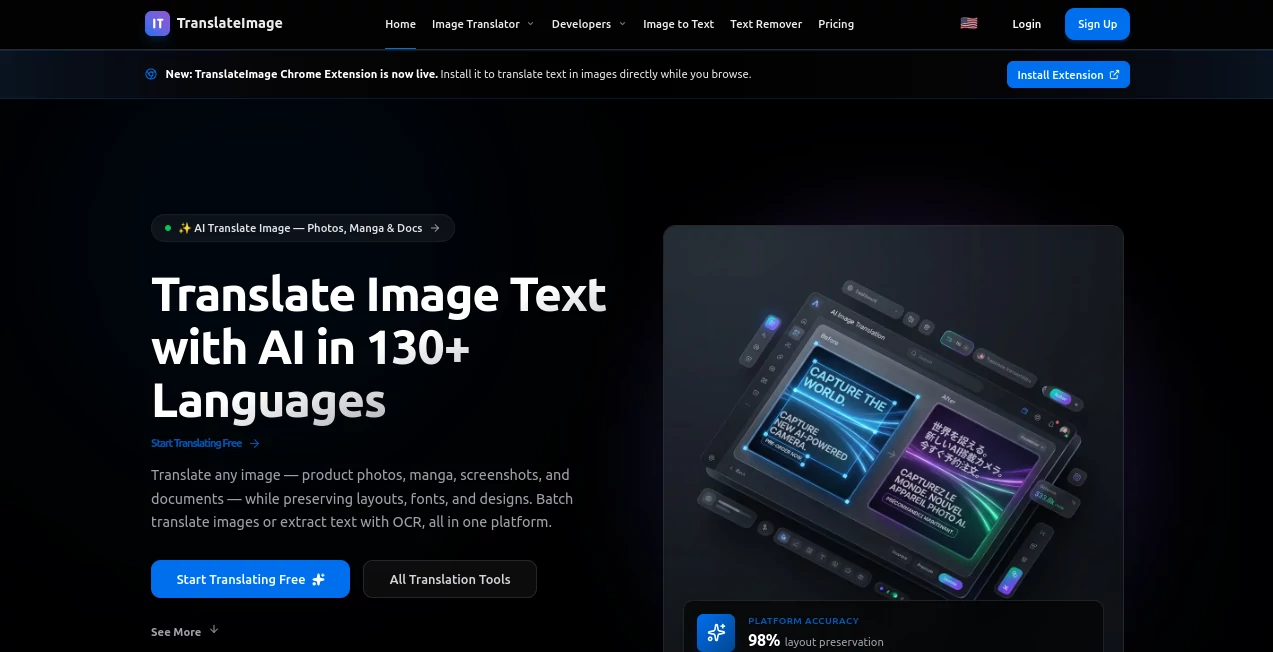
I still remember the frustration of receiving a beautiful infographic or a funny meme in another language and having no easy way to understand it without awkward screenshots and manual typing. Then I found this tool and it changed how I handle foreign visuals. You upload any image — a menu, a street sign, a product label, or a full-page document — and it not only translates the text but keeps the original design, fonts, and layout intact. The result looks like the image was originally created in your language. It’s one of those tools that feels almost too good to be true the first few times you use it.
Introduction
In our connected world, we constantly run into images full of text we can’t read. Whether you’re traveling, studying, working with international clients, or just browsing social media, language barriers pop up everywhere. TranslateImage solves this elegantly by combining powerful OCR with smart translation and precise inpainting. It doesn’t just slap translated text on top — it understands the visual context and rebuilds the image so the new text blends naturally. The process is fast, accurate, and remarkably respectful of the original design. For students, travelers, marketers, and global teams, it removes a daily friction point that used to waste a lot of time.
Key Features
User Interface
The experience is delightfully straightforward. A large, friendly upload area invites you to drop your image or click to select one. You choose the target language, and within seconds you see the translated version. Side-by-side comparison makes it easy to check accuracy, and you can fine-tune individual text segments if needed. No complicated menus or hidden settings — just upload, choose language, and get results. Even my non-technical friends figured it out on their first try.
Accuracy & Performance
The text detection is impressively sharp, even on challenging images with stylized fonts, curved text, or busy backgrounds. Translations feel natural rather than robotic, and the way it reconstructs the image keeps the visual harmony intact. Processing is quick — most images finish in under 15 seconds — and the quality holds up well across different languages and image types. I’ve tested it on everything from Japanese packaging to Spanish restaurant menus and been consistently pleased with how natural the results look.
Capabilities
It handles single images or batch uploads, supports dozens of languages, preserves fonts and styling as much as possible, and offers options for different translation tones (formal, casual, marketing-friendly). You can translate only specific areas if you want, or let it handle the entire image. The output is high-resolution and ready for immediate use — perfect for sharing, presentations, or further editing. It works beautifully on memes, documents, screenshots, signs, product labels, and educational materials.
Security & Privacy
Your uploaded images are processed securely and not stored after the translation is delivered. No unnecessary accounts are forced for basic use, and the platform focuses on delivering value without collecting more data than needed. For sensitive documents or client work, that respectful approach builds real trust.
Use Cases
A marketer receives a campaign graphic in Spanish and translates it for English audiences in minutes while keeping the original design. A traveler photographs a foreign menu and instantly understands what they’re ordering. A teacher converts educational materials from one language to another for multilingual students. A product manager localizes app screenshots for different markets without redesigning everything. It’s become an everyday helper for anyone who works across languages.
Pros and Cons
Pros:
- Preserves original design, fonts, and layout better than most tools.
- Fast and accurate across many languages and image types.
- Extremely easy to use — no learning curve.
- Great for both personal and professional translation needs.
- High-quality outputs ready for immediate use.
Cons:
- Extremely stylized or handwritten text can occasionally need minor manual fixes.
- Heavy batch processing and unlimited use require a paid plan.
Pricing Plans
It offers a generous free tier so you can test the quality on your own images before committing. Paid plans unlock higher volume, priority processing, batch uploads, and advanced features. The pricing feels fair for the time and effort it saves — many users say they recover the cost after just a few important translations.
How to Use TranslateImage
Go to the site, drag your image into the upload area or click to select one. Choose your target language from the dropdown. Click translate and wait a few seconds. Review the result using the side-by-side view, make any small adjustments if needed, and download the final image. For multiple images, paid users can process them together. The entire flow is smooth and satisfying from start to finish.
Comparison with Similar Tools
Many translation tools either ignore the visual aspect or produce ugly results with mismatched fonts. This one stands out by focusing on natural-looking reconstruction while keeping the original aesthetic. It’s faster and more accurate than manual methods and more visually intelligent than basic OCR translators. For anyone who cares about how the final image looks, not just the words, it’s currently one of the strongest options available.
Conclusion
Language should never be a barrier to understanding great visuals. This tool removes that barrier with intelligence, speed, and respect for design. It turns confusing images into clear, beautiful ones you can actually use and share. Whether you’re working, traveling, learning, or creating content, it makes crossing language lines feel effortless. Once you start using it, you’ll wonder how you ever managed without it.
Frequently Asked Questions (FAQ)
How accurate is the translation?
It combines strong OCR with high-quality translation models, delivering natural results in most common scenarios.
Does it work on handwritten text?
It handles many handwritten styles well, though very messy writing may need some editing.
Can I translate only part of an image?
Yes — you can select specific areas to focus the translation on.
Is my image stored anywhere?
No — images are processed temporarily and deleted after delivery.
What languages are supported?
A wide range including major European, Asian, and Latin American languages.
AI Translate , AI Content Generator , Photo & Image Editor , AI Image to Image .
These classifications represent its core capabilities and areas of application. For related tools, explore the linked categories above.

TranslateImage Alternatives Product

UPDF AI

URL2Pin
Free AI Chat
Square Image
TranAI
md2card

Reztune
Color-Analys…
TranslateAI
