

















URL2Pin
What is URL2Pin?
Growing on Pinterest takes more than publishing attractive visuals. Success comes from consistency, fresh content, keyword optimization, and testing different creative angles. Creating all of that manually can quickly become overwhelming, especially for bloggers, affiliate marketers, online stores, and content creators managing dozens of pages.
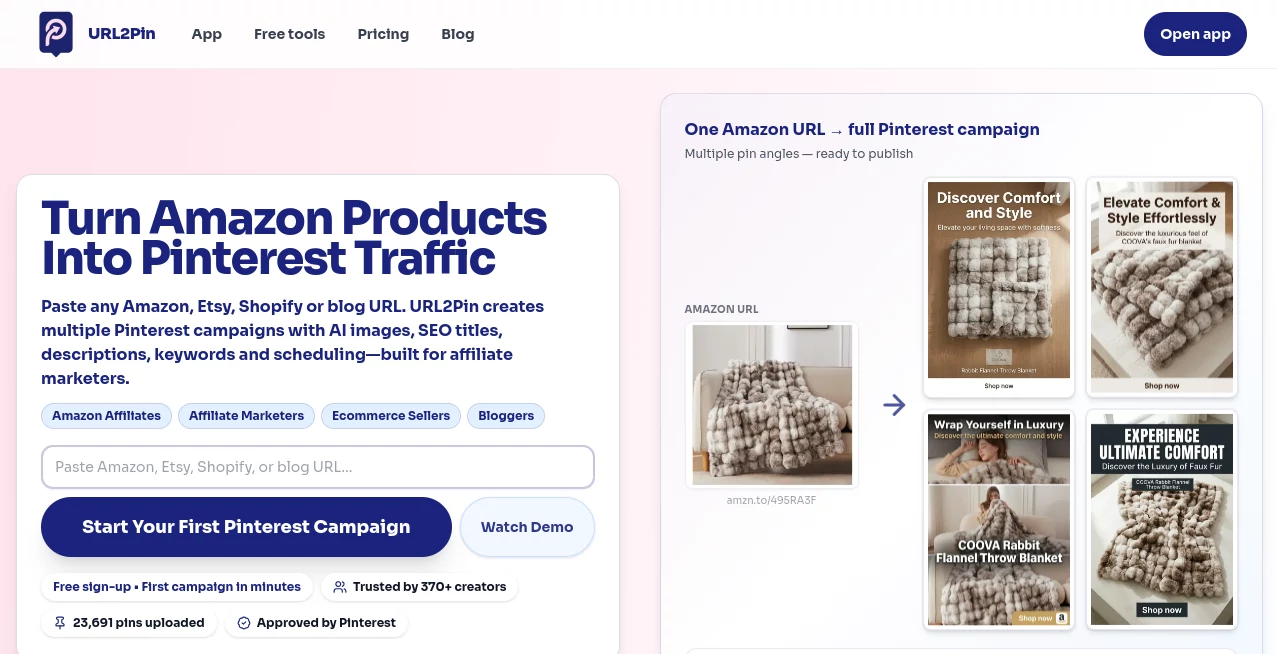
This platform simplifies the entire workflow by transforming a single webpage into multiple Pinterest-ready campaigns. Instead of designing every graphic from scratch, users can generate eye-catching pin images, SEO-friendly titles, descriptions, hashtags, and publishing schedules within minutes. The result is a faster marketing process that helps creators focus on producing valuable content instead of repetitive design tasks.
Whether promoting blog articles, Amazon products, Etsy listings, Shopify stores, or other online content, the platform provides an efficient way to maintain a consistent Pinterest presence while reducing the time spent on content creation.
Key Features
User Interface
The dashboard is designed for speed and simplicity. Users only need to paste a webpage URL, choose their preferred campaign style, and let the platform generate multiple Pinterest assets automatically. Navigation is clean, making it suitable for both beginners and experienced marketers without requiring graphic design skills.
Accuracy & Performance
The platform intelligently analyzes webpage content to generate relevant Pinterest titles, descriptions, hashtags, and visual concepts. Multiple marketing angles are created for every campaign, making it easier to test different approaches and improve engagement over time. Bulk generation and scheduling further increase productivity for users managing large content libraries.
Capabilities
- Generate multiple Pinterest pins from a single URL.
- Create AI-generated pin images.
- Produce SEO-friendly titles and descriptions.
- Generate hashtags automatically.
- Create different marketing angles for the same content.
- Support blog posts, Amazon products, Etsy listings, and Shopify stores.
- Download completed campaigns.
- Schedule posts directly for Pinterest publishing.
- Generate roundup and comparison pins using multiple product URLs.
- Support bulk campaign creation for high-volume publishing.
Security & Privacy
The platform operates through user accounts and gives creators full control before anything is published. Generated content can be reviewed, edited, downloaded, or scheduled according to individual preferences. Users remain responsible for approving final content before it goes live, helping maintain quality and compliance with publishing guidelines.
Use Cases
- Driving Pinterest traffic to blog articles.
- Promoting Amazon affiliate products.
- Marketing Etsy product listings.
- Increasing visibility for Shopify stores.
- Creating Pinterest campaigns for ecommerce businesses.
- Scaling Pinterest marketing for agencies.
- Testing multiple creative pin variations.
- Managing high-volume Pinterest publishing workflows.
Pros and Cons
- Pros
- Extremely fast campaign creation from a single URL.
- No graphic design experience required.
- Generates multiple creative pin variations automatically.
- Built specifically for Pinterest marketing workflows.
- Supports scheduling and bulk generation.
- Useful for bloggers, affiliates, and ecommerce businesses.
- Cons
- Focused mainly on Pinterest rather than multiple social platforms.
- Advanced features require a paid subscription.
- Bulk publishing is unavailable on the free plan.
Pricing Plans
A free plan is available, allowing new users to test the workflow with a limited number of AI-generated pins. Paid subscriptions begin with affordable monthly plans and scale through Creator, Pro, and Agency options, offering increased AI pin generation, scheduling, bulk creation, and higher monthly usage limits for growing businesses and professional marketers.
How to Use URL2Pin
Start by creating an account and pasting the URL of a blog article, product page, or online listing. The platform analyzes the content and generates multiple Pinterest pin concepts complete with visuals, optimized titles, descriptions, and hashtags. Review the generated assets, make any desired edits, then either download the finished pins or schedule them for publishing directly on Pinterest. The entire process typically takes only a few minutes.
Comparison with Similar Tools
Unlike traditional graphic design software that requires users to build every pin manually, this platform automates nearly every step of Pinterest content creation. While general design tools provide creative flexibility, they often demand significant time for writing copy, selecting images, and creating layouts. Dedicated Pinterest schedulers mainly focus on publishing, whereas this solution combines AI-generated visuals, optimized metadata, multiple campaign angles, and scheduling into a single streamlined workflow, making it particularly valuable for affiliate marketers and content publishers.
Conclusion
For anyone serious about growing traffic through Pinterest, this platform delivers a practical balance of automation and creative flexibility. It removes repetitive design work while helping users publish consistently with optimized visuals and marketing copy. Bloggers, affiliate marketers, ecommerce sellers, and digital creators can dramatically reduce production time while maintaining a steady flow of fresh Pinterest content. Its specialized focus on Pinterest marketing makes it a strong choice for anyone looking to scale organic traffic more efficiently.
Frequently Asked Questions (FAQ)
Who is this platform designed for?
It is ideal for bloggers, affiliate marketers, ecommerce businesses, Shopify store owners, Etsy sellers, and anyone using Pinterest to generate website traffic.
Can it generate multiple Pinterest pins from one webpage?
Yes. A single URL can produce multiple pin variations with different marketing angles, visuals, titles, and descriptions.
Does it include Pinterest scheduling?
Yes. Users can schedule campaigns directly after generating their Pinterest assets, depending on their subscription plan.
Is there a free version?
Yes. New users can access a free plan with limited AI pin generation to explore the platform before upgrading.
Does it support ecommerce products?
Yes. It works with Amazon products, Etsy listings, Shopify stores, blog articles, and many other webpage types.