Try AI Editor
What is Try AI Editor?
Editing a photo does not always need layers, brushes, masks, or a long list of settings. Sometimes, you simply know what you want to change and would rather describe it in plain English. Try AI Editor takes that approach and turns everyday image editing into a straightforward prompt-based process.
The platform is designed for people who want to make practical improvements or creative changes without installing professional editing software. You can upload a JPG, PNG, or WebP image, describe the desired change, review the result, and download a watermark-free PNG. There is also no registration requirement for getting started, making it particularly convenient for quick edits.
From cleaning up a product photograph to restoring an old family picture or experimenting with a completely different visual style, the editor focuses on getting users from an original image to a usable result with as little friction as possible.
Key Features
- Prompt-based photo editing using natural-language instructions
- Background removal and replacement
- Unwanted object removal
- Old photo restoration and color improvement
- Image upscaling and quality enhancement
- Creative style transfer and image reimagining
- Multiple AI image models available from the same interface
- Daily free credits without requiring a credit card
- Watermark-free PNG downloads
- Support for JPG, PNG, and WebP uploads up to 10MB
User Interface
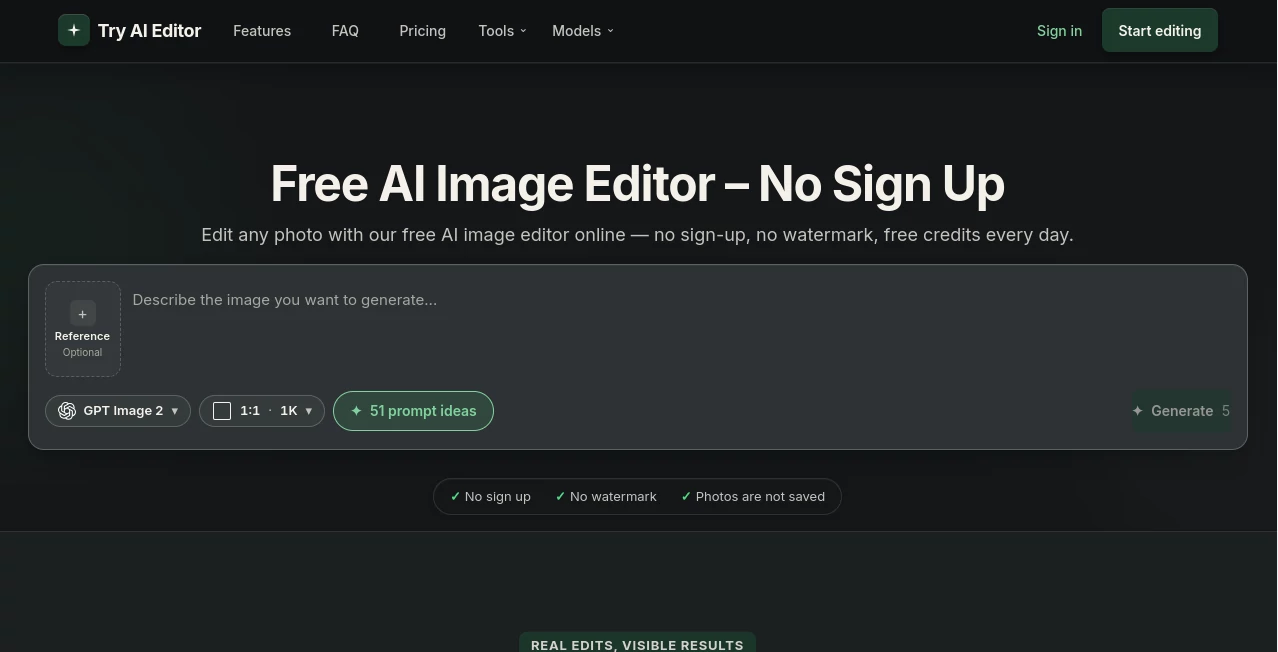
The interface keeps the editing process intentionally simple. Instead of presenting users with a crowded workspace, it centers the experience around the image, a reference upload, a model selector, and a text prompt. This makes the platform approachable even for someone who has never used professional image-editing software.
A useful detail is the reference-image workflow. When editing an existing photograph, users can upload the image and explain what should change. For example, a product seller could ask for a cluttered background to be replaced with a clean studio setting, while someone restoring a family photograph could describe the damage they want repaired.
The overall experience feels closer to giving instructions to a creative assistant than operating a traditional graphics editor. That is especially useful when the desired result is easier to explain in words than to create manually.
Accuracy & Performance
Results depend on the selected model, source image, and clarity of the instruction, but the platform is built around context-aware image editing rather than simple pixel-level adjustments. A well-written prompt can tell the model what should remain unchanged and what needs to be replaced, helping preserve the main subject while modifying its surroundings.
For everyday jobs such as removing distractions, changing backgrounds, restoring damaged areas, improving image quality, or experimenting with a different visual style, this approach can save considerable editing time. For more demanding projects, users can also choose between different image-generation models and resolutions according to the job.
A practical workflow is to start with a lower-cost generation, inspect the composition, and only move to a higher resolution when the direction looks right. This can help avoid spending unnecessary credits on an image that still needs prompt adjustments.
Capabilities
The platform covers a surprisingly broad range of image-editing tasks while keeping the interaction consistent. Background removal can produce clean cutouts for product listings, profile images, or marketplace content. Object removal can erase distracting people, signs, cables, or other unwanted elements and reconstruct the surrounding area.
Style transfer is another useful option for creative work. A normal photograph can be reimagined as an illustration, watercolor, sketch, cinematic scene, or another visual treatment simply by describing the desired look.
Old photographs can also be repaired by asking the editor to improve clarity, reduce visible damage, and restore natural-looking color. Image upscaling provides another practical option when a small or soft image needs a cleaner appearance.
For users who want more control over the underlying generation technology, the service provides several model choices, including GPT Image 2, Nano Banana variants, and Seedream models. Different models and resolutions use different amounts of credits, with the cost displayed before generation.
Security & Privacy
Privacy is an important part of the platform's positioning. The service states that uploaded images are not saved, archived, or used to create a personal image library. Images are temporarily processed by a third-party image service to complete the requested edit.
That makes the tool convenient for short-lived editing tasks, although users should still exercise normal caution with highly sensitive photographs or confidential material. Anyone uploading an image should also make sure they have the necessary rights to use and modify it.
Use Cases
E-commerce product images: Sellers can turn casual product photographs into cleaner listing images by replacing distracting backgrounds, improving presentation, or creating a more consistent visual style.
Social media content: Creators can quickly remove unwanted elements, change colors, experiment with different aesthetics, or transform ordinary photographs into more distinctive visuals.
Old family photographs: Damaged or faded pictures can be improved by describing the restoration required. This is particularly useful when the original photograph has scratches, fading, or other visible imperfections.
Profile and portrait images: Users can clean up backgrounds, adjust visual details, or experiment with creative styles without manually working through multiple editing tools.
Creative experimentation: Designers and casual users can take an existing photograph and explore entirely different visual directions. A simple instruction can be enough to turn a realistic photograph into an illustrated or artistic composition.
Quick everyday edits: Sometimes the requirement is simple: remove an object, clean a background, improve an image, or make a photograph look more polished. A prompt-based workflow is well suited to these small jobs.
Pros and Cons
Pros
- No account is required to start editing.
- Daily free credits make it possible to test the service without an immediate subscription.
- Edited images can be downloaded without a watermark.
- Natural-language prompts make advanced edits accessible to beginners.
- Several AI image models are available in one editing environment.
- Useful features cover both practical editing and creative experimentation.
- The same workflow works across computers, tablets, and phones.
Cons
- Results can vary depending on the source image and wording of the prompt.
- Different models and resolutions consume different amounts of credits.
- Unused monthly subscription credits do not roll over.
- More complex edits may require several prompt iterations before reaching the desired result.
Pricing Plans
The service uses a credit-based pricing system rather than a single unlimited subscription. Users receive free credits for trying the editor, while additional capacity is available through monthly subscriptions, annual plans, and one-time credit packs.
Monthly plans currently include 1,000 credits for $10, 2,500 credits for $20, and 5,000 credits for $40. Annual billing reduces the effective monthly price by 25%, with the corresponding plans priced at $7.50, $15, and $30 per month when billed annually.
For users who do not want a recurring subscription, one-time credit packs are also available. The listed options are 1,000 credits for $20, 3,000 credits for $40, and 7,000 credits for $80. These packs expire six months after purchase.
Credit consumption depends on the selected model and resolution. For example, GPT Image 2 uses 5 credits at 1K resolution, 10 credits at 2K, and 15 credits at 4K. Because the credit cost is displayed before generation, users can choose the quality level with a clearer idea of what each generation will consume.
How to Use Try AI Editor
Start by opening the editor and selecting the image you want to work with. JPG, PNG, and WebP files are supported, with uploads up to 10MB.
Next, describe the change you want in simple language. Instead of explaining technical editing steps, write what you want the finished image to look like. For example, you could ask for a clean studio background, removal of an unwanted object, restoration of an old photograph, or conversion into an artistic style.
Choose the image model and resolution that fit your project, then check the displayed credit cost before generating. After the result appears, review it carefully. If something is not quite right, refine the instruction and try again.
Once you are satisfied with the result, download the finished PNG. For important commercial images, it is worth checking small details such as edges, faces, product shapes, and any text generated inside the image before publishing.
Comparison with Similar Tools
Traditional editors such as Photoshop provide far more manual control, but that flexibility also comes with a steeper learning curve. A prompt-based editor takes the opposite approach: instead of giving the user hundreds of individual controls, it lets the user explain the intended result and allows the AI to handle much of the visual work.
Specialized services that focus on a single task can still be preferable when a user only needs one highly specific operation. The advantage here is breadth. Background removal, object removal, restoration, upscaling, style changes, and creative reimaging can all be approached from the same interface.
The multi-model approach is another distinction. Rather than forcing every project through one generation system, users can select from several available models and compare their strengths, resolutions, and credit requirements. That flexibility can be valuable when the best model for a product photograph is not necessarily the best choice for an artistic transformation.
Conclusion
AI image editing becomes much more useful when it removes the technical barrier between an idea and the final picture. This platform does exactly that by putting natural-language instructions at the center of the editing process.
Its strongest appeal is simplicity. Someone who only needs to remove a distracting object can get started without learning an editing suite, while a more experienced creator can explore multiple models, resolutions, restoration techniques, and creative transformations.
The combination of daily free credits, no required registration, watermark-free downloads, and a broad collection of editing capabilities makes it an attractive option for quick image work. It is not intended to replace every professional graphics application, but for many everyday photo tasks, it offers a much faster route from “I want this changed” to a finished image.
Frequently Asked Questions (FAQ)
Can I use the editor without creating an account?
Yes. The editor can be used without registration or an email address. An account becomes relevant when users want to access paid credit options and account-based features.
Does the editor add a watermark?
No. The service provides watermark-free PNG downloads, so the finished image does not contain a platform logo stamped across it.
Is the AI image editor free?
Yes. Free credits are provided on a daily basis, and no credit card is required to try the editing experience. Users who need additional capacity can purchase credits or subscribe to a paid plan.
What image formats are supported?
Users can upload JPG, PNG, or WebP images. The stated upload limit is 10MB per image.
Can I remove unwanted objects from a photo?
Yes. You can describe the object you want removed, such as a person, sign, cable, or other distraction, and the AI can reconstruct the surrounding area to create a more natural-looking result.
Can it restore old photographs?
Yes. Old-photo restoration is one of the supported use cases. Users can ask the editor to repair visible damage, improve clarity, and add natural-looking color while retaining important characteristics of the original photograph.
Which AI models are available?
The platform provides several image models, including GPT Image 2, Nano Banana variants, and Seedream models. Availability, resolution options, and credit costs vary between models.
Do credits roll over each month?
No. Credits included with monthly plans do not roll over to the next billing period. One-time credit packs have their own expiration period, currently six months from purchase.
Is it suitable for professional image editing?
It can be very useful for many professional tasks such as product images, social media assets, quick background changes, restoration, and creative concepts. However, projects requiring precise manual control, complex compositing, or detailed layer-based editing may still benefit from a traditional professional editor.
Can I use the edited images commercially?
The platform provides watermark-free downloads, but users remain responsible for having the necessary rights to any source photographs, people, brands, or other copyrighted material used in their projects. Commercial users should also review the current service terms for their specific use case.
AI Background Remover , Photo & Image Editor , AI Photo Restoration , AI Image to Image .
These classifications represent its core capabilities and areas of application. For related tools, explore the linked categories above.
Try AI Editor details
Website unavailable — View Alternatives
Pricing
- Freemium
Apps
- Web App
Categories

Try AI Editor Alternatives Product
Kirkified AI

Brave Pink H…
remove bg vi…

loraai.me

UnblurImage …

Sketchready

RemoveText

Transform An…

MAGIK FACE