

















TryOnfy
What is TryOnfy?
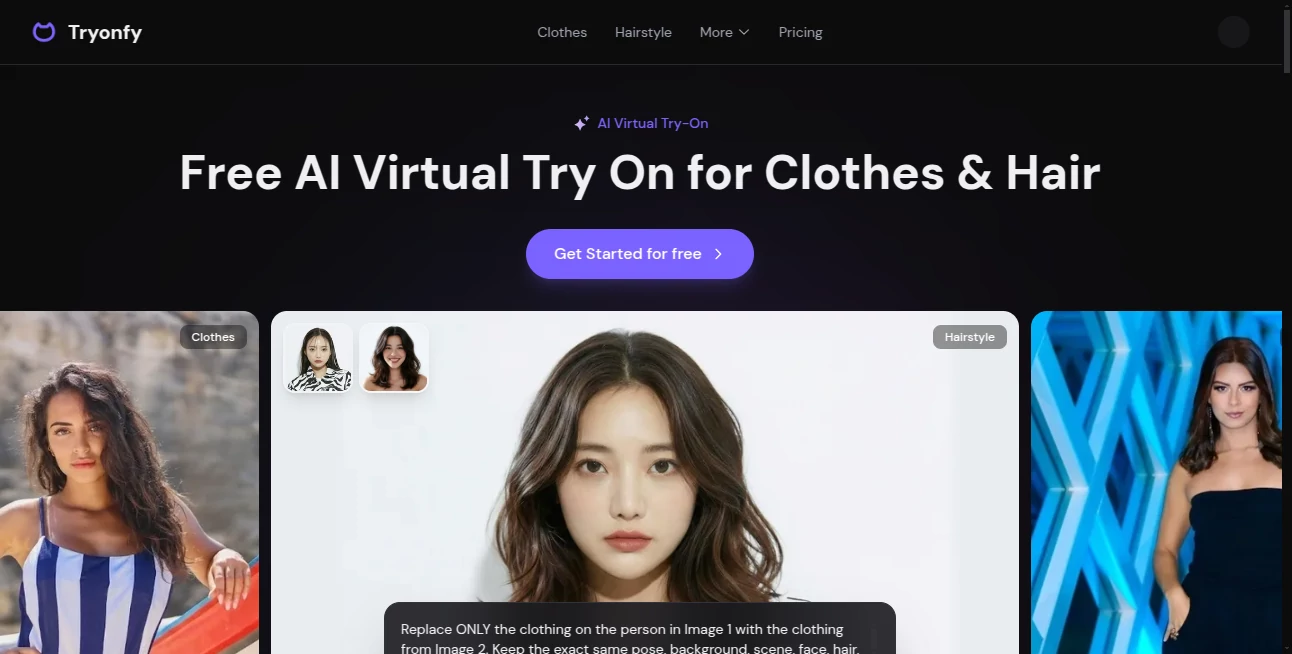
Standing in front of a mirror trying on clothes is one thing — but doing it from your couch with perfect lighting and zero pressure is something else entirely. This tool makes that possible. You upload a photo of yourself, describe the outfit or hairstyle you’re curious about, and it shows you a realistic preview of how it would look. No more guessing, no more returns because the color was off or the fit was wrong. I’ve watched friends try on twenty different hairstyles in one evening before finally booking a salon appointment with confidence. The results feel surprisingly real, preserving your face, body shape, and skin tone while swapping in the new look.
Introduction
Online shopping for clothes and beauty changes is exciting until you receive something that doesn’t fit your vibe or your body. TryOnfy removes that uncertainty by letting you see exactly how items will look on you before you buy. It works for everyday outfits, formal wear, streetwear, bridal looks, hair colors, and hairstyles. The AI is trained to respect your proportions and features, so the preview feels personal rather than generic. For shoppers tired of guessing and retailers wanting fewer returns, it’s become a practical, fun solution that bridges the gap between imagination and reality.
Key Features
User Interface
The process is delightfully simple. Upload your photo once, then either describe what you want to try or choose from categories like clothes, hairstyles, or full outfits. The interface stays clean so you can focus on experimenting. You can adjust details in the prompt for more precision, and results appear quickly with clear before-and-after views. It never feels technical — just intuitive and inviting, like having a personal stylist who never gets tired.
Accuracy & Performance
What stands out is how well it preserves your actual appearance while applying changes. Skin tone, face shape, body proportions, and lighting all stay consistent. The generated images look photorealistic rather than cartoonish or distorted. Processing is fast, and the quality holds up even on casual phone selfies. Many users report that the previews are close enough to real-life results that they feel confident making purchase decisions.
Capabilities
You can try on individual clothing items, complete outfits, different hairstyles, hair colors, and even experiment with makeup looks. The outfit generator lets you describe any style you can imagine and see it applied to your photo. It works great for fashion inspiration, personal styling, and even helping friends visualize looks. The results are high-resolution and ready for sharing or saving as references.
Security & Privacy
Your uploaded photos are processed securely and not stored permanently after generation. You control what you download or share. It’s designed with privacy in mind, so you can experiment freely with personal looks without worrying about your images lingering somewhere.
Use Cases
A woman trying to decide on a wedding guest outfit uploads her photo and tests ten different dresses in minutes instead of spending hours shopping. A guy considering a bold new hair color sees exactly how it would look before committing to the salon. An online shopper tests streetwear combinations from different brands to build cohesive outfits. Parents help teenagers preview prom looks without the stress of multiple store trips. The tool shines whenever seeing something on yourself first can save time, money, or regret.
Pros and Cons
Pros:
- Photorealistic previews that actually look like you.
- Fast and easy — great for quick decisions or long styling sessions.
- Versatile for clothes, full outfits, hairstyles, and hair color.
- Helps reduce online shopping returns significantly.
- Fun and addictive to use for creative styling experiments.
Cons:
- Best results come from clear, well-lit photos.
- Very complex or layered outfits may need prompt refinement.
- Free daily credits are limited; heavier use requires a plan.
Pricing Plans
New users get free credits to try the service and see the quality for themselves. Subscription plans offer more generations per month, higher priority, and access to premium features. One-time credit packs are also available for occasional users. The pricing is reasonable considering how much time and money it can save on bad purchases or salon regrets.
How to Use TryOnfy
Upload a clear photo of yourself (standing straight works best). Choose a category — clothes, hairstyle, or outfit generator. Describe what you want to try (be specific about color, style, fit). Click generate and review the realistic preview. Save or download the image if you like it, or tweak the prompt and try again. For best results, use good lighting in your original photo and descriptive prompts. The whole process usually takes under a minute per try.
Comparison with Similar Tools
Many virtual try-on tools feel limited to basic items or produce unnatural results. This one stands out for its photorealistic quality and flexibility across clothes, full outfits, and hairstyles. It preserves your unique features better than most, and the outfit generator adds creative freedom that pure product-based tools lack. For personal use and inspiration, it often feels more practical and fun than heavier enterprise solutions.
Conclusion
Shopping for clothes and changing your look should be exciting, not stressful. TryOnfy removes the guesswork and brings the fitting room to your screen in a way that feels both magical and practical. It helps you make better decisions, saves time and money, and adds a lot of fun to the process. Whether you’re updating your wardrobe, planning a big event, or just exploring new styles, it gives you the confidence that comes from truly seeing yourself in something new. The future of personal styling is here, and it looks good on you.
Frequently Asked Questions (FAQ)
How realistic are the results?
Very — the AI preserves your face, body shape, and skin tone while applying changes naturally.
Do I need professional photos?
No — clear, well-lit selfies work great for most previews.
Can I try full outfits?
Yes — the outfit generator lets you describe complete looks and see them applied at once.
Is it good for hair color changes?
Excellent — you can preview bold or subtle hair colors before committing to dye.
Are my photos private?
Yes — photos are processed securely and not stored permanently after use.
Photo & Image Editor , AI Design Generator , AI Image to Image .
These classifications represent its core capabilities and areas of application. For related tools, explore the linked categories above.

TryOnfy Alternatives Product

AI Hairstyle

AIImageEdit
RenderQuill

ai banana

JPG to Small

NanoBananaPro

chibi genera…

BananaPro

Nano Banana 2
