
TubeRepeat
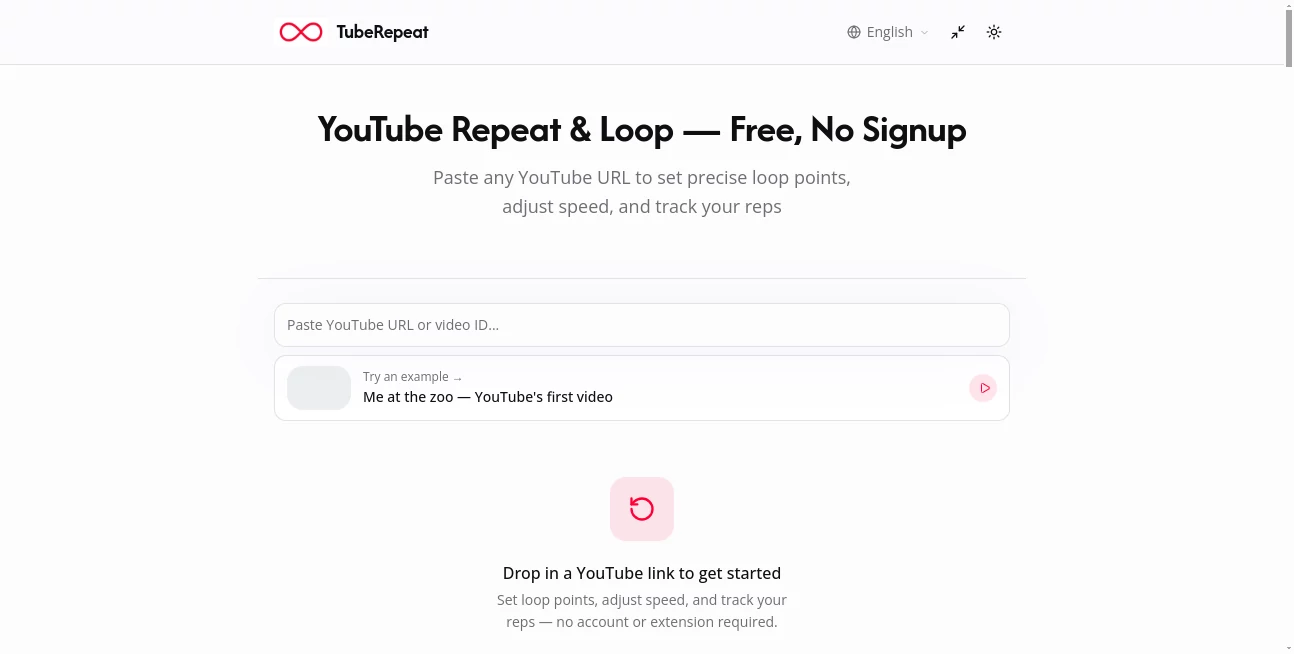
What is TubeRepeat?
Learning from a YouTube video often comes down to one small section that needs to be watched again and again. It might be a guitar riff, a difficult pronunciation, a dance move, or a few seconds of a lecture. Constantly dragging the YouTube timeline back to the same point can quickly become frustrating.
TubeRepeat makes that kind of practice much easier. The browser-based tool lets users paste a YouTube video, choose an exact starting and ending point, and repeat that section continuously. There is no browser extension to install and no account required, making it possible to start practicing almost immediately.
What makes the experience particularly useful is the combination of A-B looping, playback-speed control, repetition tracking, and progressive speed training. Instead of simply replaying an entire video, users can focus on the exact moment they are trying to understand or master.
Key Features
- Precise A-B looping for selected sections of YouTube videos
- Playback speeds ranging from 25% to 200%
- Fine speed adjustments in 0.05x increments
- Automatic speed increases after a chosen number of repetitions
- Repetition counter for tracking practice sessions
- Keyboard controls for setting loop points
- Support for looping an entire video or a selected segment
- Named practice sessions that can be saved and restored
- Shareable links containing the selected video, timestamps, and speed
- No account or browser extension required
User Interface
The interface is designed around a straightforward workflow. Paste a YouTube URL, identify the section that matters, and set the A and B points. Timeline handles can be dragged into position, while exact timestamps can also be entered when more control is needed.
The simple layout is especially helpful during hands-on practice. Musicians, for example, can keep their attention on an instrument rather than repeatedly reaching for a mouse. Keyboard shortcuts can also be used to set the beginning and end of a section, which makes the process feel less disruptive.
Accuracy & Performance
Precision is one of the strongest aspects of the experience. Users can isolate specific moments rather than relying on a full-video repeat. This is useful when a single sentence, musical phrase, movement, or explanation needs additional attention.
Playback can be slowed substantially when a section is difficult to follow. A learner might begin at 50% speed, repeat the passage several times, and gradually return to normal speed. The ability to adjust playback in small increments also gives users more control than simply choosing between a few preset speeds.
Capabilities
The platform goes beyond basic video looping. Its practice-oriented controls allow users to build a repeat session around a specific section and monitor how many times they have worked through it.
Progressive speed training is particularly interesting for musicians and other skill-based learners. A starting speed and step size can be selected, allowing the playback tempo to increase automatically after a defined number of loops. This creates a structured practice routine without requiring the learner to manually adjust the speed after every round.
Another useful capability is session sharing. A generated link can preserve the video, A-B points, and playback speed, allowing another person to open the same practice setup. This can be handy when a teacher wants to send a student a precise section to practice.
Security & Privacy
The service is designed to work directly in the browser and does not require users to create an account before starting a practice session. This keeps the initial experience lightweight and avoids the extra setup associated with many dedicated learning applications.
Users should still follow normal privacy practices when sharing session links, particularly if the linked YouTube content or timestamps are intended for a limited audience. The service itself is primarily a playback and practice interface rather than a platform for uploading personal video files.
Use Cases
Musicians and instrumentalists: Practice a difficult guitar phrase, piano passage, drum fill, vocal section, or other musical technique by looping it at a comfortable speed and gradually increasing the tempo.
Language learners: Repeat short conversations, pronunciation examples, interviews, and native-speaker phrases. Slowing down a few seconds of dialogue can make individual words and sounds much easier to recognize.
Dance students: Isolate a difficult part of a choreography and watch it repeatedly at reduced speed. This can make complicated movements easier to break down before attempting them at full speed.
Students: Some explanations in online lectures need more than one viewing. Instead of replaying a long video, students can isolate the relevant 20- or 30-second section and review it while taking notes.
Teachers and coaches: A saved practice session can be shared with students so everyone works from the same video, timestamps, and playback settings.
Skill-based learning: Anyone who learns by watching demonstrations can benefit from repeatedly reviewing a small part of a longer YouTube video rather than constantly searching for the same moment.
Pros and Cons
Pros
- Free to use
- No account required
- No browser extension or software installation needed
- Precise A-B section looping
- Wide playback-speed range from 25% to 200%
- Useful repetition counter
- Progressive speed training supports structured practice
- Shareable sessions make collaboration easier
- Works with existing YouTube videos
Cons
- Its usefulness depends on the availability of the required content on YouTube
- It is focused specifically on video repetition and practice rather than being a complete learning platform
- Users looking for advanced video editing features will need a separate application
Pricing Plans
The service is presented as a free online tool. Users can paste a YouTube URL, create an A-B loop, adjust playback speed, track repetitions, and use the available practice controls without creating an account or installing an extension.
For someone who regularly learns from YouTube, the absence of a required subscription makes it particularly easy to add to an existing study or practice routine.
How to Use TubeRepeat
Getting started takes only a few steps. First, copy the URL of the YouTube video you want to practice and paste it into the tool. Once the video is loaded, select the beginning and ending points of the section you want to repeat.
Next, adjust the playback speed if necessary. A difficult passage can be slowed down to make individual details easier to follow. Once the section feels comfortable, the speed can be increased gradually.
During practice, the repetition counter provides a simple way to see how many times the section has been reviewed. Users who want a more structured routine can also configure progressive speed increases so the tempo rises automatically after a set number of loops.
Finally, the session can be saved or shared through its generated link. This is useful when returning to the same practice material later or sending a specific exercise to a teacher, student, or fellow learner.
Comparison with Similar Tools
YouTube already provides a basic looping function, but its standard approach is better suited to repeating an entire video. A dedicated practice workflow becomes more useful when the goal is to isolate one small section and work on it repeatedly.
The combination of A-B controls, variable playback speed, repetition tracking, and progressive tempo increases gives this tool a more focused purpose. Instead of treating repetition as a simple playback feature, it turns it into a practical learning method.
For example, a guitarist can isolate a four-bar riff, practice it at half speed, repeat it several times, and then let the tempo increase gradually. A language learner can do something similar with a short sentence from an interview. The workflow is simple, but it removes a surprisingly common source of friction from video-based learning.
Conclusion
For anyone who uses YouTube as a learning resource, precise repetition can make a noticeable difference. The ability to isolate exactly the section that matters, slow it down, repeat it, and gradually increase the pace creates a much more focused practice environment than repeatedly scrubbing through a full video.
The biggest strength is its simplicity. There is no complicated setup and no need to install additional software. Whether the goal is mastering a musical passage, improving pronunciation, learning choreography, or understanding a difficult lecture, the tool provides the controls needed to concentrate on the part that requires more practice.
Its free access, browser-based workflow, and combination of precise looping with progressive speed training make it a useful addition to the toolkit of anyone who learns by watching and repeating YouTube content.
Frequently Asked Questions (FAQ)
How do I loop a YouTube video?
Paste a YouTube video URL into the tool and choose whether you want to repeat the entire video or a specific section. For focused practice, set an A point and a B point to define the exact section to repeat.
Can I repeat only part of a YouTube video?
Yes. The A-B loop controls allow you to select a specific portion of a video and repeat only that section instead of playing the entire video.
Can I slow down a YouTube video?
Yes. Playback can be reduced to 25% speed and adjusted in small 0.05x increments. This can be useful for music practice, pronunciation, choreography, and detailed demonstrations.
Do I need to create an account?
No account is required to start using the service. It works directly in a web browser after a YouTube URL is provided.
Can I save and share my practice session?
Yes. Sessions can be represented by shareable links that preserve the selected YouTube video, loop points, and playback speed, allowing the same practice setup to be restored later or shared with someone else.
Is the tool free?
Yes. The service is offered as a free online tool, allowing users to create YouTube loops and use its practice-focused controls without a required subscription.
Who can benefit from a YouTube repeat tool?
Musicians, language learners, dancers, students, teachers, and anyone who needs to study a particular moment in a YouTube video can use it to make repetition more convenient and structured.
Other .
These classifications represent its core capabilities and areas of application. For related tools, explore the linked categories above.

TubeRepeat Alternatives Product
VALTRAIN

Judgement Ta…

grow a garde…
ChatterSift

Al Maze Gene…
X-Installer
forge calcul…

DiRe-RAPIDS

Clean Paste