


















ClariText
What is ClariText?
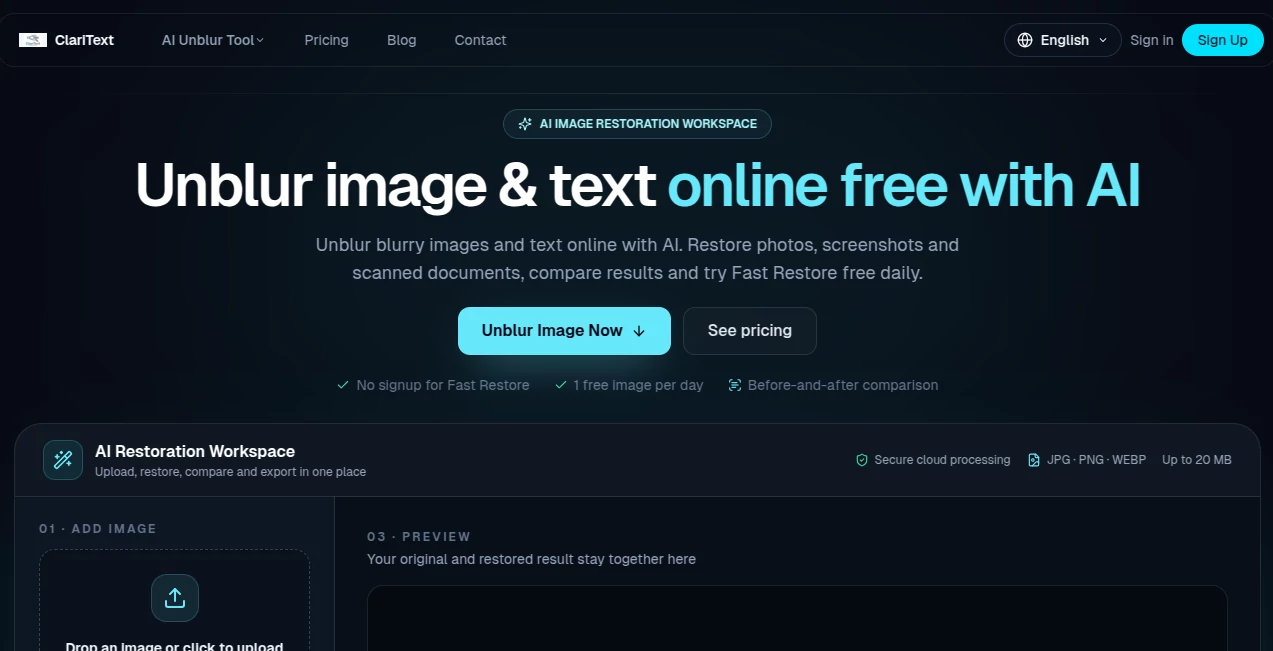
UnblurText.com is an AI-powered image restoration workspace designed to make blurry photos, screenshots, scanned documents, labels, and small text easier to see. Instead of relying on complicated editing software or manually adjusting sharpening settings, users can upload an image, select a restoration level, compare the original with the enhanced result, and download the finished image from one focused workspace.
The service is particularly useful when an image is slightly soft, compressed, low-resolution, or difficult to read. It supports JPG, PNG, and WEBP files up to 20 MB, and its free restoration option does not require an account. For everyday situations such as reading a blurry screenshot or improving an old document scan, that simple workflow can save considerable time.
Key Features
- AI image restoration: Improve blurry photos, screenshots, scans, labels, and other images where important details have become difficult to see.
- Fast Restore: A free daily enhancement mode designed for light blur, compression issues, and images that simply need a little more clarity.
- Pro Restore: A deeper generative restoration mode intended for heavier blur, difficult text, and damaged fine details.
- Before-and-after comparison: Review the original and processed image together before deciding whether the result is useful.
- Multiple image formats: JPG, PNG, and WEBP files are supported, with uploads up to 20 MB.
- No-signup free option: Fast Restore can be used once per day without creating an account.
- Clean downloads: The free Fast Restore option provides a downloadable enhanced result without a watermark.
User Interface
The interface keeps the restoration process unusually straightforward. Users can drag and drop an image, click to upload it, or paste an image directly from the clipboard. After uploading, the workspace presents the available restoration options rather than forcing users to understand complicated AI models or technical settings.
The before-and-after preview is especially useful. For example, someone working with a blurry receipt can inspect whether the numbers have actually become clearer instead of blindly downloading an enhanced version. That makes the tool feel practical rather than experimental.
Accuracy & Performance
Results depend heavily on the quality of the original image. Light focus blur, resizing softness, compression artifacts, and some forms of motion blur can often be improved effectively, while severely damaged images have much less information available to recover.
Fast Restore is intended for everyday enhancement, while Pro Restore performs deeper generative reconstruction when simple sharpening is not enough. This distinction is helpful because stronger processing is not automatically better for every image.
Text deserves extra attention. AI restoration can make difficult characters easier to read, but reconstructed details are not guaranteed to be identical to the original. Names, account numbers, dates, addresses, and other important information should always be checked against another source when accuracy matters.
Capabilities
The workspace covers several practical restoration scenarios. A small screenshot with tiny interface text can be made easier to inspect, a compressed product photograph can receive cleaner edges, and a scanned document can become more comfortable to read. It can also help with everyday photographs where softness or low resolution has reduced visible detail.
One useful aspect is that users do not need to decide which technical restoration model is appropriate. The basic workflow separates lighter enhancement from deeper generative repair, making it easier to start with the less intensive option and move up only when necessary.
Security & Privacy
Image processing takes place in the cloud, so users should consider the nature of an image before uploading it. According to the service's privacy policy, uploaded images are temporarily stored for processing and the original images and processing results are deleted after processing within a reasonable period. The company also states that image data is not stored long-term or used for unrelated purposes.
The privacy policy explains that certain service providers may receive image data when required to perform processing, including AI processing providers. For sensitive documents, users should review the current privacy policy before uploading anything confidential.
Use Cases
Reading blurry screenshots: Small text from applications, websites, dashboards, or old screenshots can sometimes become much easier to inspect after restoration.
Improving scanned documents: Old scans with compression, softness, or poor capture quality can benefit from additional clarity while retaining their original layout.
Restoring labels and signs: Photos of product labels, signs, menus, and other real-world text can be enhanced when the lettering is slightly out of focus.
Enhancing everyday photos: Portraits, product images, and casual photographs that look soft or undersized can receive cleaner edges and more usable detail.
Recovering readable text: When a document or screenshot is difficult to read, restoration can be used as a first step before manually checking the enhanced characters.
Pros and Cons
- Pros: Simple browser-based workflow, free daily Fast Restore, no account required for the free mode, before-and-after comparison, support for common image formats, and a deeper restoration option for difficult images.
- Pros: The service is designed around restoration rather than forcing users through a large collection of unrelated editing controls.
- Pros: Pro results can be previewed by eligible new accounts before users decide to unlock them.
- Cons: Severe blur or missing information cannot always be recovered accurately.
- Cons: Cloud processing means users should be cautious with highly sensitive images.
- Cons: Pro processing uses credits, so frequent users need a paid plan or credit purchase.
Pricing Plans
The pricing structure offers a useful way to test the service before paying. The Free plan costs $0 and includes one Fast Restore per day, before-and-after comparison, and clean downloads without requiring an account.
The Starter plan costs $4.99 per month and provides 60 credits per month, equivalent to roughly 20 Pro results when each completed Pro result uses three credits. It also includes access to the Pro AI tools, standard processing, no watermark, email support, and a personal license.
The Pro plan costs $19.90 per month and includes 500 credits, or roughly 166 Pro results at three credits per result. It adds priority processing, priority support, and a commercial license.
For people who do not want a subscription, the Credits Pack costs $5 for 30 credits. These credits can be used across the Pro AI tools, do not expire, and require no recurring subscription.
How to Use the Tool
- Step 1: Open the image restoration workspace and upload a JPG, PNG, or WEBP image up to 20 MB. You can drag and drop the file, click to upload, or paste an image from the clipboard.
- Step 2: Choose Fast Restore when the image has light blur, compression, or mild softness. Use Pro Restore when deeper reconstruction is needed.
- Step 3: Wait for the restoration to finish and inspect the before-and-after comparison.
- Step 4: Pay particular attention to text, numbers, faces, and other details where an incorrect reconstruction could be misleading.
- Step 5: Download the enhanced result when the restoration meets your needs.
Comparison with Similar Tools
Traditional photo editors give users detailed manual control, but that control can be excessive when the goal is simply to make a blurry image easier to read. Sharpening, contrast, noise reduction, and other adjustments often require several attempts to find a useful combination.
General-purpose AI photo enhancers take a broader approach and may focus heavily on portraits, faces, or overall image quality. This restoration workspace has a more focused workflow for blurry photos, screenshots, scanned documents, labels, and difficult text.
Another advantage is the ability to compare the original with the restored version before downloading. That is valuable because image restoration is not magic: when information has been completely lost, an AI system can only estimate plausible details. A tool that makes this limitation visible is more useful than one that simply produces a sharper-looking image without context.
Conclusion
For anyone who regularly encounters blurry screenshots, soft photographs, compressed images, or difficult-to-read scans, this AI restoration workspace offers a convenient alternative to manual image editing. The interface stays focused on the actual problem: upload the image, select the appropriate restoration level, inspect the result, and download it.
The free daily Fast Restore makes it easy to test the workflow without committing to a subscription, while Pro Restore provides a stronger option when ordinary enhancement is not enough. The most important point is to keep expectations realistic. AI can recover and reconstruct useful visual detail, but it cannot guarantee the exact original when information has been completely destroyed.
Used with that understanding, the service is a practical choice for turning many frustratingly blurry images into clearer, more usable versions without installing desktop software or learning complicated editing techniques.
Frequently Asked Questions (FAQ)
Can blurry text in an image be made clearer?
Yes. Light blur, compression artifacts, low resolution, and some other forms of image degradation can often be improved. Heavier blur is more challenging, and reconstructed characters should be verified when the information is important.
Is there a free option?
Yes. Fast Restore is available once per day for free and does not require an account. It is intended primarily for lighter image blur and everyday enhancement.
What image formats are supported?
The service supports JPG, PNG, and WEBP images up to 20 MB.
What is the difference between Fast Restore and Pro Restore?
Fast Restore is designed for lighter blur and general enhancement. Pro Restore uses deeper generative restoration for heavier blur, difficult text, and damaged fine details.
Can AI recover information that has completely disappeared?
No. AI can estimate and reconstruct plausible details, but it cannot guarantee the exact original when the source contains insufficient information. Important names, numbers, and other critical details should be verified independently.
Do I need to create an account to try the free restoration?
No. The daily Fast Restore can be used without signing up.
How much does Pro processing cost?
Each completed Pro AI result uses three credits. Paid options include monthly Starter and Pro plans as well as a one-time 30-credit pack for users who prefer not to subscribe.
Are uploaded images stored permanently?
According to the privacy policy, uploaded images and processing results are temporarily stored for processing and are not intended to be stored long-term. Users handling sensitive material should review the current privacy policy before uploading it.
Can the tool remove blur from every photograph?
No. Results vary according to blur severity and the amount of usable information remaining in the original image. Mild blur generally offers a better opportunity for useful restoration than severe damage or extremely low-resolution sources.
Photo & Image Editor , AI Photo Enhancer , AI Photo Restoration , AI Image to Image .
These classifications represent its core capabilities and areas of application. For related tools, explore the linked categories above.

ClariText Alternatives Product

FitHairAI

Roblox Man F…

Edit Stamp

Picture to L…

Unblur Image

AI Image Enh…

insMind

Maginary

ArchOne AI
