
Vdoo AI
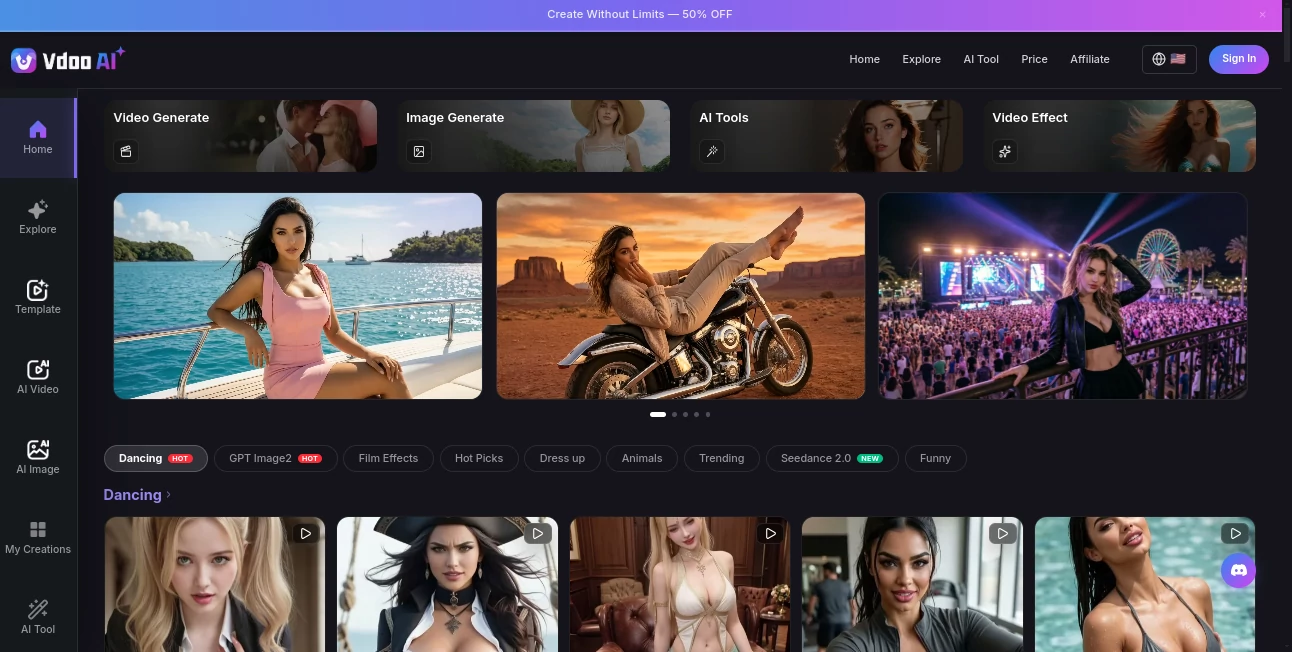
What is Vdoo AI?
There’s something exciting about typing a simple description and watching a full scene come to life with smooth motion, consistent characters, and cinematic feel. This platform makes that experience feel almost effortless. Whether you start with text, an image, or a short clip, it pulls from top AI video models and turns your idea into something watchable and often surprisingly polished. I’ve used it to mock up short stories, product ads, and even silly meme concepts — and the results consistently impress people who see them. It’s not just another video tool; it feels like a creative partner that keeps getting better.
Introduction
AI video has come a long way, but many tools still feel experimental — jerky motion, inconsistent characters, or results that need heavy editing. This one stands out by bringing together multiple leading models in one place, giving you choices and quality that actually deliver. You can create from text prompts, transform images into motion, or use reference videos to guide the style and characters. It’s built for creators who want fast, high-quality output without switching between five different platforms. The variety of scenarios it handles — from realistic scenes to stylized animations — makes it feel like a true creative hub rather than a single-trick generator.
Key Features
User Interface
The dashboard is clean and inviting. A big prompt area sits front and center, with easy options to upload reference images or videos. You can choose different models depending on the style you want, adjust duration and aspect ratio, and hit generate without digging through complicated menus. Previews load reasonably fast, and the whole flow encourages experimentation. Even when I’m tired or in a hurry, I can jump in and get decent results on the first try — that kind of approachability is rare and very welcome.
Accuracy & Performance
Motion stays smooth and characters remain consistent across frames far better than many alternatives. It handles complex prompts with multiple subjects or camera moves without falling apart as quickly. Generation times are practical for short clips, and the quality often needs very little cleanup. In real use, it shines on both realistic scenes and creative, stylized concepts, giving you reliable output that feels intentional rather than random.
Capabilities
You get strong text-to-video, image-to-video, and reference-based generation. It supports different aspect ratios for social media, YouTube, or cinematic looks. The platform integrates several top models so you can pick the best one for your specific need — whether that’s realistic motion, artistic flair, or fast prototyping. It also handles a wide range of creative scenarios, from product showcases to storytelling clips, making it versatile for both personal fun and professional work.
Security & Privacy
Your prompts and uploaded references are handled responsibly. The platform focuses on delivering great output while respecting user data. For creators working on client projects or personal ideas, knowing the content isn’t being misused for training feels reassuring and professional.
Use Cases
A content creator generates quick Reels with consistent characters and trending styles in minutes instead of hours. A small brand turns product photos into engaging lifestyle videos without hiring a full production team. An indie filmmaker mocks up key scenes to test pacing and tone before full shooting. A marketer creates multiple ad variations from one prompt to see what resonates best. It fits naturally into daily creative work for anyone who needs video fast without compromising too much on quality.
Pros and Cons
Pros:
- Access to multiple strong AI video models in one place gives real choice.
- Good character and motion consistency compared to many single-model tools.
- Supports both text and image references for better control.
- Fast enough for meaningful iteration during creative sessions.
- Handles a wide variety of styles and scenarios effectively.
Cons:
- Clip lengths are still relatively short on most generations.
- Higher quality or longer videos may require paid credits.
- Very complex or highly specific scenes can still need prompt refinement.
Pricing Plans
It offers a free tier with daily credits so you can test the quality without commitment. Paid plans provide more generations, higher resolution options, faster processing, and access to premium models. The pricing feels reasonable for the creative output you get — many users find that the time saved more than justifies the cost once they start using it regularly for real projects.
How to Use Vdoo
Sign up quickly, go to the creation page, and start with a clear prompt describing your scene. Add a reference image or video if you want stronger guidance on style or characters. Choose your preferred model, aspect ratio, and length, then generate. Review the result, tweak the prompt if needed, and generate again. Download when you’re happy or create variations to pick the best one. The process stays fast and intuitive, encouraging you to experiment until the clip feels right.
Comparison with Similar Tools
While many AI video platforms focus on one strong model, this one gives you access to several top options in a single place, letting you match the right engine to your specific need. It balances quality, speed, and creative control better than most single-model tools, and the reference features give more precision than pure text-to-video alternatives. For creators who want options without switching platforms constantly, it stands out as a smart, practical choice.
Conclusion
Video creation has never been more accessible, and this platform pushes that accessibility further by combining quality, variety, and ease of use. It turns vague ideas into watchable clips quickly enough that you stay in the creative flow instead of fighting the tool. Whether you’re making content for fun, work, or experimentation, it delivers results that feel exciting rather than experimental. In a crowded space of AI video tools, it’s one that consistently earns a spot in the daily workflow.
Frequently Asked Questions (FAQ)
How long are the generated videos?
Most clips range from a few seconds up to around 10 seconds, depending on the model and plan.
Can I use reference images or videos?
Yes — image and video references significantly improve consistency and style control.
Is there a free way to try it?
Yes, the free tier gives daily credits so you can test quality before upgrading.
Are the videos suitable for commercial use?
Paid plans generally allow commercial usage — always check the specific terms for your plan.
How do I get the best results?
Use clear, descriptive prompts and add reference images when possible. Iteration with small prompt tweaks usually yields excellent outcomes.
AI Animated Video , AI Image to Video , AI Video Generator , AI Text to Video .
These classifications represent its core capabilities and areas of application. For related tools, explore the linked categories above.

Vdoo AI Alternatives Product
seeddance

Video Upscal…

FastMoro AI

seedance 3.0

seedance 2

VideoSnap

Wan 2.7 AI

Seedance 2.0

seedream vid…