Veida AI
What is Veida AI?
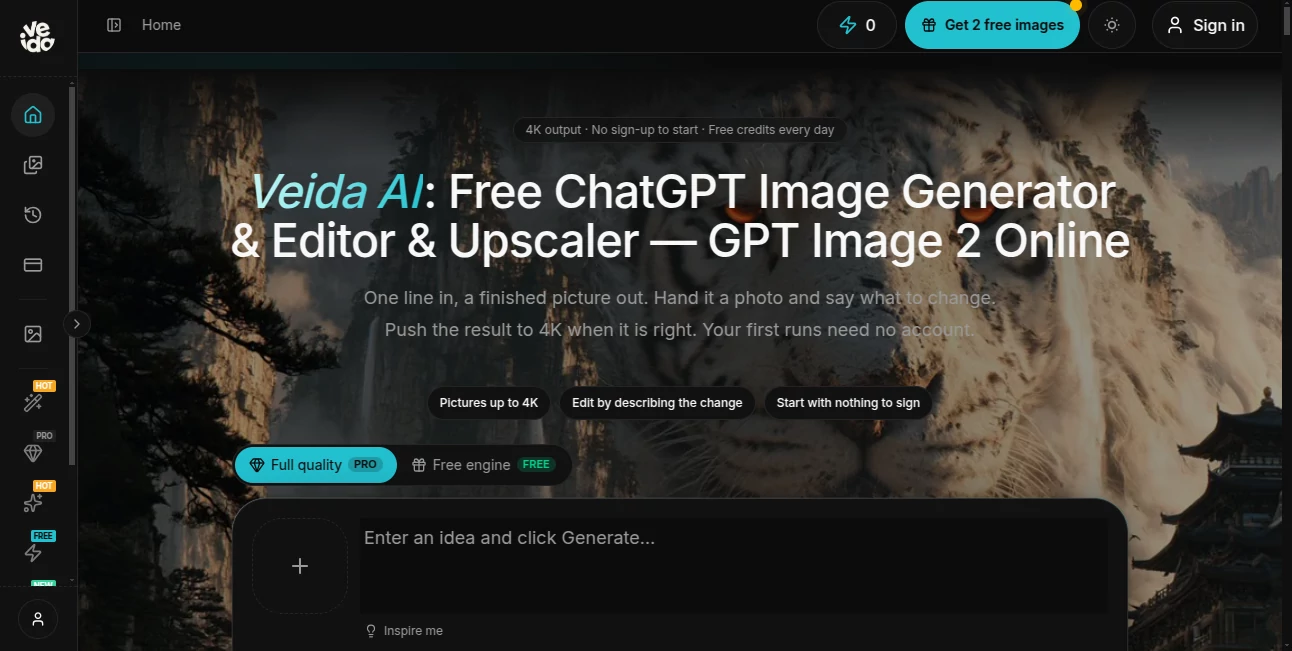
Creating polished images usually means jumping between a generator, a photo editor, and an upscaling tool. This platform brings those jobs together in one straightforward workspace. Users can start with a written idea, upload an existing photo, describe the changes they want, and improve the final image to higher resolutions.
The service is particularly interesting for people who want to experiment before committing to a subscription or complicated software. The first generation can be started without an account, while registered users receive additional credits and can continue working with several image models from the same interface.
Its workflow is refreshingly simple: choose a model or ready-made tool, provide a prompt or reference image, check the expected credit cost, and generate. There is no installation process, and the platform clearly shows the estimated cost before a generation is started.
Key Features
- AI image generation from natural-language prompts.
- Photo editing through written instructions rather than traditional layers and masks.
- Image generation and editing with multiple AI models in one workspace.
- Support for 1K, 2K, and 4K image output with supported models.
- Image upscaling for improving the resolution of finished visuals.
- Reference-image workflows with support for multiple uploaded photos.
- Ready-made tools and prompts for portraits, product imagery, posters, characters, and other common creative tasks.
- Visible credit estimates before generating an image.
- Free access for initial experimentation without requiring an account.
- Daily credits and additional credits for registered users.
User Interface
The interface is designed around the result rather than technical controls. Instead of forcing users through a complicated editing timeline, it lets them explain what they want in plain English. For example, a user can upload a photograph and ask to replace the background while keeping the person, clothing, and overall subject consistent.
There are also ready-made workflows that remove much of the guesswork from prompting. This is useful for someone who knows the type of image they need but does not want to spend time building a detailed prompt from scratch.
Another practical touch is the credit estimate displayed before generation. It gives users an opportunity to decide whether a particular resolution or model is worth using before spending credits.
Accuracy & Performance
Performance depends on the selected model and the type of generation, but the platform gives users several options for different priorities. GPT Image 2 is positioned around prompt accuracy and readable text inside generated images, while Nano Banana 2 is aimed more toward editing existing photographs. Seedream is available when faster drafts are more important.
The ability to test an idea at a lower resolution and then create the final version at a higher resolution is also useful. A designer can first work out the composition without spending heavily on a 4K generation, then upscale or regenerate the preferred result when the concept is ready.
Capabilities
The platform covers considerably more than basic text-to-image generation. Users can create portraits, social media graphics, thumbnails, covers, product visuals, mockups, campaign imagery, educational graphics, and other creative assets.
Its editing workflow is particularly useful for product and portrait work. Multiple reference photographs can be supplied, allowing users to give the model more visual context. Existing images can then be changed by describing the desired modification instead of manually selecting objects, masks, or individual editing layers.
For professional users, the combination of generation, editing, and upscaling in one place can make the creative process considerably more convenient. A single project can move from rough concept to finished high-resolution asset without requiring several separate services.
Security & Privacy
The platform explicitly prohibits adult and NSFW content. It also allows users to begin generating images without creating an account, which makes initial experimentation possible without immediately committing to a registration process.
As with any online image-generation service, users should consider the nature of the images they upload and avoid submitting sensitive personal or confidential material unless the service's current privacy terms provide the protections they require.
Use Cases
Social media creators: Generate posts, thumbnails, covers, and other visual assets without opening a separate graphics editor for every small change.
E-commerce businesses: Create product variations, campaign visuals, and branded imagery while maintaining a consistent appearance across different generations.
Designers: Quickly explore concepts, compositions, mockups, and visual directions before committing time to detailed production work.
Photographers: Experiment with alternative environments, backgrounds, styles, and visual treatments while keeping important parts of an original photograph intact.
Educators: Create diagrams, covers, explanatory visuals, and supporting artwork for lessons or training materials.
Solo creators: Turn an idea into a finished image without learning a complicated professional editing application.
Marketing teams: Produce multiple visual concepts for campaigns and refine them through natural-language editing rather than rebuilding every variation manually.
Pros and Cons
Pros:
- Can be used without an account for initial generations.
- Combines generation, editing, and upscaling in one workspace.
- Offers several image models for different creative requirements.
- Supports high-resolution output up to 4K with supported workflows.
- Credit costs are shown before generation.
- Useful ready-made tools reduce the need for complex prompting.
- Supports reference images for more controlled editing.
- Failed generations are not charged according to the site's FAQ.
Cons:
- Credit usage varies depending on the model, resolution, and input type.
- Higher-resolution generations can require considerably more credits.
- Users looking for advanced manual editing controls may still prefer traditional professional image editors.
- The platform is focused specifically on visual creation rather than being a general-purpose creative suite.
Pricing Plans
The service uses a credit-based pricing system rather than charging a fixed amount for every generation. The number of credits required depends on factors such as the selected model, resolution, length where applicable, and input type.
Users can start for free, with the platform providing initial credits and additional credits through account registration and daily check-ins. The site also states that the credit estimate is displayed before a generation is made, allowing users to understand the expected cost in advance.
For example, a Nano Banana 2 image at 1K resolution is listed as costing around 20 credits. Higher resolutions and different models can have different requirements, so checking the displayed estimate before each generation is the safest way to manage usage.
How to Use the Tool
Getting started does not require software installation or a complicated setup. The workflow can be completed in a few simple steps.
- Choose a model or ready-made tool: Select an option based on whether you need accurate prompt following, photo editing, fast drafts, or another specific task.
- Enter your idea or upload a photo: Describe the image you want or provide one or more reference photographs.
- Set the output options: Choose the available resolution and other generation settings according to your project.
- Check the credit estimate: Review the displayed cost before starting the generation.
- Generate the image: Run the request and review the result.
- Refine the result: If the image needs changes, describe what should be modified and generate another version.
- Download the final result: Once the image is ready, save the version that best matches your requirements.
Comparison with Similar Tools
Many AI image platforms concentrate on one particular part of the workflow. Some are primarily prompt-based generators, while others focus on photo manipulation or image enhancement. This service takes a broader approach by placing generation, conversational editing, multiple models, and upscaling in the same environment.
Another distinction is the emphasis on visible credit consumption. Instead of leaving users uncertain about how much a particular generation will cost, the platform presents an estimate before the request is submitted. For people who generate images frequently, this can make experimentation easier to manage.
The choice of several models is also useful. Someone working on a detailed prompt may prefer one model, while another project involving an existing photograph may benefit from an editing-focused model. Having both options available from the same workspace saves the need to constantly move files between different services.
Conclusion
For anyone who regularly creates or modifies images with AI, having generation, editing, and upscaling available together is a practical advantage. The simple prompt-based workflow makes the platform approachable for beginners, while multiple models and higher-resolution options give more experienced creators room to experiment.
The strongest part of the experience is arguably its flexibility. You can start with a blank idea, edit an existing photograph, test a concept at a lower resolution, or prepare a finished visual for a campaign or product catalogue. The ability to see the expected credit cost before generating adds another useful layer of control.
It is not intended to replace every professional image-editing application, especially for users who need detailed manual controls. But for fast AI-assisted visual creation, editing, and enhancement, it offers a convenient workflow that keeps the process focused on the image rather than the software.
Frequently Asked Questions (FAQ)
Can I use the image generator without creating an account?
Yes. The website states that the free engine can be used without an account for initial generations. Creating an account provides additional credits and access to more usage.
Which AI models are available?
The available models include GPT Image 2, Nano Banana 2 and its Lite version, Seedream variants, Qwen Image 3, and the platform's own image model. Different models are intended for different tasks such as prompt accuracy, photo editing, fast drafts, and layout-heavy work.
Can I edit an existing photograph?
Yes. Users can upload a photograph and describe the desired change in natural language. Common workflows include changing backgrounds, fixing details, restyling images, and maintaining important visual elements.
Can I generate images in 4K?
Yes. Supported workflows offer 1K, 2K, and 4K output. The available resolution depends on the selected model and generation settings.
How does the credit system work?
Each generation uses credits, and the amount depends on factors such as the model, resolution, and input type. The estimated cost is shown before the generation is submitted.
Are failed generations charged?
According to the website's FAQ, failed generations do not consume credits.
Is a ChatGPT Plus subscription required?
No. The platform provides direct access to supported image-generation models without requiring a ChatGPT Plus subscription.
Can I use the platform for commercial images?
The service can be used for many commercial-oriented workflows such as product imagery, marketing graphics, social media content, and campaign concepts. However, users should review the current terms and licensing conditions for their specific commercial use before publishing generated material.
Does the platform allow NSFW content?
No. The website explicitly states that adult and NSFW content is prohibited.
AI Photo & Image Generator , AI Photo Enhancer , AI Image to Image , AI Text to Image .
These classifications represent its core capabilities and areas of application. For related tools, explore the linked categories above.

Veida AI Alternatives Product

Nano Banana 2

AI Hairstyle
NanoAI
string art g…

Image3

ai banana

Z-Image

chibi genera…

Kogashitsuka…