
















VexImg
What is VexImg?
Let’s be honest for a second. Most AI image generators out there feel like they need a roadmap just to figure out. You type in a prompt, cross your fingers, and hope the output doesn’t look like a melted painting. But every once in a while, a tool comes along that actually gets it. It understands that you’re not just looking for a picture. You are looking for an emotion, a brand asset, or maybe that perfect shot for a client presentation that needs to happen yesterday.
I’ve spent countless late nights testing these platforms, and I know the frustration of getting a beautiful image that has misspelled words or a person with seven fingers. That’s exactly why the technology behind this platform feels like a breath of fresh air. It handles the heavy lifting of complex physics and text rendering so you don’t have to fix everything in Photoshop afterward. It’s built for those moments when creativity strikes and you need an image that doesn’t just exist but actually works.
Key Features
What makes this creative studio stand out isn't just one magic button. It's the collection of smart details that save you hours of frustration. Whether you are designing a social media campaign or sketching out the next big UI concept, these features are designed to keep you in the flow state.
User Interface
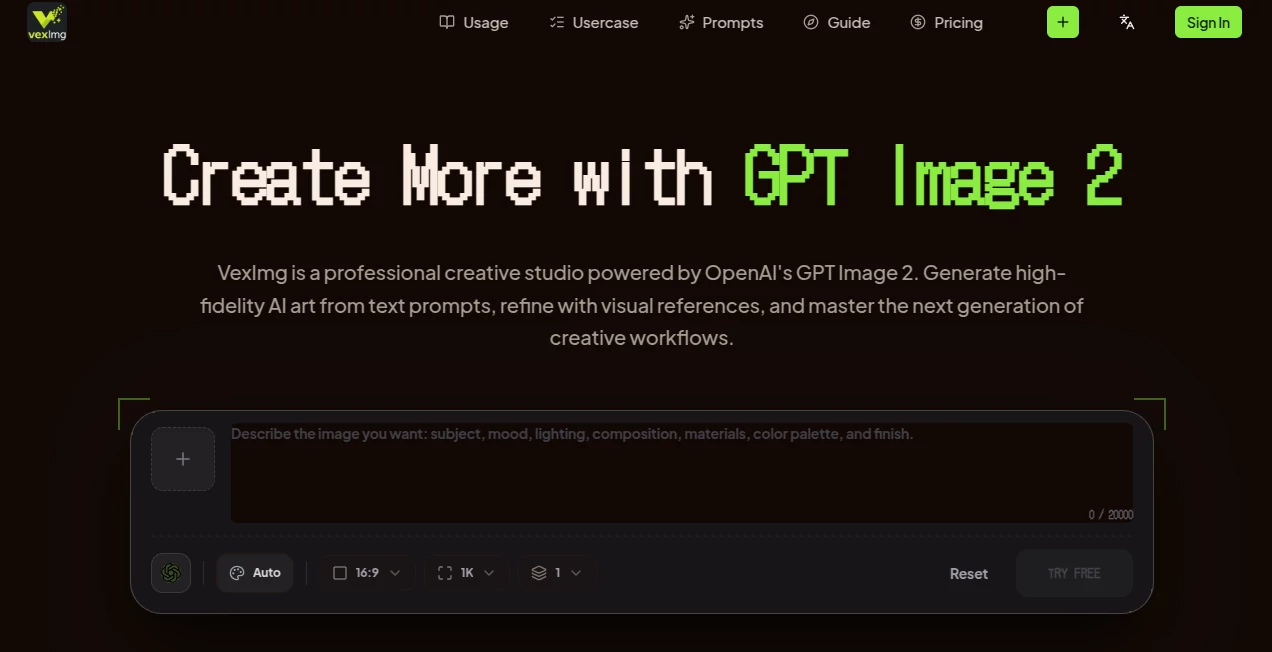
You know that feeling when you open a professional tool and immediately feel lost? That doesn’t happen here. The workspace is stripped of unnecessary clutter. Everything is right where you expect it to be. On the left, you have your canvas. On the right, your controls. It respects your time by making the generation process visual rather than forcing you to memorize code. You can upload a reference image, pick a vibe like "Cinematic" or "Studio Portrait," and just go. It feels more like driving an automatic car than piloting a spaceship.
Accuracy & Performance
This is where the magic happens. We’ve all seen those AI images that look great from afar but fall apart when you look at the text on a sign or the anatomy of a hand. This platform leverages a core model that understands natural language and physical logic at a deep level. It knows that water flows down and that reflections should mirror the environment. I tested it with a prompt asking for a neon sign that said "Open Late" reflecting in a puddle. The result was crisp, accurate, and shockingly real. It handles the small details that separate amateur AI art from professional-grade visuals.
Capabilities
It’s not just about typing words and hoping for the best. This tool gives you actual creative control. You can use the reference workflow, which is a lifesaver if you have a specific character or product in mind. You upload a starting image, and the AI builds upon that foundation instead of starting from zero. There is also a robust prompt history tracker. How many times have you generated the perfect image but forgot the exact wording you used? That problem disappears here. You can scroll back, grab your old prompts, and iterate instantly.
Security & Privacy
In a world where your creative assets are your currency, you need to know they are safe. While using the platform, the focus remains on giving you ownership of your output. For professionals handling sensitive client briefs or unreleased product designs, knowing that your uploads aren't just feeding a public training model brings a lot of peace of mind. It allows you to experiment with brand assets without the fear of them showing up in someone else's feed next week.
Use Cases
I’ve seen this tool pop up in some unexpected places. It’s not just for digital artists anymore. Real people are using it to solve real business problems. Here is who is getting the most value out of it right now:
- Marketing Professionals: Imagine needing five different ad variations for a product launch. Instead of hiring a photoshoot for every angle, you generate high-res, context-accurate images in minutes. It’s a game changer for A/B testing visuals.
- UI/UX Designers: Wireframes are great, but stakeholders love visuals. You can generate realistic UI mockups or app interfaces that look like they are already live, helping you sell your vision faster.
- Content Creators: Whether it is a thumbnail for YouTube or a carousel post for Instagram, you need visuals that stop the scroll. The built-in style presets help you maintain a consistent aesthetic across your entire feed.
- Small Business Owners: Not everyone has a graphic designer on retainer. This levels the playing field. You can generate professional logos, posters, or social media assets without needing a degree in design.
Pros and Cons
No tool is perfect, but being aware of the trade-offs helps you decide if it fits your workflow. Here is the honest breakdown based on real usage.
Pros:
The text rendering is genuinely top-tier. You rarely get those garbled, nonsense words that plague other generators. The speed is also impressive; you aren't waiting five minutes for a single render. I also love the style presets. Sometimes you just don't know what look you want, and clicking "Anime" or "Cinematic" acts as great creative inspiration.
Cons:
While the free tier is generous for testing the waters, power users will find themselves wanting the professional plan pretty quickly due to generation limits. Also, while it excels at realism and graphic design, if you are looking for extremely niche, abstract art styles, you might find the library slightly less diverse than some dedicated artistic platforms. It leans heavily into high-fidelity usability.
Pricing Plans
Money talks, right? The platform keeps it simple so you don't need a calculator to figure out what you are paying. There is a free tier designed to let you kick the tires. It gives you enough credits to really test the engine and see if it fits your style. For the daily power users, the Pro plan unlocks higher generation volumes, priority access during peak times (which means you skip the digital line), and access to advanced studio features. It’s priced for professionals who see this as a tool that saves them hours of work every single week.
How to Use VexImg
Getting started takes less time than making a cup of coffee. You don't need a tutorial video. Just follow this flow:
- Head to the studio and either type a text prompt describing the world you want to see or upload a reference image to give the AI a specific starting point.
- Look at the style preset row. Pick a mood. Do you want a hyper-realistic "Product Shot" or a dreamy "Cinematic" landscape? Choose one.
- Hit the generate button. Watch as the engine works its magic. In seconds, you will usually get multiple variations to choose from.
- Compare the results. Did the AI miss a detail? Tweak your prompt or adjust the reference strength.
- Once you have "the one," download it in high resolution. You are ready to post, print, or present.
Comparison with Similar Tools
Look, the market is flooded with "AI image generators." But most of them are running on older, slower models that choke on complex prompts. Many competitors force you to upscale images just to get decent resolution, which usually makes them look waxy and weird.
Where this tool wins is the "GPT Image 2" backbone. While others struggle to draw a simple clock showing 10:10, this one handles text, logos, and complex lighting naturally. It’s like comparing a toy camera to a professional lens. Other tools might be faster for a simple cartoon, but when you need realistic physics, accurate text, or brand-safe visuals, this studio is in a league of its own. It doesn't just generate images; it generates usable assets.
Conclusion
AI is only useful if it saves you time without sacrificing quality. Too many tools sacrifice one for the other. This platform hits that sweet spot where speed meets professional-grade aesthetics. Whether you are a solo creator burning the midnight oil or a marketing team trying to keep up with the content calendar, having a tool that reliably turns "I have an idea" into "I have the visual" is priceless. It respects your input and delivers output that doesn't look cheap. Give the free tier a spin, but be warned: once you see how fast it handles the tricky stuff, you won't want to go back to the old way of doing things.
Frequently Asked Questions (FAQ)
Do I need to be a designer to use this?
Not at all. If you can type a sentence and recognize a style you like, you can use this. The interface handles the technical heavy lifting for you.
Can I really generate readable text?
Yes, and this is the main selling point. The model is specifically optimized to understand typography and natural scene text, so your signs, posters, and labels will actually make sense.
What happens if I use a reference image?
The AI uses it as a structural guide. It maintains the composition or character features while letting you change the style, background, or lighting via text prompts.
Is the free plan actually useful or just a trial?
It is genuinely useful for low-volume users. You can test complex prompts and explore the feature set without paying a dime, though power users will want the Pro plan for speed and volume.