
VidBG Remover
What is VidBG Remover?
Anyone who has tried to film a talking-head video at home knows the problem. The lighting is fine, the audio is decent, but the background is a mess of bookshelves, laundry, or that one wall you never got around to painting. For years the only real fix was a green screen, a tripod, and a lot of patience. That's changed. A new wave of browser-based tools now strips the background out of a clip automatically, and one of the cleaner examples of this approach focuses entirely on doing that one job extremely well.
Introduction
This is a web-based video background remover built for creators who don't have a studio, a green screen, or hours to spend in DaVinci Resolve masking frame by frame. You upload a clip, the AI isolates the subject, and you download a transparent video ready to drop into whatever scene you actually wanted. No physical setup, no plugins, no waiting around for a render farm that may or may not finish before your deadline.
What stands out isn't just that it removes backgrounds — plenty of tools claim that. It's that it does so without the flickering, fuzzy hair, and missing-finger artifacts that plague a lot of "free" alternatives bundled into bigger editing suites.
Key Features
User Interface
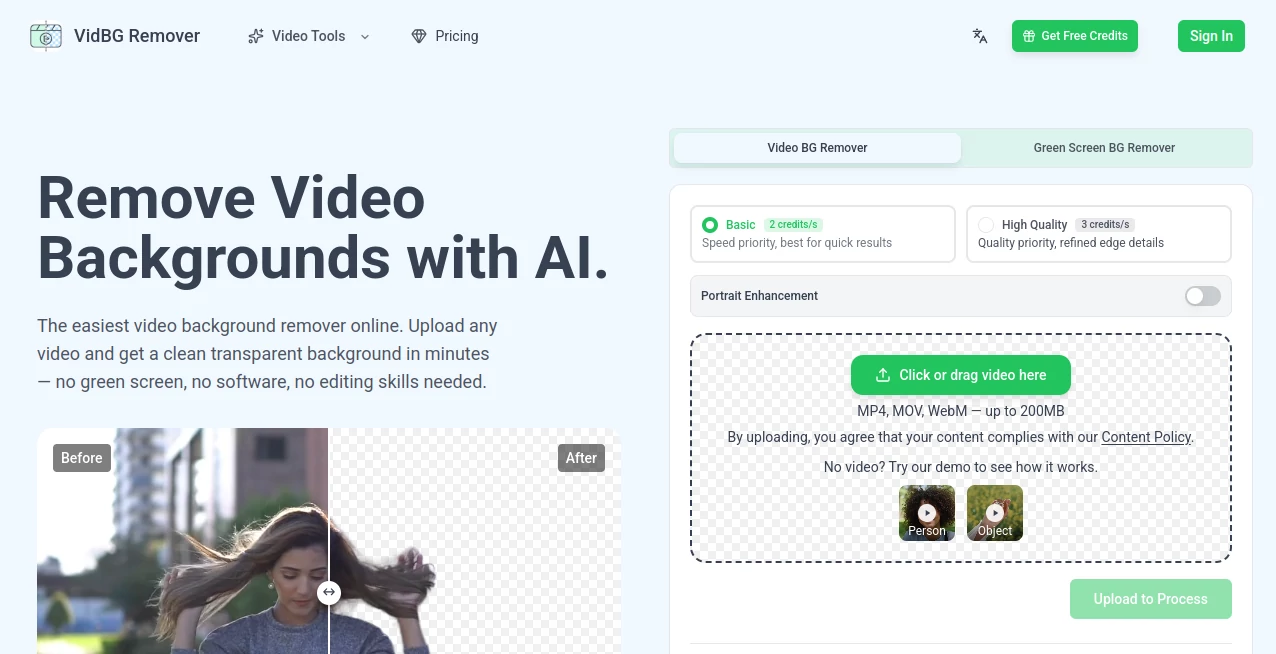
The workflow is about as simple as it gets: drag a video onto the page, pick a processing mode, and wait. There's no account wall blocking you from trying it, and a couple of demo clips are available if you want to see the output before committing your own footage. The interface keeps a short history of recent jobs too, though it's worth noting that processed files are only kept for a limited window, so downloading promptly matters.
Accuracy & Performance
This is really where the tool earns its keep. Edge detection around hair strands and fingers — historically the weak point of every automated rotoscoping tool — stays remarkably stable even during fast movement. I've seen plenty of background removers that work fine on a static portrait and then fall apart the moment someone gestures with their hands. This one doesn't seem to have that problem, and it handles shaky or handheld footage without the edges crumbling apart mid-clip.
Capabilities
Two processing tiers are offered: a faster "Basic" mode for quick turnarounds, and a "High Quality" mode that prioritizes refined edge detail when precision matters more than speed. There's also a portrait enhancement toggle for talking-head content specifically. Output comes as WebM with VP9 encoding or as MOV using ProRes 4444 — both carry a genuine alpha channel, meaning real transparency rather than a green-screen workaround that needs further keying.
Security & Privacy
Uploaded footage is processed in the cloud rather than locally, and according to the site's own policies, processing history is automatically limited and clips don't sit around indefinitely. If you're working with client footage or anything sensitive, it's still worth reading the content and privacy policies directly, but the basic structure — limited retention, no permanent public storage — is the right instinct for this kind of tool.
Use Cases
- Talking-head videos: reviewers, coaches, and real estate agents recording in cluttered rooms can swap in a clean studio backdrop without buying one.
- E-commerce ads: shoot a model once against a plain wall, then composite into dozens of localized scenes for A/B testing across markets.
- Online courses: layer a presenter directly over slides without a picture-in-picture box eating screen space.
- Social and meme content: extract a pet, a person, or an object from chaotic footage for quick, shareable edits.
- Automotive and product shoots: isolate a vehicle or product to drop into custom scenes without renting a studio.
Pros and Cons
Pros:
- No green screen or physical setup required
- Genuinely stable edges, even with motion and hand gestures
- Real alpha-channel export compatible with Premiere, DaVinci Resolve, After Effects, and CapCut
- Pay-as-you-go credits instead of a mandatory monthly subscription
- No account required to test it out
Cons:
- Clip length is currently capped at around 60 seconds
- Processed files aren't stored long-term, so you need to download promptly
- Heavier, professional-grade jobs will eat through credits faster than casual use
Pricing Plans
Pricing runs on a credit system rather than a recurring subscription, which is a relief if you only need background removal occasionally rather than every week.
- Starter – $9.9 for 240 credits, good for roughly two minutes of basic processing, credits never expire
- Creator – $29.9 (discounted from $39.6) for 960 credits, aimed at regular content creators
- Pro – $79.9 (discounted from $123.8) for 3,000 credits, built for heavier workloads
- Max – $199.9 (discounted from $495) for 12,000 credits, designed for agencies and power users
All tiers are one-time purchases, and credits roll over indefinitely rather than resetting monthly.
How to Use VidBG Remover
- Upload your MP4, MOV, or WebM file (up to 200MB) directly on the homepage
- Choose between Basic or High Quality processing, and toggle portrait enhancement if needed
- Let the AI process the clip — most videos finish within a few minutes depending on length
- Download the result as a transparent WebM for web use, or a ProRes MOV for professional editing software
Comparison with Similar Tools
Compared to the background-removal feature bundled into CapCut, the edge quality here is noticeably cleaner — CapCut tends to blur fine details like hair. Canva's equivalent feature suffers from shimmer during motion and caps clips at 90 seconds, and the older standalone tool many people relied on for this exact purpose, Unscreen, was discontinued in December 2025. Runway offers strong quality too but processes much more slowly and runs on a more expensive credit structure. For pure speed-to-quality ratio on short clips, this tool sits in a solid middle ground: faster than Runway, cleaner than CapCut or Canva.
Conclusion
For anyone tired of fighting with green screens or paying for editing suite subscriptions just to get one feature, this is a refreshingly focused tool. It does one thing — remove video backgrounds — and does it with a level of edge stability that's genuinely hard to find elsewhere at this price point. It won't replace a full editing suite, and the 60-second clip limit means it's not built for long-form content, but for short-form creators, marketers, and educators, it fills a real gap.
Frequently Asked Questions (FAQ)
Does it require a green screen?
No. The AI segments the subject from the background automatically, regardless of what's behind them.
What file formats are supported?
You can upload MP4, MOV, or WebM files up to 200MB, and export as WebM (VP9) or MOV (ProRes 4444), both with true alpha transparency.
Is there a free trial?
Yes, no credit card is required to test the tool with your own footage or the provided demo clips.
How long are processed videos stored?
Processing history is limited to a short retention window, so it's best to download your results soon after processing finishes.
What's the maximum video length?
Currently clips are supported up to roughly 60 seconds, which fits most social and ad use cases.
AI Background Remover , AI Video to Video , AI Video Editor , AI Video Enhancer .
These classifications represent its core capabilities and areas of application. For related tools, explore the linked categories above.

VidBG Remover Alternatives Product

Text Remover…

JPG to Small

VidiOne

Remove Water…

Happyhorse 1…

Removebg one

RemoveVideoBG

ModelsLab

MixHub AI