


















Videosora2
What is Videosora2?
Creating a polished video no longer has to mean spending hours behind an editor, searching for stock footage, or organizing a complicated production workflow. VideoSora2 brings AI video generation into a much simpler process, allowing creators to turn text prompts and images into short, engaging videos for social media, advertising, and eCommerce.
The platform is particularly appealing to creators who need visual content regularly but do not want every idea to become a full production project. You can start with a written concept or an existing image, choose the desired format, and let the system handle the visual generation. The service also highlights realistic motion, synchronized audio, personalization features, and cinematic-style output.
For someone preparing a product clip for an online store, a vertical video for TikTok, or a quick visual concept for an advertising campaign, this approach can remove much of the usual friction. The free option also gives new users a practical way to test the workflow before committing to a paid credit package.
Key Features
- Text-to-video generation for turning written ideas into video scenes.
- Image-to-video generation for animating existing visual assets.
- Physics-focused motion designed to create more natural movement and object interaction.
- AI-generated dialogue, sound effects, and background audio.
- Cameo-style personalization for incorporating people or objects into generated scenes.
- Support for vertical and landscape video formats.
- Video generation designed for TikTok, Instagram, YouTube Shorts, advertising, and eCommerce.
- MP4 video output for convenient use across common platforms.
- Private video visibility options.
- No-watermark generation is included with the listed plans.
- Batch generation is available on paid plans.
- Commercial licensing is included with the Max plan.
User Interface
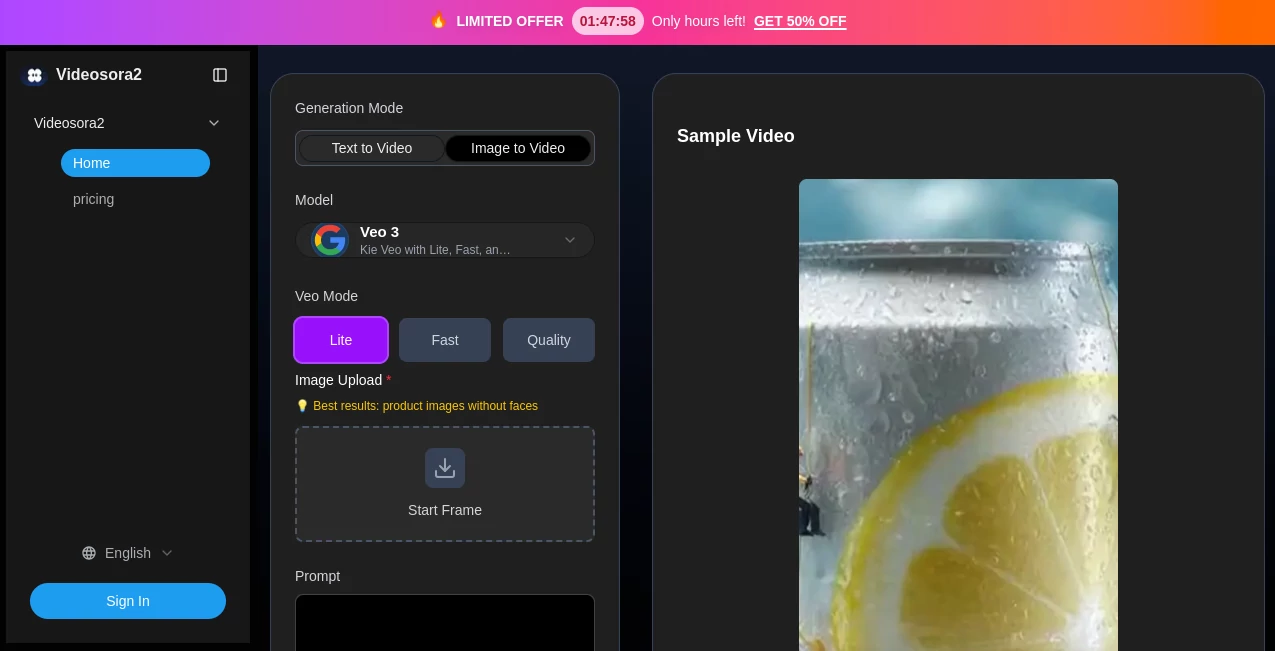
The interface keeps the main generation process relatively straightforward. Users can select a generation mode, enter a prompt or upload an image, choose an aspect ratio, and adjust available generation settings before starting the process. The current interface also presents model and quality options, making the workflow useful for people who want more control than a single prompt-and-generate button provides.
The 16:9 and 9:16 choices are especially practical for modern content creation. A landscape composition can work well for websites and traditional video placements, while the vertical format is a natural fit for short-form social content.
Accuracy & Performance
One of the more interesting aspects of the platform is its focus on realistic movement. Its feature set emphasizes physics-aware animation, including elements such as gravity, momentum, lighting, shadows, and interactions between objects. This matters when a generated scene contains movement that would otherwise look artificial or inconsistent.
Generation is not instantaneous in every case. The platform states that high-quality videos can take around four to five minutes to generate. That trade-off is reasonable for users who care more about the finished visual than producing a result in a few seconds.
Output length depends on the selected plan, with the listed Free plan supporting videos of up to 10 seconds and paid plans supporting videos of up to 15 seconds. The service also advertises 720p and 1080p output options.
Capabilities
The platform is built around short-form video production rather than traditional long-form editing. Its combination of text-to-video and image-to-video workflows makes it suitable for testing different creative concepts quickly.
The audio generation capability is another useful addition. Instead of treating sound as a completely separate production step, the platform promotes synchronized dialogue, sound effects, and background audio. Multi-language audio can also be useful for businesses producing localized campaigns for different audiences.
Personalization is another notable capability. The service describes its Cameo technology as a way to place a person or object into generated scenes while maintaining recognizable visual characteristics. For creators building recurring characters, branded clips, or promotional material, this can make AI-generated content feel more consistent.
Security & Privacy
Privacy is supported through private video visibility on the available plans, which is useful when working on unpublished campaigns, product concepts, or personal projects. The platform also provides dedicated privacy and terms pages for users who want to review its policies before uploading content.
As with any AI service that accepts images or other creative assets, users should review the current terms and privacy documentation before uploading confidential or sensitive material. Businesses should also make sure that they have the necessary rights to any people, images, logos, or products included in their prompts and source files.
Use Cases
Social Media Content: Short-form platforms require a constant flow of fresh visual material. The text-to-video and image-to-video workflows can help creators turn simple ideas into vertical clips for TikTok, Instagram Reels, and YouTube Shorts.
eCommerce Product Videos: Product photography can be given movement and context without setting up a traditional video shoot. This can be useful for product demonstrations, advertising concepts, and promotional listings.
Advertising: Marketers can experiment with different visual concepts before investing in a full production. Short AI-generated scenes can be particularly useful during the creative testing stage.
International Marketing: Multi-language audio can help businesses prepare variations of promotional content for different audiences without producing every version completely from scratch.
Personalized Content: The personalization features can be useful for creators who want recurring characters, branded elements, or recognizable subjects to appear in generated scenes.
Creative Experiments: Writers, designers, filmmakers, and social creators can use the service to turn a rough idea into a visual prototype. Even when the final production will be created elsewhere, an early visual concept can make it much easier to evaluate an idea.
Pros and Cons
Pros
- Supports both text-to-video and image-to-video workflows.
- Useful aspect ratios for social media and other video placements.
- Focus on realistic motion and physical interactions.
- Integrated AI-generated audio and sound effects.
- Personalization features can help with recurring visual elements.
- Free plan available for testing the service.
- Paid plans offer no-watermark output and batch generation.
- Credits on the Pro plan do not expire.
Cons
- Generated videos are relatively short, with listed plans supporting up to 10 or 15 seconds.
- Higher-volume production requires purchasing additional credits.
- Generation can take several minutes for a finished result.
- Users looking for advanced traditional video editing tools may still need a separate editor.
- Commercial licensing is specifically highlighted as part of the Max plan.
Pricing Plans
Free – $0: The free plan includes 10 credits, up to 10-second videos, up to three videos, no watermark, private video visibility, and 24×7 email support. It is a sensible starting point for users who want to test the generation experience.
Pro – $29.90: The Pro plan provides 200 credits and supports videos of up to 15 seconds. It includes batch generation, no-watermark output, private visibility, access to the Pro generation option, and 24×7 email support. The site states that credits do not expire.
Max – $69.90: The Max plan is positioned for higher-volume users and includes 1,000 credits, videos of up to 15 seconds, batch generation, no watermark, private visibility, Pro access, 24×7 email support, and a commercial license.
The pricing page currently lists different credit quantities as selectable options within the paid plans, so users should check the current checkout selection before purchasing. :contentReference[oaicite:1]{index=1}
How to Use the Tool
Step 1: Choose a generation method. Start with either a text prompt or an image, depending on whether you want to create a scene from an idea or animate an existing visual.
Step 2: Write a specific prompt or upload your image. Describe the subject, environment, movement, camera perspective, and overall mood when working from text. For image-to-video generation, upload a suitable source image.
Step 3: Select the video format. Choose between available aspect ratios such as 16:9 and 9:16 based on where the finished video will be published.
Step 4: Configure the available settings. Depending on the selected generation mode, adjust options such as quality, motion, camera behavior, or other available parameters.
Step 5: Generate the video. Start the generation process and allow the system several minutes to process the request.
Step 6: Review and use the result. Once the video is ready, review the movement, composition, audio, and overall quality before publishing or using it in an advertising campaign.
Comparison with Similar Tools
Compared with basic AI video generators that focus mainly on turning a sentence into a short animation, this platform puts more emphasis on realistic motion, image-to-video generation, audio, and personalization. That combination makes it particularly interesting for creators who need more than a simple visual experiment.
It is also positioned differently from traditional video editors. An editor gives users detailed manual control over footage, transitions, timelines, and effects, while an AI generator is more useful at the idea-to-video stage. For many creators, the two approaches can work together: generate a concept quickly, then refine the strongest result in a conventional editing application.
The biggest advantage for social creators is the focused workflow. Instead of building every short promotional clip from individual assets, users can begin with a prompt or product image and explore several creative directions much faster.
Conclusion
For creators and businesses that regularly need short visual content, this AI video generator offers a practical way to move from an idea to a finished clip without the overhead of a traditional production workflow. Text-to-video and image-to-video generation cover the two most common starting points, while realistic motion, generated audio, personalization, and social-friendly aspect ratios add useful depth.
The free plan makes it easy to experiment before spending money, while the Pro and Max options are better suited to users producing content more frequently. It is not intended to replace every part of a professional video production pipeline, but for social campaigns, product demonstrations, creative testing, and quick promotional videos, it can be a valuable addition to a modern content workflow.
Frequently Asked Questions (FAQ)
Can I create videos from text?
Yes. The platform supports text-to-video generation, allowing users to describe a scene with a written prompt and generate a short video from the concept.
Can I animate an existing image?
Yes. Image-to-video generation is available, making it possible to use an existing JPG or PNG image as the starting point for a video.
How long can the generated videos be?
The Free plan supports videos of up to 10 seconds, while the listed Pro and Max plans support videos of up to 15 seconds.
Does it generate audio?
Yes. The platform advertises AI-generated dialogue, sound effects, and background audio synchronized with video content, with support for multiple languages.
Are generated videos watermarked?
The listed Free, Pro, and Max plans include no-watermark video output.
Can I use the generated videos commercially?
The Max plan explicitly includes a commercial license. Users should review the current terms and licensing conditions for their specific intended use before publishing commercial material.
How long does video generation take?
The platform states that high-quality video generation can take approximately four to five minutes, although actual processing time may vary depending on the request and selected settings.
AI Image to Video , AI Video Generator , AI Text to Video , AI UGC Video Generator .
These classifications represent its core capabilities and areas of application. For related tools, explore the linked categories above.

Videosora2 Alternatives Product

LoveGen AI
seedance2-pro
gpt video
ds video

VeoNano

Yevideo

Motion Contr…

LTX-3 AI

Veo 4 AI
