
















Yevideo
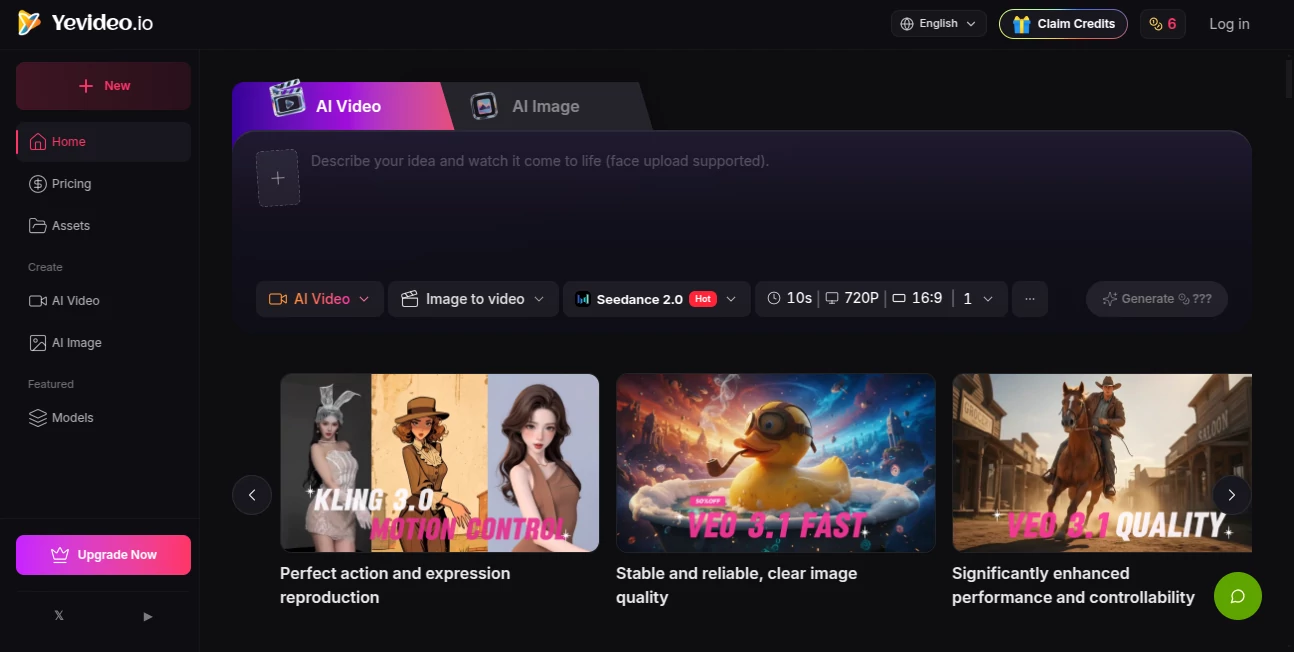
What is Yevideo?
You know that feeling when you have a brilliant idea for a video or an image, but getting it from your head to the screen feels like a huge hurdle? Most creative teams know the struggle all too well. You're juggling three or four different AI tools just to get one project done. One platform for generating images, another for turning those images into videos, and maybe a third for editing the final cut. It's expensive, confusing, and eats up all your time.
That's exactly why this platform feels like such a breath of fresh air. It is a unified workspace designed to kill the chaos of constant tab-switching. Instead of managing multiple subscriptions and learning different interfaces, you get everything in one place. The goal here is simple: to help you produce high-quality content faster, without needing a degree in film production or graphic design. Whether you're running a small business or leading a marketing team, this tool is built to give you your time back.
I've spent some time digging into how it works, and honestly, it is impressive how smooth the workflow feels. It combines some of the best open-source and proprietary AI models available right now, all under one roof.
Key Features
So, what exactly can this thing do? A lot. But instead of throwing a buzzword salad at you, here is a breakdown of the actual features that will save you time and money.
User Interface
One of the biggest pain points with AI tools is the learning curve. Nobody wants to watch a 40-minute tutorial just to make a simple TikTok video. The dashboard here is surprisingly clean. You aren't bombarded with confusing sliders or technical jargon. Everything is organized into logical sections: Text to Image, Image to Video, Video Edit, and so on.
There is also a massive "Inspiration Library" filled with examples from other creators. This is a lifesaver if you are suffering from creative block. You can browse through styles you like, and there is a "Generate Similar" button. You click it, and the tool automatically loads the settings used to make that example. You just swap out the prompt or the reference image, and you are ready to roll. It turns "I don't know what to make" into "I can make that in 10 seconds."
Accuracy & Performance
Let’s be real: some AI tools generate hands with six fingers or videos where people melt into the background. The performance here is a different story because the platform isn't relying on just one engine. It acts as a hub, pulling from top-tier models like Google Veo 3.1, Kling 3.0, and OpenAI’s GPT-4o for images.
If you are generating a video and need it to look cinematic, you switch to the Seedance model. If you need speed because you are batch-testing ideas for an ad, you flip to Veo 3.1 Fast. The accuracy is high because you get to choose the tool that fits the job. For images, the text rendering on the "Nano Banana" model is shockingly good. You can generate a poster with a specific quote, and it actually spells the words correctly. That is a game-changer for social media managers.
Capabilities
This goes way beyond just typing "a cat wearing a hat." It covers six core creative workflows end-to-end. First, there is Text to Image and Image to Image, which are great for concept art and product shots. Then you move into motion with Text to Video, Image to Video, and Video to Video.
But the most impressive feature is the AI Video Editor. This lets you upload an existing video and change it with text commands. I saw a demo where someone took a video shot in summer and typed, "Change the leaves on the trees to orange and add snow on the ground." Within minutes, it turned into a winter scene. You can remove objects, change backgrounds, or add VFX like lightning or fire just by describing them. It feels like magic, but it is just very clever AI.
Security & Privacy
If you are making commercial content, you need to know your assets are safe. Nobody wants their product video leaking before a launch. The platform takes this seriously. While the free tier leaves a watermark (fair enough), the paid tiers remove the watermark and give you "Private Videos."
This means your generations are not shared with the public gallery. Plus, the terms of service explicitly grant you commercial rights to the assets you create on the paid plans. You legally own the output. That is a huge relief for business owners who are worried about copyright issues or their trade secrets floating around online.
Use Cases
This isn't just a toy for making surreal art (though you can do that too). It solves real business problems across the board.
E-commerce Owners: You know how expensive product photography is. Imagine taking a single photo of a t-shirt and using Image to Video to make a short clip of it floating in space or waving in the wind. Or, use the AI editor to change the background of your product shots from a studio to a beach to a city street in seconds without a reshoot.
Social Media Managers: The demand for content is endless. You need vertical videos for Reels and TikTok. With the 9:16 aspect ratio option, you can batch-generate 10 variations of an ad in the time it used to take you to edit one. If a trend pops up, you can use the "Generate Similar" feature to apply that trend's aesthetic to your brand assets instantly.
Video Editors: You hate rotoscoping (cutting out objects frame by frame). We all do. Use the AI Video Editor to remove a microphone boom from a shot or erase a logo from the floor with a single text prompt. It handles the tedious grunt work, so you can focus on the creative storytelling.
Pros and Cons
Nothing is perfect, but the balance here is heavily tipped toward the "Pro" side. Here is the honest breakdown.
What works well:
The variety of models is the biggest win. You aren't locked into one "house style." If one model gives you weird results, you just switch to another. The unified credit system also saves a lot of headaches. Instead of buying credits on five different websites, you buy them here and allocate them as you see fit. The free tier is also genuinely useful, thanks to the daily签到 (check-in) system that gives you free credits just for logging in.
Where it gets tricky:
Because it relies on external APIs, sometimes the generation speed varies. If a lot of people are using the Kling model at once, it might slow down a bit compared to the in-house options. Also, the credit system requires a little math. Different actions cost different amounts (1080p costs more than 480p). You have to glance at the "estimated cost" before you hit generate, which is fine, but it does take a minute to get used to what a "bargain" generation looks like versus a "premium" one.
Pricing Plans
Money talks. The pricing is structured around a monthly subscription model with a very fair free option.
Free Plan ($0): You get about 100 credits a month through the daily check-in. Enough to make a couple of videos and a handful of images. There is a watermark on the video outputs.
Lite Plan ($10-$15/month): This bumps you to 300 credits. The watermark disappears, and you get private videos. This is for solo creators who post weekly.
Pro Plan (Starting at $14.50/month if paid yearly): This throws you into the deep end with 800+ credits. You get faster speeds and can run 4 tasks at once. If you are an agency or a hardcore marketer, this is the one to get. The "pay as you grow" model means you can start small and scale up as your content needs explode.
How to Use Yevideo
Getting started takes about two minutes. First, sign up with an email. You will get a few welcome credits instantly. Don't go straight to video yet; that costs more credits. Instead, start in the "Inspiration" tab. Find a style you like and hit the "Generate Similar" button. It will pre-fill the settings for you. Now, delete the sample prompt and write your own. "A futuristic coffee shop in the rain, cinematic lighting." Hit generate. Once you have an image you love, look for the "To Video" button on that image. Click it. The system will switch modes. Add a little motion prompt like "camera slowly pushes in." Generate. You just made a cinematic clip in three minutes.
Comparison with Similar Tools
Most alternatives do one thing well. Runway ML is great for video editing, but their image gen isn't as strong. Midjourney makes amazing images, but it doesn't do video at all. Leonardo.ai is good for gaming assets, but it lacks the multi-model video backend.
The main difference here is the aggregation. Instead of being a master of one trade, this platform is the manager of all trades. It gives you the flexibility of "model shopping." If you don't like the way your video turned out, you can regenerate it using a completely different AI engine without leaving the page. That plug-and-play flexibility is something you just don't get with standalone tools like Pika Labs or Stable Diffusion interfaces.
Conclusion
If you are tired of paying for multiple subscriptions and wasting hours navigating between different AI dashboards, this is your solution. It takes the complexity out of generative AI by putting the best engine for the job right at your fingertips. The user interface is smart, the output quality is professional-grade, and the pricing model offers a genuine free entry point that actually lets you test the waters. It isn't just a tool; it is a production house that fits in your browser tab.
Frequently Asked Questions (FAQ)
Do I own the commercial rights to the videos I make?
Yes. If you are on a paid plan (Lite or Pro), you own the outputs and can use them for ads, merchandise, YouTube videos, or client work without any issues.
Can I really edit videos just by typing?
Within limits, yes. You can change backgrounds, remove objects, and alter the weather or lighting easily. For complex physics (like a person doing a backflip), you might need a few tries, but for stylistic edits and clean-ups, it works shockingly well.
Which AI model should I pick?
For text on images, pick Nano Banana Pro. For speed in video, pick Veo 3.1 Fast. For realistic motion and human anatomy, pick Kling 3.0 or Seedance. The best part is you can test all of them with your free credits to see which one clicks with your style.