Virse AI
What is Virse AI?
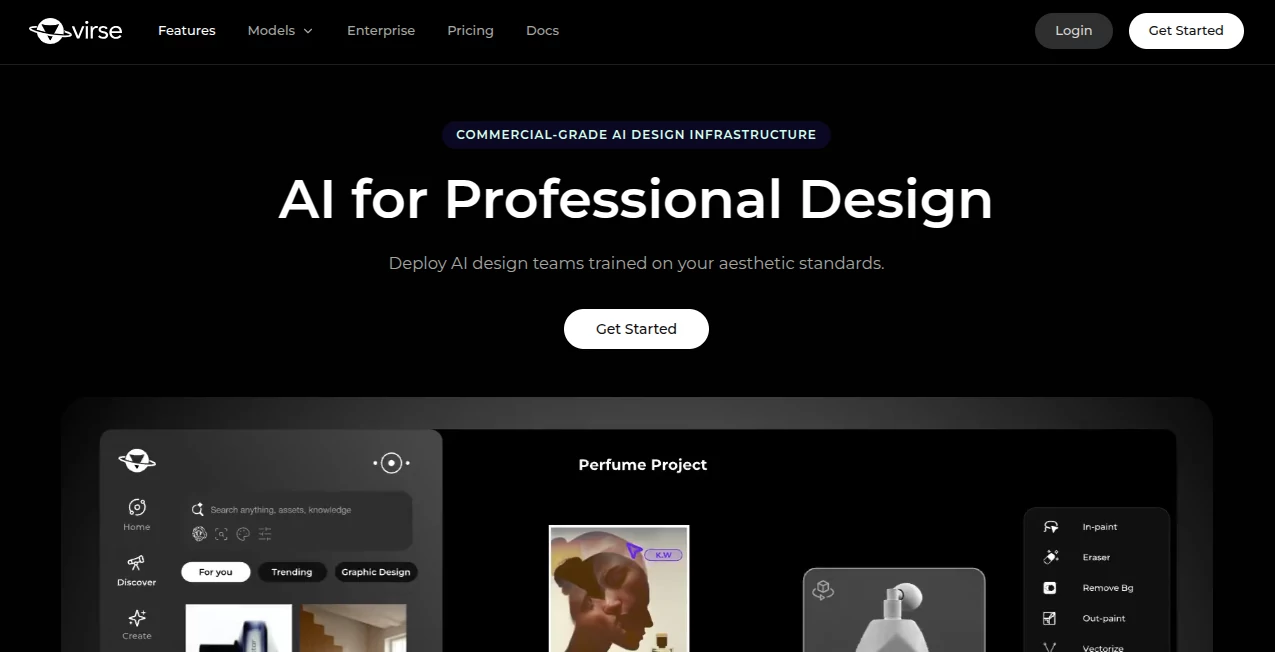
Virse is a professional AI creative workspace built for turning visual ideas into production-ready design work. Instead of jumping between separate image generators, video tools, editing apps, and reference boards, it brings the creative process into one visual canvas.
The platform is designed around a simple idea: your creative taste should not disappear every time you start a new project. References, generated assets, edits, workflows, and creative decisions can stay connected inside the same workspace, making it easier to move from an early concept to a polished result.
It is particularly interesting for designers, creative studios, agencies, product teams, and brands that need more than occasional AI-generated images. The emphasis is on repeatable creative work, visual consistency, and collaboration rather than one-off prompting.
Key Features
- Infinite creative canvas for organizing visual projects and references.
- Access to a broad collection of current AI image and video models in one workspace.
- Image generation and image editing workflows.
- Text-to-image and image-to-video creation.
- Node-based workflows that connect different creative steps.
- AI Agents capable of handling multi-step creative tasks.
- Reference-driven creation for maintaining visual direction.
- Tools designed around commercial product visualization and brand content.
- Shared creative standards for teams and professional studios.
User Interface
The interface takes a canvas-first approach rather than presenting AI generation as a simple prompt box. Users can create a canvas, add nodes, select a model, enter instructions, and connect outputs to subsequent steps.
This approach makes the workspace feel closer to a visual production board than a conventional AI generator. A generated image can become the starting point for another image edit, or it can be connected to a video workflow to turn a still concept into motion.
For someone working on a campaign, for example, this makes it possible to keep product references, visual experiments, generated images, and video concepts together instead of scattering them across several applications.
Accuracy & Performance
Performance depends on the selected underlying model, since the platform provides access to multiple specialized image and video systems. This is one of its practical strengths: users can choose a model based on the creative requirement instead of forcing every project through the same generation engine.
Some available image models are designed for detailed commercial imagery, long creative briefs, text rendering, or precise layouts, while the video selection includes models aimed at cinematic generation, reference-driven motion, dialogue, and synchronized audio.
The workflow itself also helps with consistency. Rather than generating an isolated result and starting over, users can connect outputs, make sequential changes, compare directions, and preserve the creative context of a project.
Capabilities
The platform covers a surprisingly broad section of the modern visual production process. Its image tools can be used for product photography, advertising concepts, packaging, brand visuals, architectural studies, and other commercial design work.
Its video capabilities extend from image-to-video creation to more advanced workflows using reference images, frames, dialogue, audio, and multi-shot concepts. The model library currently includes systems such as Seedance, Kling, Veo, Gemini Omni Flash, and other video models, alongside a selection of image generation and editing models.
Another useful feature is Agent Mode. Instead of manually operating every step, a user can provide materials and describe the desired outcome. The agent can then break a larger creative task into multiple stages and return a packaged result to the canvas.
This is particularly useful for repetitive work such as creating several product variations, preparing a series of campaign visuals, or processing a collection of existing references.
Security & Privacy
For professional creative work, privacy and control over project materials are important considerations. The platform provides dedicated terms and privacy documentation, while its workflow is structured around project-based creative work rather than treating each generation as an isolated interaction.
Businesses considering the service for sensitive brand assets, unreleased products, or client projects should still review the current privacy policy and terms before uploading confidential material. This is especially important for agencies and enterprise teams handling client-owned designs.
Use Cases
Product Visualization: Product teams can explore packaging, materials, environments, lighting, and commercial product scenes without commissioning a complete photoshoot for every early concept.
Advertising and Campaigns: Creative teams can develop campaign directions, test visual styles, create advertising concepts, and turn approved imagery into motion.
Brand Design: Brands can keep references and visual rules together while exploring new creative directions. This is useful when consistency matters as much as experimentation.
E-commerce: Online retailers can create product scenes, lifestyle imagery, promotional visuals, and variations from existing product references.
Creative Agencies: Agencies can use connected workflows to manage multiple concepts and iterations while keeping the project's visual context in one place.
Design Exploration: Designers can move quickly through alternative compositions, materials, environments, and visual styles before committing time to a final direction.
Video Production: A finished still can become a starting point for an animated sequence, allowing teams to explore motion and storytelling without rebuilding the visual concept from scratch.
Pros and Cons
Pros
- Combines multiple AI creative models in one workspace.
- Canvas-based workflow is well suited to visual projects.
- Supports both image and video generation.
- Useful for professional design and commercial visualization.
- Connected workflows make iterative creation easier to manage.
- AI Agents can automate multi-step creative tasks.
- Strong fit for brands, agencies, studios, and creative teams.
Cons
- The number of available models can feel overwhelming for first-time users.
- Results can vary depending on the selected underlying model.
- Professional features are more relevant to serious creative workflows than casual experimentation.
- Users working with confidential client assets should carefully review the current privacy and usage terms.
Pricing Plans
The service uses a paid-plan model for access to its creative model library. Individual model usage is generally handled through monthly credits rather than requiring users to purchase each generation separately.
Higher-tier plans can provide broader or unmetered model usage within fair-use limits, making the pricing structure more suitable for teams with regular creative production needs than for occasional one-image experiments.
New users can also start with free credits to test the workflow before committing to a paid plan. Because model availability, credit allowances, and plan terms can change as new generation models are introduced, checking the current pricing page before subscribing is recommended.
How to Use Virse
Getting started is relatively straightforward. Create a new canvas and add a node for the type of work you want to perform. You can then choose an appropriate model, provide a prompt or reference material, and generate the first result.
From there, the real advantage of the workflow becomes apparent. Connect the output to another node, edit the image, animate it, try another model, or pass the materials to an AI Agent for a more involved task.
A practical workflow might look like this: start with a product reference, generate several visual directions, select the strongest concept, refine the image, connect it to a video model, and then review the resulting motion. Each stage remains connected to the original creative project.
Comparison with Similar Tools
Traditional AI image generators are often excellent at producing a picture from a prompt, but they may not be designed around an entire creative production process. Dedicated video generators, meanwhile, usually focus primarily on generating or editing clips.
The main difference here is the attempt to connect these functions. Image generation, image editing, video creation, references, workflows, and AI-assisted automation can live on the same canvas.
That makes the platform particularly compelling for professional users who need to explore several creative directions and then develop the selected idea through multiple stages. A casual user looking for a single generated image may not need this level of structure, but a design team working across campaigns or product launches can benefit considerably from it.
Conclusion
For professional visual work, the most useful AI tools are not necessarily the ones that produce the prettiest single image. They are the ones that make the entire creative process easier to control.
That is where this platform makes its strongest case. By combining a visual canvas, multiple generation and editing models, connected workflows, references, and AI Agents, it provides a more structured environment for turning ideas into finished creative assets.
Designers can still make the creative decisions, while AI handles more of the repetitive exploration and production work. For brands, studios, agencies, and product teams looking to build a repeatable AI-assisted design workflow, it is a platform worth exploring.
Frequently Asked Questions (FAQ)
What is Virse?
It is an AI-powered visual creation workspace designed for professional design workflows. It combines image and video generation, editing, references, connected creative nodes, and AI-assisted workflows in one canvas.
Can it generate both images and videos?
Yes. The platform provides both image and video models, allowing users to create still visuals and turn selected images or references into video.
How many AI models are available?
The platform currently promotes access to more than 50 models across its creative workspace, covering different image generation, image editing, and video creation requirements.
Can I edit an existing image?
Yes. Several available models support image editing from an uploaded or existing reference, including workflows where changes can be described using natural-language instructions.
Does it support AI video generation?
Yes. Its video library includes several modern generation systems supporting workflows such as text-to-video, image-to-video, frame-based generation, reference-driven creation, and video editing.
What is Agent Mode?
Agent Mode is designed for multi-step creative work. You provide materials and describe the goal, and the agent can perform intermediate tasks before returning the result to the canvas.
Is it suitable for professional designers?
Yes. The platform is specifically positioned around professional design, commercial creative production, brands, studios, agencies, and creative teams rather than only casual AI experimentation.
Is there a free option?
New users can receive free credits for testing selected creative models. Full model access and higher usage levels are provided through paid plans.
Is it better than using separate AI image and video tools?
That depends on the workflow. If you only need an occasional image or short video, a specialized tool may be enough. If you regularly move between references, image generation, editing, video, and creative iterations, having those stages connected in one workspace can save considerable time.
Who can benefit most from this platform?
It is particularly well suited to designers, creative agencies, brand teams, product teams, studios, e-commerce businesses, and anyone producing visual content at a professional or commercial scale.
AI Design Assistant , AI Video Generator , AI Art Generator , AI Design Generator .
These classifications represent its core capabilities and areas of application. For related tools, explore the linked categories above.

Virse AI Alternatives Product
nano banana

Seedance 4.0

nana banana …
Claude Desig…

Flux 2 Cloud

Seedance 2

MeltFlex AI

meta ai image

kling 4.0