
Watashi Colorizer
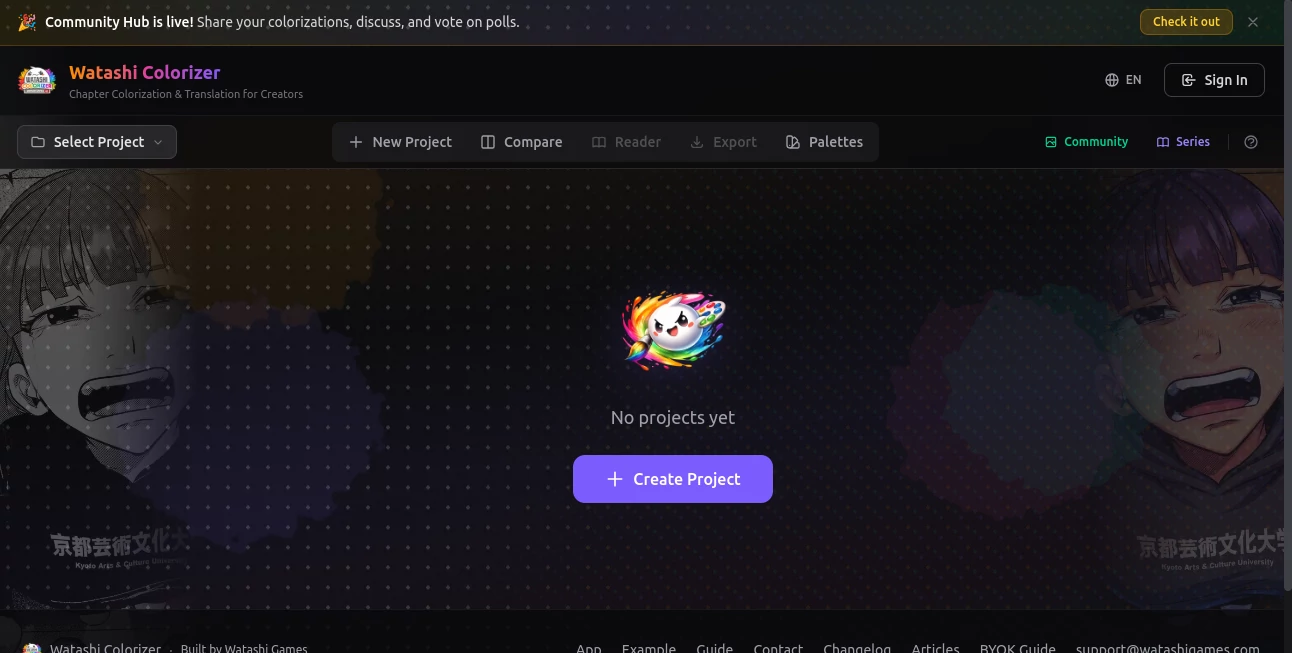
What is Watashi Colorizer?
Old photographs carry emotions that time cannot erase, but their faded or black-and-white nature often keeps those memories distant. This platform steps in as a modern solution designed to breathe color into historic and personal images with impressive realism. It transforms monochrome pictures into vibrant, lifelike visuals while preserving the original essence of every detail.
What makes it stand out is its simplicity. You don’t need editing skills or complex software knowledge. Everything is handled through a smooth, intuitive experience that feels almost effortless, even for first-time users.
Key Features
User Interface
The interface is clean, minimal, and designed for speed. Users can upload images quickly and see results without navigating through unnecessary settings or complicated tools.
Accuracy & Performance
The system focuses on realistic color prediction, analyzing textures, lighting, and context to generate natural-looking results rather than overly saturated or artificial tones.
Capabilities
- Transforms black and white images into full color
- Restores faded photos with enhanced clarity
- Maintains facial details and natural skin tones
- Works with historical, portrait, and everyday images
- Processes images quickly without heavy software installation
Security & Privacy
User-uploaded images are treated with care, ensuring a secure environment where personal photos are not misused. The platform prioritizes privacy during processing and delivery of results.
Use Cases
- Restoring old family albums for digital archiving
- Enhancing historical photographs for educational use
- Improving visuals for creative storytelling projects
- Social media content creation with vintage transformations
Pros and Cons
Pros
- Simple and beginner-friendly workflow
- Produces realistic colorization results
- Fast processing time
- No advanced editing skills required
Cons
- Results may vary depending on image quality
- Limited manual control over fine color adjustments
Pricing Plans
The platform may offer free access with basic functionality, while advanced processing or higher-resolution outputs could be part of premium options. Exact pricing details can vary depending on usage and service updates.
How to Use Watashi Colorizer
- Upload a black and white or faded image
- Let the system analyze and process the photo
- Preview the colorized result
- Download the enhanced version
The entire process is designed to be straightforward, requiring just a few clicks from start to finish.
Comparison with Similar Tools
Compared to traditional photo editing software, this solution removes the need for manual color mapping and technical expertise. While other tools may offer more customization, they often require a learning curve. This platform focuses instead on speed, accessibility, and automatic realism, making it ideal for everyday users and quick restorations.
Conclusion
This tool offers a refreshing way to reconnect with the past through color. By turning old monochrome images into vivid memories, it bridges the gap between history and modern visual storytelling. Whether for personal keepsakes or creative projects, it delivers results that feel both emotional and visually compelling.
Frequently Asked Questions (FAQ)
Is it necessary to have editing experience?
No, the platform is designed for users of all skill levels, including complete beginners.
Can it handle very old photographs?
Yes, it works well with aged and faded images, although results depend on the original quality.
Does it change the original photo?
The original image remains untouched while a new colorized version is generated.
How fast is the processing?
Most images are processed within seconds to a few moments depending on size and complexity.
AI Photo Restoration , AI Photography , AI Colorize , Image .
These classifications represent its core capabilities and areas of application. For related tools, explore the linked categories above.
Watashi Colorizer details
Website unavailable — View Alternatives
Pricing
- Free
Apps
- Web App
Categories

Watashi Colorizer Alternatives Product

Modelfy

poseup
Better Datin…

AI Ease AI P…

FaceSage

RGB to CMYK …

Picnana

Photo Locati…
Fahhh Meme