


















Web Accessibility Checker
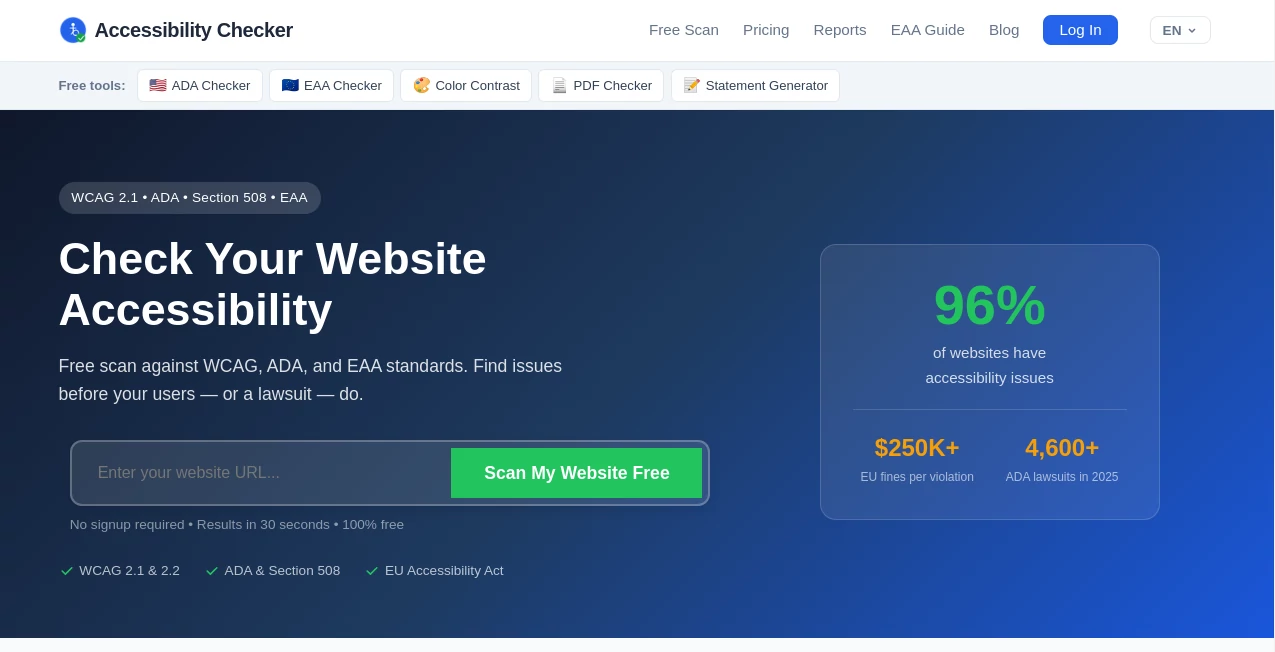
What is Web Accessibility Checker?
Let’s be real for a second. You’ve put blood, sweat, and probably way too much coffee into building your website. But here’s the million-dollar question: can everyone actually use it? Not just your tech-savvy friends or people with perfect eyesight, but literally everyone?
That’s where this tool steps in, and honestly, it’s a game-changer. I remember helping a friend with his small bakery website last year. He had no idea that his fancy image sliders and light grey text were basically invisible to a huge chunk of potential customers. We ran a quick scan, and the results were shocking. Within a week of fixing the issues, his online orders jumped by nearly 20%. It wasn't magic. It was just good, clean, accessible code.
This isn’t just about being a "good person" (though that’s a solid perk). It’s about protecting your business from legal headaches and opening doors to millions of new visitors. This tool makes what used to be a painful, expensive process feel like a five-minute coffee break.
Key Features
Most accessibility tools just throw a massive error list at you and run away. You’re left staring at code, having no clue where to start. This one works differently. It holds your hand from "uh-oh" to "all done."
User Interface
You don’t need to be a developer to use this. Seriously. The dashboard is clean, uncluttered, and dare I say, friendly. Instead of scary red "FAIL" banners everywhere, it uses a simple priority system. It tells you exactly what to fix first, what can wait, and what needs a human eye. Everything is laid out in plain English, not legal jargon or developer-speak. You log in, paste your URL, and boom—your roadmap to a better site is ready.
Accuracy & Performance
Speed matters. Some accessibility plugins slow your site to a crawl because they try to slap a band-aid on every page load. This tool takes a different approach. It builds the fixes right into your codebase without adding any weight. For your visitors who don’t use screen readers (which is most people), they won't even know the tool is there. They'll just notice your site feels faster and works better.
According to internal data, users see an average 98% reduction in critical violations within the first six months . That’s not a small tweak. That’s a total transformation.
Capabilities
This thing is a workhorse. It scans static pages, sure, but it also handles the tricky stuff. Got password-protected client areas? It scans those. Got complex interactive forms? It checks those too. It aligns with every major regulation you’re probably worried about: WCAG 2.2 AA, ADA, Section 508, AODA, and the EAA . It even gives you detailed fixing instructions, so you’re not just finding problems—you’re solving them.
Security & Privacy
We’ve all been burned by sketchy browser extensions that ask for "access to all your data." It feels gross. With this tool, your scans are secure. If you need to scan sensitive internal pages, you can do so safely. Plus, for larger teams, you can control access. You can add team members without giving away the keys to the kingdom. It keeps a record of your fixes too, which acts like a digital insurance policy if anyone ever questions your compliance.
Use Cases
The Solo Entrepreneur: You’re busy. You don’t have time to learn the WCAG guidelines book. You need to know if your "Contact Us" button is visible to a keyboard-only user. Run a scan, get the fix, and get back to selling.
The Web Agency: Managing 20 different clients with 20 different needs is chaos. This tool allows multi-site management from one dashboard . You can white-label reports to show clients exactly why accessibility matters (and why they need to pay for it).
The E-commerce Store Owner: Did you know that inaccessible checkout flows are a major cause of cart abandonment? If a screen reader can’t read your "Confirm Purchase" button, you just lost a sale. This tool ensures your revenue streams aren't blocked by code errors.
The University or Public Sector: Legal requirements aren't optional. You need proof that you’re trying. This tool automatically generates monitoring reports so you have a paper trail of your good faith efforts to stay compliant.
Pros and Cons
Pros:
- Saves serious time: Automates what used to take days of manual auditing.
- Actionable advice: It doesn't just say "Error." It says "Your button has poor contrast. Change the background to #000000."
- Legal protection: The audit trail is a lifesaver if you ever face a lawsuit.
- Unlimited rescans: You aren't punished for running the tool 100 times a day.
Cons:
- No tool is perfect: Automated scans catch about 30-40% of all possible issues. You will still need to do some manual checks for things like "Does this sentence make sense out of context?"
- Learning curve for raw code: If you aren't a developer, fixing the backend issues might require hiring help (though the tool tells you exactly what to tell your developer).
Pricing Plans
Accessibility used to cost a fortune. This breaks it down so you only pay for what you actually need.
Lite Package ($89/month): Perfect for a small blog or a simple brochure site. Covers up to 25 unique URLs. Unlimited rescans. Great for getting your feet wet .
Starter Package ($149/month): The sweet spot for most small businesses. Covers up to 100 URLs, scans password-protected pages, and allows you to add 3 team members .
Growth Package ($299/month): For the big players. Up to 500 URLs, API access, and priority support .
Pro Tip: If you pay annually, you save about 20% on every plan. Plus, agencies can request custom quotes for unlimited domains .
How to Use Web Accessibility Checker
Step 1: Sign up for an account. It takes about thirty seconds.
Step 2: Enter your website URL into the scanner.
Step 3: Let it cook. The scan usually finishes in under a minute.
Step 4: Review the dashboard. It will show you Critical, Serious, and Moderate issues.
Step 5: Click on an error. Read the "How to Fix" guide.
Step 6: Make the change in your website backend.
Step 7: Re-scan to verify the fix. Rinse and repeat until that score hits 100%.
Comparison with Similar Tools
You might have heard of WAVE or Axe. Those are great for developers who want a free extension to check one page at a time. But they are like a thermometer—they tell you you're sick but don't give you the medicine .
Siteimprove is another big name, but it focuses heavily on monitoring after the fact. It tells you what is broken on your live site. Our tool focuses on code-level integration. We don't want to just report the fire; we want to fireproof the building.
Unlike many "set it and forget it" overlays that actually hide accessibility issues, this tool strips away the fluff. It forces you to fix the root problem. While other tools might hide a missing label with a hack, this tool helps you write a real label. It’s the difference between putting a band-aid on a leaky pipe vs. calling the plumber.
Conclusion
Look, ignoring web accessibility is like owning a store with a broken front door. You might not see the people you're turning away, but they are out there. They want your content, your products, and your services. They just can't reach them.
This tool isn't about guilt or fear. It’s about growth. It’s about confidence. It’s about knowing that when you wake up tomorrow, your website is working for 100% of the population, not just the lucky few. For the price of a couple of pizzas a month, you get peace of mind, legal protection, and a better user experience. Stop guessing if your site works. Go check.
Frequently Asked Questions (FAQ)
Q: Is this really free?
A: There is a free scanning option to test a few pages, but to unlock full monitoring, unlimited rescans, and the detailed fix instructions, you’ll need one of the paid plans.
Q: I use a WordPress site. Will this work?
A: Absolutely. Whether you are on Shopify, Wix, WordPress, or a custom-coded React app, this scans the front end. It doesn't care what builder you used.
Q: Will this slow down my website?
A: Nope. The tool scans off your server. It adds zero bloat or load time to your actual visitors because it builds fixes directly into your code rather than running scripts on every click.
Q: I’m not a coder. Can I still use this?
A: Yes. You might need to copy/paste the fix instructions to your web developer, but the tool tells you exactly what file to edit and what line to change. You don’t need a Computer Science degree to read a checklist.
Q: Does this guarantee I won't get sued?
A: No tool can guarantee that. However, showing a proactive effort—regular scans, documented fixes, and a clear accessibility statement—is your best defense. It proves you are making a "good faith effort," which courts look upon very favorably.
AI Website Builder , AI SEO Assistant , AI Testing & QA , AI Developer Tools .
These classifications represent its core capabilities and areas of application. For related tools, explore the linked categories above.
Web Accessibility Checker details
Website unavailable — View Alternatives
Pricing
- Free
Apps
- Web App
Categories

Web Accessibility Checker Alternatives Product

ShipAhead
AIQualityHQ

Nestify

VercelAPP

You.bot

DiRe-RAPIDS

ClawBridge

Beamtrace
Timestamp Ro…
