
What To Watch
What is What To Watch?
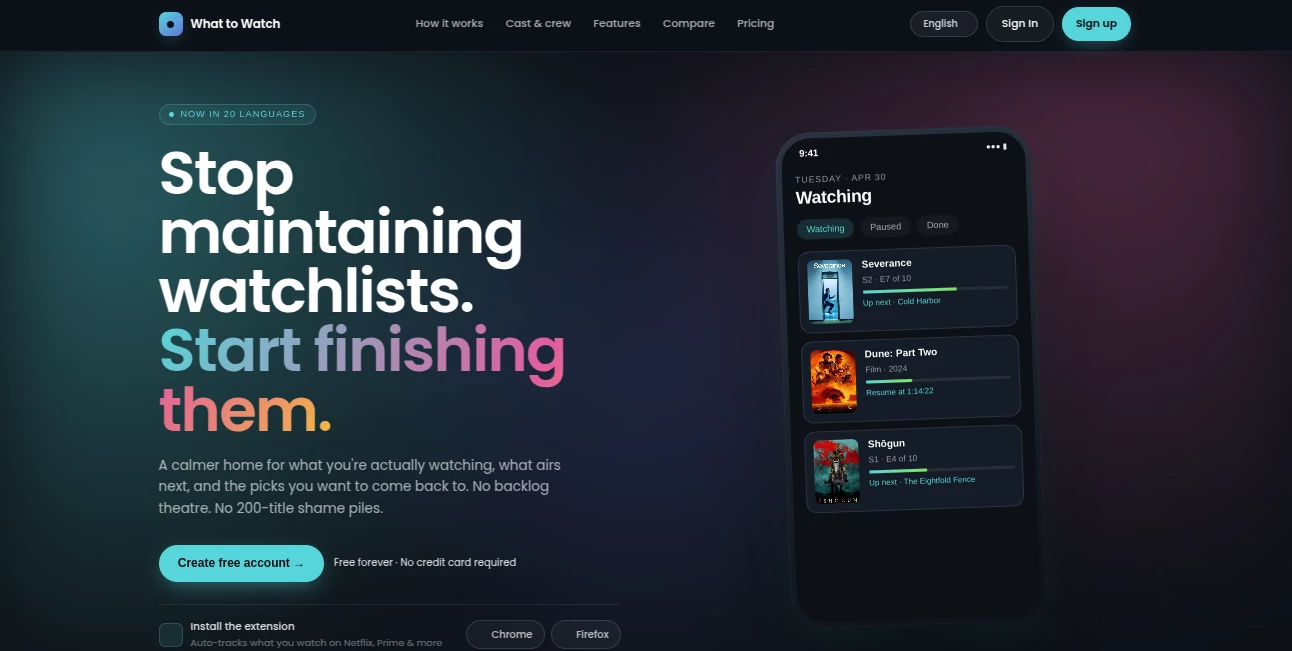
Nothing kills the joy of watching something more than spending twenty minutes scrolling through endless options, only to pick something mediocre and regret it later. This tool changes that frustrating ritual into something genuinely helpful. It learns what you actually enjoy, keeps track of what you’ve watched across different platforms, and surfaces smart suggestions that feel tailored just for you. I’ve had evenings where I opened it feeling indecisive and walked away with a show I genuinely loved—something that matched my mood perfectly. For anyone with multiple streaming subscriptions and limited time, it feels like having a very knowledgeable friend who remembers every series you’ve ever mentioned.
Introduction
With so many shows and movies scattered across Netflix, Prime, Disney+, and more, keeping track becomes exhausting. This platform brings everything together in one clean place. It syncs your watching progress, builds a smart personal watchlist, and uses AI to recommend what you’ll probably love next. No more jumping between apps to remember where you left off or what’s worth watching. It’s become my go-to whenever I have an evening free—quick, accurate, and surprisingly good at avoiding the usual recommendation traps that suggest the same popular titles everyone else is watching. Instead, it digs deeper and finds hidden gems that actually suit your taste.
Key Features
User Interface
The design is refreshingly straightforward and calm. Your watchlist sits front and center, progress across shows updates automatically, and recommendations appear in clean rows with short, useful explanations. Searching feels fast, filters are intuitive, and the whole experience stays light even when you’ve added dozens of titles. It never overwhelms you with clutter—just the information you need to decide quickly and start watching.
Accuracy & Performance
The recommendations stand out because they actually learn from what you rate and finish. It doesn’t just push trending shows; it understands patterns in your taste and suggests titles that often surprise people with how well they fit. Syncing across services is reliable, updates happen in the background, and the AI improves over time as you use it more. Many users notice it getting noticeably better after just a couple of weeks of honest feedback.
Capabilities
It tracks movies and TV shows across major streaming platforms, builds personalized watchlists, delivers AI-driven recommendations, shows where to watch something right now, and lets you rate and review to refine future suggestions. You can import your history from different services, set reminders for new seasons, and browse intelligently filtered categories. The combination of tracking, discovery, and smart suggestions makes it feel like a complete entertainment companion rather than just another list app.
Security & Privacy
Your watching habits stay private—data is used only to improve your recommendations, with strong protections in place. No creepy targeted advertising based on what you watch, and you control what gets synced. That respect for privacy makes it comfortable to be honest with your ratings and build a truly personal profile.
Use Cases
A couple uses it on Friday nights to find something they’ll both enjoy instead of arguing over what to watch. A busy professional adds shows they want to get to and gets gentle reminders when new episodes drop. Someone binging a long series sees clear progress tracking and smart “if you liked this…” suggestions that keep the momentum going. Even groups of friends use the shared lists to plan movie nights with titles everyone is likely to appreciate. It quietly removes the decision fatigue that often kills the fun of watching.
Pros and Cons
Pros:
- Excellent personalization that gets better the more you use it.
- Unified tracking across multiple streaming services in one place.
- Clean, fast interface that makes choosing something easy.
- Smart suggestions that go beyond obvious popular picks.
- Free core features give you real value before considering paid upgrades.
Cons:
- Some smaller or niche platforms may have limited syncing support.
- Advanced analytics and unlimited custom lists are in premium plans.
Pricing Plans
The free version already delivers solid tracking and recommendations—enough for most casual users. Premium unlocks deeper personalization, priority support, advanced filters, and removal of any occasional limits. Pricing stays reasonable for the convenience it brings, especially if you have multiple subscriptions and want to make the most of them.
How to Use Whattowatch
Sign up quickly, connect the streaming services you use, and import your existing watch history if available. Start adding titles to your list or rate a few things you’ve recently watched. The AI begins learning immediately and starts surfacing recommendations. When you finish something, mark it as watched and let the system suggest what’s next. Check the “For You” section whenever you’re looking for something new—it gets smarter with every interaction.
Comparison with Similar Tools
Many recommendation engines push trending content or generic popular titles. This one focuses on your personal taste and keeps everything organized across platforms in one clean view. Where other apps feel like glorified search tools, this feels like a thoughtful companion that remembers what you like and helps you discover more of it without the usual noise.
Conclusion
Good entertainment should be about enjoyment, not endless scrolling and frustration. This tool quietly removes the friction and replaces it with smart, personal guidance that makes watching feel fun again. Whether you have one streaming service or five, it helps you get more value from them by making sure you spend time on things you’ll actually love. In a world with too much content and too little time, that kind of help is genuinely welcome.
Frequently Asked Questions (FAQ)
How accurate are the recommendations?
They improve quickly as you rate and watch more content—most users find them very relevant after a short time.
Does it work with all streaming services?
It covers all major ones and keeps adding more—Netflix, Prime, Disney+, Hulu, and others.
Can I use it without connecting my accounts?
Yes—you can manually add titles and use the recommendation engine without full sync.
Is my watching data private?
Yes—your data is used only to improve your experience and stays protected.
Do I need to pay to get good recommendations?
No—the free version already delivers strong personalization for most users.
AI Life Assistant , AI Fun Tools .
These classifications represent its core capabilities and areas of application. For related tools, explore the linked categories above.

What To Watch Alternatives Product

MEANINGS

KalonAI

MBTI Compati…

Garden Horiz…

Grow A Garde…

Une Amie à P…

Kitchendary

Diss Track G…

Pelaris