


















WisprFlow
What is WisprFlow?
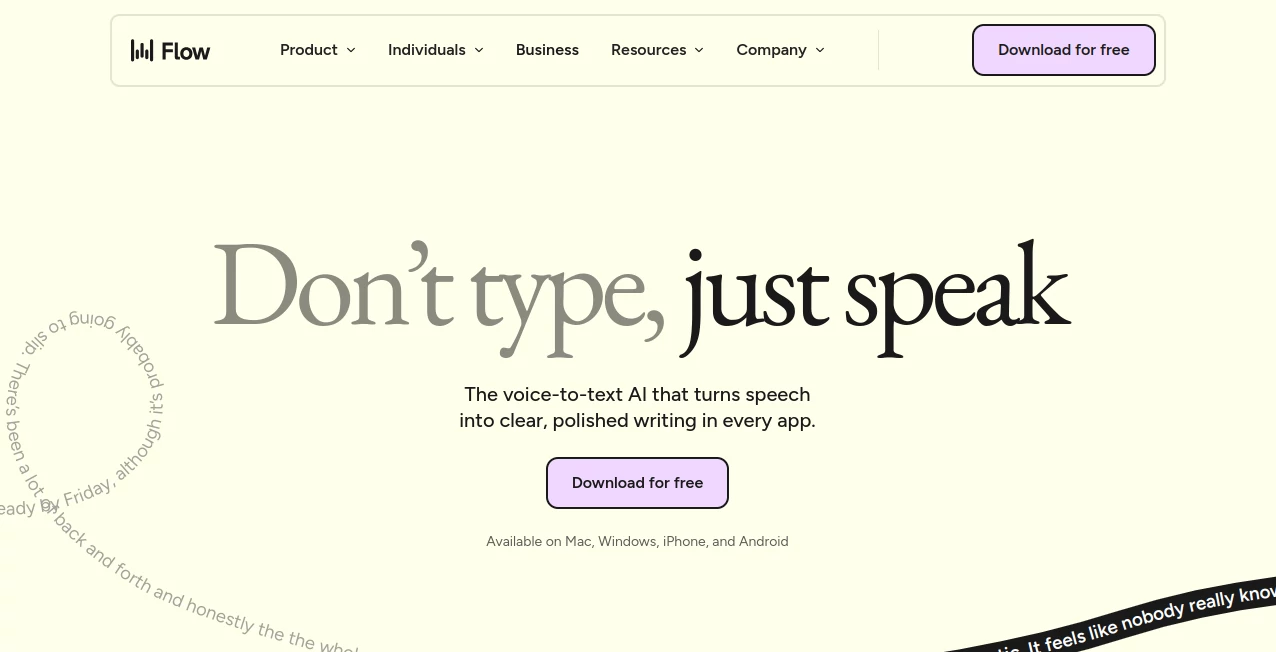
Typing has long been the default way to communicate with computers, but voice technology is finally catching up. This platform transforms spoken words into polished, ready-to-use text across virtually any application, making communication faster and more natural. Whether you're drafting emails, creating documents, writing code, taking notes, or replying to messages, it helps users capture thoughts at the speed they think.
Unlike traditional dictation tools that require extensive editing afterward, this solution automatically refines speech as it is transcribed. Filler words disappear, punctuation is added intelligently, and formatting is applied in real time. The result feels less like voice typing and more like having a personal writing assistant that understands context.
Available on desktop and mobile devices, it offers a seamless experience for professionals, students, developers, content creators, and anyone who wants to spend less time typing and more time getting work done.
Key Features
User Interface
The interface is designed around simplicity. Users can start dictating with a quick shortcut and continue working inside their favorite applications without switching tabs or opening separate editors. The experience feels lightweight and unobtrusive, allowing voice input to become part of the natural workflow.
Settings, personal vocabulary management, snippets, and customization options are organized clearly, making onboarding easy even for first-time users.
Accuracy & Performance
One of the strongest aspects of the platform is its impressive transcription accuracy. It understands natural speech patterns, self-corrections, pauses, and conversational language remarkably well. If a user changes their mind mid-sentence, the system can recognize the correction and update the text accordingly.
Speech is converted into text at remarkable speed, allowing users to write significantly faster than with a traditional keyboard. Support for over 100 languages further improves accessibility for global users.
Capabilities
The platform offers much more than simple speech-to-text functionality.
- Real-time voice transcription.
- Automatic punctuation and formatting.
- Removal of filler words and speech hesitations.
- Personal dictionary for names, technical terms, and jargon.
- Voice shortcuts for frequently used text snippets.
- Tone adaptation based on different writing contexts.
- Developer-friendly support for coding terminology and syntax.
- Cross-device synchronization for settings and vocabulary.
- Support for over 100 languages.
Security & Privacy
Privacy is an important consideration for professionals and organizations handling sensitive information. The platform includes enterprise-focused security measures and offers features designed for business environments. Shared dictionaries and team collaboration tools can be managed centrally, while users maintain control over their personalized vocabulary and settings.
Organizations in industries such as legal services, customer support, and healthcare can benefit from compliance-focused capabilities that support professional workflows.
Use Cases
- Writing emails and business communications faster.
- Taking meeting notes without manual typing.
- Drafting blog posts, articles, and creative content.
- Creating documentation and reports.
- Generating code comments, commit messages, and development notes.
- Responding to customer support tickets.
- Recording ideas while commuting or traveling.
- Helping users with accessibility needs reduce keyboard dependency.
- Capturing lecture notes and study materials.
- Managing sales follow-ups and outreach communication.
Pros and Cons
Pros
- Works across multiple platforms and devices.
- Very high transcription accuracy.
- Natural handling of speech corrections.
- Automatic formatting and punctuation.
- Personalized dictionary support.
- Developer-friendly coding assistance.
- Supports more than 100 languages.
- Significantly faster than typing.
Cons
- Advanced features may require a paid subscription.
- Internet connectivity is needed for the best experience.
- Voice input may not be ideal in every environment.
- Some customization features are limited to specific platforms.
Pricing Plans
The platform offers a free trial that allows new users to explore its core capabilities before committing to a paid plan. Additional premium and team-focused plans provide access to advanced productivity features, collaboration tools, enhanced customization, and enterprise-level management options.
Pricing may vary over time, so users should review the latest plans directly through the official website.
How to Use Wispr Flow
Getting started is straightforward.
- Download and install the application on your preferred device.
- Grant microphone permissions.
- Activate dictation using the designated shortcut or voice interface.
- Speak naturally while working in any supported application.
- Allow the system to automatically format and refine your text.
- Create custom snippets and vocabulary entries for recurring terms.
- Sync settings across devices for a consistent experience.
Most users become comfortable with the workflow within minutes and quickly discover how much time voice-first writing can save.
Comparison with Similar Tools
Compared with traditional dictation software, this solution stands out because it does more than convert speech into text. It actively improves output quality through automatic editing, formatting, contextual understanding, and personalized learning.
Many competing tools focus primarily on transcription accuracy, while this platform emphasizes productivity. Features such as snippet libraries, personal dictionaries, tone adaptation, and developer-focused functionality create a more complete writing environment.
For users who frequently move between email, documents, messaging apps, and coding environments, the cross-platform experience provides a major advantage over solutions limited to a single operating system or application.
Conclusion
Voice technology has evolved dramatically, and this platform demonstrates how effective modern dictation can be when combined with intelligent editing and personalization. Instead of treating speech as a replacement for typing, it transforms voice into a practical productivity tool that feels natural in everyday work.
From professionals managing busy schedules to developers writing code documentation and students organizing notes, the platform delivers a compelling way to communicate faster. Its combination of speed, accuracy, customization, and cross-device compatibility makes it one of the most impressive voice productivity solutions available today.
Frequently Asked Questions (FAQ)
Can it work in any application?
Yes. It is designed to function in virtually any application that accepts text input, including email clients, messaging platforms, document editors, and development environments.
Does it support multiple languages?
Yes. The platform supports more than 100 languages and can automatically detect and transcribe many of them.
Is it useful for developers?
Absolutely. It understands technical terminology, coding syntax, file names, and developer workflows, making it particularly useful for software professionals.
Can teams use it collaboratively?
Yes. Team-oriented features include shared dictionaries, shared snippets, usage analytics, and centralized management options.
Is it faster than traditional typing?
For most users, speaking is significantly faster than typing, allowing ideas to be captured more naturally and efficiently.
AI Writing Assistants , AI Speech to Text , AI Voice Assistants , AI Productivity Tools .
These classifications represent its core capabilities and areas of application. For related tools, explore the linked categories above.

WisprFlow Alternatives Product

LyricStudio

Odysseus AI

Skywork Supe…

Inkfox AI

Jasper

mp3tourl

Sourcetable
Quikauthor

AllInOneTools
