


















Words to Describe
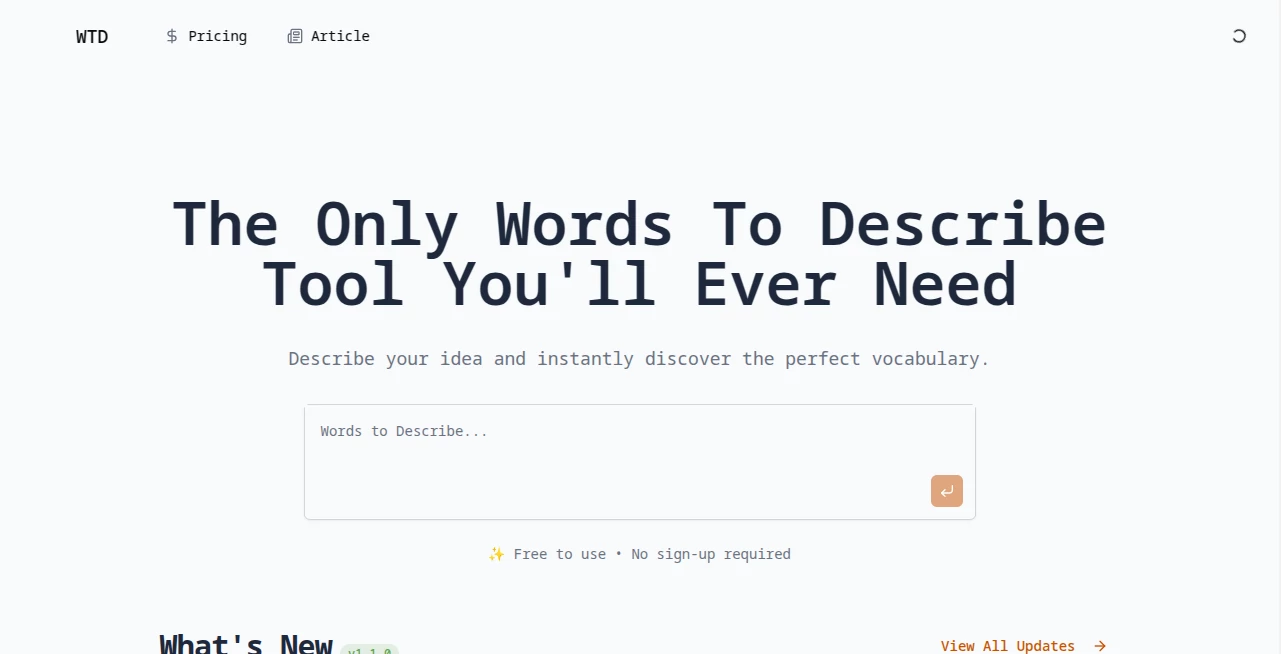
What is Words to Describe?
Have you ever stared at a blinking cursor, stuck on the exact same word for the third sentence in a row? We have all been there. Whether you are a novelist trying to paint a sunset or a marketer crafting a product description, finding the perfect adjective can be a real headache.
That is exactly where this platform steps in to save the day. Think of it as your personal brainstorming buddy who never gets tired. It is not just a dictionary; it is a creative engine built specifically to help you break out of writer's block and add some serious flavor to your work. The focus here is on variety and nuance, helping you move beyond basic vocabulary to something that truly resonates with your readers.
I remember trying to write a poem about a storm last month and just repeating "dark" and "loud." After spending a few minutes on this site, I had a list that included everything from "menacing" and "brooding" to "tempestuous." It completely changed the tone of the piece for the better. That is the kind of practical magic we are talking about.
Key Features
Digging into the functionality, you will find it is packed with features designed to make your writing process smoother and more creative. It goes far beyond a simple list of synonyms.
User Interface
First impressions matter, and the layout here is refreshingly clean. You are not bombarded with pop-ups or complicated menus. It is just a straightforward search bar that asks, "What word do you want to describe?" The results are organized in neat, digestible blocks. You can scan categories based on parts of speech or specific contexts. It loads fast, which is a lifesaver when you are in the zone and don't want to lose your flow.
Accuracy & Performance
How well does it actually work? Pretty darn well. The algorithm seems to understand context better than your average thesaurus. If you search for a word like "light," it doesn't just dump every possible meaning on you at once. It separates the physical descriptors (luminous, radiant) from the weight descriptors (feathery, airy). This filter saves a ton of time because you aren't digging through irrelevant definitions to find the vibe you want.
Capabilities
This tool handles a massive range of requests. You can look up adjectives for almost any noun you throw at it. Need to describe a "house"? It offers architectural terms, emotional vibes, and size references all in one place. Looking for words to describe a "voice"? You get tonal qualities, pitch references, and even emotional states. The database is surprisingly deep, covering everything from creative writing projects to professional business reports.
Security & Privacy
Nobody likes feeling watched, especially when you are working on a rough draft. The good news is that you can use this resource without worrying about your data. You do not need to create an account, log in, or give up your email address just to look up a word. There is no tracking of your search history attached to your identity. You simply visit, search, learn, and leave. For writers working on sensitive or unpublished manuscripts, this level of privacy is a huge weight off your shoulders.
Use Cases
So, who actually gets the most out of this? Pretty much anyone who uses words for a living or a hobby.
- Creative Writers & Novelists: Stop settling for "good" or "bad." Find the exact shade of meaning for your characters and settings.
- Students & Academics: Elevate your essays and research papers by avoiding repetitive language.
- Marketing & SEO Professionals: Craft product descriptions and ad copy that actually pop off the screen.
- Social Media Managers: Keep your captions fresh, engaging, and unique every single day.
- English Language Learners: See how native speakers use descriptive words in different contexts.
Pros and Cons
Every tool has its strengths and weaknesses. Here is the honest breakdown so you know exactly what to expect before you start typing.
- Pros:
- Completely free to use with no paywalls blocking results.
- Extremely fast search results.
- Categorization by context saves massive mental energy.
- No account registration required.
- Mobile-friendly interface works great on phones.
- Cons:
- Generally focuses on adjectives, not always verbs or adverbs.
- Requires an active internet connection to work.
- The interface is very basic; some may want more visual flair.
Pricing Plans
Here is the best part. You do not need to pull out your credit card or worry about a subscription fee eating into your monthly budget. The service operates fully as a free resource. There are no "Premium" tiers that hide the good words behind a paywall. Every adjective, every descriptor, and every category is available to everyone equally.
This makes it an invaluable asset for students on a tight budget or freelancers just starting out. You get full access to the entire database without spending a single cent.
How to Use Words to Describe
Getting started is a three-second process. First, navigate to the homepage. You will see a simple text box waiting for you. Second, type in the noun you want to describe. Think "ocean," "laughter," or "computer." Third, hit search. Instantly, you will be presented with a categorized list of adjectives.
From there, just scan the lists. If you see a word you like but aren't 100% sure of the meaning, you can click through for a deeper definition. Copy your favorites into a notepad or directly into your manuscript. It really is that simple.
Comparison with Similar Tools
How does this stack up against the standard thesaurus? Traditional thesauruses usually give you direct synonyms. If you search for "happy," you get "glad," "joyful," "cheerful." That is fine, but it is linear.
This tool works more like a thought association engine. Instead of just swapping one word for another, it helps you build a mood. If you want to describe a "smile," it doesn't just give you synonyms for "grin." It gives you words that change the quality of the smile: "warm," "toothy," "mysterious," "sheepish." This semantic approach is much more useful for a writer trying to paint a picture rather than just a student trying to avoid repetition.
Conclusion
Writing is hard enough without fighting for the right vocabulary. This tool acts as a safety net and a creative springboard all at once. It respects your time with fast load speeds, respects your privacy with no login requirements, and respects your intelligence by providing context-rich results.
If you are looking to level up your prose, engage your readers more deeply, or just get past a stubborn case of writer's block, give this a try. It is a reliable companion for anyone who takes their words seriously.
Frequently Asked Questions (FAQ)
Do I need to download an app to use this?
No. It works entirely in your web browser on desktop, tablet, or phone.
Can I use these words for commercial projects like ads?
Absolutely. The words themselves are part of the English language. Use them anywhere you like.
Why do I get different results than my friend?
The database updates periodically to reflect modern usage. You might be on slightly different versions.
Is there a word limit per search?
Not really. You can search for single words or short phrases, though single nouns work best.
What if the word I want isn't in the database?
The database is quite extensive, but language evolves. If it is missing, try a related noun or a more common term.
AI Creative Writing , AI Content Generator , AI General Writing , AI Writing Assistants .
These classifications represent its core capabilities and areas of application. For related tools, explore the linked categories above.
Words to Describe details
Website unavailable — View Alternatives
Pricing
- Free
Apps
- Web App
Categories

Words to Describe Alternatives Product

Perchance AI…

The #1 Text …

Z-Image

ResumeTailor…

PostingCat

EditForge

ChatGPT

AI Podcast I…

Publiq Studio
