
Yila AI
What is Yila AI?
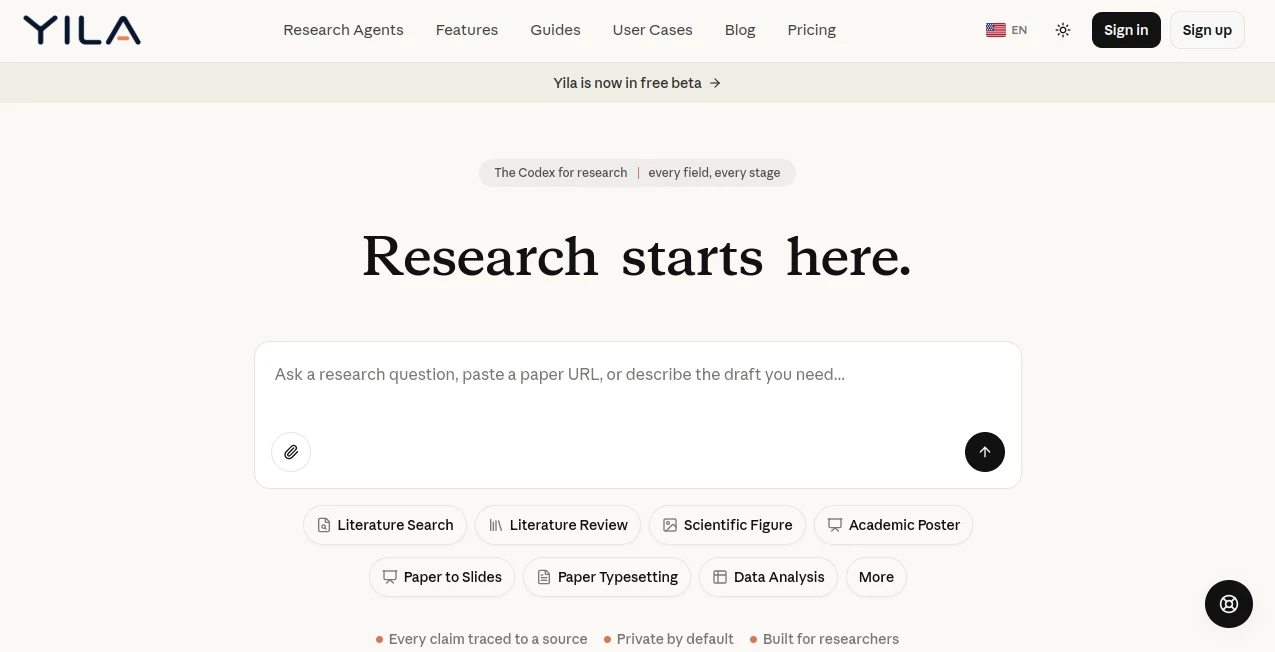
Yila is an AI-powered research platform designed to reduce the time researchers spend on the repetitive parts of academic work. Instead of jumping between separate tools for finding papers, reviewing literature, analyzing datasets, preparing figures, building presentations, and formatting manuscripts, researchers can handle many of these tasks from one workspace.
The platform is built around a simple idea: research should start with the question, not with hours of manual searching and formatting. Users can ask a research question, paste a paper URL, upload a manuscript, or describe the type of research output they need. From there, the platform can help turn raw information into structured, reusable research material.
One particularly useful aspect is its emphasis on traceable evidence. The platform states that claims are traced to their sources, while its research workflows are designed specifically for academic and scientific work. It is currently available as a free beta, making it interesting for students, researchers, academics, and research teams who want to explore a more streamlined workflow.
Key Features
- AI-assisted literature search across scholarly sources
- Literature reviews based on full research papers
- Research gap validation and paper triage
- Multi-paper evidence comparison
- Data analysis for CSV and XLSX files
- Scientific figure generation from natural-language prompts
- Academic poster creation from research papers
- Paper-to-slide presentation generation
- Academic paper typesetting for journal and conference templates
- Editable research outputs and reusable files
- Statistical analysis and research write-up assistance
- Manuscript section building and polishing
User Interface
The interface is organized around individual research tasks rather than forcing users to learn a complicated collection of features first. From the main workspace, a researcher can choose a workflow such as literature search, literature review, data analysis, scientific figure creation, academic posters, or paper-to-slides.
This approach makes the platform feel practical. A researcher working on a thesis, for example, can move from finding relevant papers to organizing evidence and eventually preparing presentation material without constantly switching between unrelated applications.
Accuracy & Performance
Academic research requires more than fluent text generation. Sources, evidence, methodology, and the relationship between findings matter. The platform addresses this by focusing its research workflows on source-backed information and by stating that it provides verified papers rather than invented citations.
For literature reviews, it can search and read more than 50 full papers, compare methods and findings, identify themes and gaps, and produce a citation-backed draft. Its data analysis workflow can also profile an uploaded dataset before selecting an analysis approach, then return results, charts, and reusable code.
As with any research assistant, generated material should still be checked by the researcher before being used in a publication. The value here is in accelerating the investigation and preparation process while keeping the researcher in control of the final work.
Capabilities
The range of research workflows is one of the strongest parts of the platform. Literature search can build a quality-ranked pool of relevant academic papers with abstracts, citation signals, and key findings. Literature review goes further by comparing evidence across multiple papers instead of simply producing isolated summaries.
For researchers working with data, CSV and XLSX files can be uploaded for analysis. The system first profiles the data, selects an analysis path based on the research question, and produces charts, results, and reusable files.
Visual research communication is also covered. Users can describe a scientific mechanism, workflow, or concept in natural language and generate an editable scientific figure. A full paper can be transformed into an academic poster or presentation, while manuscripts can be rebuilt into journal or conference templates with a camera-ready PDF and a complete LaTeX project.
Security & Privacy
Privacy is presented as an important part of the product, with the platform describing itself as private by default. This is particularly relevant for researchers who may work with unpublished manuscripts, datasets, research notes, or other material that should not be casually shared.
Researchers should still review the platform's current privacy policy and terms before uploading confidential or unpublished material, especially when working under institutional, contractual, or publication-specific data requirements.
Use Cases
- Literature reviews: Search across relevant scholarly research, compare evidence, identify themes, and build citation-backed review drafts.
- Academic research: Move from an initial research question to relevant papers, evidence, analysis, and presentation materials.
- Data analysis: Upload CSV or XLSX datasets and receive an analysis workflow with results, charts, and reusable code.
- Scientific figures: Turn descriptions of mechanisms or research workflows into polished figures for papers and academic presentations.
- Conference preparation: Convert a research paper into a structured academic poster or presentation deck.
- Journal submissions: Reformat Word, PDF, or LaTeX manuscripts according to the requirements of a target journal or conference.
- Research teams: Create reusable evidence, figures, analysis outputs, and presentation material from a shared research workflow.
Pros and Cons
- Pros: Covers multiple stages of the research process in one platform.
- Pros: Strong emphasis on source-backed academic research.
- Pros: Supports full-paper literature review workflows rather than simple web summaries.
- Pros: Includes data analysis, scientific figures, posters, slides, and manuscript formatting.
- Pros: Several outputs remain editable or reusable.
- Pros: Currently available in a free beta.
- Cons: The platform is still in beta, so workflows and features may continue to change.
- Cons: Researchers should independently verify generated analysis and written material before publication.
- Cons: Users looking only for a basic writing assistant may find the research-focused feature set broader than necessary.
Pricing Plans
The platform is currently offered as a free beta. This makes it possible for researchers and students to explore its research workflows without committing to a paid subscription during the beta period.
Because beta products can change their pricing and usage limits, users should check the current pricing information inside the platform before relying on it for long-term research workflows.
How to Use the Research Platform
Getting started is straightforward. Begin by choosing the type of research task you want to complete. You can ask a research question, provide a paper URL, upload a manuscript, or describe the output you need.
For a literature review, describe your research topic and let the platform search for relevant scholarly papers. For data analysis, upload a CSV or XLSX file and explain the question you want to investigate. If you need a scientific figure, describe the mechanism or workflow in natural language and refine the generated result in the browser.
Researchers preparing a conference presentation can upload a paper and have the main argument, methods, results, and conclusions organized into slides. For journal submission, a Word, PDF, or LaTeX manuscript can be processed into the appropriate publication format, with both a PDF and the underlying LaTeX project available.
Comparison with Similar Tools
Many AI research products concentrate on a single task, such as searching for papers, summarizing documents, or helping with academic writing. This platform takes a broader approach by connecting several stages of the research lifecycle.
Its combination of literature discovery, evidence synthesis, data analysis, scientific figure generation, academic poster creation, paper-to-slide conversion, and manuscript typesetting gives it a wider scope than a conventional AI writing assistant. The distinction is especially noticeable when a researcher needs to move from reading papers to producing a complete research deliverable.
For someone who only needs quick summaries, a specialized research search tool may be sufficient. For someone managing a longer academic project, however, having research discovery, analysis, visualization, and publication preparation available within the same environment can save considerable time.
Conclusion
Yila stands out by treating academic research as a connected process rather than a collection of unrelated tasks. Its focus goes beyond generating paragraphs: it helps researchers find evidence, compare papers, analyze datasets, create scientific visuals, prepare conference materials, and format manuscripts for publication.
The strongest appeal is its breadth. A researcher can begin with a question and gradually turn that question into evidence, analysis, figures, slides, or a publication-ready manuscript. Since the service is currently in free beta, it is also an attractive time to explore its workflows and see where they fit into an existing research process.
For students, academics, scientists, and research teams looking to reduce the administrative workload surrounding serious research, this is a promising platform worth testing.
Frequently Asked Questions (FAQ)
What is this AI research platform used for?
It is designed for academic research tasks including literature search, literature reviews, paper analysis, data analysis, scientific figure creation, academic posters, presentations, and manuscript formatting.
Can it help with literature reviews?
Yes. The literature review workflow can search and read more than 50 full papers, compare methods and findings, identify themes and gaps, and produce a citation-backed draft that can be edited.
Can I analyze research datasets?
Yes. CSV and XLSX files can be uploaded for analysis. The workflow profiles the data, selects an analysis approach based on the research question, and can produce results, charts, and reusable code.
Can it create academic presentations?
Yes. A research paper can be converted into a presentation structure containing the argument, background, methods, results, conclusions, figures, and key takeaways. The resulting presentation can be exported as an editable PowerPoint file.
Can it format papers for journals?
Yes. Word, PDF, and LaTeX manuscripts can be processed into the official format of a target journal or conference, with a camera-ready PDF and a complete LaTeX project.
Is it free?
The platform is currently available as a free beta. Pricing and usage conditions may change as the product develops.
AI Data Mining , AI Papers , AI Research Tool , AI Presentation Generator .
These classifications represent its core capabilities and areas of application. For related tools, explore the linked categories above.

Yila AI Alternatives Product

AI Complianc…

AI Podcast I…

Treeova
langextract.…

Best of AI

Kimi K2.5

AlphaTax

Fig0

Toonifyit