
















What is YoFont?
I remember spending weeks hunting for the perfect font for a branding project — nothing quite matched the feeling I wanted. Then I tried describing it in plain words here, and a few minutes later I had a complete, installable typeface that actually captured the vibe. Not just a few letters, but thousands of glyphs across multiple weights and languages. The first time it happened, I sat there smiling because it felt almost too good to be true. That’s the kind of surprise this tool keeps delivering.
Introduction
Custom typography has always been expensive and time-consuming — hiring a type designer, waiting months, paying thousands. This platform flips that reality. You describe the feeling or mood you want, or upload a reference image, and it generates a full professional typeface with proper kerning, multiple weights, and broad language support. What used to be a luxury reserved for big brands is now accessible to indie designers, startups, and creators in minutes. The results are editable in its built-in studio, so you can refine individual glyphs until everything feels exactly right. It’s not replacing human type designers — it’s giving everyone the ability to start with something truly custom.
Key Features
User Interface
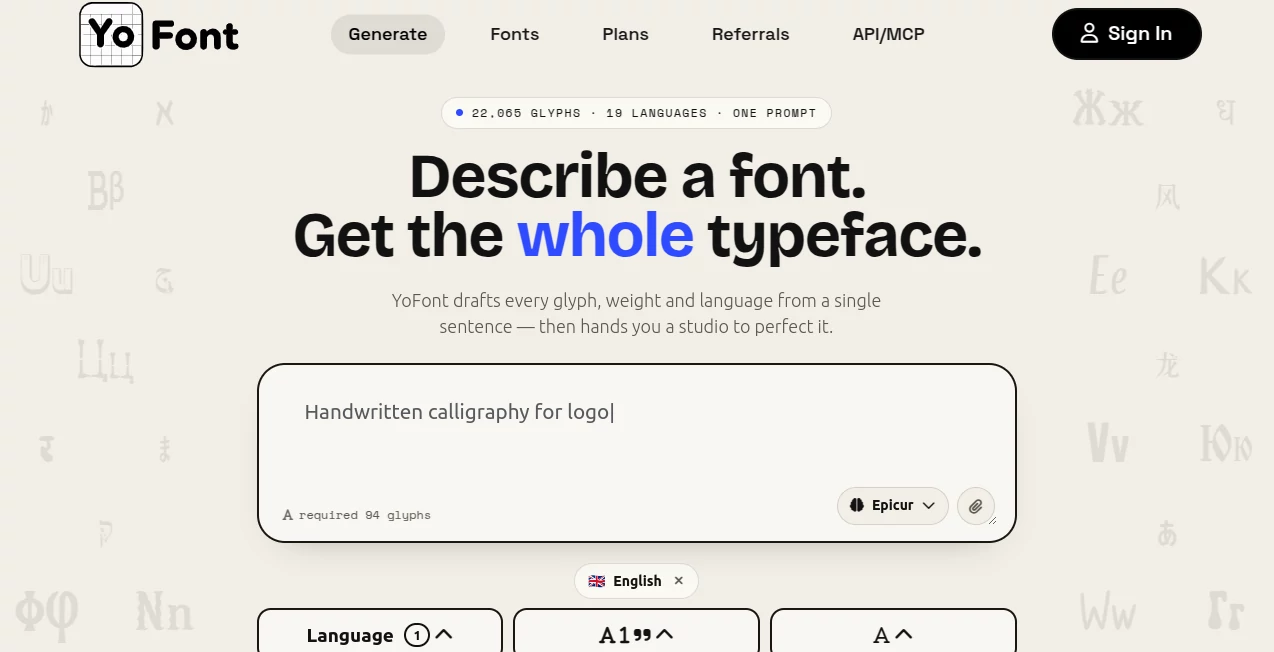
The process feels delightfully simple. A clean prompt box invites you to describe the font in everyday language — no need for technical jargon. You can add a reference image if you have one, choose a model, and hit generate. The studio that opens afterward lets you preview text live, tweak individual letters, adjust weights, and test how it feels in real copy. Everything stays responsive and focused, so you stay in the creative flow instead of fighting the tool.
Accuracy & Performance
It consistently delivers coherent, usable fonts from surprisingly short descriptions. The glyphs maintain visual harmony across the entire character set, and the kerning feels natural rather than mechanical. Generation is fast — often under two minutes for a full typeface — and the quality holds up for both display and body text use. I’ve tested it with everything from elegant serifs to playful display fonts, and the consistency across languages and weights is impressive.
Capabilities
One prompt produces thousands of glyphs covering up to 19 languages and multiple writing systems. You get Thin, Regular, and Bold weights by default, with full punctuation, numbers, and special characters. The studio lets you edit any glyph individually, regenerate specific letters, test live text, and export in standard formats like TTF, OTF, WOFF, and WOFF2. It also supports commercial use and even has an author program where you can publish and earn from fonts you create.
Security & Privacy
Your prompts and generated fonts stay under your control. The platform doesn’t train on user creations without permission, and exports are yours to use freely. For designers working on client projects or sensitive branding, that level of ownership and privacy provides real peace of mind.
Use Cases
A branding designer describes the exact mood for a new coffee shop identity and gets a custom display font ready for logos and packaging in one afternoon. An indie game studio generates unique in-game typography that perfectly matches their world aesthetic. A content creator builds a signature handwritten-style font for their brand across social media and merch. Marketing teams quickly create on-brand display fonts for campaigns without waiting on external designers. It opens doors for anyone who wants typography that feels truly theirs.
Pros and Cons
Pros:
- Turns vague ideas into complete, installable fonts remarkably fast.
- Multi-language and multi-script support in a single generation.
- Built-in studio for easy refinement and testing.
- Commercial rights included with generated fonts.
- Generous free tier to experiment without pressure.
Cons:
- Very complex or extremely niche styles may need more prompt refinement.
- Advanced editing features and unlimited generations are on paid plans.
Pricing Plans
Your first font is completely free with no card required. Paid plans unlock higher-quality models, unlimited generations, advanced studio features, and commercial licensing options. There’s also a creator program where you can publish fonts and earn revenue. The structure feels fair — you can start exploring for free and scale up naturally as your needs grow.
How to Use YoFont
Go to the generator page and describe the font you want in plain language — something like “elegant modern serif with slight contrast, warm and inviting.” Optionally upload a reference image. Choose a generation model and hit create. Once the font appears, open the studio to preview text, tweak individual glyphs if needed, and export the file. Install it locally or use it directly in your design software. The whole journey from idea to usable font can happen in minutes.
Comparison with Similar Tools
Many font tools either offer limited customization or produce incomplete character sets. This one stands out by delivering full, production-ready typefaces with broad language support and an actual editing studio. Where others give you static images or basic generators, this creates real, installable fonts you can refine and own. The balance of speed, quality, and creative control makes it feel like a genuine leap forward.
Conclusion
Typography has the power to shape how people feel about a brand, a product, or a story. This tool makes creating the right voice accessible to far more people than ever before. Whether you’re building a brand from scratch, enhancing a personal project, or experimenting with new ideas, it turns inspiration into something real you can hold and use. In a world full of generic fonts, having the ability to create something truly your own is a special kind of freedom.
Frequently Asked Questions (FAQ)
How many glyphs does a generated font include?
Usually thousands — covering full alphabets, numbers, punctuation, and special characters across supported languages.
Can I use the fonts commercially?
Yes — fonts you generate are yours to use in commercial projects.
How long does generation take?
Typically under two minutes for a complete typeface.
Do I need design experience?
Not at all — plain language descriptions work beautifully.
Can I edit the font after generation?
Yes — the built-in studio lets you refine individual glyphs and test live text.