1ClickClaw
What is 1ClickClaw?
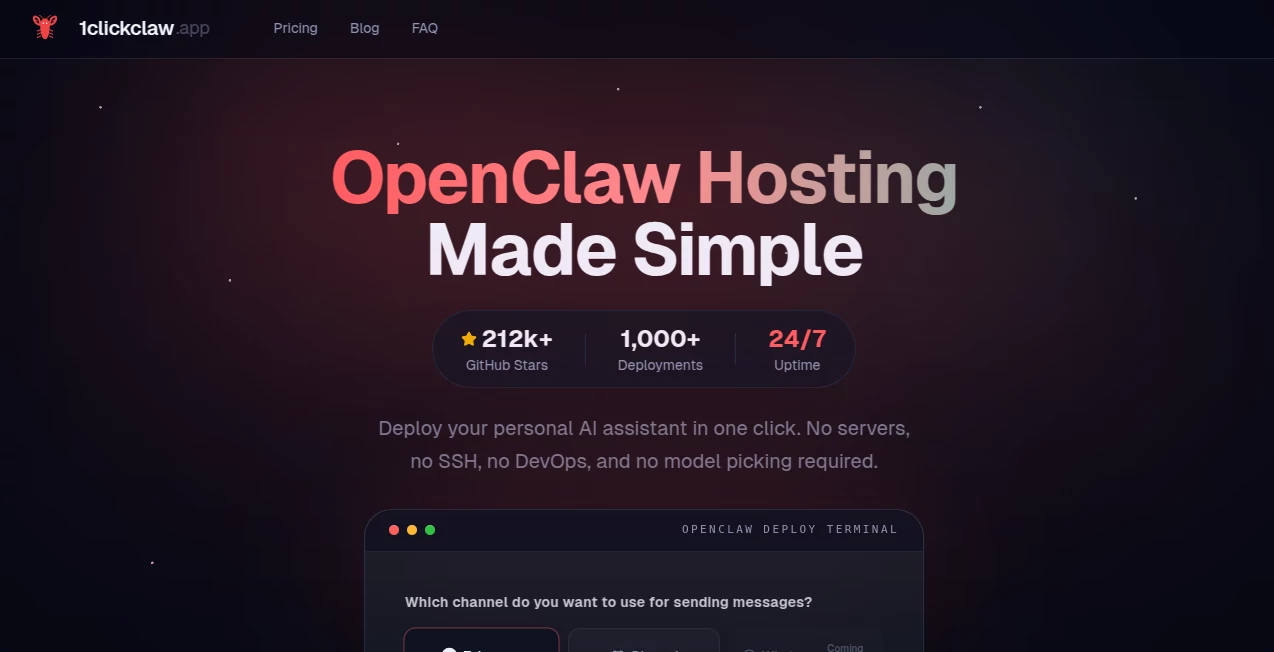
Launching an AI assistant often sounds exciting until the technical setup begins. Server provisioning, dependency installation, cloud configuration, security settings, and ongoing maintenance can quickly turn a simple project into a time-consuming challenge. This platform removes those barriers by providing a streamlined environment where users can deploy AI-powered assistants in minutes rather than spending hours configuring infrastructure.
Designed for developers, creators, businesses, and AI enthusiasts, the service focuses on simplicity without sacrificing reliability. Instead of managing servers, SSH access, deployment scripts, or model configurations, users can connect their preferred communication channel and launch a working assistant almost instantly. The result is a faster path from idea to deployment, allowing teams to focus on building useful experiences instead of maintaining backend systems.
Whether the goal is creating a customer support bot, a personal productivity assistant, a community management solution, or an automated workflow agent, the platform provides a practical way to get started with minimal technical overhead.
Key Features
User Interface
The dashboard is intentionally designed to reduce complexity. New users can connect supported messaging platforms, configure deployment settings, and launch assistants through a guided workflow. The clean interface minimizes unnecessary options and keeps the process accessible even for individuals with limited DevOps experience.
Navigation is straightforward, making it easy to manage deployments, monitor activity, and maintain multiple AI assistants from a centralized location.
Accuracy & Performance
Performance is supported through dedicated cloud infrastructure that keeps assistants available around the clock. Smart model routing helps optimize operational efficiency by automatically selecting suitable AI resources, reducing unnecessary spending while maintaining responsive interactions.
The platform is built for reliability, allowing deployed assistants to remain active and responsive across supported communication channels without requiring constant supervision.
Capabilities
- One-click deployment of AI assistants.
- Support for popular messaging platforms.
- Dedicated cloud hosting environment.
- Continuous uptime for always-available assistants.
- Centralized management for multiple deployments.
- Rapid deployment without server configuration.
- Cost optimization through intelligent model selection.
- Suitable for personal, commercial, and community projects.
Security & Privacy
Security remains an important consideration for AI deployments. Each assistant operates within a dedicated environment that helps isolate workloads and maintain stability. Deployments are designed to remain private rather than being openly exposed to the public internet.
Users maintain control over their bot configurations and operational settings while benefiting from managed infrastructure that eliminates many common security risks associated with self-hosting.
Use Cases
- Creating customer support assistants that answer questions around the clock.
- Deploying community management bots for Discord and Telegram groups.
- Building personal productivity assistants that automate repetitive tasks.
- Launching AI-powered workflow automation agents.
- Testing and validating AI assistant concepts before larger-scale deployment.
- Managing multiple specialized assistants from a single platform.
- Supporting internal team operations and information access.
Pros and Cons
Pros
- Extremely fast deployment process.
- No server administration required.
- Accessible to non-technical users.
- Dedicated cloud hosting included.
- Supports multiple communication channels.
- Centralized deployment management.
- Always-on availability.
- Reduced infrastructure complexity.
Cons
- Focused primarily on OpenClaw-based assistants.
- Advanced infrastructure customization may be limited compared to self-hosting.
- Subscription costs may not suit every hobby project.
- Dependent on supported communication platforms.
Pricing Plans
The platform offers a subscription-based model designed for users who want managed AI assistant hosting without infrastructure management. Plans include dedicated cloud resources, usage credits, and ongoing access to deployment tools.
A starter plan is available for individuals and small teams seeking professional AI assistant deployment while maintaining predictable operating costs. Additional usage can be added as requirements grow.
How to Use 1ClickClaw
Getting started requires only a few simple steps:
- Sign up and access the deployment dashboard.
- Connect a supported communication channel such as Telegram, Discord, or WhatsApp.
- Provide the required bot credentials.
- Review deployment settings.
- Launch the assistant with a single click.
- Monitor activity and performance through the management interface.
- Scale or update deployments as project requirements evolve.
The entire process is designed to take minutes instead of the lengthy setup procedures commonly associated with traditional AI hosting environments.
Comparison with Similar Tools
Many AI deployment platforms require users to manage cloud providers, install dependencies, configure security settings, and maintain server environments. While these solutions offer flexibility, they often introduce significant complexity.
This platform focuses on convenience and accessibility. Instead of spending valuable time on infrastructure, users can move directly to deploying functional assistants. The combination of managed hosting, rapid deployment, dedicated resources, and multi-channel support makes it particularly attractive for independent developers, startups, and businesses looking for a faster route to production.
For users who value speed, simplicity, and reduced operational overhead, the experience feels significantly more approachable than traditional self-hosted alternatives.
Conclusion
Building and deploying AI assistants should not require hours of infrastructure work. By simplifying hosting, deployment, and management into a straightforward workflow, this platform enables users to focus on creating useful AI experiences rather than troubleshooting servers.
Its combination of dedicated hosting, one-click deployment, continuous availability, and support for popular messaging channels makes it an appealing solution for developers, entrepreneurs, and organizations looking to launch AI-powered assistants quickly. For anyone seeking a practical way to move from concept to deployment without DevOps complexity, it delivers a remarkably efficient experience.
Frequently Asked Questions (FAQ)
What type of users is this platform designed for?
It is suitable for developers, startups, businesses, creators, and anyone who wants to deploy AI assistants without managing infrastructure.
Do I need server administration knowledge?
No. The service is specifically designed to eliminate the need for server management, SSH access, and complex deployment procedures.
Which communication channels are supported?
Supported channels include popular messaging platforms such as Telegram, Discord, and WhatsApp.
How long does deployment take?
Most deployments can be completed in under a minute after connecting the desired communication channel.
Is the deployment environment private?
Yes. Deployments are designed to operate in dedicated environments that are not publicly exposed.
Can businesses use it for customer support automation?
Yes. Customer support assistants are among the most common use cases for the platform.
Does it support multiple AI assistants?
Yes. Users can manage multiple deployments through a centralized dashboard.
AI Developer Tools , AI Chatbot , AI Productivity Tools , AI Workflow Management .
These classifications represent its core capabilities and areas of application. For related tools, explore the linked categories above.

1ClickClaw Alternatives Product

Syncity AI

freellm

Chatref

VercelAPP

Firefox

Lime Social

PineBill
You.bot

Liftburst