
1Scholar
What is 1Scholar?
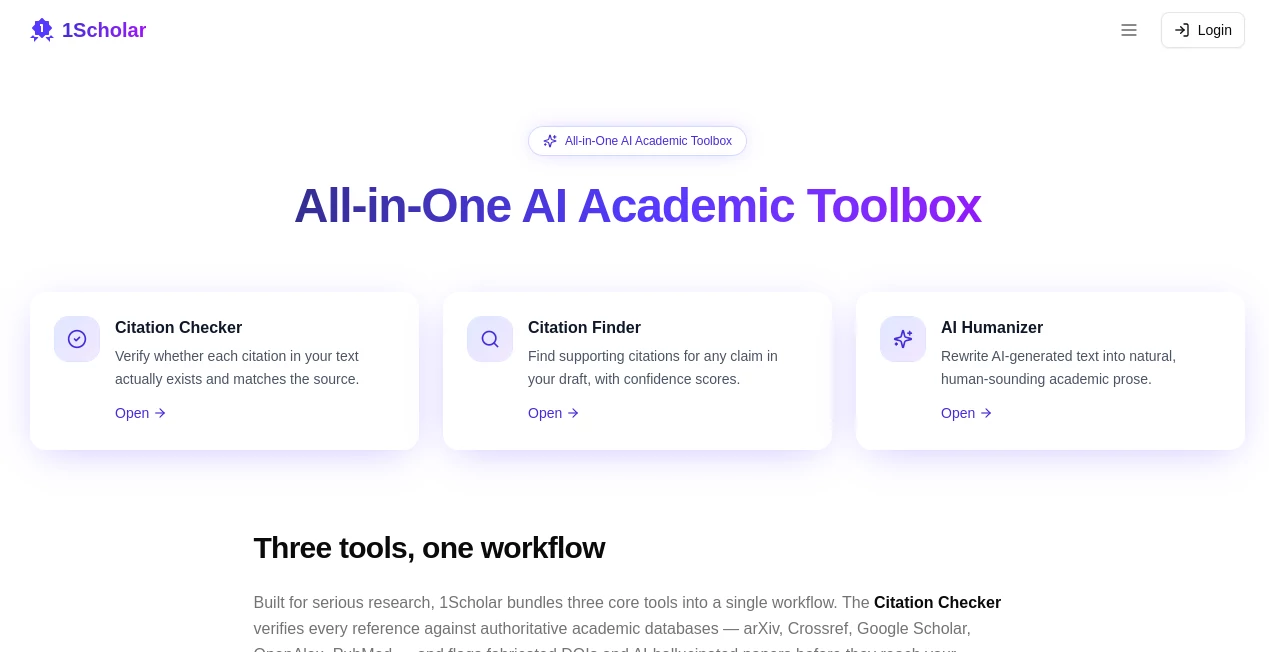
I remember the panic of submitting a paper only to later discover one of my citations was hallucinated by an AI tool. That sinking feeling is far too common these days. This platform was built to solve exactly those headaches. It brings together three powerful tools — citation checking, citation finding, and AI humanizing — into one smooth workflow that serious researchers and students actually trust. The first time I ran a draft through it, it caught two fake references I hadn’t noticed and suggested real ones that strengthened my argument. That kind of practical help feels rare in the crowded academic AI space.
Introduction
Academic writing today is a minefield. You’re racing deadlines, using AI to brainstorm or draft, and then praying nothing gets flagged or debunked during review. 1Scholar steps in as a focused, no-nonsense companion that handles the most error-prone parts of the process. It verifies every citation against real academic databases, finds legitimate sources for your claims, and turns stiff AI-generated text into natural, human-sounding academic prose. It’s not trying to be everything for everyone — it’s laser-focused on making your research workflow more reliable and your writing more authentic. For anyone who’s ever lost sleep over a literature review or revision round, it feels like a quiet ally in the background.
Key Features
User Interface
The design is clean and purposeful — exactly what you want when you’re deep in a paper. You paste text, upload a draft, or work section by section. Results appear clearly side-by-side with your original content, complete with confidence scores and direct links to sources. No cluttered dashboards or unnecessary features. It’s the kind of interface that gets out of your way so you can stay focused on your ideas rather than fighting the tool.
Accuracy & Performance
It checks citations against major databases like arXiv, Crossref, Google Scholar, OpenAlex, and PubMed. The accuracy is impressive — it reliably flags fabricated DOIs and hallucinated papers before they embarrass you. The citation finder doesn’t just throw links at you; it ranks them by relevance and strength for your specific claim. In real use, it catches issues that generic checkers miss and suggests stronger alternatives that actually improve the paper.
Capabilities
The Citation Checker scans your references and confirms they exist and match the source. The Citation Finder solves the opposite problem — paste a paragraph and it returns real, peer-reviewed sources with confidence scores. The AI Humanizer rewrites AI-generated text into natural academic prose while preserving your facts, citations, and meaning. Together they create a complete loop: draft with AI, humanize it, verify and strengthen citations, then submit with confidence. It works for manuscripts, theses, literature reviews, and grant proposals.
Security & Privacy
Your documents are handled securely and not used to train models. The platform was built with academic integrity and researcher privacy in mind — important when you’re working with unpublished ideas or sensitive data. You stay in control of what gets processed and stored.
Use Cases
A PhD student polishing their dissertation runs every chapter through the checker and finder, catching weak citations and strengthening arguments before the defense. A professor reviewing AI-assisted student papers uses the humanizer to help students make their writing sound more natural while maintaining academic standards. A researcher drafting a journal submission verifies all references in one pass and avoids the nightmare of post-submission corrections. Even early-career academics use it to build stronger literature reviews faster. It fits naturally into any serious writing process where credibility matters.
Pros and Cons
Pros:
- Three focused tools that actually solve real pain points in academic writing.
- Strong integration with authoritative databases for trustworthy results.
- Humanizer preserves meaning while making text pass detectors naturally.
- Clean, efficient workflow that saves hours during tight deadlines.
- Built specifically for researchers rather than general AI users.
Cons:
- Best results come from reasonably well-structured drafts.
- Some very niche or brand-new papers may have fewer matches.
Pricing Plans
It offers a free tier generous enough to handle smaller papers and get a real feel for the quality. Paid plans unlock higher usage limits, priority processing, and advanced features for heavier academic workloads. The pricing feels reasonable for the time and stress it saves, especially for graduate students and researchers working on multiple projects.
How to Use 1Scholar
Sign up (quick and straightforward), paste your text or upload a document, and choose the tool you need. For checking, it scans and flags issues with explanations. For finding citations, highlight a claim and get relevant sources ranked by strength. For humanizing, select sections or the whole draft and review the natural-sounding rewrite. Iterate as needed, then export or copy the improved version. The workflow is logical and fast enough to fit into real deadlines.
Comparison with Similar Tools
Many general AI writers can generate text but struggle with accurate citations and natural academic tone. General checkers often miss subtle issues or hallucinated sources. This platform stands out by combining verification, discovery, and humanizing in one focused academic toolbox. It’s less about flashy features and more about practical reliability — exactly what researchers need when credibility is on the line.
Conclusion
Academic writing doesn’t have to be a constant battle against AI hallucinations, weak references, or unnatural prose. This tool quietly handles the hardest, most error-prone parts so you can focus on the ideas that matter. Whether you’re a student racing a deadline, a researcher preparing a submission, or a professor guiding others, it delivers dependable help that respects the integrity of scholarly work. In a noisy AI landscape, that focused reliability feels like a breath of fresh air.
Frequently Asked Questions (FAQ)
Can it catch all hallucinated citations?
It catches the vast majority by checking against real databases, though no tool is 100% perfect with brand-new or obscure sources.
Does the humanizer bypass AI detectors?
It significantly improves natural flow and helps text pass most detectors while keeping your original meaning intact.
Is it suitable for STEM fields?
Yes — it works especially well with arXiv, PubMed, and technical literature.
Do I need to upload my full paper?
No — you can work section by section for better privacy and control.
AI Content Generator , AI Research Tool , AI Writing Assistants .
These classifications represent its core capabilities and areas of application. For related tools, explore the linked categories above.

1Scholar Alternatives Product

YouTube Thum…

RichlyAI

Top AI Writi…

UseWok

AI page tran…
Thinkesta

PatentFig AI
JSON to TOON…

AyeWatch AI